Yes—but in TheRasteri’s PiPU demonstration, “unmodified” describes the NES console, not the cartridge. A custom cartridge houses a Raspberry Pi that runs Doom; interface electronics connect it to the NES graphics hardware, and the console supplies controller input. The NES’s CPU does not run Doom in this setup.
How Doom works with PiPU
PiPU means “PPU + Pi.” Its creator describes it as a Raspberry Pi embedded in an NES cartridge to act as a graphics accelerator, similar in concept to the Super FX chip for Super Nintendo. The PiPU project’s documentation identifies the Raspberry Pi 3A+ as its platform. PiPU project and build guide

An FX2LP USB controller links the Pi to the NES graphics memory bus and takes control of the PPU, the console’s picture-processing unit. The Pi runs Doom and prepares graphics; the NES displays them. A small NES ROM handles PPU setup and frame synchronization, reads controller input, and can request music. The project also arranges Doom MIDI music for the NES sound generator. PiPU project documentation
So the console can remain stock while the cartridge does far more than a normal game cartridge: it contains a computer and interface electronics. The game’s computation is not being performed by the NES CPU alone.
What’s actually slowing this PC down?
Pick the symptom - the matching free tool is one click away.
#1 Best Overall

- Nintendo Action Set
What is modified—and what the hardware comparison means
Hackster’s 2019 report described the comparison as 8MB of RAM and a 33MHz processor for Doom versus 2KB of RAM and a 1.79MHz processor in the NES. Those are figures reported by Hackster in 2019, not a new benchmark of PiPU or a claim about every version of Doom. The essential point is that PiPU places Doom execution on the Raspberry Pi rather than asking the NES to run the PC game itself. Hackster’s 2019 report
What building a PiPU cartridge involves
PiPU is a hands-on electronics project, not a ready-made cartridge or a no-tools setup. Its parts list names these components:
Rank #2

- The system comes bundled with: an HDMI cable
- an AC adapter
- one NES Classic Controller
- and all 30 games, installed and ready-to-play.
- E10+ w/ Mild Violence
- Raspberry Pi 3A+ and an SD card of at least 2GB
- CY7C68013A FX2LP USB development board
- EEPROM programmer; the creator names a TL866 as the one used
- 32K × 8 parallel EEPROM, such as a 28C256
- A donor or reproduction cartridge with compatible connector pins
The build guide covers cartridge-board preparation, EEPROM programming, FX2LP firmware, wiring to cartridge pads, and Pi power. Some cartridge boards omit the write-strobe pin, so board compatibility must be checked rather than assumed. The guide provides separate NTSC and PAL ROM files; that is not a guarantee of compatibility with every NES or Famicom variant, display, or cartridge board. PiPU parts list and build guide
VICE’s June 4, 2019 coverage said the project was not yet ready for readers to reproduce at that time. The PiPU repository now includes a build guide, so that historical caveat should not be read as a statement about the project’s current documentation. VICE’s June 4, 2019 report
How PiPU differs from the later DOOM-NES project
DOOM-NES describes a separate approach: an original 6502 engine runs adapted Doom-derived content using the stock NTSC NES’s CPU, PPU, APU, and cartridge work RAM. Its page says the project rebuilds E1M1, E1M2, and E1M3 as a connected game, using an MMC3/TSROM-compatible cartridge layout and 8 KiB of work RAM. Maps, enemies, weapons, and systems are adapted to NES constraints. The project says it is unofficial and not affiliated with or endorsed by id Software. DOOM-NES project
| Project | Where the game engine runs | Hardware and stated scope |
|---|---|---|
| PiPU | On a Raspberry Pi inside a custom cartridge; the NES provides graphics output and controller input. | Requires the Pi, interface electronics, and cartridge assembly. PiPU documentation supplies separate NTSC and PAL ROM files; that does not establish universal console or board compatibility. PiPU documentation |
| DOOM-NES | On an original 6502 engine using NES hardware resources. | Describes adapted content on a stock NTSC NES, with an MMC3/TSROM-compatible layout and 8 KiB work RAM. DOOM-NES project |
These are materially different projects. PiPU demonstrates Doom running with help from a Raspberry Pi in the cartridge; DOOM-NES describes an engine designed for the NES itself, with content adapted to the console’s limitations.
Quick Recap
Best Value
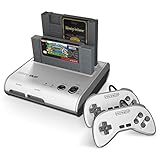
- PLAY BOTH NES & SNES CARTRIDGES – Two dedicated cartridge slots let you instantly enjoy your original Nintendo Entertainment System and Super Nintendo games without swapping consoles.
- EVERYTHING YOU NEED IS INCLUDED – Comes complete with two wired controllers, AV/S video cable, and AC power adapter so you can start playing right out of the box.
- DESIGNED FOR ORIGINAL CARTRIDGES – Engineered for exceptional compatibility with original NES and SNES game cartridges, making it one of the most TOP RATED retro consoles for classic gaming enthusiasts.
- WORKS WITH ORIGINAL CONTROLLERS & ACCESSORIES – Compatible with original NES, and SNES controller port accessories, making it easy to enjoy your existing retro gaming collection.
- REDISCOVER RETRO GAMING – Experience your favorite Nintendo classics on a single console designed for collectors and gamers who want to enjoy their original library for years to come.
Rank #4
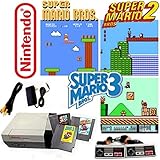
- This Bundle Includes Console, Power Supply, Video Cable, Two Control Pads, Plus The Games Super Mario Bros. 1, 2 And 3.
- Product Type-Video Game Hardware
- Package Quantity-1
- Package Weight-5.05079042242 Lbs
Product prices and availability are accurate as of the date/time indicated and are subject to change. Any price and availability information displayed on Amazon at the time of purchase will apply.




