What’s actually slowing this PC down?
Pick the symptom - the matching free tool is one click away.
Yes. Several Grand Theft Auto games have native iPad apps, including GTA III, Vice City, San Andreas, Liberty City Stories, and Chinatown Wars. GTA V does not have a native iPad game app in Rockstar’s current iPad catalog, but you can stream it from a compatible console or PC—or use a cloud service if GTA V is currently available in your region and plan.
Which GTA games can you install directly on an iPad?
Rockstar’s App Store developer catalog lists these iPad-compatible GTA games. Check each listing on your iPad before buying: availability, operating-system requirements, and device compatibility can vary by country and model.
| Game | Native iPad app? | Available version |
|---|---|---|
| Grand Theft Auto III | Yes | Original mobile release and GTA III – Definitive |
| Grand Theft Auto: Vice City | Yes | Original mobile release and Vice City – Definitive |
| Grand Theft Auto: San Andreas | Yes | Original mobile release and San Andreas – Definitive |
| GTA: Liberty City Stories | Yes | Original mobile release |
| GTA: Chinatown Wars | Yes | Original mobile release |
| Grand Theft Auto IV | No native iPad game identified | Stream from a compatible PC or console setup |
| Grand Theft Auto V | No native iPad game identified | Stream from a console, PC, or currently supported cloud service |
With a native app, the iPad runs the game itself. These games are the straightforward choice if you do not own a console or gaming PC; they are separate from streaming versions of newer console and PC games.
Original mobile ports or Definitive Editions?
The original mobile releases and the mobile Definitive apps are separate App Store products. Rockstar describes the Definitive Edition trilogy as including GTA III, Vice City, and San Andreas, with updated visuals such as improved lighting, textures, and draw distances, as well as modernized controls.
#1 Best Overall
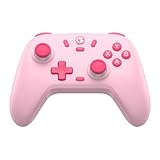
- Multi-Platform Compatibility: The GameSir Nova Lite is designed to work seamlessly with Windows 10/11, Nintendo Switch, Android, iOS, and Steam Deck. It includes a 2.4G wireless dongle for a stable connection, making it a versatile choice for various gaming platforms.
- Precision Hall Effect Joysticks: Experience accurate and drift-free performance with the GameSir Hall Effect joysticks. Engineered for zero dead zones and smooth control, these joysticks enhance your gameplay with consistent and precise movements.
- Tri-Mode Connectivity: Enjoy ultimate flexibility with three connectivity options: Bluetooth, 2.4G Wireless Dongle, and USB-C. Easily switch between devices for a hassle-free gaming experience, adapting to your preferred setup.
- Long Battery Life & Multi-Function M Button: Equipped with a 600mAh battery, the Nova Lite offers up to 10 hours of playtime on a full charge, which takes only 2 hours. The multi-function M button allows you to adjust vibration intensity, ABXY layout, and joystick deadzone settings, giving you complete control over your gaming experience.
- Enhanced Gaming Features: The Nova Lite features a 20Hz Turbo function with customizable buttons (A/B/X/Y/LB/LT/RB/RT), which can be activated or deactivated using the M button. This feature allows for rapid input and improved gameplay, letting you focus fully on the action.
The Definitive apps use a free trial of up to 30 minutes followed by an in-app purchase to unlock the full game, according to their App Store listings. The U.S. listings retrieved for Vice City – Definitive and San Andreas – Definitive showed $19.99 for each full game; that is a U.S. price signal, not a guaranteed current price elsewhere. Check the live listing for GTA III – Definitive, Vice City – Definitive, and San Andreas – Definitive.
There is no universally best version. The original ports may suit players who prefer the older presentation or have an older iPad; the Definitive releases may appeal if updated visuals and controls matter more. Definitive apps can be more demanding, so use each App Store page’s compatibility details to confirm your iPad can run it.
Why can’t you install GTA V as an iPad game?
Rockstar’s current iPad catalog does not list GTA V as a native game app. It does list Grand Theft Auto V: The Manual, which is a companion manual, not the game. A guide, map, video app, unofficial launcher, or remote-play app is not a native GTA V release.
Be wary of sites or apps promising “GTA V for iOS” as a free download, especially if they ask you to install a configuration profile, certificate, or pirated game file. For an App Store download, check that the developer is Rockstar Games and that the listing is for the actual game—not a manual or guide. Remote-play apps only stream a game running elsewhere.
The Tool Desk
Outbyte PC Repair FREEClear out junk files and repair common Windows errorsFree Scan →Outbyte Driver Updater FREEFix the driver behind crashes, sound loss and screen glitchesFind Drivers →Ways to stream GTA V to an iPad
Streaming means the console, computer, or cloud server runs the game; the iPad displays the video and sends your controls back over the internet. You need a reliable connection and, for practical GTA V play, a compatible physical controller.
Rank #2

- Hall Effect Joystick Update.
- Compatible with Switch/Switch 2, Windows, Apple, Android, Steam Deck, and Raspberry Pi.
- Compatible with iPhone, iPad, macOS and Apple TV now. (Officially Supported)
- Full-featured retro controller- clickable joysticks, rumble vibration, motion controls, wireless Bluetooth, rechargeable battery, home and screenshot Buttons and a USB-C connector
- Perfect classic d-pad.
Xbox Remote Play: use a game installed on your Xbox
Xbox Remote Play streams games from your own console. You need an Xbox with GTA V installed and playable, a Microsoft account linked to the console, remote features enabled, an iPad and supported browser, and a network connection. This is the option to consider if you already own the Xbox version. It does not require cloud-catalog availability, but the console must be powered and reachable.
- Install GTA V on your Xbox and confirm it launches there.
- Enable Remote Play in the console’s settings.
- On the iPad, open Xbox’s mobile gaming page and follow its current Remote Play link and on-screen steps.
- Sign in with the Microsoft account linked to the console, select the console, and launch GTA V.
- Pair a compatible controller with the iPad for gameplay.
Menu labels and the mobile entry point can change. Xbox’s Remote Play page has current service information. Picture quality and input response depend on the console’s connection and the iPad’s network.
Xbox Cloud Gaming: check whether GTA V is currently offered
Cloud Gaming does not require you to own an Xbox console, but it only works when the game is cloud-enabled for your location and subscription or purchase option. Xbox lists iPads running iPadOS 14.4 or later as supported, subject to regional and service availability. The cloud catalog can change, so do not assume GTA V will always be included.
- Open the current Xbox cloud-gaming catalog while signed in.
- Search for Grand Theft Auto V and confirm the listing offers cloud play in your region and on your plan.
- Launch it in the supported browser flow and pair a controller, unless the current game listing explicitly confirms touch controls.
Xbox explains that cloud-game availability varies by region, plan, platform, and time on its mobile gaming page. A title appearing in a general games list does not guarantee that it is playable through cloud streaming on your account.
PlayStation Remote Play: stream from your PlayStation
If you own a compatible PlayStation and have GTA V installed or otherwise available on it, PlayStation Remote Play can send the console’s game stream to your iPad. The iPad does not run the PlayStation version locally. You will need the console, a PlayStation account, remote play set up for your console, a network connection, and normally a compatible controller. The console must be available to connect to; image quality and responsiveness depend on the network.
Rank #3

- Universal Multi-Platform Compatibility: Works seamlessly with Windows PC, Switch/Switch 2, Android, and iOS via USB-C, 2.4G wireless (1000Hz), or Bluetooth (125Hz). Note: Not compatible with X-box, Play-Station, Luna, or GeForce
- Ultra-Quiet Silent Gaming: Silicone-damped buttons for whisper-quiet operation. Perfect for late-night gaming without disturbing family or roommates. All buttons redesigned for silent play—ABXY, D-pad, triggers, and function keys
- Hall Effect Precision Technology: Drift-free 11-bit Hall Effect joysticks with 1000Hz polling rate in wired/2.4G modes for ultra-fast competitive response. Bluetooth mode offers 125Hz for mobile gaming. Long-lasting durability guaranteed
- Advanced Trigger & Programmability: Dual-stage adjustable triggers with 2+2 rumble motors for realistic feedback. Two top-mounted programmable buttons avoid accidental presses—solving common back-paddle issues for competitive advantage
- Ergonomic Comfort & Endurance: Sweat-resistant silicone grip for marathon sessions. 1000mAh rechargeable battery for extended play. Upgraded 8-way D-pad with dome switches delivers precise diagonal control for fighting and retro games
Steam Link: stream from a gaming PC
Steam Remote Play supports streaming to iPad through Steam Link. GTA V runs on the host computer, so this is a fit if you already have a PC that can run the game and a supported PC copy. The computer must be on and running Steam while you play.
- Install Steam on the gaming PC and install GTA V through a supported PC version.
- Install Steam Link on the iPad.
- Pair the iPad with the Steam client using Steam Link’s on-screen instructions.
- Connect a compatible controller, then launch GTA V from the Steam Link library.
Steam Link is a streaming receiver, not a way to install or run the Windows version of GTA V on an iPad. It is most convenient when the PC and iPad are on a good home network.
Recommended Free Tools
GeForce NOW: confirm both the game and your license
NVIDIA supports GeForce NOW on iPad through a browser-based experience, but that alone does not mean GTA V is available on the service. Before relying on this option, search NVIDIA’s live game catalog for GTA V and confirm that your PC-store license—such as a Steam or Epic Games copy—is supported.
NVIDIA’s system requirements support iPadOS 15.4 or later and recommend a gamepad for iPad. NVIDIA specifies at least 15 Mbps for HD streaming and 25 Mbps for Full HD streaming, and recommends latency below 80 ms to an NVIDIA data center for a good experience. These are service recommendations, not a guarantee of smooth play on every connection.
Independent reader supportYour contribution helps us test, update, and keep practical guides available for everyone.Which option fits your setup?
| Your situation | Practical option | What to have |
|---|---|---|
| You want to play without another device | Install a native GTA mobile port | Compatible iPad, App Store access, and the game |
| You own an Xbox with GTA V | Xbox Remote Play | Console, installed game, remote features, account, network, controller |
| You own a PlayStation with GTA V | PlayStation Remote Play | Console, available game, remote-play setup, network, controller |
| You own a gaming PC with GTA V | Steam Link or another supported PC-streaming option | PC capable of running the game, supported PC copy, network, controller |
| You have no console or gaming PC | Check Xbox Cloud Gaming or another live cloud catalog | GTA V must be offered in your region and on your plan; reliable network and controller |
If you only want a classic GTA game, a native mobile app is usually the simplest route. For GTA V, choose remote play if you already own the relevant console or PC; consider cloud gaming only after confirming the live catalog and account requirements.
Rank #4

- 🎮【Newly Enhanced】1. Added support for host SW 2 connection. 2.Now supports the C function on Switch 2 — chat directly with your team. 3.Minimized Hall Stick drift for enhanced precision. 4.Fully upgraded key buttons for improved performance and responsiveness.
- 🎮【Customizable Back Buttons】The switch controller includes 2 extra programmable buttons on the back, allowing you to assign custom combos or actions — such as AR/AL = A+B+Y+L+ZL+R+ZR+D-pad. This pc controller also supports recording up to 30 seconds of gameplay for added convenience. Additionally, the ABXY button layout can be freely switched to suit your different gaming style.
- 🎮【Large Capacity Battery】Stop scrambling for a charger. The built-in 1000 mAh high-density cell delivers hours of non-stop play on a single charge, so you can finish that final boss fight—or five—without interruption. The shell is molded from tough, lightweight ABS and finished with a curved, frosted texture and micro-ridged grips, keeping wireless controller securely in your hands even during the most intense sessions.
- 🎮 【Universal Cross-Platform Support 】One Controller, every screen. Pair instantly with Nintendo Switch 2 / Switch / Lite / OLED, then jump to Windows 7+, macOS, iOS, and Android devices (including smart-TVs and TV boxes running Android 6.0+). Plug-and-play wireless or wired modes keep latency low and pairing painless—no dongles, no drivers, no drama.(Note: not compatible with Xbox or PlayStation consoles.)
- 🎮【Precision Hall Effect Joysticks】Dual Hall-effect sensors eliminate traditional wear-and-tear parts, delivering drift-free, pixel-perfect analog input for life. Glide through 360° landscapes or snap to targets with micro-meter accuracy—no dead-zone calibration, no creeping offset, just buttery-smooth control that keeps its edge long after the final boss falls.
Controller, internet, and offline play
- Controller: An Xbox Wireless Controller, DualSense or DualShock controller, or compatible Bluetooth/MFi controller is a practical choice. Touch controls can be awkward for driving and aiming. For cloud titles, check the game listing for a touch-control indicator rather than assuming it is supported; NVIDIA does not recommend its virtual gamepad for long-term iPad play.
- Connection: Streaming quality depends on speed, latency, Wi-Fi coverage, and network congestion. NVIDIA’s stated GeForce NOW recommendations are 15 Mbps for HD, 25 Mbps for Full HD, and latency below 80 ms to its data center; other services may have different requirements.
- Offline: Streaming through Xbox Cloud Gaming, Xbox or PlayStation Remote Play, Steam Link, or GeForce NOW requires an active network connection. Remote play also requires the host console or computer to be available. A locally installed App Store game can generally be played on the iPad, subject to that app’s own licensing and account checks; do not treat offline access as guaranteed indefinitely.
- Storage and compatibility: If an app will not install, check its App Store compatibility section on the iPad, its required iPadOS version, regional availability, and free storage. An iPhone-compatible listing is not necessarily compatible with every iPad.
What if a game will not install or streaming will not launch?
A native game will not install
Common causes include an unsupported iPad or iPadOS version, regional App Store restrictions, low storage, or a listing that does not support iPad. Open the specific listing on the iPad and check its compatibility details, confirm the App Store account’s region, and free storage before trying again.
A downloaded game crashes
Update the app and iPadOS, restart the iPad, and close background apps. Older hardware, low free storage or memory, and game-specific bugs can affect performance. Check Rockstar support before reinstalling; confirm cloud-save or backup status first so you do not lose progress.
A cloud game appears but will not launch
Check that the game is still in the live catalog, included with your account’s region and plan, and available for cloud play—not merely listed as an Xbox title. Sign in to the correct account, use the service’s supported browser path, and pair a controller if required. Temporary licensing or server problems can also interrupt access.
GTA+ and mobile-game access
GTA+ may provide access to eligible iOS and Android games while they remain in its rotating Games Library; it does not automatically include every mobile GTA title. Check Rockstar’s current GTA Games Library list before subscribing. If you want one particular game, compare the live membership terms with the app’s current purchase options.
Quick Recap
Product prices and availability are accurate as of the date/time indicated and are subject to change. Any price and availability information displayed on Amazon at the time of purchase will apply.
Quick wins for a faster PC:
Clear out junk files and repair common Windows errorsFree Scan →Fix the driver behind crashes, sound loss and screen glitchesFind Drivers →



