Quick wins for a faster PC:
Scan for outdated or missing drivers - takes under a minuteDriver Scan →Clear out junk files and repair common Windows errorsFree Scan →Fix the driver behind crashes, sound loss and screen glitchesFind Drivers →Yes, but usually not by plugging a retail console controller straight into a JAMMA board or cabinet. You need an interface designed for the particular controller electronics and JAMMA setup, and some configurations require signal mapping or a separate kick harness for extra buttons.
Why a console controller does not plug directly into JAMMA
JAMMA describes an arcade-board and cabinet wiring standard; it does not provide a universal socket for home-console controllers. A working setup inserts an interface between the controller side and the JAMMA wiring. Which interface fits depends on what you are connecting: a home console, a controller PCB, a hacked gamepad, a PC, or a standalone JAMMA PCB.
Before choosing hardware, identify the exact controller or controller PCB, the cabinet or harness, the game board, and the inputs the game uses. Product documentation establishes intended connection methods, not compatibility with every controller or game.
Which kind of interface fits your setup?
| Approach | What it connects | What to check |
|---|---|---|
| JAMMA-Prog | JAMMA harness, and where applicable a kick harness, to third-party controller boards such as Brook Fighting Board series boards or hacked gamepads | Controller-side electronics, signal mapping, jumper wiring, and whether your setup needs the separate video/audio hardware |
| Console JAMMAizer V2 | Home-console controls, video, and audio for a JAMMA-wired cabinet; its support instructions connect controller PCB headers to the unit’s Player 1 and Player 2 controller PCB headers | Whether your specific controller PCB and console configuration match the documentation; the instructions do not establish that any retail pad plugs directly into the unit |
| PC-JAMMA Rev 3.00 | Arcade cabinet controls to USB joystick and keyboard inputs for a PC installed in the cabinet | This is a PC-input setup, not by itself a way to connect a console controller to any JAMMA PCB |
| JAMMA control box such as EASY ARCADE 2 | A JAMMA PCB with USB controllers and USB-PD power, as described in its manual | Use the exact model’s manual for power and output limits; do not assume another control box has the same ratings |
JAMMA-Prog: map controller signals to JAMMA
JammaStar describes JAMMA-Prog as an interface between a JAMMA harness and supported controller-side electronics. It routes signals to pin strips, and the user connects corresponding pins with jumper wires to map inputs. A Brook Fighting Board is one possible controller-side board named in the documentation; it is not, by itself, the JAMMA adapter. The documentation also describes a start-up hold circuit. RGB and audio amplification use a separate SCART2ARC30 board, sold separately according to JammaStar’s documentation.
#1 Best Overall

- Compatibility: Compatible with Jamma arcade game machines and custom gaming device projects.
- Dual-Sided Design: Features 56 solder pads, 28 per side, for flexible arcade game wiring setups.
- Material: Made with metal contacts and sturdy PCB for long-lasting performance.
- Easy Soldering: Large, clearly labeled pads make soldering quick, accurate, and user-friendly.
- Versatile Use: Ideal for building, repairing, or upgrading arcade cabinets, machines, and control panels.
Console JAMMAizer V2: console-focused conversion
ARTHRIMUS’s Console JAMMAizer V2 support page describes conversion of home-console controls, video, and audio for JAMMA-wired cabinets. Its instructions specify controller PCB headers on the JAMMAizer for Player 1 and Player 2. That is a board-level connection description, not proof of direct support for every retail console pad. Confirm the controller PCB and console arrangement against the product documentation.
PC-JAMMA: cabinet controls for a PC
Bartox Systems’ PC-JAMMA Rev 3.00 converts arcade cabinet controls into USB joystick and keyboard inputs for a PC in the cabinet. Its listed configurations include two players with six buttons or four players with four buttons, using a CPS2-compatible kick harness. This serves a different direction of conversion from connecting a console controller to a JAMMA board.
Rank #2
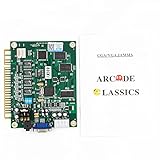
- ✪✪✪The Jamma game borad is total with 60 popular Classic games, which can bring you magical experience
- ✪✪✪It works in vertical screen and comes with universal Jamma connector, and it supports Upright and Cocktail Cabinets and use standard arcade power supply.
- ✪✪✪Supports CGA (standard resolution) and VGA (high resolution) Monitors, clear game picture can give you more exciting feeling.
- ✪✪✪NOTE:You can save the highest score of the game, but check if the 5V and 12V voltage of the 28P wire is normal before saving, if the voltage is lower than 5V, the save settings will not work properly
- ✪✪✪There is no board manual attached in the package, if you need an instruction manual, please contact us.
JAMMA control boxes: check the exact model
The EASY ARCADE 2 manual describes a Supergun-style adapter for JAMMA PCBs intended to use USB controllers and USB-PD power. Its output ratings are specific to that model. Treat this as a separate product category from controller-interface boards, and check the manual for the exact unit rather than transferring its specifications to another control box.
How to check compatibility before wiring
- Identify the host. Decide whether you are connecting a home console, controller electronics to a JAMMA harness, cabinet controls to a PC, or USB controllers to a standalone JAMMA PCB. These are different signal paths.
- Identify the controller-side connection. Check whether the adapter expects controller PCB headers, a supported third-party controller board, hacked gamepad wiring, or USB controllers. Do not assume a USB or console connector is supported just because the setup uses JAMMA.
- Check the game’s inputs. Confirm the player count and button mapping required by the board and game. If the game uses extra buttons beyond the JAMMA connection, find the exact PCB and adapter instructions for those signals.
- Match the harness and adapter documentation. Verify the cabinet harness, controller headers, pin mapping, and any console- or PCB-specific requirements. For JAMMA-Prog, account for the documented jumper-wire mapping rather than expecting a passive plug-in connection.
- Check video, audio, and power separately. Confirm what the chosen product handles and whether it requires another board or a particular power arrangement. Do not infer those functions from the word “JAMMA.”
When you need a kick harness
Some games use extra buttons on a non-JAMMA pinout, often through a separate kick harness. The connector and mapping are setup-specific: the JNX-DM3 manual describes a DB9 kick-harness port, while PC-JAMMA Rev 3.00 lists a CPS2-compatible kick harness for its configurations. Check the exact game PCB and interface manuals before connecting extra-button wiring; a harness that fits one setup is not evidence it fits another.
What’s actually slowing this PC down?
Pick the symptom - the matching free tool is one click away.
Rank #3

- ★★★28x2 Pin Jamma Wiring Harness, it is used for Arcade Machine Video Game Consoles Pandora Box 4 5 6 Game to simplify conversion of game cabinets.
- ★★★Standard Jamma connector, contains 5 6 PIN Interface Cabinet,fast connection to the jamma board and joystick or buttons.
- ★★★New Premium Standard 56 pin Jamma connector used on many arcade boards to simplify conversion of game cabinets with color coded connections for 2 players, power, coin doors, test, service, video, and sound. 28 pins on each side of the Jamma harness. It comes with edge connector, push button lugs, power leads, grounds, and RGB monitor output connection for hookup to older tube monitors.
- ★★★Brand New & High Quality.
- ✔✔✔We promise to offer high quality products and best service, please contact us if you have any problem.
What to search for
If you are shopping, useful category terms include “JAMMA controller adapter” and “gamepad-to-JAMMA interface.” Search with the controller or controller PCB model and the target cabinet or PCB included. A “Brook Fighting Board” may be a controller-side component, but JAMMA-Prog’s documentation shows that an interface and signal wiring are also part of that route. A “JAMMA kick harness” is relevant only if the particular game and board require extra controls. Product manuals describe intended use; they do not establish current stock or universal compatibility.
Quick Recap
Best Value
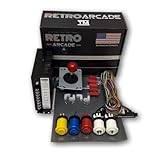
- Upright arcade 60-in-1 control kit
- Includes RetroArcade.us Jamma wiring harness with US label
- Includes RetroArcade.us 16 amp RetroArcade.us power supply
- Game boards sold separately!
Rank #4

- Jamma Switcher
- Arcade PCB Switch
Product prices and availability are accurate as of the date/time indicated and are subject to change. Any price and availability information displayed on Amazon at the time of purchase will apply.




