Quick wins for a faster PC:
Scan for outdated or missing drivers - takes under a minuteDriver Scan →Repair Windows errors before they cause bigger problemsFix Now →Generally, no: a standard USB mouse is not documented as a way to control the Wii Menu or ordinary Wii games. There is a narrow exception: the homebrew Amiga emulator UAE4Wii documents mouse input within that software. For standard Wii play, use the controller specified for the game.
Does a USB mouse work with the Wii Menu or regular games?
Nintendo’s controller guidance does not establish general USB mouse support for the Wii Menu or commercial games. For Wii disc games, Nintendo describes the Wii Remote, with or without a Nunchuk, as the usual controller; some games also support other controllers. See Nintendo’s controller guidance for Wii games.
For Virtual Console and WiiWare titles, supported controllers vary by game. Check the compatible-controller information for the specific title rather than assuming a mouse will work. Nintendo explains the variation in its Virtual Console and WiiWare controller guidance.
What is the mouse exception?
WiiBrew’s community documentation for UAE4Wii, a homebrew Amiga emulator for Wii, says a real mouse can be connected to the console’s USB port for use in the emulator. That is a software-specific capability, not evidence that the mouse controls the Wii Menu, official Wii games, or other homebrew applications. WiiBrew is not a Nintendo compatibility guarantee.
#1 Best Overall
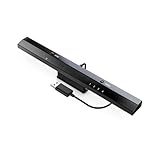
- Wireless sensor dolphin bar can connect your Wii remote plus controller to your PC by Bluetooth.
- Supports cursor anti-shake function, works as a normal keyboard and mouse.
- Allows you to play more quickly and precisely with your GC controllers, Light guns or Racing wheels.
- You can return or skip to the beginning of the current, previous or next chapter and supports Fast reverse, Fast forward, Pause playing, etc.
- Supports the G-sensor function that is the best choice for the Racing Games. Supports the Vibration Feedback.
Does Wii keyboard support mean a mouse will work?
No. Keyboard and mouse compatibility are separate. Nintendo’s keyboard guidance says compatible USB keyboards require Wii Menu version 3.1 or later, and that support can vary by application. Its keyboard pages discuss keyboards, not general mouse support; a supported keyboard does not make a mouse a Wii pointer.
Quick Recap
Best Value
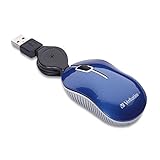
- ULTRA-COMPACT DESIGN: The mini mouse takes up minimal space and fits easily into briefcases, laptop bags, and other small compartments.
- SMOOTH, PRECISE TRACKING: The optical sensor provides responsive cursor control and accurate tracking for everyday notebook and laptop use.
- RELIABLE WIRED CONNECTION: The USB 2.0 connection provides dependable plug-and-play performance without requiring batteries or a wireless receiver.
- COMPACT, TRAVEL-FRIENDLY DESIGN: The retractable USB cable helps prevent tangles and eliminates the need to wrap the cord around the mouse when traveling.
- BROAD COMPATIBILITY: Works with computers featuring a USB port and supports USB 2.0 and USB 1.1. Backed by a Verbatim one-year limited warranty.
Rank #4

- PS/2-to-USB ADAPTER: Adapter for those who like to continue using their PS/2 devices. Connect mouse and keyboard to your computer by using only one USB port
- SUITABLE FOR PS/2 DEVICES: Two PS2 female ports, purple for keyboard and green for mouse, and one USB male port.
- BUILT-IN USB-IC: You can use PERIPRO-401 to connect your keyboard and mouse with PS2 interface to USB 2. 0 port at PC or laptop. It also supports PS/2 Port of KVM Switch.
- UNIVERSAL PURPOSES: Fits with industrial and professional needs
- PACKAGE INCLUDES: Perixx PERIPRO-401 adapter, manual; 12-month limited
Rank #3

- Plug & Play No drivers - No installation required. Just plug this USB mouse jiggler into your device port, and it automatically simulates natural mouse movement every 3 seconds to keep your PC active and prevent sleep mode instantly.
- Undetectable Mouse Mover - Mouse Jiggler will show up as a Hibernation Preventor. Once connected, the device simulates consistent, natural cursor movement with a precise 3-pixel step, effectively preventing your computer from entering sleep mode, locking the screen, or showing an idle status.
- Compact & Portable Design - Made from durable yet lightweight plastic, this mini mouse jiggler features an ultra-compact form factor that fits easily into any laptop bag, backpack, or pocket. Perfect for users on the go who need a discreet, travel-friendly solution
- Undetectable & Discreet - Designed to mimic real user activity, the subtle movement pattern goes unnoticed by system monitoring software. Its unobtrusive appearance blends seamlessly into any workspace, ensuring your computer stays awake without drawing attention
- Perfect for Every Scenario - Ideal for a wide range of situations: maintain an active status on Teams, Zoom, or Slack during remote work; prevent system sleep during long downloads or file transfers; keep your screen active during presentations; and avoid the frustration of repeatedly unlocking your computer during short breaks or while reading documents
Rank #2

- Computer mouse for easily navigating a computer interface; click, scroll, and more
- USB-A wired connection; if existing device only supports USB-C, an additional adapter will be required
- High-definition (1000 dpi) optical tracking ensures responsive cursor control for precise tracking and easy text selection
- 3 buttons offer effortless fingertip control
- Plug-and-go ready for instant use
Which controller should you use?
- For ordinary Wii games: use the controller listed for that game, typically a Wii Remote, with a Nunchuk where required.
- For Virtual Console or WiiWare: check that title’s compatible-controller information because requirements differ.
- For UAE4Wii: the emulator documentation describes using a real USB mouse for mouse input. This does not establish that every mouse model works or that it will work in other software.
Product prices and availability are accurate as of the date/time indicated and are subject to change. Any price and availability information displayed on Amazon at the time of purchase will apply.




