Free tools Windows power users keep installed
One-click scans. No signup required.
If Call of Duty: Mobile says it is unable to connect, start by checking your internet connection, then test the game after each troubleshooting step. Activision’s guidance covers connection and device checks for Android and iOS, but it cannot identify the cause on a particular device, account, network, or at that moment.
1. Check your internet connection
Call of Duty: Mobile requires an internet connection to play, according to Activision Support. First, confirm that your phone is online and that other apps or websites can connect. Activision recommends a strong Wi-Fi connection for play.
- If you are on Wi-Fi and the connection seems unreliable, switch to mobile data and try COD Mobile again.
- If you can access the wireless router, restart it, reconnect your phone, and test the game.
- After each change, reopen or retry COD Mobile so you can tell whether that step made a difference.
These checks test the connection you already have; Activision’s guidance does not call for buying a new router or hotspot.
2. Restart your phone or tablet
Activision recommends restarting the device as a way to refresh the connection and address connection problems. Use the normal restart procedure for your specific Android device or iPhone; button combinations and menu labels vary. Once the device has restarted and reconnected to the internet, test COD Mobile before moving on.
The Tool Desk
Outbyte Driver Updater FREEScan for outdated or missing drivers - takes under a minuteDriver Scan →Outbyte PC Repair FREERepair Windows errors before they cause bigger problemsFix Now →#1 Best Overall

- 6 FINGERS OPERATION, FULL OF CHICKEN DINNER- Just use your index and middle fingers to press the L1 R1 L2 R2 triggers, that shooting, aiming, left/ right tilted head, moving, jumping, squatting and and lying operations can be performed at the same time, It will be a breeze to defeat the thumb-hold players, also a massive advantage in close range combat because difference in milliseconds can be life or death. No disconnection, response delay, root request or system incompatibility issues.
- UPGRADED 1200mAh EMERGENCY POWER BANK- Portable charging dock to power your phone anywhere, so you’re not tied to a wall when your phone is out of power. Playing without the fear of phone dying in a gameplay, that's a must! Hate that charging cable getting in the way when playing fierce battle royale games? We solved it for you.The triggers are set on the back not shoulder, so there is an angle and distance between index finger and the cable, it won't interfere with your operation at all.
- QUIET COOLING FAN & 180°FLIP DESIGNED TOUCH HEAD- Rotatable touch head for easy installation of the phone and setting buttons. The high conductive silicone head is smaller and more sensitive than other grips, it won't obscure the game map. Alloy l1 r1 buttons are tested over 100,000 times to ensure durability and fast responsive. The powerful cooling fan with switch button protects your smart phone from overheat and reduce heat lag, prolong the service life of the phone and battery.
- ERGONOMIC CONTROLLER & PHONE SECURE LOCKED IN PLACE- People may get hands cramps after playing hours of battle royal games with cellphone. DELAM gamepad is specially designed for mobile shooting games, it extends your phone into a traditional Xbox or PS controller, more comfortable for big hands. Phone body and controller are firmly fixed through three contact points covered of rubber pads to prevent the phone sliding, and won't press your on off button and volume keys, or scratch your phone.
- TELESCOPIC-BOOM GRIP SUPPORT ALL 4.7-6.5 INCH MOBILE PHONES OF IOS & ANDROID DEVICE- Work for PUBG Mobile/ Call Of Duty Mobile/ Free Fire/ Critical Ops/ Rules of Survival/ Knives Out/ Cross Fire/ Terminator 2 Judgment Day/ Survivor Royale as long as the game allows customize and drag the keys. Please feel free to contact us at the first time if you have any questions or problems.
3. Check for game and system updates
Activision includes app and device updates in its troubleshooting guidance. Check the Google Play Store on Android or the Apple App Store on iOS for a COD Mobile update. Then check your device’s system settings for an available Android or iOS update. Install available updates and try the game again.
4. Clear the game cache on Android
Activision’s cache-clearing instructions apply to Android. Menu names differ by manufacturer, but the general path is:
Rank #2

- Multi-Platform Compatibility - The Bcofo gaming controller features a mode switch button specially designed for diverse devices. With the switch button on the back of the game controller, you can easily and quickly switch to the corresponding mode (iOS/Android/Switch/PC), allowing the wireless game control to be compatible with various platforms such as iPhone, ipad, mac, Apple Acrade MFi Games, Android mobile smart phones, Android HID Games, tablet, Switch/Lite/OLED, laptop, and other devices via Bluetooth. Furthermore, the gamepad is also stable and convenient for wired connection via the included USB cable to connect a computer/PC Windows 7/8/10/11/Steam Deck
- Hall Effect Triggers - The wireless mobile game controller for phone has 2 advanced Hall Effect sensors that provide smoother and more accurate gameplay, giving you a competitive edge in fast-paced action games and improving overall gaming performance
- 2 Programmable Buttons - Our PC gaming controllers has simplify complex skill operations with N1/N2 key. With the 2 marco back buttons on the back of controller, players can customise a combination up to 30 seconds with N1/N2 to program the 21 buttons ( A/B/X/Y... button) of the controllers
- Cool RGB Lighting - The game controller features RGB LED lighting effects, allowing gamers to customise the lighting to their personal preference, creating a more immersive gaming experience. The gaming control is equipped with 8 lights and 1 colorful gradient. It offers 4 lighting modes: colour, wave, breathing, and static. Press the 'RGB' button on the back of the gamepad to switch the light and choose from 9 different RGB colors. The RGB light can also be toggled on or off by pressing and holding the "RGB" button for a few seconds, according to your preference
- Six Gyro Sensor, Dual Vibration, 3 Turbo Speed - The wireless controller with 6-Axis motion control functions allows the professional Switch controller to detect movements rapidly and helps you make quick responses. The dual vibration provides realistic, immersive gaming experiences like the feeling of the impact, explosions, and collisions that extend beyond the scope of audio and visuals. The 3 turbo speeds: 5/12/20 shots per second, greatly enhancing your experience in action and arcade games
- Open Settings and go to Apps or the device’s app-management screen.
- Select Call of Duty: Mobile.
- Open Storage and tap Clear Cache.
- Launch the game and check whether it connects.
These Android settings steps do not apply to iPhone or iPad.
5. Reinstall only after the simpler checks
If the connection checks, restart, updates, and (on Android) cache clearing have not helped, Activision lists deleting and reinstalling COD Mobile as another troubleshooting option. Its support article says deleting the app will not delete progress or other game data and instructs players to sign in with the same account after reinstalling to reinstate that data. Follow that account instruction; the guidance does not establish what happens to data that was not associated with the account.
Rank #3

- Bluetooth Controller for iPhone & Android: Mocagen mobile gaming controller Compatible with all iPhone models (including 18/17 series) and Android devices. Pairing steps: 1. Turn on Bluetooth on your phone and go to the pairing screen. 2. Press and hold the Home button for 3 sec until LED4 flashes. 3. Find "XBOX Wireless Controller" on your phone and tap to pair. Quick reconnect: After first pairing, simply press the Home button once (with Bluetooth on) to reconnect
- Play Most Controller-Compatible Games: This iPhone game controller supports cloud gaming (e.g., Xb*x Game Pass, GeForce NOW), Xbox Remote Play, emulator games, and native mobile games (e.g., Apple Arcade). Enjoy effortless control and play Fortnite, Call of Duty, Roblox, Genshin Impact, and many more anytime, anywhere. Note: Controller only works with games that support controller input, and does not support PS Remote Play
- 5M-Cycle Lifespan & Zero Drift: MC1 mobile gaming controller features a Hall-effect joystick with a 5M cycle lifespan, 2.5x longer than standard carbon-film sticks. Its innovative electromagnetic induction technology ensures drift-free operation, enabling precise character control in intense games and significantly extending this phone game controller durability
- Ergonomic Grip Design: The handle is ergonomically shaped with a l*ser-engraved texture for anti-slip and enhanced grip, effectively reducing fatigue during long gaming sessions. The scientifically designed joystick and button layout ensures smooth operation. Whether for personal use or as a gift, it delivers a more comfortable and healthier gaming experience
- 7-Color RGB Light Ring & 600mAh Battery: The mobile game controller features a 7-color adjustable light ring on the joystick(ABXY button lights can be turned off, but their colors are not adjustable). The lighting is vibrant yet eye-friendly. The built-in 600mAh battery provides up to 6 hours of battery life in brightness mode — enough for a full day of gaming
6. Contact support if the error continues
If you can reach the main lobby, Activision’s article directs players to tap the question-mark icon at the top of the lobby, then select a category and topic for help. If the connection error prevents you from reaching the lobby, that in-app route may not be available; the article does not specify one support path that works in every such case.
Should you change your registered region?
No. Activision says changing the registered country or region does not affect performance and that players connect to the servers physically closest to them. Changing region is not a supported fix for this connection error, according to Activision Support.
Rank #4
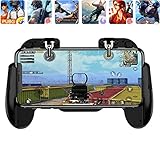
- 【Game Controller Design】Our gamepad have two adjustable triggers on the top, mechanical button made of conductive silicone and zinc alloy that triggers no delay. The handle whole body is made of high quality ABS material, which is sturdy and lightweight.
- 【Improve Your Game Level】Perfect four-finger operation. In the game, the two trigger on the top of the handle is responsible for aiming and shooting. You can quickly open the aiming magnifier and then shoot the enemy while moving and aiming. These four actions can be completed in one instant. You only need to practice a few times to adapt to this mobile game handle, you will find that the shooting game will become so easy, you can also become a game master.
- 【Best Assistant for Shooting Games】Very easy to use and install. You can use it for almost any PvP, FPS type shooter, as long as you can customize the keys icons in the game to fit the trigger. It is especially suitable for PUBG mobile phone shooter games.
- 【Supported Mobile Devices】This mobile game controller is compatible with almost all large screen smartphones. Stretchable handle body, maximum stretch length left and right: 172 MM/6.77 inch. The supported phone size is 4.7-7.0 inch screen, and the supported phone thickness is 10.5 MM/0.41 inch (recommended to remove the phone protection case before installing the controller).
- 【Ideal for Mobile Shooting Games】For PUBG/ Critical Ops/ Rules of Survival/ Knives Out/ CrossFire/ Survivor Royale/ Terminator 2 Judgment Day, etc., as long as the game settings are allowed to customize the position of the button keys.
Is COD Mobile currently down?
A connection error on your device does not by itself confirm a game outage. Activision’s Online Services page provides general connection guidance, but the cited material does not establish a live COD Mobile-specific outage status. Service conditions can change, so these troubleshooting steps should not be treated as a real-time diagnosis.
Quick Recap
Best Value

- ✅【Using Tips】These Mobile Game controllers are using the sensitive real mouse micro switch inside. So there are several phones which have the electromagnetic problems. This will cause the triggers touch the screen automatically. Please do not worry about this and you just need to turn off the screen and turn on again. This issue will solved right away.
- ✅【Max Phone Thickness: 13mm】These L2R2 Mobile Game controllers are compatible with iPhonesand most Android Phones, without even remove your case.(The thickness of the compatible mobile phone should be less than 13mm.) These 6-fingers-operation mobile game controllers are suitable for a variety of shooting games, including PUBG Mobile, Call of Duty Mobile, Fortnite Mobile, Knives Out Mobile, Rules of Survival, Apex Legends Mobile, Survivor Royale, Critical Ops etc. As long as the game allows customizing and draging the keys.
- ✅【Small and Lightweight】The PUBG game triggers are portable and tiny for you to put them into your pocket, and have them for gaming when in office, school, trip, camping and play games anywhere and anytime. With this 4 triggers PUBG mobile controller, you can simultaneously move, turn, aim and shoot by using the six fingers to press the buttons, which can eliminate the trouble that use thumbs only to make all operations.
- ✅【Mechanical Touch】4 triggers PUBG mobile controller designed for longevity with greater durability and responsiveness, more than 2 million click. Fast mechanical keys with medium resistance, precise actuation, audible click sound, and tactile bump feedback. Easy To Use, High Sensitive, Physical Button Feedback. Using this PUBG mobile game controller, you can move, angle adjust, aim and shoot at the same time with the thumbs and index fingers of the left and right hand.
- ✅【Super Gaming Experience】This PUBG game triggers is made of ABS and alloy, durable and ergonomic. 6 trigger PUBG mobile controller electroplated alloy materials, mouse buttons, smooth touch, six-finger linkage, auxiliary pressure grab, one-second burst, dominate the game battlefield, and enjoy the ultimate gaming experience. Call of Duty mobile controller are sensitive to shoot and aim, no Power supply and driver needed, easy to use and high precision, increase your game score!
Product prices and availability are accurate as of the date/time indicated and are subject to change. Any price and availability information displayed on Amazon at the time of purchase will apply.
Recommended Free Tools




