DarkfullDante built a DIY USB switch box to add the physical controls their HOTAS setup lacked. A Raspberry Pi Pico running CircuitPython reads the panel’s switches, potentiometers and rotary encoder, then presents inputs to a computer as gamepad or keyboard events. The project was used with Microsoft Flight Simulator and Elite Dangerous, but it is an auxiliary controller—not a replacement HOTAS or a game-specific plug-and-play product.
What the switch box does
The box adds cockpit-style controls to a flight-simulation setup. Its purpose was practical: the builder wanted more physical switches without buying a substantially more expensive commercial panel. The creator reported using it mainly with Microsoft Flight Simulator and Elite Dangerous; the available account describes generic USB input emulation, not official integration with either game. The controls must be bound in the simulator or host software. DarkfullDante’s June 2021 Reddit discussion and the Hackster project feature document the build.
Hardware and enclosure
The confirmed hardware includes a Raspberry Pi Pico, multiple switches, a keyed switch, a rotary encoder and linear potentiometers. Two three-position switches provide a selector arrangement. The case is a stock aluminum electronics enclosure, modified with hand-cut and drilled openings rather than a custom 3D-printed shell.
In a Reddit reply, the creator said the rotary encoder and linear potentiometers were salvaged from an old TV amplifier, while the switches and keyed switch were purchased. A stepper bit was used for drilling and a jeweler’s saw for the difficult linear-potentiometer cutout. The creator estimated the total cost at about $60–$70 in June 2021; that historical estimate, helped by salvaged parts, is not a current parts budget.
#1 Best Overall

- 1. Comprehensive Aircraft Systems Control Panel Combines essential aircraft controls into a single panel, including ignition key switch, master switches, avionics master, fuel pump, lighting controls, pitot heat, and other commonly used cockpit functions for a more immersive flight simulation experience.
- 2. Realistic Aircraft-Style Ignition Switch Features an authentic magneto key switch with OFF, RIGHT, LEFT, BOTH, and START positions, helping recreate realistic aircraft startup and shutdown procedures found in general aviation aircraft.
- 3. Illuminated Cockpit-Style Buttons Includes illuminated push buttons that enhance cockpit appearance and realism. The buttons feature built-in lighting for an authentic aircraft-inspired look and are intended as decorative cockpit elements rather than simulator-mapped controls.
- 4. Desktop Clamp Mount Design Supplied with a sturdy desk clamp mount that securely attaches to desks and simulator stations. Ideal for desktop flight simulator setups without requiring a dedicated home cockpit installation.
- 4. Desktop Clamp Mount Design Supplied with a sturdy desk clamp mount that securely attaches to desks and simulator stations. Ideal for desktop flight simulator setups without requiring a dedicated home cockpit installation.
The available coverage does not establish a complete bill of materials, enclosure model or dimensions, potentiometer values, encoder part number, wiring diagram, GPIO assignments or source code. The photographs and descriptions show a finished project, not enough construction detail to reproduce it exactly.
How the Pico sends controls to a computer
The Pico acts as a USB input bridge: a physical control changes, the microcontroller reads its GPIO or analog input, CircuitPython turns that reading into a USB Human Interface Device (HID) event, and the computer receives a gamepad or keyboard input that can be assigned to a simulator function. This general approach lets a host recognize standard input-device events without a project-specific desktop driver.
Rank #2

- Integrated Desk Clamps and 100mm Vesa Mounting Option for rock-solid stability during gameplay
- Vibrant enhanced backlighting – Light up your setup with crystal-clear visibility and a stunning glow, perfect for late-night gaming marathons. Instantly switch between 11 fan-favorite colors, or unlock full-spectrum customization with Sim-Panel’s Simlink for a truly personalized experience!
- Brushed stainless steel buttons for a premium tactile experience
- Premium Black Brushed Aluminum Finish
- True-to-life ignition switch and Brake knobs adding realism to your sim setup
DarkfullDante used hid_gamepad for most commands and hid_keyboard for some rotary-encoder functions. The exact firmware configuration, HID descriptor and library version are not available, so the project’s precise USB device layout cannot be reconstructed from the published account. For a current implementation, begin with the CircuitPython HID examples and the Adafruit simple gamepad example. Raspberry Pi has also shown the broader Pico-to-USB-controller pattern in its Pico controller project.
Why the rotary encoder needed a second HID type
The unusual design choice was splitting inputs between gamepad and keyboard HID. The creator’s two three-position selector switches formed a 3-by-3 grid. Each of the nine selector combinations needed to recognize both encoder directions:
Rank #3

- Realistic landing gear control with LEDs indicating actual gear status from Microsoft FSX. Fully Customizable for All Flying Conditions.
- Start your aircraft engines and access other cockpit functions with ease. Compatible with most major simulation software and games, including:Flight Simulator X,Prepar3D 2.2+,X-Plane 10
- Modular and interchangeable. Saitek's range of Instrument Panels can be situated one on top of another or side-by-side. Want the Multi Panel above the Radio Panel? Done. Want your Switch Panel to the left of your Yoke? Go for it. Easy-to-use mounting brackets provide the means to arrange your flight simulation setup in a configuration only limited by your imagination.
- Compatible: Windows 7, 8, 8.1 and 10 or newer
- 3 positions × 3 positions = 9 selectable modes.
- 9 modes × 2 directions = 18 encoder-related input events.
In the gamepad representation the creator was using, 32 report bits were described as including four analog-axis fields, leaving 16 usable button positions. That implementation-specific accounting fell two events short of the 18 needed for the encoder modes. The workaround was to send some encoder actions as keyboard keystrokes, including otherwise-unused keys in the F13–F24 range.
This is not a universal 16-button limit on the Pico or CircuitPython. It describes the creator’s chosen report format and implementation. Current CircuitPython HID examples provide a starting point for gamepad-style devices and custom approaches; the original creator also discussed a possible future move to a 64-bit gamepad report, but the available account does not establish that the project made that change.
Rank #4
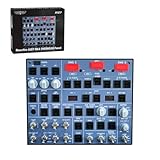
- Stable Performance with Professional Build: Crafted using quality PCB board manufacturing for reliable and stable performance. Sized at 26×21×3 cm, it features a custom backlit panel, 100×100mm VESA mounting holes on the back, and comes with a USB cable for easy setup. Realistic travel buttons offer a true-to-life tactile experience for deeper flight simulation immersion.
- Mobiflight Compatible with Comprehensive Support: Powered by Mobiflight for wide compatibility and ease of use — with full tutorial support included. Supports most mainstream models like A35xx and A32xx, including Fenix and FBW. While other models like A35X and A38X are also adaptable, future Mobiflight updates will further upgrade compatibility.
- True-to-Scale Buttons with Space-Saving Design: Buttons match the size and feel of real aircraft panels. Operates with a single USB cable and replaces multiple controls with one compact unit, making cold and dark starts easy while saving precious desktop space.
- Adjustable Backlight for Visual Comfort: Features an adjustable backlight brightness for optimal visibility in various lighting conditions, enhancing usability and visual comfort during long simulation sessions.
- Note: This is version v3.0, which upgrades the lighting synchronization feature. Lighting can now interact with the model, allowing linear adjustment and shutdown. The configuration files have undergone major changes. Therefore, please use the v3.0 configuration files. Do not use files labeled v1, v2, or any files without the v3.0 designation, as they will not function properly.
What F13–F24 solve—and what they complicate
Using keyboard events avoids consuming the gamepad button positions available in that implementation, and keyboard inputs can be straightforward to test. But a keyboard event is not identical to a joystick button. F13–F24 may be awkward to select in some configuration interfaces, and operating systems, games, overlays or other host software may expose or handle them differently. Bindings can also depend on which application has focus, and press/release or repeat behavior needs testing.
The creator characterized latency as theoretically present but practically unnoticeable. That is an individual observation, not a measured benchmark. A new build should test response and event handling in its intended host and simulator rather than treat that comment as a performance guarantee.
Best Value

- 1.COCKPIT INSTRUMENT PANEL FRAME ONLY – Designed for building a realistic and organized home flight simulator cockpit. Compatible with Logitech flight simulator yokes, throttle quadrants and various Logitech flight panels, as well as Honeycomb yokes. Supports Up to 2 Throttle Quadrants.Please note: electronic instruments, displays, yokes, throttle quadrants and other flight controls shown in the images are not included.
- 2. DIMMABLE LED AMBIENT LIGHTING – Features an integrated LED light strip around the upper edge of the panel. The brightness can be adjusted to create comfortable cockpit illumination for daytime or nighttime flight simulation.
- 3. MULTIPLE INSTRUMENT MOUNTING POSITIONS – The pre-drilled panel provides mounting locations for a variety of flight simulator instruments and control modules, helping users build a cleaner and more organized custom cockpit setup.
- 4.IMPRESSIVE BUILD & DESIGN - This cockpit simulator set features sturdy aluminum alloy that neither bends nor flexes. Rubber-tipped clamps make it safe to mount on 0.5” to 2.2” thick desks.
- 5. STABLE FREESTANDING COCKPIT DESIGN – Equipped with supporting legs and adjustable feet for stable placement on a desk or simulator platform. Suitable for home cockpit builders, flight simulation enthusiasts and training-style simulator setups.
What a modern recreation should plan
The project is useful as an architecture example, not a complete build recipe. A comparable panel needs a USB-capable microcontroller and compatible firmware, controls selected for the desired functions, a wiring and input-handling plan, a suitable enclosure, and time to configure simulator bindings. Before settling on a design, decide whether each control should appear to the host as a keyboard key, gamepad button or analog axis. If the control count exceeds the report’s capacity, consider a custom HID report or deliberate input multiplexing instead of automatically expanding the keyboard mapping.
- Switch inputs: choose a pull-up or pull-down strategy, debounce mechanical contacts, and distinguish momentary controls from toggles whose state persists.
- Encoder handling: test both directions, contact bounce, rapid rotation and selector changes so a state transition does not produce unintended commands.
- Analog controls: map and calibrate potentiometer readings to the expected axis range.
- Wiring and mounting: use secure connectors and strain relief; prevent exposed conductors or board contacts from shorting against the metal case, and avoid mechanical stress on solder joints.
- Host bindings: test press, release and toggle behavior in the actual simulator, and check for key conflicts if using keyboard HID.
- Serviceability: document the pinout and firmware, label controls, and use modular connectors where they make later repairs easier.
The exact circuit used by DarkfullDante is not documented, so these are design considerations for an equivalent build, not claims about the original wiring. Board details, CircuitPython version, debounce method, HID descriptor and cross-platform behavior are likewise unverified.
What the project demonstrates
DarkfullDante’s box shows how a small microcontroller and a mix of purchased and salvaged controls can add a tailored physical interface to a simulator setup. Its most transferable lesson is to plan the USB input representation alongside the control layout: once multiple selector states and encoder directions multiply the number of actions, the HID report—not just the number of switches—becomes a design constraint.
Quick Recap
Product prices and availability are accurate as of the date/time indicated and are subject to change. Any price and availability information displayed on Amazon at the time of purchase will apply.
Recommended Free Tools




