To troubleshoot Diablo IV error 397000, fully close the game and launcher, check for an update, then run Scan and Repair on Battle.net. If the error remains, check for current Blizzard notices before trying disruptive fixes: the same “lobby server is currently not available” and version-check message has appeared during incidents affecting players on multiple platforms. It does not, by itself, prove your game is out of date.
What Diablo IV error 397000 means
Players report code 397000 with a message that the lobby server is unavailable and to double-check the game version. That message points to a problem reaching or checking the game’s lobby service, but it is not a definitive diagnosis of a stale local installation. Reports include cases where no update was available and repairing the game did not resolve the error. Blizzard’s surfaced patch notes do not define this code or give a code-specific fix.
| # | Preview | Product | Price | |
|---|---|---|---|---|
| 1 |

|
Diablo IV - PlayStation 5 | $31.00 | Buy on Amazon |
| 2 |

|
Diablo IV | Lord of Hatred Standard Edition | XBOX Digital Code | $39.99 | Buy on Amazon |
| 3 |

|
Diablo® IV (PS5) | $36.40 | Buy on Amazon |
| 4 |
|
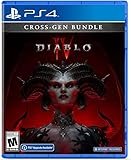
Diablo IV (Cross-Gen Bundle) - For Playstation 4 | $38.90 | Buy on Amazon |
| 5 |

|
Diablo IV (Cross-Gen Bundle) | $29.95 | Buy on Amazon |
The cause can vary: an update or damaged local game files are worth checking, but a wider service incident is also possible. There is no established single cause that explains every occurrence.
Try these low-risk fixes first
- Close Diablo IV and its launcher completely, then reopen both. Launch the game again and see whether the lobby loads.
- Check for a game update. In Battle.net, select the gear icon beside Play, then choose Check for Update. On PlayStation or Xbox, check for an update through the console’s game-management interface.
- Run Scan and Repair on Battle.net. Open the game’s Battle.net page, select the gear beside Play, choose Scan and Repair, and let the process finish before launching again. This checks the local installation; it is not a guaranteed fix.
- Restart your device and try once more. This is a simple next check if the update and repair steps did not change the error.
Check whether it is a wider Blizzard incident
If the error persists after the local checks, look for current Blizzard service notices and recent reports from other players. Multiple reports around the same time, especially across PC and consoles, make a shared service issue more plausible than a problem unique to your device. Check for contemporaneous information rather than relying on old forum threads: a past incident cannot establish that the service is down now.
Recommended Free Tools
#1 Best Overall
This distinction matters because players have reported the same lobby/version-check message during broader incidents. In a January 2026 Diablo IV forum thread, players reported the error on PC and consoles; a Blizzard representative wrote, “We are aware of this error and have opened an investigation.” Players later reported that access had returned. A December 2023 thread also included cross-platform reports, followed by a Blizzard representative saying the issue should be resolved. These are historical examples, not confirmation of a current outage.
When to contact Blizzard Support
If Blizzard has not posted an incident notice and the update, repair, and restart checks have not helped, contact Blizzard’s Diablo IV support forums or Blizzard Support. Include your platform, the exact error message, when it began, and which checks you tried. That information helps distinguish a local client problem from a service-side issue.
Rank #2
- LORD OF HATRED EXPANSION — Includes Diablo IV: Vessel of Hatred Standard Edition and Diablo IV: Lord of Hatred. The Diablo IV base game is required to play.
- IN-GAME EXTRAS — Get 1 Extra Stash Tab, 2 Additional Character Slots, and 3 Decor Items in World of Warcraft.
- NEW CLASSES AND REGION — Master two new classes and explore the ancient region of Skovos in the Lord of Hatred expansion.
- ACTION RPG ADVENTURE — Slay demons, master abilities, explore nightmarish dungeons, and find legendary loot in a dark open world.
- NEW CAMPAIGN AGAINST MEPHISTO — Make your stand against the Prime Evil Mephisto in a rich new story featuring new enemies, regions, and narrative twists.
Fixes that are not established for error 397000
Do not assume that changing hardware or repeatedly reinstalling the game will solve this code. Player reports include unsuccessful router restarts and repair attempts, and the available evidence does not establish router changes, driver changes, third-party driver utilities, or reinstalling as proven 397000 fixes. Check for a service incident before moving on to more disruptive steps.
Quick Recap
Best Value
Rank #4
- Diablo IV is the next-gen action RPG experience with endless evil to slaughter, countless abilities to master, nightmarish Dungeons, and legendary loot
- Embark on the campaign solo or with friends, meeting memorable characters through beautifully dark settings and a gripping story
- Explore an expansive end game and shared world where players can meet in towns to trade, team up to battle World Bosses, or descend into PVP zones to test their skills against other players
- No lobbies necessary - with cross-play and cross-progression on all available platforms
Rank #3
- Pre-order and receive:
- Light Bearer Mount in Diablo IV
- Only one code per customer
- Diablo IV is the next-gen action RPG experience with endless evil to slaughter, countless abilities to master, nightmarish Dungeons, and legendary loot.
- Embark on the campaign solo or with friends, meeting memorable characters through beautifully dark settings and a gripping story, or explore an expansive end game and shared world where players can meet in towns to trade, team up to battle World Bosses, or descend into PVP zones to test their skills against other players - no lobbies necessary - with cross-play and cross-progression on all available platforms.
Product prices and availability are accurate as of the date/time indicated and are subject to change. Any price and availability information displayed on Amazon at the time of purchase will apply.
Quick wins for a faster PC:
Clear out junk files and repair common Windows errorsFree Scan →Scan for outdated or missing drivers - takes under a minuteDriver Scan →Repair Windows errors before they cause bigger problemsFix Now →



