What’s actually slowing this PC down?
Pick the symptom - the matching free tool is one click away.
dlcapapi.dll is most strongly associated with the Acer C120 USB projector and its companion software. If Windows says dlcapapi.dll is missing, was not found, or could not be loaded, restore the Acer installation rather than downloading a loose DLL.
What dlcapapi.dll is
Public file metadata describes dlcapapi.dll as DLCapAPI Dynamic Link Library. The known indexed copy is a 32-bit third-party DLL, version 1.2.17.17, with a file size of approximately 143–144 KB.
As an Amazon Associate I earn from qualifying purchases.
It is not a standard Windows component. There is no reliable evidence that Microsoft owns it or that it is supplied by Visual C++ Redistributable, DirectX, .NET, Windows Update, Photoshop, or Skype.
The strongest public product association is the discontinued Acer C120 USB-powered projector. Acer’s installation instructions use an executable named dlusb_launcherC120.exe, and C120 users have reported dlcapapi.dll errors while installing or starting the projector software.
#1 Best Overall

- 5-in-1 Connectivity: Equipped with a 4K HDMI port, a 5 Gbps USB-C data port, two 5 Gbps USB-A ports, and a USB C 100W PD-IN port. Note: The USB C 100W PD-IN port supports only charging and does not support data transfer devices such as headphones or speakers.
- Powerful Pass-Through Charging: Supports up to 85W pass-through charging so you can power up your laptop while you use the hub. Note: Pass-through charging requires a charger (not included). Note: To achieve full power for iPad, we recommend using a 45W wall charger.
- Transfer Files in Seconds: Move files to and from your laptop at speeds of up to 5 Gbps via the USB-C and USB-A data ports. Note: The USB C 5Gbps Data port does not support video output.
- HD Display: Connect to the HDMI port to stream or mirror content to an external monitor in resolutions of up to 4K@30Hz. Note: The USB-C ports do not support video output.
- What You Get: Anker 332 USB-C Hub (5-in-1), welcome guide, our worry-free 18-month warranty, and friendly customer service.
| Item | What is known |
|---|---|
| File | dlcapapi.dll |
| Description | DLCapAPI Dynamic Link Library |
| Known architecture | 32-bit |
| Known version | 1.2.17.17 |
| Known size | Approximately 143–144 KB |
| Publisher | Not reliably identified |
| Most likely owner | Acer C120 projector software |
| Windows system file | No reliable evidence |
A 64-bit version was not verified. The known copy should be treated as an application-private file, not something to place in C:WindowsSystem32 or C:WindowsSysWOW64.
Fix 1: Reinstall the Acer C120 software
This is the most likely repair when the error appears after connecting or launching an Acer C120 projector.
Acer’s documented package is named:
USB_Acer_1.0_W7x86W7x64W8x86W8x64W81x86W81x64W10x86W10x64_A.zip
Use Acer’s C120 support instructions or its Drivers and Manuals page to obtain the package. If the direct Acer archive is no longer available, search Acer’s support site by entering the projector model rather than searching for the DLL itself.
- Disconnect the C120 projector from USB.
- Remove any incomplete C120 software from Settings → Apps → Installed apps. On Windows 10, open Settings → Apps → Apps & features.
- Restart Windows.
- Download the C120 USB package from Acer or use the original installation media.
- Right-click the ZIP file, select Properties, and choose Unblock if that option appears.
- Select Apply, then extract the ZIP to a new temporary folder.
- Open the extracted folder.
- Right-click
dlusb_launcherC120.exeand select Run as administrator. - Follow the installer prompts.
- Restart Windows after installation.
- Connect the projector directly to the computer and start the C120 software.
A successful repair usually means the launcher opens without the DLL message and Windows detects the projector. If the same error returns, do not copy a replacement DLL into a Windows folder. Continue with the USB and compatibility checks below.
Fix 2: Use a direct USB 2.0 connection
Community reports about the C120 describe problems with USB 3.0 ports and recommend USB 2.0. This is practical compatibility guidance, not proof of a current official Windows compatibility guarantee.
Try the following:
- Shut down the projector software.
- Disconnect the projector.
- Connect it directly to a USB 2.0 port if the computer has one.
- Do not use a USB hub, dock, monitor port, or extension cable during testing.
- If the computer has multiple ports, try another direct port.
- Start the Acer launcher again.
If the projector works through USB 2.0 but not USB 3.0, the DLL may be present and the actual problem may be the old projector driver’s interaction with the newer USB controller.
Check the device in Device Manager:
- Right-click Start and select Device Manager.
- Expand Universal Serial Bus controllers.
- Look for an unknown device, warning icon, or entry that appears only when the projector is connected.
- Right-click the affected entry and select Properties.
- Read the message under Device status.
- Select Driver → Update Driver → Search automatically for drivers.
- Restart Windows and test the projector again.
If Device Manager does not change at all when the C120 is connected, test another cable or computer if available. That points more toward USB detection, hardware, or compatibility than a missing DLL.
Rank #2

- The Anker Advantage: Join the 80 million+ powered by our leading technology.
- Vivid Video: The HDMI adapter lets you connect to any TV or display with an HDMI port to stream video in up to 4K resolution.
- Plug and Play: Instantly turn your laptop’s USB-C port into an HDMI port, with no installation necessary. This product does not support charging or Power Delivery (PD).
- Premium Construction: A lightweight aluminum casing allows for greater heat dissipation, while the reinforced braided-nylon cable is designed to withstand the twists and tugs of daily use.
- Compatibility: Supports USB-C DP Alt mode, USB4, and Thunderbolt connections.
When manually hunting through manufacturer driver pages and checking which old USB components are stale, Outbyte Driver Updater can scan and identify driver problems; its free scan shows what needs attention, while driver installation is handled by the full version. Reinstalling the Acer C120 package remains the definitive fix for this application-specific DLL.
Fix 3: Run the launcher in compatibility mode
Acer’s archive name lists Windows 7, Windows 8, Windows 8.1, and Windows 10 package labels in both x86 and x64 forms. That does not establish current Windows 11 compatibility.
If the installer is blocked or installs incompletely:
Windows Errors? Fix Them Before They Spread
Repair common Windows errors and clear accumulated junk for a smoother, more stable PC - no reinstall needed.Free scan · no reinstallOutdated Drivers Are Slowing You Down
One free scan finds every outdated or missing driver and matches the right update for your exact hardware.Free scan · exact hardware match- Open the folder containing
dlusb_launcherC120.exe. - Right-click the file and select Properties.
- Open the Compatibility tab.
- Select Run this program in compatibility mode for.
- Start with Windows 7.
- Select Run this program as an administrator.
- Select Apply, then OK.
- Run the launcher again.
- Reconnect the projector after installation completes.
If Windows displays a compatibility warning, accept it only when the installer came from Acer or your original installation media. If the software installs but the projector still does not work, try the same compatibility setting on the installed C120 executable, not only on the setup file.
The archive labels indicate intended package coverage through Windows 10. They do not prove that the old C120 software works correctly on Windows 11.
Fix 4: Check Windows Security quarantine
Security software can remove or quarantine an old application DLL, especially when an installation is incomplete or the file has unusual age or behavior.
- Open Windows Security from the Start menu.
- Select Virus & threat protection.
- Select Protection history.
- Look for an event involving the Acer installer, C120 software, or
dlcapapi.dll. - Expand the event and review its path and detection details.
Restore a quarantined file only when it came from Acer or your original, trusted installation media. Do not restore a file downloaded from a DLL repository. The safer action is to remove the incomplete installation, scan the computer, and reinstall the complete Acer package.
If the file repeatedly disappears after a verified installation, update Microsoft Defender, run a full scan, and check whether another security product is removing it.
Fix 5: Confirm the 32-bit dependency path
The known indexed copy of dlcapapi.dll is 32-bit. A 32-bit application needs 32-bit dependencies even when Windows itself is 64-bit.
Rank #3
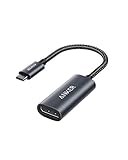
- The Anker Advantage: Join the 65 million+ powered by our leading technology.
- Supports 4K: Connect your USB-C phone or laptop to a DisplayPort monitor and access resolutions of up to 4K@60Hz. Note: this adapter only works with DP cable and is not compatible with HDMI cable.
- Multiple Display Modes: Allows you to both mirror or extend your display.
- Plug and Play: Start using immediately, with no installation necessary.
- What You Get: PowerExpand USB-C to DisplayPort Adapter, welcome guide, our worry-free 18-month warranty, and friendly customer service.
Do not assume that installing a 64-bit runtime repairs a 32-bit Acer program. If the Acer installer specifically reports a missing Microsoft runtime, install the x86 edition from Microsoft’s Visual C++ Redistributable download page. Do not claim that Visual C++ supplies dlcapapi.dll; that has not been verified.
A message saying “The specified module could not be found” can also mean that dlcapapi.dll exists but one of its dependencies does not. To check:
Recommended Free Tools
- Open the C120 installation folder.
- Confirm whether
dlcapapi.dllis beside the application executable. - Check the file’s Properties → Details tab.
- Confirm that the executable and DLL came from the same Acer package.
- Avoid mixing files from different downloads or Windows machines.
If the file is present but the error remains, the problem may be an incompatible dependency, incorrect architecture, blocked file, or unsupported operating-system combination.
Fix 6: Repair Windows components only when other symptoms exist
Because dlcapapi.dll is not verified as a Windows file, system repair commands are unlikely to recreate it. Use them when Windows has broader problems, such as damaged system applications, update failures, or multiple unrelated programs failing.
First install pending Windows updates and restart. Then:
- Open Start.
- Type
Command Prompt. - Right-click Command Prompt and select Run as administrator.
- Run:
DISM.exe /Online /Cleanup-image /Restorehealth
- Wait for it to finish.
- Run:
sfc /scannow
- Restart Windows.
- Test the Acer software again.
Microsoft documents this DISM-then-SFC sequence. If SFC repairs files but dlcapapi.dll is still missing, return to the Acer package. These commands repair Windows components, not application-private files.
When repeatedly running SFC and DISM leaves you guessing about what changed, Outbyte PC Repair can show detected system problems in a free scan; repair is performed by the full version. It is optional, and reinstalling the Acer C120 software remains the correct fix for a missing private DLL.
Fix 7: Check Windows Features only when the installer asks
Do not enable random Windows Features to repair dlcapapi.dll. The file has not been identified as a .NET, DirectX, or Windows component.
If the Acer installer explicitly names a Windows feature:
Rank #4

- 【With V/A/W Display】The adapter with an LED digital display screen that can display charging voltage, current and power in real time. It has a visual design that allows you to know the charging speed in real time and monitor device status.
- 【240W PD Fast Charging】The adapter can provide up to 240W(48V/5A) PD charging, It will not reduce the original charging speed of your device.
- 【40Gbps Data Transfer】The USB C adapter complies with the USB 4 standard and supports 40Gbps data transfer, allowing for faster transfer of movies, music, and more.
- 【HD 8K Video Output】The adapter supports 8K@60Hz HD video transmission, which can transfer the video of USB C device to the monitor, TV or projector (Note: it needs to be used with a cable that can support video transmission).
- 【Wide Compatibility】Compatible with iPhone 15/15 Plus/15 Pro/15 Pro Max,iPad Air/Pro,Galaxy S23/S23 Ultra/S23+/S22/S21/S21 Plus/ S20/Note 20/20 Ultra/10/10 Plus,Galaxy Z Flip 5,Galaxy Z Fold 5,Pixel 7/6/5/4, laptops, tablets and other usb-c devices.
- Press Windows key + R.
- Type
optionalfeatures. - Press Enter.
- Enable only the feature named by the installer.
- Select OK and restart if Windows requests it.
If no feature is named, leave this window unchanged. Installing unrelated components can add complexity without restoring the C120 application.
Quick wins for a faster PC:
Repair Windows errors before they cause bigger problemsFix Now →Fix the driver behind crashes, sound loss and screen glitchesFind Drivers →Clear out junk files and repair common Windows errorsFree Scan →What not to do
Do not download a loose DLL
Random DLL download sites can provide malware, the wrong version, or the wrong architecture. A replacement may also fail because the real problem is a missing dependency, damaged installer, quarantined file, or incompatible USB driver.
The safe sources are Acer’s C120 package, original installation media, and Acer’s official driver lookup. Restore a file only when you can verify that it came from one of those sources.
Do not copy it into System32 or SysWOW64
Windows searches an application’s folder before many system locations. An application-private DLL should normally remain beside the executable that owns it.
Copying a 32-bit file into a Windows system directory can create architecture conflicts, version conflicts, DLL-preloading risks, and harder-to-diagnose failures.
Do these 3 things before closing this tab:
1Repair Windows errors before they cause bigger problems2Scan for outdated or missing drivers - takes under a minute3Clear out junk files and repair common Windows errorsDo not run regsvr32 routinely
regsvr32 registers DLLs that expose registration entry points such as DllRegisterServer. There is no evidence that dlcapapi.dll is an ActiveX or COM server.
Running this command is therefore not a general repair:
regsvr32 dlcapapi.dll
Use it only when the application’s documentation explicitly requires registration and identifies the correct file and architecture. A missing application DLL is normally restored by reinstalling its application.
Best Value

- 5-in-1 USB-C Hub: Experience comprehensive connectivity featuring a Power Delivery input, two USB-A 2.0 ports, a USB-A 3.0 port, and an HDMI port. (Note: The USB-C power delivery input port is only for connecting an external wall charger to power your laptop and cannot power peripheral devices.)
- 90W Pass-Through Charging: Achieve optimal charging with 90W pass-through power to your laptop, supported by a total input of 100W, with the hub reserving 10W for operational efficiency. (Note: Wall charger not included.)
- Quick Data Transfers: Accelerate your productivity with rapid data transfers using a high-speed 5Gbps USB 3.0 port and two 480Mbps USB 2.0 ports.
- 4K HDMI Display: Enhance your visual experience with a hub capable of delivering 4K resolution at 30Hz in both mirror and extend modes. Please note that this hub is compatible with MacBook (macOS 12 and newer), Windows 10 and 11, ChromeOS, and laptops equipped with DP Alt Mode and Power Delivery. Note: This device is not compatible with Linux.
- What You Get: Anker USB-C Hub (5-in-1, 4K HDMI), welcome guide, 18-month warranty, and our friendly customer service.
Do not use registry cleaners
A registry cleaner cannot recreate a missing file, repair a bad USB connection, or make an old 32-bit projector driver compatible with Windows 11.
The Tool Desk
Outbyte Driver Updater FREEScan for outdated or missing drivers - takes under a minuteDriver Scan →Outbyte PC Repair FREEClear out junk files and repair common Windows errorsFree Scan →If the error remains
Identify exactly what is failing:
- Which executable displays the message?
- Is
dlcapapi.dllabsent from that program’s folder? - Was it quarantined?
- Is the application 32-bit?
- Is the projector visible in Device Manager?
- Are you using a direct USB 2.0 port?
- Did the error begin after an incomplete installation or Windows upgrade?
- Does the software work on another supported Windows computer?
If the Acer package installs but the C120 remains unusable on Windows 11, the old projector software may simply be outside its verified compatibility range. Test the official package on a supported Windows installation, use the original media, or contact Acer support with the projector model and the exact launcher error.
FAQ
Is dlcapapi.dll a Windows file?
No reliable evidence identifies it as a Windows component. The known file is a third-party 32-bit DLL associated most strongly with Acer C120 software.
Does Visual C++ install dlcapapi.dll?
That has not been verified. Install Microsoft’s x86 Visual C++ Redistributable only if the Acer installer or dependency analysis specifically requires it.
Should I install a 64-bit version?
The known indexed copy is 32-bit. Use the x86 Acer software and x86 dependencies on 64-bit Windows. A verified 64-bit dlcapapi.dll build was not established.
Free tools Windows power users keep installed
One-click scans. No signup required.
Can I register it with regsvr32?
Usually no. There is no evidence that this DLL supports self-registration, and regsvr32 does not restore missing application files.
Will SFC fix the error?
Usually not. SFC repairs protected Windows files, while dlcapapi.dll appears to be private to third-party software. Reinstall the Acer C120 package first.
Does this prove the DLL is malware?
No. There is no reliable evidence that the legitimate Acer-associated file is malware. It is still unsafe to trust an arbitrary copy from an unknown download source.
Quick Recap
Product prices and availability are accurate as of the date/time indicated and are subject to change. Any price and availability information displayed on Amazon at the time of purchase will apply.
Quick wins for a faster PC:
Clear out junk files and repair common Windows errorsFree Scan →Fix the driver behind crashes, sound loss and screen glitchesFind Drivers →Repair Windows errors before they cause bigger problemsFix Now →



