Quick wins for a faster PC:
Clear out junk files and repair common Windows errorsFree Scan →Scan for outdated or missing drivers - takes under a minuteDriver Scan →Repair Windows errors before they cause bigger problemsFix Now →Sometimes—but it depends on the controller, your purchase, and the coverage you have. GameStop’s published policies describe repair, replacement, or exchange options under specific plans and return rules; they do not establish a general walk-in stick-drift repair service for every controller. Check your receipt and plan terms before taking the controller in.
Does GameStop offer stick-drift repair without a plan?
GameStop’s published materials explain remedies for customers with qualifying coverage or an eligible recent purchase. They do not confirm a general, paid repair-counter service for controllers with stick drift. If you have no plan and the return window has passed, contact your local GameStop to ask what services are currently available, or check with the controller’s manufacturer or a qualified repair provider.
What coverage or purchase options might apply?
| Situation | What may be available | What to check |
|---|---|---|
| Product Replacement Plan (PRP) | GameStop’s support article describes hardware coverage that may result in repair or a one-time replacement at GameStop’s discretion. Its legal PRP terms describe replacement at GameStop’s discretion. | Compare the terms tied to your purchase with your receipt; the plan version and eligibility determine the remedy. GameStop’s support article was modified May 26, 2026, and the legal plan terms are available online. |
| Product Protection Plan | GameStop’s legal terms provide for a one-time repair or replacement, at GameStop’s discretion, for covered failures. | Confirm that your specific plan covers the problem and obtain any required approval before service. Review GameStop’s plan terms. |
| GameStop Protect | The terms list video game controllers as covered products and allow the administrator to choose an authorized repair, replacement, or reimbursement. | File and get authorization before having the controller serviced elsewhere. The terms list a $5 service fee per approved controller claim; plan enrollment has a separate monthly price disclosed at sign-up. Pre-existing conditions are excluded. Read the GameStop Protect terms. |
| Recently purchased defective controller | An exchange may be possible for eligible defective products within the applicable return window. This is an exchange policy, not a repair promise. | Check the current window and eligibility for your item, including separate timing rules that may apply to pre-owned products. Bring proof of purchase. See GameStop’s return policy. |
How to check whether your controller qualifies
- Find your receipt and plan document. Identify whether the coverage is PRP, a Product Protection Plan, or GameStop Protect; these are not interchangeable.
- Check when the drift began and when you bought the plan. GameStop Protect excludes pre-existing conditions, so drift that started before enrollment may not qualify.
- Contact GameStop before arranging a repair. Ask whether the specific controller and plan qualify, what remedy is available, and whether the claim must be authorized first. For GameStop Protect, the terms require advance authorization.
- If the controller is a recent purchase, check the return policy instead. Ask whether an exchange is available under the applicable window and bring proof of purchase.
What if you have no eligible GameStop coverage?
Contact the controller manufacturer for support specific to its model and your country, or request a quote from a repair provider. Do not assume that GameStop will accept an uncovered controller for repair, or that a third-party repair will preserve other coverage. For example, Nintendo UK describes a Joy-Con repair route and circumstances in which free repair may be refused; its guidance is specific to Joy-Con and the UK. Check Nintendo UK’s Joy-Con guidance and use the support page for your own region.
Can you fix stick drift yourself?
DIY instructions depend on the controller. An iFixit guide for the GameStop GS3 GameCube controller says drift in that model is commonly caused by dirt or debris inside the metal casing, and describes cleaning the affected area with rubbing alcohol and tissue. That advice is not a universal fix for PlayStation, Xbox, or Switch controllers, and it does not guarantee a repair. Read the model-specific iFixit guide before attempting work.
Quick Recap
Best Value
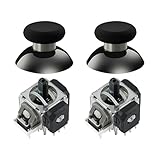
- Upgraded Anti-Drift TMR Joystick Technology – Evolved from GuliKit's patented Hall Effect joystick, the more advanced TMR (Tunnel Magnetoresistance) thumb stick same works with contact-less magnetic field sensing mechanism to eliminate stick drift cause,while offers ultra-low power consumption, enhanced stability, drift-free long lasting durability, high-precision and silk-like smoothness.
- No Circuit Changes Required (Soldering Required) – Replace the original stick module with the enhanced TMR version to fix stick drift on Switch Pro controllers.
- Anti-Interference Structure –Unique structural design prevents interference from magnetic triggers on the joysticks.
- Premium Stick Caps – Includes 2 GuliKit KK Ring anti-friction stick knobs designed for enhanced gripping and comfort during extended play.
- Note: The analog joystick replacement work requires professional tool kit/repair devices(not included in our package) and good skills in desoldering and soldering. If you are not experienced with soldering, we recommend seeking professional assistance to ensure proper installation. After replacing the joysticks, you can go to the Switch console's Settings -> Controllers and Sensors -> Calibrate Joysticks, and follow the instructions to calibrate the joysticks.
Rank #4
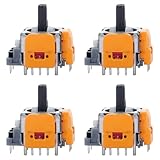
- 【Compatible model】-- Replacement Hall-Effect joystick compatible with PS5 Controller Only (NOT FIT for PS4 Xbox One Xbox One S/X Controller).
- 【4 × 3D Hall-Effect Analog joystick 】-- Made of high quality wear-resistant materials designed to ensure durability and long service life. Perfect replacement analog joysticks work for PS5 controller, repair your worn-out, damaged and drift analog joystick.
- 【Design for PS5 controller】-- Solve Most Joystick Problem: Stick drift, stuttering, dead zones, creeping, blind spots, non centered.
- 【What you Get】-- 4 x Hall-Effect joystick.
- 【Customer Service & Warranty】We provide 3 months warranty for replacement joystick. If you have any problem about the product, please feel free to contact us, we will reply you with 24 hours.Computer Repair Kits
Rank #3
![BRONAL TMR Hall Effect Joystick Replacement for Switch JoyCon [2 Pack]](https://m.media-amazon.com/images/I/41va8bi60wL._SL160_.jpg)
- 【TMR Hall Effect Joystick】Upgrade TMR Hall Effect Stick without any drift and dead zone. High precision control helps gamers have a better gaming experience and achieve higher scores.
- 【Longer Lifespan】The Hall Effect Switch Joystick is designed to be more durable and reliable than traditional carbon film joysticks, reducing the frequent replacements and repairs, save your money and time.
- 【Low Power Technology】50% power consumption less than original carbon film stick, provides more energy saving and longer gaming session.
- 【Easy Installation】Hall Effect Switch Joycon Joystick designed with plug-and-play model, do not need to changing circuit and welding, which helps to reduce the risk of damaging controller.
- 【1:1 Compatibility】Joycon Joystick replacement is fit for Left / Right Joycon of Switch, Switch OLED, Switch Lite.
Rank #2

- Compatible Model: Replacement Hall Effect joysticks designed exclusively for the PS5 Controller (Will NOT fit PS4, Xbox One, or Xbox One S/X controllers).
- 8 Premium Hall Effect Joysticks: Includes 8 high-quality, wear-resistant 3D Hall Effect analog sticks. Engineered for exceptional durability and a long lifespan. The perfect solution to replace worn-out, damaged, or drifting joysticks in your PS5 controller.
- Engineered for PS5 Controllers: Solves common joystick issues including stick drift, stuttering, dead zones, creeping, blind spots, and poor centering.
- The packaging includes: 8 Hall Effect joysticks
- Installation tips: Installation requires welding and hands-on skills. If you have no experience, please seek professional help. If you encounter any issues with the product, please contact us
#1 Best Overall

- 【Hall Effect Joystick】Upgrade TMR Hall Effect Stick without any drift and dead zone. High precision control helps gamers have a better gaming experience and achieve higher scores.
- 【Longer Lifespan】The Hall Effect Switch Joystick is designed to be more durable and reliable than traditional carbon film joysticks, reducing the frequent replacements and repairs, save your money and time.
- 【Low Power Technology】50% power consumption less than original carbon film stick, provides more energy saving and longer gaming session.
- 【Easy Installation】Hall Effect Switch Joycon Joystick designed with plug-and-play model, do not need to changing circuit and welding, which helps to reduce the risk of damaging controller.
- 【1:1 Compatibility】Joycon Joystick replacement is fit for Left / Right Joycon of Switch, Switch OLED, Switch Lite.
Product prices and availability are accurate as of the date/time indicated and are subject to change. Any price and availability information displayed on Amazon at the time of purchase will apply.
Independent reader supportYour contribution helps us test, update, and keep practical guides available for everyone.



