Do these 3 things before closing this tab:
1Repair Windows errors before they cause bigger problems2Scan for outdated or missing drivers - takes under a minute3Clear out junk files and repair common Windows errorsdoubler.dll is a Waves Audio plugin file, not a Windows system file. If Windows or your DAW says doubler.dll is missing, the safest fix is to reinstall Waves Doubler through Waves Central, activate the correct license, and rescan the plugin in your audio host.
Do not begin by downloading a replacement DLL or copying it to System32. The file may belong to an older Waves VoiceDoubler installation, while current Waves Doubler releases may use a different plugin format, folder, or product generation.
Fix 1: Reinstall Waves Doubler through Waves Central
Time needed: 10–20 minutes, plus download time
This is the most likely solution when the plugin was deleted, only partly installed, removed during an update, or carried over from an older computer.
- Close your DAW and any Waves applications.
- Open the Windows Start menu.
- Type Waves Central.
- Open Waves Central.
- Sign in with the Waves account that owns Doubler.
- Open the product installation or product-management section.
- Find Doubler in your products.
- Select the version that matches your project and DAW.
- Start the installation.
- When installation finishes, open the licensing or activation area.
- Activate Doubler to the computer or to an eligible USB device.
- Restart Windows if Waves Central requests it.
Open the DAW only after the installation and activation steps are complete. Then use the DAW’s plugin settings to rescan the format it supports.
The Tool Desk
Outbyte PC Repair FREERepair Windows errors before they cause bigger problemsFix Now →Outbyte Driver Updater FREEScan for outdated or missing drivers - takes under a minuteDriver Scan →#1 Best Overall

- [Multi-Function Real-Time Voice Changer] Transform your voice in real time with 8 unique sound modes—male to female, female to male, cute, funny, robotic, and more. Each mode includes 10 adjustable tone levels to help you fine-tune your ideal sound. Perfect for phone calls, gaming, livestreaming, or content creation.
- [Portable Yet Powerful Sound Card] Despite its compact size, this sound card packs serious performance. Choose from 7 smart modes including Singing and Live Streaming. Customize pitch and four input/output settings. Features three pro-level tools: vocal remover (keeps background music only), noise reduction, and auto ducking. Supports two phones and one PC at the same time—ideal for cross-platform streaming.
- [Plug and Play with Broad Compatibility] Plug and play with no drivers required. Includes TRS and TRRS audio cables, plus a Type-C adapter for flexible connectivity. Compatible with phones, computers, speakers, PS4/PS5, Xbox, Switch, tablets, and more—complete accessories are included for gaming, streaming, voice chat, and karaoke.
- [Fun Voice Effects for Pranks & Roleplay] Disguise your voice while chatting or gaming and surprise your friends with unexpected sounds. Especially great for anonymous online games where you can switch characters on the fly and add more fun to your interactions.
- [Complete Accessories Included] Everything you need to get started is included. The package comes with TRS/TRRS audio cables, a Type-C adapter, mini microphone, monitoring earphones, USB-C data cable, and a portable PU storage case—no need to purchase additional accessories.
A successful repair normally has three signs:
- Waves Central reports that Doubler is installed.
- The plugin appears in the DAW’s Waves or audio-plugin list.
- A project containing Doubler opens without the missing-plugin message.
If Waves Central does not list Doubler, check that you signed in to the account that owns the license. A missing license can prevent activation even when the files are installed correctly.
Fix 2: Install the Waves generation required by the project
Time needed: 15–30 minutes
Waves projects are not always interchangeable between product generations. A project created with an older Waves release may fail after you install only a newer release. Current Waves downloads include current and legacy generations, including V9 through V17.
This matters especially when:
- An old project opens with a missing Doubler instance.
- You moved the project to a newer computer.
- You updated the DAW or Waves software.
- A collaborator used an older Waves installation.
- Waves Central installed a newer generation than the project expects.
First identify the Waves generation used by the project or by the original computer. Look in the project’s plugin information, the DAW’s plugin manager, old installation records, or the project documentation.
Then:
- Close the DAW.
- Open a web browser and go to the official Waves website.
- Open the Downloads area.
- Choose the required Waves generation.
- Download the installer for your Windows version.
- Install that generation through Waves’ supported installation process.
- Open Waves Central and activate the matching product license.
- Reopen the DAW.
- Rescan the plugin format used by the project.
Do not mix individual files from different Waves generations. Multiple Waves versions can coexist, but copying files between their folders can create licensing, scanning, and compatibility problems.
If the project still shows a missing plugin after the correct generation is installed, save a backup copy of the project, rescan the plugins, and reopen it. Some DAWs retain a missing-plugin placeholder until a fresh scan is completed.
Fix 3: Check the DAW’s plugin format and scan paths
Time needed: 5–15 minutes
A file named doubler.dll may refer to a legacy Windows plugin format. Your DAW may instead be scanning VST3, AAX, or another supported format. Waves currently provides Doubler in formats including VST3, AAX, Audio Units, and SoundGrid, depending on the platform and Waves generation.
The DAW may therefore report that Doubler is missing even though a related Waves installation exists.
Open your DAW’s preferences or settings and find its plugin-management page. Common labels include:
- Plugin Manager
- Plug-in Locations
- VST Plug-ins
- Rescan Plugins
- Scan and Verify
- Plugin Cache
Then:
- Confirm that the plugin format supported by your DAW is enabled.
- Confirm that the official Waves installation location is included in the scan list.
- Remove obsolete or manually added DLL folders from the scan list if they contain unrelated files.
- Start a full rescan.
- Restart the DAW.
- Search for Doubler, VoiceDoubler, or Waves in the plugin browser.
The exact menu names vary by DAW. Use the DAW’s documentation if you cannot find its scan settings.
Do not assume that placing doubler.dll in a random VST folder will make the plugin work. The host may require a different format, a matching Waves shell or support component, and a valid license.
Rank #2

- 8 VOICE EFFECTS WITH FINE-TUNING - Transform your voice with 8 distinct modes: male to female, female to male, normal, Lolita, baby, youth, king, and witch. Use the fine-tuning knob to adjust each voice further — unlock endless variations. Perfect for gaming, streaming, and prank calls.
- 8 Built In Sound Effects: The sound card comes with 8 interesting sound effects,8 BUILT-IN SOUND EFFECTS & RGB LED LIGHTS - 8 fun sound effects at your fingertips: applause, kiss, laughter, cheerful, surprise, fright, crow, and time. Colorful LED lights create a cool gaming vibe — with a separate switch to turn them off when not needed. you can get sound effects just by pressing each sound effect . The eight sound effects are applause, kiss, laughter, cheerful, surprise, fright, crow, and
- PLUG & PLAY WITH CARRYING CASE - No drivers needed — just plug in and start changing your voice instantly. Compact and portable, comes with a carbon-fiber storage case for easy transport. Perfect for indoor and outdoor use, from gaming sessions to parties.
- COMPATIBLE WITH MULTIPLE DEVICES - Works with phones, computers, tablets, , , , Switch, iOS, and Android. Note: 3.5mm interface — iOS devices require a separate adapter cable (not included). PC connection also requires an adapter.
- FUN VOICE FOR GAMING & PRANKS - your voice in online games, party chats, or voice calls — surprise your friends with unexpected characters. Perfect for role-playing, content creation, and adding excitement to any conversation. No one will know who you are!
Fix 4: Check 32-bit and 64-bit compatibility
Time needed: 5–15 minutes
The historical doubler.dll metadata published by file-indexing sites is inconsistent about whether the file is 32-bit or 64-bit. That metadata is not an authoritative Waves specification.
The correct architecture depends on both the DAW and the Waves release:
- A 64-bit DAW generally requires a 64-bit plugin.
- A 32-bit plugin may not load directly in a 64-bit DAW.
- A 32-bit DAW may require a 32-bit plugin.
- A newer Waves generation may not use the same legacy DLL arrangement.
To check your DAW architecture:
- Open Settings from the Start menu.
- Select System.
- Select About.
- Check System type for the Windows architecture.
- Check the DAW’s About or Help menu for the application architecture.
Windows being 64-bit does not automatically mean that every installed application is 64-bit. The DAW’s own architecture and the Waves release must match.
Install the required architecture through Waves Central or the official Waves legacy installer. Do not copy a DLL labeled “32-bit” or “64-bit” from an unknown source into C:WindowsSystem32 or C:WindowsSysWOW64.
The names of those folders are counterintuitive: on 64-bit Windows, System32 contains 64-bit system files and SysWOW64 contains 32-bit system files. Neither folder is the correct general-purpose home for a Waves plugin.
Fix 5: Check antivirus quarantine and protection history
Time needed: 5–15 minutes
Security software may quarantine or remove a Waves component if it considers the file suspicious, damaged, or altered. This is a possible cause, not proof that every missing doubler.dll report is an antivirus problem.
What’s actually slowing this PC down?
Pick the symptom - the matching free tool is one click away.
Check the security product that protects the computer:
- Open Windows Security from the Start menu.
- Select Virus & threat protection.
- Select Protection history.
- Look for a quarantined Waves or VoiceDoubler file.
- Review the file path and detection details.
- Restore it only if it clearly belongs to a legitimate Waves installation.
- Reinstall or repair Waves through Waves Central afterward.
If you use third-party antivirus software, open its quarantine or detection-history screen instead.
Do not approve an unknown DLL downloaded from a file repository. If the file was found in an unexpected folder, especially C:WindowsSystem32, treat it as suspicious and allow the legitimate Waves installer to recreate the required files.
If security software repeatedly removes the official installation, follow that product’s policy for adding an exclusion. Keep the exclusion limited to the legitimate Waves installation path and verify the installer source first.
Recommended Free Tools
Rank #3

- Spy Labs Incorporated's activity kits and equipment provide an engaging and interactive way for kids to learn about detective work, including forensic analysis and tracking techniques.
- Record up to 12 seconds of audio that you can distort to keep your voice (and identity!) hidden from rival spies.
- The unique distortion slider allows young detectives to make their voice sound higher or lower, or faster or slower; experiment with changing the same recording for ultimate unrecognition.
- Promotes pretend play as kids ages 8 and up take on the role of detective, setting out to unravel mysteries one tough case at a time.
- Become a first-class secret agent with Spy Labs, the Detective Gear Experts; your trusted source for all your essential spy tools and gear!
Fix 6: Repair the DAW installation if only one host fails
Time needed: 10–30 minutes
If Doubler works in one compatible host but not another, the Waves installation may be healthy and the problem may be limited to the failing DAW.
First test the plugin in another installed host that supports the same Waves format. If it loads there:
- Close the failing DAW.
- Open the DAW’s plugin manager.
- Remove the failed or cached Doubler entry if the DAW provides that option.
- Clear or rebuild the plugin cache using the DAW’s documented procedure.
- Confirm the correct Waves scan location.
- Run a full plugin rescan.
- Reopen the project.
If the DAW still fails:
- Open Settings.
- Select Apps.
- Select Installed apps.
- Find the DAW.
- Select its three-dot menu.
- Choose Advanced options, Modify, or Repair if available.
- Follow the repair prompts.
- Restart Windows and rescan plugins.
If no repair option exists, reinstall the DAW from its official installer. Back up projects, templates, custom presets, and third-party plugin settings first.
A project may continue to show a missing plugin even after repair if the project references an unsupported Waves generation or an unavailable format. In that case, install the compatible Waves generation rather than repeatedly reinstalling the DAW.
Quick wins for a faster PC:
Clear out junk files and repair common Windows errorsFree Scan →Fix the driver behind crashes, sound loss and screen glitchesFind Drivers →Fix 7: Test whether the Windows user profile is involved
Time needed: 10–20 minutes
A damaged user configuration or incorrect permissions can prevent a plugin from appearing in one account.
Create a temporary local Windows account for testing:
- Open Settings.
- Select Accounts.
- Select Other users.
- Select Add account.
- Follow the prompts to create a local test account.
- Sign in to that account.
- Install or launch the DAW as appropriate.
- Test the Waves plugin scan.
If Doubler works in the test account, the original profile may contain a damaged DAW cache, restricted folder permission, or corrupted application configuration. Move only the necessary settings after backing them up, and follow the DAW’s documentation for resetting its user configuration.
Do not copy an entire application-data folder blindly. That can copy the damaged configuration back into the new profile.
Windows Errors? Fix Them Before They Spread
Repair common Windows errors and clear accumulated junk for a smoother, more stable PC - no reinstall needed.Free scan · no reinstallCrashes, No Sound, or Screen Glitches?
Random freezes, missing sound and display glitches usually trace back to one bad driver. Find and replace yours safely.Free scan · under a minuteFix 8: Repair Windows components with DISM and SFC
Time needed: 15–30 minutes
Use Windows repair commands when several unrelated applications report missing or corrupted system components, Windows behaves abnormally, or the failure began after broader system damage. These commands do not normally reinstall a third-party Waves plugin.
Microsoft recommends running DISM before System File Checker.
Rank #4
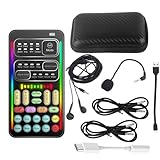
- 🎤 [Real-Time Multi-Function Voice Changer] Transform your voice instantly with 8 sound modes and 8 voice effects — including Robot, Cute, Male, Female, DJ, Cartoon, and more. Each effect supports 10 adjustable pitch levels for full tone control. Ideal for gaming, livestreaming, podcasts, or online chatting.
- 🎧 [Compact but Powerful Sound Card] Small in size (4×2 inches), yet packed with features. Offers 7 smart sound modes, 4 input/output channels, and 3 pro-grade functions — vocal removal, noise reduction, and auto-ducking. Supports up to 2 phones and 1 computer simultaneously for multi-platform streaming.
- 🔌 [Plug & Play – No App or Driver Needed] Simply plug it in and start using — no installation required. Includes 3.5mm audio cables and two adapters. Works with phones, tablets, laptops, PCs, and gaming consoles .
- 😄 [Fun for Pranks, Streaming & Roleplay] Surprise your friends or audience by switching between voices in real time. Perfect for online games, live shows, or video creation — add more fun, mystery, and creativity to your content.
- 🎁 [All-in-One Package – Everything You Need] Comes with all essential accessories: 1× Voice Changer, 1× Charging Cable (also OTG for PC), 2× Audio Cables, 2× Adapters (iOS & Android), 1× Plug-in Microphone, 1× Monitoring Earphone, 1× User Manual, and 1× PU Storage Case.
- Open the Start menu.
- Type Command Prompt.
- Right-click Command Prompt.
- Select Run as administrator.
- Select Yes if User Account Control asks for confirmation.
- Run this command:
DISM.exe /Online /Cleanup-Image /RestoreHealth
- Wait for DISM to finish.
- Then run:
sfc /scannow
- Wait until the scan reaches 100 percent.
- Restart Windows.
- Repair or reinstall Waves through Waves Central.
- Rescan plugins in the DAW.
The SFC result explains what happened. If it reports that it repaired corrupted files, restart and test again. If it reports that it found no integrity violations, the Windows component store is less likely to be the cause. If it cannot repair some files, repeat the process only as directed by Microsoft support documentation and investigate broader Windows damage.
Outbyte PC Repair can reduce the manual work of hunting through system problems and repeating SFC or DISM without knowing what changed; its free scan shows detected issues, while repair requires the full version. Reinstalling Waves remains the definitive fix when the missing file belongs to Doubler.
Do not install Visual C++, DirectX, or .NET solely because doubler.dll is missing. Those components may be relevant only if the DAW or Waves installer separately identifies a missing Microsoft dependency.
Fix 9: Update or reinstall drivers only when the host identifies a driver fault
Time needed: 10–30 minutes
An audio driver problem can stop a DAW from opening correctly, but it does not normally recreate a missing Waves plugin DLL. Use driver repair when the DAW reports an audio-device error, crashes while initializing the audio engine, or cannot access the selected interface.
To check drivers:
- Right-click the Start button.
- Select Device Manager.
- Expand Sound, video and game controllers.
- Find your audio interface or sound device.
- Right-click it.
- Select Update driver.
- Select Search automatically for drivers.
- Restart Windows if prompted.
For an audio interface, the manufacturer’s official driver is usually preferable to a generic Windows driver. Download the driver from the hardware manufacturer, close the DAW, run the installer, restart Windows, and select the device again in the DAW’s audio settings.
Outbyte Driver Updater can make it easier to identify stale drivers instead of checking many devices manually; its free scan reports detected issues, while driver installation requires the full version. A driver update will not replace a missing Waves component, so reinstall Doubler when the error specifically names doubler.dll.
Do not uninstall a working audio driver merely because the plugin is missing. Change drivers only when the audio device or DAW reports a related problem.
Independent reader supportYour contribution helps us test, update, and keep practical guides available for everyone.Why regsvr32 doubler.dll is usually the wrong fix
regsvr32 is intended for DLLs that expose registration entry points such as DllRegisterServer, commonly used by COM or ActiveX components.
Waves Doubler is an audio plugin loaded by a compatible host. There is no evidence that every historical Doubler DLL is a COM component that needs Windows registration. Running this command is therefore generally irrelevant:
regsvr32 doubler.dll
It may produce messages such as DllRegisterServer was not found or an architecture error. It can also register the wrong file if you first copied an unverified DLL into a system folder.
Free tools Windows power users keep installed
One-click scans. No signup required.
Use Waves Central and the DAW’s plugin scanner instead. Only use regsvr32 when the software vendor specifically instructs you to register that particular component.
Why random DLL downloads are unsafe
Avoid websites offering a standalone doubler.dll download. A replacement file can be:
Best Value

- Real-Time AI Voice Changer for Console Game Chat: Sound like a robot, a deep villain, an alien or a girl while you play, with your new voice sent straight into PS5, PS4, Xbox Series X/S, Xbox One, Switch 2 and Meta Quest chat
- Your Squad Hears It, Not Just You: Works in Fortnite, Roblox, Call of Duty Warzone, GTA Online and any console or VR game with voice chat, while game audio and chat keep playing in your headset
- 200+ AI Voices and a Meme Soundboard: Pick voices and trigger memes, reactions and sound effects from the Voicemod app on iPhone or Android, build your own soundboard and browse 76,000+ community voice filters
- Three-Step Setup, No PC or Drivers: Plug VMKey into your controller, connect your phone and wired headset, then open the app last; includes USB-C to USB-C, USB-C to Lightning and 150 cm 3.5 mm TRRS cables
- Works with the Free Voicemod App: The complete voice and soundboard library requires a Voicemod PRO subscription, a fun pick for adult gamers who play online with friends
- Modified or bundled with malware.
- From the wrong Waves generation.
- The wrong architecture.
- Incompatible with the DAW’s plugin format.
- Missing required dependent files.
- Unlicensed or unable to load the project.
- A different file with the same name.
Manual copying to System32 or SysWOW64 also hides the real problem. The correct repair may require Waves support files, licensing data, a specific generation, or a host-compatible plugin format.
Use Waves Central, official Waves installers, and the Waves account that owns the product. If you cannot install or activate the product, check the account license, installer messages, VPN or network interference, Windows compatibility, and Waves support information.
What the error usually means
Common reported variants include:
- “This application failed to start because doubler.dll was not found.”
- “The program can’t start because doubler.dll is missing from your computer.”
- “The file doubler.dll is missing or corrupted.”
- “Error loading doubler.dll. The specified module could not be found.”
- “doubler.dll was not found.”
- “Cannot register doubler.dll.”
These phrases come from third-party file-indexing reports and may not be the exact wording shown by every Windows version or DAW.
“The specified module could not be found” does not always mean that doubler.dll itself is absent. Windows may be unable to find a dependency required by the plugin. Reinstalling the complete Waves product is safer than replacing only the named file.
Likely causes and the matching fix
| Likely cause | Best next step |
|---|---|
| Waves Doubler was deleted or incompletely installed | Reinstall and activate it through Waves Central |
| The project requires an older Waves generation | Install the matching official legacy release |
| The DAW scans the wrong format or folder | Correct the scan settings and rescan |
| The plugin architecture does not match the DAW | Install the architecture required by the host |
| Antivirus quarantined a Waves component | Review quarantine, then repair the official installation |
| A plugin dependency is missing | Reinstall the complete Waves generation |
| Only one DAW fails | Clear its cache, repair it, and rescan |
| Several Windows programs are damaged | Run DISM, then SFC |
| The audio host reports an interface-driver error | Update or reinstall the official audio driver |
Historical file indexes describe doubler.dll as VoiceDoubler and associate it with Waves Audio, with old metadata such as a version and file size. Those details are not an official Waves binary manifest and should not be used to choose a replacement download. Current Waves Doubler may not use the same filename or format as the historical file.
FAQ
Is doubler.dll part of Windows?
No. It is associated with Waves VoiceDoubler or Doubler audio software. A normal Windows installation should not require it.
Which program needs doubler.dll?
Historically, Waves VoiceDoubler or Doubler installations and audio hosts loading legacy Waves plugins may need it. The filename alone cannot identify the exact calling application.
Should I put it in System32?
No. Waves plugins should be installed through Waves Central or the appropriate official Waves installer. Do not place an arbitrary DLL in System32 or SysWOW64.
Will Microsoft Visual C++, DirectX, or .NET fix it?
Not specifically. Install or repair a Microsoft runtime only when the DAW or installer separately reports that runtime as missing.
Can I fix it with System File Checker?
Usually not. SFC repairs protected Windows components, while doubler.dll belongs to third-party Waves software. Run DISM and SFC only when broader Windows corruption is suspected, then reinstall Waves.
Quick wins for a faster PC:
Repair Windows errors before they cause bigger problemsFix Now →Scan for outdated or missing drivers - takes under a minuteDriver Scan →Clear out junk files and repair common Windows errorsFree Scan →Does the file need to be registered?
There is no general evidence that Waves Doubler requires COM-style registration. regsvr32 is normally not an appropriate repair method for this audio plugin.
Why does the project still show Doubler as missing after installation?
The project may require a different Waves generation, plugin format, architecture, or license. Confirm all four, rescan the supported format, and reopen the project.
What should I give Waves support if nothing works?
Collect the complete error message, DAW name and version, Windows version, Waves generation, plugin format, file path, license status, and whether antivirus quarantined a Waves component. Also note whether another DAW or Windows account can load the plugin.
Quick Recap
Product prices and availability are accurate as of the date/time indicated and are subject to change. Any price and availability information displayed on Amazon at the time of purchase will apply.
Do these 3 things before closing this tab:
1Clear out junk files and repair common Windows errors2Fix the driver behind crashes, sound loss and screen glitches3Repair Windows errors before they cause bigger problems



