Recommended Free Tools
“The program can’t start because dts2apoapi64.dll is missing from your computer. Try reinstalling the program to fix this problem.” The dts2apoapi64.dll error usually points to an incomplete or damaged VIA audio installation, not a missing Windows component.
You may also see:
- “dts2apoapi64.dll was not found.”
- “Cannot find dts2apoapi64.dll.”
- “The code execution cannot proceed because dts2apoapi64.dll was not found.”
- “dts2apoapi64.dll could not be loaded.”
Which fix applies to you
Start with the event that happened immediately before the error:
- After reinstalling Windows: install the audio driver from your computer or motherboard manufacturer.
- After an audio-driver update: roll back or reinstall the complete OEM audio package.
- After removing VIA software: reinstall the package if you still use the related audio hardware.
- After antivirus detection: inspect quarantine and verify the original file before restoring anything.
- After disk cleanup or system cleanup: reinstall the VIA audio application rather than copying a DLL.
- The error names another application: repair or reinstall that parent application first.
- The file exists but will not load: investigate dependencies, architecture, and neighboring VIA files.
- No VIA hardware remains: uninstall the orphaned VIA control software or remove its startup entry.
What dts2apoapi64.dll is
dts2apoapi64.dll is a third-party audio DLL associated with older VIA Technologies audio software. Public file inventories place it in the VIAudioiVDeck package, commonly alongside files such as QsApoApi64.dll, VMicApi.dll, skin.dll, viaaud.exe, vdeck.exe, and dts2apo.dll.
A historical location is:
C:Program Files (x86)VIAVIAudioiVDeckDts2ApoApi64.dll
The filename and its neighboring files indicate a DTS audio-processing or audio-processing-object component used by VIA’s HD Audio control software. The exact product name, supported chipsets, and API purpose are not documented clearly enough to identify one universal installer.
#1 Best Overall

- HIGH-RESOLUTION AUDIO - Delivers ultra-clear playback with 32-bit / 384 kHz and up to 120 dB SNR
- SURROUND SOUND - Supports discrete 7.1-channel analog output for immersive multi-channel audio on your PC
- VERSATILE CONNECTIVITY - Connects effortlessly to multi-channel PC speaker systems, SPDIF output and headset outputs, mic-in, as well as line-in sources
- ALL-NEW CREATIVE NEXUS APP - AutoEq customization that allows users to simulate the frequency response of various headphones for a tailored listening experience
- COMPACT LOW-PROFILE DESIGN - The card is 10.5 cm in length and comes with a half-height bracket to ensure compatibility with smaller cases and different build needs
It is not a normal Windows system file and is not a Visual C++ runtime file. It should not normally be placed in C:WindowsSystem32 or C:WindowsSysWOW64.
Why it can be under Program Files (x86)
The 64 suffix generally indicates that the DLL is intended for 64-bit code. That does not mean every program in the surrounding folder is 64-bit.
A 32-bit control application can be installed under Program Files (x86) on 64-bit Windows while loading a separate 64-bit audio component through the driver or audio stack. The folder name alone therefore does not prove that the file is the wrong architecture.
Historical listings also disagree about this DLL’s size and version. Treat those listings as observations from old driver builds, not as a current specification.
Fix 1: Reinstall the computer or motherboard audio driver
This is the most likely repair. The DLL needs to match its VIA executables, configuration files, dependencies, and the audio hardware. An isolated replacement downloaded from elsewhere may be the wrong build.
Find the correct package
- Press Windows + R, type
msinfo32, and press Enter. - Note System Manufacturer and System Model.
- If this is a custom desktop, identify the motherboard model instead.
- Open the manufacturer’s official support page in your browser.
- Search for the exact model.
- Open its Drivers, Downloads, or Support section.
- Download the listed audio driver for your installed Windows version.
- Prefer the manufacturer’s package over a generic “latest VIA driver.”
For a laptop, use the laptop manufacturer’s package. For a desktop, use the motherboard manufacturer’s package. OEM audio packages can contain customized DTS or APO components that a generic package does not include.
Rank #2

- 7.1 USB SOUND CARD: This External Sound Card adds up to 7.1 channels of audio through a single USB port to your computer; This sound card supports 7.1, 5.1 and 2 channel output using 3.5mm jacks, a headphone port, line-in and stereo microphone inputs
- UPGRADE YOUR PC SOUND: With support for analog and digital audio output for stereo to 7.1 channel audio applications, the bus-powered audio to USB adapter upgrades the existing integrated audio on a desktop or laptop computer; 1m USB Cable Included
- QUALITY AUDIO: Supports 44.1KHz and 48KHz sampling rates for analog playback and recording; SPDIF Digital output only supports 48KHz audio playback; SPDIF optical input passthrough supports up to two-channel audio at 48KHz
- EASY INSTALLATION: The digital audio adapter is easy to install with plug and play support in Windows 7/8.1/10; The external sound card features easy-to-use volume controls and mute buttons; The audio outputs are selectable via the included software
Reinstall it
- Right-click Start and select Device Manager.
- Expand Sound, video and game controllers.
- Right-click the VIA or related audio device and choose Uninstall device.
- If Windows offers Attempt to remove the driver for this device, select it only when you intend to replace the package immediately.
- Select Uninstall.
- Restart Windows.
- Run the driver installer downloaded from the manufacturer.
- Restart again, even if the installer does not require it.
Open the VIA audio-control application, if it was included, and test playback, recording, microphone effects, and the control panel that previously produced the error. If the application starts and audio works, the matching package restored the missing component.
If Device Manager shows only High Definition Audio Device, an unknown device, or a warning icon, continue with the OEM driver installation. Windows may have installed a basic audio driver without restoring the VIA control software.
Manually comparing many driver packages and guessing which one contains the matching APO files is tedious. Outbyte Driver Updater can scan for outdated drivers and show what needs attention; the free scan identifies issues, while repair and driver installation require the full version. Reinstalling the manufacturer’s audio package remains the definitive fix when this file belongs to that package.
Fix 2: Repair or reinstall the VIA audio application
VIAudioiVDeck refers to the VIA audio software directory. VDeck.exe is the control application associated with that package, while viaaud.exe and the companion DLLs support its audio features.
If the error appears when opening a VIA control panel or audio utility:
- Open Settings.
- Select Apps and then Installed apps.
- Search for VIA, VIA HD Audio, VDeck, or a similarly named audio utility.
- Select the application’s three-dot menu.
- Choose Advanced options, if available.
- Select Repair.
- If Repair does not help, return to the same screen and select Reset, if available.
- Restart Windows.
If those options are absent:
- Select the VIA entry in Installed apps.
- Choose Uninstall.
- Restart.
- Install the audio package supplied for your exact computer or motherboard model.
- Restart once more.
If no VIA hardware remains, do not restore the DLL merely to silence a startup message. Uninstall the obsolete VIA application and check Task Manager > Startup apps for a leftover VIA entry.
Crashes, No Sound, or Screen Glitches?
Random freezes, missing sound and display glitches usually trace back to one bad driver. Find and replace yours safely.Free scan · under a minutePC Slower Than It Used to Be?
A free scan shows the junk files, broken settings and background clutter dragging Windows down - then fixes them in one click.Free scan · Windows 10 & 11Fix 3: Check antivirus quarantine
Security software may remove or quarantine a third-party audio DLL after a driver update or cleanup operation.
Rank #3

- 8M MEMORY CAPACITY: Features 8 megabytes of storage space allowing you to record up to 10 minutes of personalized audio messages, music, or voice greetings for your DIY projects
- MAGNETIC ACTIVATION TECHNOLOGY: Automatically triggers playback when the card opens or closes using the included magnetic sensor, creating a magical hands-free experience that delights recipients without any buttons to press
- HIGH-QUALITY SPEAKER OUTPUT: Delivers clear and crisp audio with sufficient volume to ensure your recorded messages, songs, or greetings are heard perfectly, making every moment memorable and special
- SIMPLE ONE-BUTTON RECORDING: Easy-to-use recording function allows anyone to capture personalized messages in seconds - just press the button, speak your message, and release, perfect for all skill levels
- COMPLETE DIY KIT INCLUDED: Comes with circuit board module, speaker, microphone, lithium battery, and connecting wires - everything you need for birthday cards, holiday greetings, anniversary cards, and creative craft projects for loved ones
In Windows Security:
- Open Start and search for Windows Security.
- Select Virus & threat protection.
- Open Protection history.
- Find the detection involving
dts2apoapi64.dll. - Expand the entry and review its path and detection details.
Restore or allow the file only when all of these are true:
- The path belongs to the original VIA driver directory.
- The file came from the computer or motherboard manufacturer’s installer.
- The digital signature and publisher information are consistent with that package.
- You are restoring the original package, not an isolated download.
If the file came from an unknown source, leave it quarantined. The safer repair is to remove the incomplete installation and reinstall the complete OEM audio package. Afterward, update Windows Security and run a scan.
Fix 4: Check whether the error is really a dependency or architecture problem
A file can exist and still produce “could not be loaded.” That usually means Windows found the named DLL but could not load it or one of its dependencies.
Check the following:
- In the error dialog, note the program named in the title bar or message.
- Open Task Manager and check whether that application is running.
- Search File Explorer for
dts2apoapi64.dll. - Right-click the file, choose Properties, and inspect Location, Digital Signatures, and Details.
- Compare its folder with the application named by the error.
- Do not replace it with a random x86 or x64 copy.
If the error names a game or unrelated application, repair that application first. Windows searches an application’s own directory early when loading its DLLs, so placing a file in System32 is not a universal solution.
If the DLL is in the expected VIA directory but still fails, reinstall the full driver package. The cause may be a missing companion DLL, damaged configuration, incompatible architecture, or a mismatched version of VDeck.exe.
Fix 5: Install Windows updates
Windows updates will not normally supply this third-party VIA DLL, but updating can correct related operating-system components and improve driver compatibility.
Rank #4
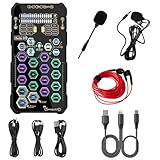
- [Portable Handheld Sound Card] This SK9 basic sound card set features BT, voice changing, ambiance sounds, reverb, electronic effects, noise reduction, and more for singing, recording, and live streaming. It is compatible with phones, computers, tablets, headphone, PS5, and speakers(via 3.5mm audio cable only, not via BT).
- [Multiple Voice Changing Modes] Enjoy six fun voice-changing modes: Male, Female, Child, Girl, Monster, and Robot. These modes add a fun twist for entertainment and enhance your streaming experience.
- [Various Reverb Effects] Choose from six reverb modes: Voice, KTV1, KTV2, KTV3, KTV4, and MC. These effects are perfect for karaoke and singing, providing a professional sound for your live sessions.
- [Diverse Ambiance Sound Effects] The sound card includes 14 fixed ambiance effects and a 12-step electronic music effect, making your live streams more engaging and dynamic, adding a unique atmosphere to any performance.
- [Multiple Live Streaming Functions] Features like one-click noise reduction, sound bypass, original sound, make live streaming effortless and professional, covering all the basic streaming needs.
- Open Settings.
- Select Windows Update.
- Choose Check for updates.
- Install available updates.
- Restart when prompted.
- Recheck Windows Update for optional driver updates.
Use the manufacturer’s driver package when the update does not restore the VIA application. Do not assume that an optional generic audio driver includes the OEM’s control software.
Free tools Windows power users keep installed
One-click scans. No signup required.
Fix 6: Repair broader Windows corruption with DISM and SFC
This DLL is normally third-party, so System File Checker will not usually recreate it. Use these commands when Windows has wider problems, such as damaged built-in applications, update failures, or other system-file errors.
- Open Start and search for Command Prompt.
- Right-click it and choose Run as administrator.
- Run:
DISM.exe /Online /Cleanup-Image /RestoreHealth
- Wait for it to finish.
- Then run:
sfc /scannow
- Restart Windows.
DISM should be run before SFC. If both commands report no repair or the DLL error remains, return to the OEM audio-driver repair rather than repeating them indefinitely.
If tracking component corruption and repeating these repairs manually is becoming guesswork, Outbyte PC Repair can scan and show what needs attention; the free scan identifies issues, while repair requires the full version. It is optional, and it does not replace reinstalling the VIA application that owns this DLL.
Independent reader supportYour contribution helps us test, update, and keep practical guides available for everyone.Do not copy the DLL to System32
Avoid DLL download sites websites and isolated files shared in forums. A downloaded copy can contain malware, use the wrong architecture, belong to a different driver release, or omit the dependency that caused the error. It can also create version conflicts or increase DLL hijacking risk.
The safe sources are:
- The official support page for the computer manufacturer.
- The official support page for the motherboard manufacturer.
- The original recovery media or driver package supplied with the device.
- Microsoft Windows Update for Windows components and supported drivers.
Do not run regsvr32 routinely. There is no verified evidence that dts2apoapi64.dll is a self-registering COM or ActiveX library. Audio-processing DLLs are generally loaded by their host application or audio stack, and regsvr32 cannot restore missing dependencies. It may instead report that DllRegisterServer was not found.
If the error still persists
Use this escalation order:
- Confirm the exact path and parent program from the error.
- Uninstall the damaged VIA package.
- Restart Windows.
- Install the exact OEM audio package again.
- Check antivirus Protection History.
- Inspect Device Manager for audio-device warning icons.
- Use System Restore if the file worked before a recent driver or software change.
- If no VIA device remains, remove the obsolete application rather than restoring the DLL.
If the file exists but a particular application still refuses to start, repair that application and its own dependencies. The filename alone cannot identify every program that may request it.
Best Value

- 【Hi-Res DAC & Hi-Fi Sound】The AUXNIU USB to 3.5mm audio adapter features a built-in advanced Smart DAC decoding chip, delivering high-resolution stereo sound. Unlike standard adapters, this external sound card supports precise audio decoding and powerful noise reduction, converting digital signals to analog with minimal loss. Whether for gaming, music production, or watching movies, it brings you a rich, clear, and immersive sound quality experience.
- 【2-in-1 Audio & Mic】Designed with a TRRS 4-pole female port, this USB external sound card integrates both audio-out and microphone-in functions, allowing you to listen to music while chatting with teammates. It is the perfect solution for adding a 3.5mm audio port to your device or as a replacement for a faulty internal sound card. (Note: The microphone function may not be compatible with all Apple EarPods.)
- 【Plug & Play】Experience true plug-and-play convenience with the AUXNIU USB to audio adapter. No drivers, software, or external power supply are required; simply connect the USB male connector to your device, and the system will automatically recognize it in seconds. It is widely compatible with Windows 10/8/7/XP/Vista, Mac OS X, Linux, Raspberry Pi, PS4, PS5, and Google Chromebook. (Note: Does NOT support PS3, Xbox, TV, or car audio systems.)
- 【Durable & Portable】Built for longevity, this USB headset adapter features a premium aluminum alloy casing and a sturdy nylon braided cable. Compared to ordinary plastic and PVC adapters, this design is more resistant to tangling, scratching, and bending. Its compact and lightweight construction makes it extremely portable, easily fitting into your pocket, laptop bag, or backpack for travel, work, or gaming on the go.
- 【3-Year Warranty】The package includes 2 x AUXNIU USB-A to 3.5mm TRRS 4-Pole Audio Adapters. products come with a 3-year after-sales warranty. If you encounter any problems during use, please feel free to contact our customer support team. We will respond to your inquiries via email within 12 hours and will be happy to assist you until your issue is resolved.
FAQ
Is dts2apoapi64.dll a Windows file?
No. Available file inventories associate it with older VIA audio software, not with the Windows operating system.
Is it part of Visual C++?
No verified evidence identifies it as a Visual C++ runtime file. Installing the Microsoft Visual C++ Redistributable may repair a separate dependency, but it does not replace this DLL.
The Tool Desk
Outbyte Driver Updater FREEScan for outdated or missing drivers - takes under a minuteDriver Scan →Outbyte PC Repair FREEClear out junk files and repair common Windows errorsFree Scan →Is the file 32-bit or 64-bit?
The 64 suffix suggests a 64-bit component, but old driver packages can combine a 32-bit control application under Program Files (x86) with separate 64-bit audio components. Reinstall the matching package instead of choosing a replacement based only on the filename.
Should I run regsvr32 dts2apoapi64.dll?
Usually not. There is no verified indication that this audio DLL is self-registering, and regsvr32 cannot fix a missing dependency or mismatched driver.
Why does the error appear after reinstalling Windows?
The clean Windows installation may have installed a basic audio driver without restoring the manufacturer’s VIA control software and its companion files. Install the OEM audio package for the exact model.
What if I no longer use VIA audio hardware?
Uninstall the orphaned VIA application and remove its startup entry. Restoring a DLL for hardware and software no longer present is unnecessary.
Do these 3 things before closing this tab:
1Scan for outdated or missing drivers - takes under a minute2Clear out junk files and repair common Windows errors3Fix the driver behind crashes, sound loss and screen glitchesQuick Recap
Product prices and availability are accurate as of the date/time indicated and are subject to change. Any price and availability information displayed on Amazon at the time of purchase will apply.



