For Dying Light: The Beast, Pilgrim Outpost—now branded Dying Light Outpost—is mainly used to link your game account, redeem Dockets, activate selected events, and deliver rewards to your in-game stash. It is not currently documented as a Beast progression system built around Bounties, Pilgrim Tokens, or the Outpost Armory.
The former Pilgrim Outpost address now redirects to Dying Light Outpost. Techland says existing TechlandGG accounts, connected platforms, XP, levels, claimed rewards, and profile history were migrated.
| # | Preview | Product | Price | |
|---|---|---|---|---|
| 1 |

|
The Walking Dead: The Telltale Definitive Series - PlayStation 4 | $15.85 | Buy on Amazon |
| 2 |

|
Dying Light 2 Stay Human - PlayStation 5 | $25.51 | Buy on Amazon |
| 3 |

|
Dying Light: The Beast (Original Game Soundtrack) | $8.99 | Buy on Amazon |
| 4 |
|
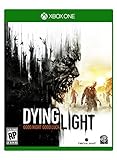
Dying Light - Xbox One | $26.98 | Buy on Amazon |
| 5 |

|
Dying Light - Nightmare Row | $19.99 | Buy on Amazon |
What Outpost does for The Beast
The Beast-specific Outpost workflow is:
- Create or sign in to a Dying Light Outpost account.
- Link the Steam, Epic Games Store, PlayStation Network, or Xbox account used to play The Beast.
- Redeem a Docket or activate an available Beast event.
- Launch The Beast while connected to the internet.
- Collect the reward from the game’s in-game stash.
Start at the Outpost website, then use Account settings to connect your platform. Techland’s official support instructions list Steam, Epic Games Store, PlayStation Network, and Xbox as supported connections.
How to redeem a Docket
Dockets are codes for in-game items. Codes may use a familiar format such as abcd-1234-ef56, although Techland also distributes arbitrary combinations of letters and numbers through trailers, videos, screenshots, social posts, and other promotions.
#1 Best Overall
- Play the series that revolutionized storytelling in games. The Walking Dead: The Telltale Definitive Series contains all 4 Seasons, 400 Days DLC, and The Walking Dead: Michonne.
- “Graphic black” art style brings Season 4's enhanced visual style to all previous seasons of the acclaimed series.
- Exclusive looks at the making of the game from the developers, VO artists, and other team members that brought Clementine’s story to life.
- Character performances, lip syncing, and other gameplay and UI enhancements make this the definitive Telltale’s The Walking Dead experience.
- Music player that includes 140+ tracks across all seasons, art gallery, 3D model viewer with playable voice lines, & new 3D front end.
- Open the Dockets page.
- Sign in to your Outpost account.
- Confirm that the correct Steam, Epic, PSN, or Xbox account is linked under account settings.
- Enter the code in Enter your code.
- Select Redeem.
- Launch Dying Light: The Beast online.
- Open the in-game stash and retrieve the item.
Unlike the original Dying Light, Beast rewards do not go to a Quartermaster. Techland says they are delivered automatically to The Beast’s in-game stash after redemption and an online game launch.
When the stash becomes available
Your save must have progressed far enough for the stash to be accessible. Techland describes this as completing the Prologue section or sections. If you redeem a reward before reaching that point, the missing item may be progression-locked rather than lost.
Outpost events
The Outpost Events page can host Beast-specific quests and community rewards. Availability is limited and changes over time, so an old event guide is not evidence that the same event is still active.
Rank #2
- Includes: Dying Light 2 Stay Human and ‘Bloody Ties’ DLC. (DLC must be downloaded separately.)
- Enjoy the perks of more than 10 post-launch updates. Good luck out there, and stay human!
- VAST OPEN WORLD: Participate in the life of a city engulfed in a new dark era. Discover different paths and hidden passages, as you explore its multiple levels and locations.
- CREATIVE & BRUTAL COMBAT: Take advantage of your parkour skills to tip the scales of even the most brutal encounter. Clever thinking, traps and creative weapons will be your best friends.
- 2-4 PLAYER CO-OP GAMEPLAY: Play in up to four-player co-op. Host your own games or join others and see how their choices have played out differently than yours.
For example, the Dying Light: The Beast and PUBG MOBILE collaboration required players to activate the event quest on Outpost and then complete its in-game requirements. Activating it awarded the Airdrop Finder car skin, while the Skillet quest required completion of the Power Gambit main-story quest. That event ran from October 31 through November 21, 2025, and is historical rather than a currently available offer.
Crashes, No Sound, or Screen Glitches?
Random freezes, missing sound and display glitches usually trace back to one bad driver. Find and replace yours safely.Free scan · under a minutePC Slower Than It Used to Be?
A free scan shows the junk files, broken settings and background clutter dragging Windows down - then fixes them in one click.Free scan · Windows 10 & 11Co-op participation did not replace activation: a player could join someone else’s session and complete the quest, but still needed to activate the event on their own Outpost account to receive the collaboration rewards.
How community events work
Techland’s “Call of the Beast” page documented a community-challenge format rather than a permanent reward system. Players did not need separate registration; they qualified by personally performing the event’s required in-game action while the challenge was active.
The documented format used 11 weeks, 22 exclusive prizes, and a final Legendary reward. The final reward required the community to complete 17 of 22 weekly goals. Joining late did not grant rewards from earlier weeks, and players had to contribute themselves. Rewards were sent to the stash, with delivery sometimes taking up to 10 minutes. These rules apply to that event format and do not establish that the event is currently running.
What Bounties and Pilgrim Tokens actually do
The frequently repeated explanation that Beast players complete Pilgrim Outpost Bounties to earn Pilgrim Tokens for Beast gear is outdated or incorrectly generalized. The current Outpost documentation describes Bounties and the Armory primarily for Dying Light and Dying Light 2: Stay Human.
That system works like this:
- Open Bounties.
- Select Activate on available Bounties.
- Complete their objectives in Dying Light or Dying Light 2: Stay Human.
- Return to Outpost and claim the completed Bounties’ Reputation Points.
- Increase your Reputation Rank.
- Earn Pilgrim Tokens from rank-ups.
- Spend those tokens in the Armory.
Only three Bounties can be active at once. Weekly Bounties replace the previous batch, so claim completed Bounties before that batch disappears.
Rank #4
- At night, the world undergoes a deadly transformation: the hunter becomes the hunted as the infected grow more aggressive and numerous, and something far more sinister awakens to stalk its prey
- Free Running Movement – Whether tracking prey or escaping predators, Dying Light lets players swiftly navigate the world by seamlessly leaping between buildings, grappling up walls and pouncing on unsuspecting enemies
- Dying Light is set in a vast open world, delivering expansive and varied environments, a wide variety of enemy classes and a hopeless tale of survival where resources are scarce and the infected are not the only threat
- Get up-close using a variety of light and heavy weapons including knives, bats, axes, sledgehammers and more exotic weaponry or utilize guns and other firepower to take down enemies from a distance
- Why use a wrench when you can use a wrench wrapped in electrified barb wire Dying Light's sizeable crafting system enables players to create a slew of new, more potent weapons and equipment, as well as specialized ammunition
Is the Armory a Beast store?
Do not assume so. The current Armory page lists weapons, outfits, headgear, charms, paraglider skins, Outpost Drop items, Nightfall Drop items, and other equipment, but its explanatory text specifically identifies Dying Light and Dying Light 2: Stay Human. It does not currently document Pilgrim Tokens as a normal The Beast currency or present the Armory as a Beast storefront.
For the games the Armory does support, some items can be purchased more than once. Weapons include unique blueprints, and the blueprint must be redeemed separately in the relevant game’s stash.
Why a redeemed Beast reward is missing
The platform was not linked
Link the correct Steam, Epic, PSN, or Xbox account before redeeming. A reward redeemed without the relevant platform connection will not appear in that game account.
Free tools Windows power users keep installed
One-click scans. No signup required.
Best Value
The game was not launched online
Close and relaunch The Beast with an active internet connection so the reward can synchronize to the stash.
The game was open during redemption
If the game was already running when you claimed the reward, Techland says delivery can take up to 10 minutes. If it was closed, the item should be waiting the next time you log in.
The Prologue is incomplete
Continue until the stash becomes available. The reward may be present but inaccessible before that progression point.
An event reward is delayed
For community-event rewards, allow up to 10 minutes. Also confirm that you contributed during the event and met any story prerequisite; simply joining an event late or another player’s co-op session may not qualify your account.
Recommended Free Tools
The current Beast workflow at a glance
Outpost → sign in or create an account → Account settings → link your platform → Dockets or Events → Redeem or Activate → launch The Beast online → check the in-game stash.
You should not currently expect Beast Bounties in the standard Bounties list, Pilgrim Tokens to function as documented Beast currency, rewards to arrive through a Quartermaster, or items to appear before the Prologue has unlocked the stash.
Quick Recap
Product prices and availability are accurate as of the date/time indicated and are subject to change. Any price and availability information displayed on Amazon at the time of purchase will apply.




