The Tool Desk
Outbyte PC Repair FREEClear out junk files and repair common Windows errorsFree Scan →Outbyte Driver Updater FREEFix the driver behind crashes, sound loss and screen glitchesFind Drivers →Use the World Map’s legend filters to reveal truck-dealer markers, then inspect the dealerships discovered in your own save. That is the reliable way to find dealers in Euro Truck Simulator 2 (ETS2), because locations vary with your map DLC, discovered roads and ongoing map reworks. SCS Software’s official manufacturer roster includes DAF, Iveco, MAN, Mercedes-Benz, Renault, Scania and Volvo.
Prefer not to run the server on your own PC? Godlike.Host offers hosted Euro Truck Simulator 2 servers with free DDoS protection and up to three free backups a day.
For a first purchase, compare the new trucks currently offered against your budget and preferred driving style rather than chasing an unsupported “best” truck. If cash is tight, the used-truck screen in the main menu can reduce the purchase price, but mileage, wear, the star rating and the detailed damage report all affect the decision.

As an Amazon Associate I earn from qualifying purchases.
How to find truck dealers on the ETS2 map
ETS2 does not require you to memorize a universal city list. The dependable in-game method is the World Map Legend Filters, introduced in update 1.43 specifically to make places such as dealerships easier to locate. The map only shows what is relevant to your current save and installed content, so the markers you see can differ from another player’s map.
Show dealership markers
- Open the World Map from the in-game menu.
- Open the map’s Legend Filters or legend controls.
- Enable the entry for truck dealerships (the wording can vary slightly with the current interface).
- Zoom and pan across the areas you have discovered. Dealership icons identify the locations available to inspect.
- Select a marker to open its location information or the relevant dealer interaction when you reach the site.
Filtering is more useful than scanning every road symbol because it hides unrelated map categories. If you are looking for a particular manufacturer, use the dealership markers together with the brands represented in your game. A dealer may not appear in an undiscovered area, and a city shown in an older guide may have changed after a road or city rework.
#1 Best Overall

- Ca. 6000 km of motorway and 600 km of country road, to a scale of 1:10
- Numerous detailed models of motorway interchanges
- 16 cities, some of them with unique road designs (e.g. roundabouts or bridges)
- Numerous POIs in cities and near motorways and country roads
- All large waterways.Ground based on real satellite data.Licensed vehicles from Scania and MAN.Purchase trucks and trailers.Hire drivers
Why city-by-city lists become outdated
SCS has not published a single, exhaustive, permanently current dealer-by-city inventory covering the base game and every map expansion. Map DLC, regional reworks and version changes can alter how a location appears. The Benelux rework announced for update 1.59 refreshed locations and included a DAF Trucks facility in Eindhoven, for example. Treat any static online list as a starting clue, then verify the marker in your current version and installed map content.
As of the September 17, 2026 release information for update 1.61, the safest procedure remains checking your own World Map. Your discovered roads, DLC ownership and the game build shown by your launcher determine what you can actually visit.
What’s actually slowing this PC down?
Pick the symptom - the matching free tool is one click away.
Which truck manufacturers are available?
SCS Software’s ETS2 project information lists seven licensed truck manufacturers:
Rank #2
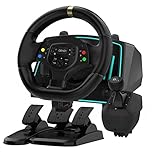
- Professional 1080° Racing Simulator Experience - Take control of your racing games with a full 1080° rotation steering wheel for ultra-precise handling. Adjustable between 270°–1080°, this wheel lets you fine-tune sensitivity for every racing style—from tight street racing to realistic truck simulation.
- Multi-Platform Compatibility – Clear and Reliable - Works with Xbox One, Xbox Series X|S, PS4, PS3, Switch, PC (Windows 7/8/10/11), and Android. ✅ Best performance with racing games like Forza Horizon, F1, Assetto Corsa, Gran Turismo, Euro Truck Simulator, and Need for Speed. ⚠️ For PC use, please enable “Xinput Mode” for game recognition.
- 6-Speed H-Shifter + Responsive Pedal Set - Includes a 6-speed manual shifter with push-down reverse for smooth and realistic gear transitions. The 3-pedal set features a progressive brake, sensitive throttle, and independent clutch, providing the feeling of a real car cockpit.
- Secure Mounting & Durable Design - Clamp-style mounting fits any desk, racing rig, or flat surface. Reinforced ABS housing and a weighted steering base prevent slipping during aggressive turns. The included suction cups keep pedals firmly in place—even on smooth floors.
- Easy Setup – Plug & Drive - No complex drivers or software needed. Simply: Connect the USB cable Switch to the correct platform mode Calibrate the steering angle once Then, you’re ready to race! LED indicators guide your connection and calibration status for an effortless start.
| Manufacturer | How to use this information |
|---|---|
| DAF | Look for its dealership marker in your discovered map; the 1.59 Benelux refresh includes a DAF Trucks facility in Eindhoven. |
| Iveco | Compare the models and configurations shown by the dealer interface in your save. |
| MAN | Use the in-game dealer listing to compare available specifications and prices. |
| Mercedes-Benz | Availability and exact model choices depend on the dealership content in your game. |
| Renault | Inspect the trucks presented by the dealer rather than assuming every model is offered in every location. |
| Scania | Use the dealer screen to compare the configurations that fit your budget and driving preferences. |
| Volvo | Ordinary dealerships are separate from the Volvo Trucks Experience Center in Gothenburg. |
This is a supported manufacturer list, not a promise that every model, trim or dealer is present in every save. The dealer interface is the authority for the options you can buy now.
Choosing a new truck
There is no official, standardized comparison in the cited SCS material that makes one ETS2 truck objectively best. A sensible first purchase therefore starts with constraints you can evaluate in the showroom: the money available after the purchase, the layout and equipment you enjoy driving, and whether you want to spend more on customization immediately.
Use your budget first
- Leave enough money for the operating costs that follow a purchase instead of spending your entire balance on the most expensive configuration shown.
- Compare the complete price of each truck and any configuration changes in the dealer screen.
- If two choices fit your funds, select the one whose cab, controls and visual layout you will be comfortable using for many deliveries.
ETS2 is built around licensed trucks and customization, so the purchase decision is not only a badge comparison. Check the options actually listed by each dealer and make the trade-off that suits your routes and preferred driving style. Avoid treating a forum ranking or a single “best truck” claim as a universal result; the official sources do not establish such a winner.
Rank #3

- The ATS Shifter comes with customized button , allows you to use switches to quickly switch between high and low gears. It supports up to 18 gears and also includes custom setting button for personalized preferences, offering a seamless and immersive gameplay experience.
- aikeec USB shifter is designed specifically for Euro Truck Simulator 2 (ETS2) and American Truck Simulator (ATS) games or FIA ETRC 18 WOS .Versatile Compatibility: Our USB Gearshift is compatible with popular racing wheel models such as Logitech G25, G27, G29, G920, Thrustmaster TH8A.
- The American truck simulator shifter provide three different sizes of adapter accessories to ensure compatibility with other brand models shifter shalft . If you require a different adapter size, simply replace the 10mm or 12 mm adapter plugs with the appropriate size.
- Easy Installation with Plug and Play: The USB Gearshift comes with an upgraded 2-meter long cable, including an independent USB connection. Plug and play without need of driver , , only supports PC windows system Set up steps: →①Open the game settings in ETS2/ATS: Options → Controls (Keyboard → Select "Add joystick/controller") →②Select "Transmission H-Shifter" →③Choose the "Shifter layout" (Eaton Fuller 10/13/18 speeds) →④Set "Shifter Toggle: 1 Joy Button 1" for the first switch →⑤Set "Shifter Toggle: 2 Joy Button 2" for the second switch →⑥Enable "Shifter Toggle use Switch Mode"
Compare the options shown in your own game
Before confirming a purchase, open each candidate’s details and note the configuration you are comparing. Keep the comparison consistent: evaluate similarly equipped trucks, record the displayed price, and decide whether the cab and controls match the way you drive. If a model is unavailable at the location you first visit, return to the filtered map and inspect another discovered dealer rather than assuming it is absent from ETS2 altogether.
Are used trucks worth buying?
Used trucks are available immediately from the main menu. In its November 28, 2023 update announcement for version 1.49, SCS described them as “more budget-friendly compared to brand new vehicles.” The lower entry price is useful when you want a truck sooner, but every used listing carries mileage and wear that a new purchase does not.
What to inspect before buying
- Open the Used Trucks selection from the main menu.
- Choose a listing and check its asking price against your available funds.
- Read the displayed mileage and wear information rather than judging from the price alone.
- Check the truck’s star rating.
- Open the separate detailed damage window and review which parts are affected.
- Estimate whether the lower purchase price still makes sense after likely repairs and the condition you are willing to manage.
The star rating is a quick condition signal, while the damage breakdown explains where the problems are. Neither is a complete ownership-cost calculation: repair expense, your cash reserve and how much condition matters to you still have to be considered. A cheap listing with significant damage can require more immediate spending than a better-maintained used truck.
Do these 3 things before closing this tab:
1Repair Windows errors before they cause bigger problems2Scan for outdated or missing drivers - takes under a minute3Clear out junk files and repair common Windows errorsRank #4
| Decision point | New truck | Used truck |
|---|---|---|
| Purchase position | Brand-new vehicle offered through the dealer interface | Lower-priced alternative available from the main menu |
| History | No used-vehicle mileage and wear history is attached to the listing | Listing includes mileage and wear |
| Condition checks | Compare the configuration and displayed price | Compare price, star rating and detailed damage by part |
| Best fit | Players who want a clean starting point and can afford the purchase | Players prioritizing a smaller initial outlay and willing to evaluate condition |
Do not equate a high star rating with guaranteed low running costs. Use it to narrow the choices, then read the damage details and keep money available for any work the listing may need.
Independent reader supportYour contribution helps us test, update, and keep practical guides available for everyone.Truck dealers versus special manufacturer locations
The Volvo Trucks Experience Center in Gothenburg, Sweden, is easy to confuse with a normal purchasing dealer. It is an explorable driving facility with a circuit, and SCS says the Scandinavia DLC is required to visit it. Its purpose is a manufacturer-themed experience, not a replacement for the ordinary dealership interface used to buy a truck. Use the World Map filters to find purchase dealers; visit the Experience Center only if you own the required DLC and want to drive its facility.
Controls and optional driving hardware
A steering wheel or gamepad can make dealer and driving navigation more comfortable, but neither is required to locate a dealer. SCS’s 1.51 update announcement in September 2024 says navigation became more comfortable with a gamepad or steering wheel, reducing the need to reach for a keyboard after launching ETS2. The title-screen and menu interaction support described by SCS makes these devices relevant accessories for a simulator setup.
Before buying a peripheral
- Confirm that the device works with your platform and current ETS2 control settings.
- Check how it connects and whether your system has the required port or wireless support.
- Plan for calibration and button mapping inside ETS2 after connecting it.
- Choose a wheel only if you want the additional driving immersion; a gamepad remains a supported alternative for menu and driving input.
Official support for a control category does not validate every individual model or configuration. Verify compatibility for the exact hardware you intend to use before spending money.
Recommended Free Tools
A practical buying workflow
When you have enough money for a new truck
- Use the World Map Legend Filters to locate discovered dealerships.
- Visit the brands represented in your map and open their current purchase listings.
- Shortlist configurations that fit your funds after leaving a reserve for normal operating expenses.
- Compare the cabs, controls and customization choices you will actually use.
- Buy the truck that best matches your budget and driving style, not an unsupported universal ranking.
When cash is limited
- Open Used Trucks directly from the main menu.
- Sort your shortlist by the price you can safely pay, then inspect mileage and wear.
- Use the star rating to identify better-condition candidates.
- Read the detailed damage breakdown for every finalist.
- Keep enough funds for likely repairs before confirming the purchase.
When a guide and your map disagree
- Check your game version and installed map DLC.
- Use the legend filter in your own save instead of relying on an old city list.
- Explore the roads around the marker; a reworked city may place the facility differently than an older guide shows.
- Remember that the Gothenburg Experience Center is a special driving location, not evidence of an ordinary purchasing dealer there.
Common mistakes to avoid
- Using an exhaustive-looking city list: no single official list covers every current base-game and DLC dealer location, so verify locations in-game.
- Assuming every brand is available everywhere: the seven-brand roster does not guarantee identical model or dealer availability in each save.
- Buying a used truck from price alone: mileage, wear, star rating and the part-by-part damage window are all relevant.
- Calling one truck objectively best: the official material does not provide a complete standardized performance ranking; budget and driving preference remain the defensible criteria.
- Confusing a themed facility with a dealer: the Gothenburg Volvo Trucks Experience Center requires the Scandinavia DLC and is an explorable circuit.
- Assuming a supported wheel works automatically: compatibility, connection and in-game calibration still need checking for your hardware.
The Bottom Line
Open the World Map, enable the dealership legend filter and trust the markers in your current save. Choose a new truck by budget and driving preference, or use the main-menu used-truck screen for a cheaper entry point only after checking mileage, wear, star rating and detailed damage.
Quick Recap
Product prices and availability are accurate as of the date/time indicated and are subject to change. Any price and availability information displayed on Amazon at the time of purchase will apply.




