
Do these 3 things before closing this tab:
1Repair Windows errors before they cause bigger problems2Fix the driver behind crashes, sound loss and screen glitches3Clear out junk files and repair common Windows errorsA PS5 that stays blue, blinks blue, and then powers off is not completing its normal startup. Sony says the console should change from blue to solid white; a blue light that remains blue indicates a console error or frozen startup state. Start with Sony’s three-minute power cycle, then try Safe Mode. Do not repeatedly unplug the console while its light is on, and do not reset it before trying the non-destructive recovery options.
Sony’s power-indicator guide is the reference for the light meanings and initial power-cycle procedure.
As an Amazon Associate I earn from qualifying purchases.
First, identify the light pattern
Not every blue-looking light means the same thing:
| Light pattern | Meaning and next step |
|---|---|
| Blue, then solid white | Normal startup. |
| Blinking or solid blue that never becomes white | Startup error or frozen console state. Follow the recovery steps below. |
| Blinking white, then off | Usually a normal shutdown sequence if you intentionally turned the PS5 off. |
| Solid orange | Rest Mode. |
| No light | The PS5 is off or may not be receiving power. |
The timing also matters. An immediate blue-to-off shutdown is more concerning for power delivery or an internal hardware fault. A PS5 that remains stuck blue but stays powered on is more consistent with a frozen startup or storage/software problem, although neither pattern proves which component failed.
Fix 1: Perform Sony’s three-minute power cycle
Do this before rebuilding the database or reinstalling system software.
#1 Best Overall
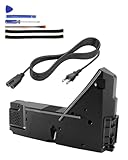
- Wide Compatibility: Internal power supply replacement compatible with PS5, supporting ADP-400DR, ADP-400ER and PA-1401-JT20 power supply models, compatible with CFI-1015A, CFI-1015B, CFI-1115A, CFI-1115B, CFI-1016A/B, CFI-1116A/B, CFI-1002A/B, CFI-1102A/B, CFI-1018A/B and CFI-1118A/B, suitable for PS5 Digital Edition and Ultra HD Console
- Power Adapter Voltage: Game console internal power supply, input voltage is 100-127V, 4.5A 50/60Hz, 200-240V, 2.3A 50/60Hz, output voltage is +12V, 31A, please confirm power supply specifications required by your console before purchasing to ensure perfect compatibility and optimal performance
- Stable Power Support: Replacement internal power supply AC adapter brick can provide stable power support for game console, enhance gaming experience, solve problems such as game lag, shutdown caused by unstable power supply, and improve gaming experience
- High Quality ABS Material: Made of high quality ABS material, has excellent wear resistance and anti-aging properties, is not easy to crack or rust, and can remain stable and reliable even after long term use, providing safer, more durable and longer-lasting power support for equipment
- Easy Installation: Internal power source replacement comes with necessary power cord and screwdriver, allowing direct replacement of original adapter, do not forcefully disassemble during installation to avoid damaging internal components of game console, can search for relevant installation videos for disassembly and installation guidance
- Hold the PS5 power button until the console turns off.
- Wait until the indicator is completely off.
- Disconnect the AC power cable.
- Wait at least three minutes.
- Reconnect the cable directly to a known-good wall outlet.
- Turn on the PS5.
Do not unplug the AC cable while the indicator is solid or blinking. Sony warns that interrupting power in that state can corrupt data or damage the console.
While the console is disconnected, inspect the power cable for damage and try another wall outlet. If possible, test with a known-compatible replacement cable. iFixit identifies the PS5 cable as an IEC C7 type, but a new cable will not repair an internal power supply, motherboard, or software fault.
Fix 2: Remove accessories and isolate the power problem
Turn the PS5 off and disconnect unnecessary devices before trying Safe Mode:
- USB storage drives
- USB hubs and charging docks
- Capture devices
- Unsupported USB accessories
- Ethernet, if practical for testing
- An added M.2 SSD, only if you are comfortable removing it and the console is out of warranty
Leave only AC power, HDMI, and a DualSense controller connected by a USB data cable. Removing accessories is a low-risk isolation step, not a guaranteed fix.
Fix 3: Enter PS5 Safe Mode
- Make sure the console is off. If necessary, hold the power button for about three seconds.
- Press and hold the power button again.
- Keep holding until the second beep, approximately seven seconds after the first.
- Release the button after the second beep.
- Connect the DualSense controller with a USB cable.
- Press the PS button.
If the controller receives power but does not respond, try another cable. Many USB cables charge devices but do not carry data, which prevents the controller from communicating with Safe Mode.
Rank #2

- ps5 power supply for: CFI-1015A/B、CFI-1115A/B、CFI-1016A/B、CFI-1116A/B、CFC-1002A/B、CFI1018A/B (PS5 Digital Edition & Ultra HD game console)
- Attention! To avoid purchasing the wrong model and not being able to use it, please carefully check the model of your PS5 host!
- Power supply model: ADP 400DR&ADP 400ER&PA-1401-JT20 Both can be used
- Voltage: Game machine power supply unit adapter with input voltage of 100‑127V, 4.5A 50/60Hz, 200‑240V, 2.3A 50/60Hz, output voltage of +12V, 31A
- Easy To Install: The console power supply unit is easy to install and use, no drivers or other special settings are required.
Safe Mode options, from safest to most destructive
Use the least destructive option that matches the problem. The exact menu wording can vary by system software version.
- Restart PS5: Exits Safe Mode and attempts a normal startup.
- Repair Console Storage: Sony says this does not erase data and may help when the console cannot start properly or has storage problems.
- Clear System Software Cache: Useful for system-feature or performance problems.
- Rebuild Database: Scans the drive and creates a new content database. It is not a factory reset, but it may take time. Do not turn off the console during the process.
- Update System Software: Try the internet update first. If that is unavailable, Sony supports updating from a USB drive through Safe Mode.
- Restore Default Settings: Restores settings without deleting games, apps, screenshots, video clips, or saved data stored on the console, according to Sony. Your customized settings will be removed.
- Reset PS5: Deletes user data and restores the console to its original state.
- Reset PS5 — Reinstall System Software: Deletes user data and removes the PS5 system software. Treat this as a last resort, not a routine blue-light fix.
For the official Safe Mode instructions and option effects, see Sony’s PS5 support page and its system-software reinstallation guidance.
What’s actually slowing this PC down?
Pick the symptom - the matching free tool is one click away.
If Safe Mode will not open
If the console powers off before the second beep, or shuts down every time you attempt Safe Mode:
- Repeat the three-minute power cycle once.
- Try another wall outlet and a known-compatible power cable.
- Remove external accessories.
- Confirm that the console is not hot and has unobstructed ventilation.
- Stop repeatedly forcing power cuts.
A PS5 that cannot remain powered long enough to display Safe Mode is less likely to be fixed by database rebuilding or a system reset. Sony’s PS5 power-issues page routes symptoms such as “loses power shortly after turning on” and “won’t turn on” to its Repairs diagnostic flow.
If the PS5 reaches white but the TV shows no picture
This is a different troubleshooting branch. If the indicator reaches solid white and the console stays powered on, the problem may involve HDMI, video output, HDCP, or display compatibility rather than startup power.
Rank #3

- Compatible with PS5: Please MUST confirm your model before place the order, our photo and video could help to confirm the model!!!!!Other wise it can't work!!!! The power supply replacement compatible with PlayStation 5 PS5 ADP-400DR / ADP-400ER /PA-1401-JT20. For : CFI-1015A/B、CFI-1115A/B、CFI-1016A/B、CFI-1116A/B、CFC-1002A/B、CFI1018A/B (for PS5 Digital Edition & Ultra HD Console).Input voltage of 100‑127V, 4.5A 50/60Hz, 200‑240V, 2.3A 50/60Hz, output voltage of +12V, 31A.
- Replacement Application: When your console meet with the problem of can’t turn on/suddenly shuts down/power indicator light is abnormal/unable to charge or provide power,etc. Replace the new power supply for PS5 400DR, which will help to solve these problem and make the console normal to use.
- Quality Guarantee: For PS5 ADP-400ER internal power Source replacement was test before shipment,and the 400ER power supply are made of good quality, ABS plastic material make it use more accurately and has longer working life,resistant to wear and tear,. The controller will use as a new one after replacing for PA-1401-JT20 console power supply replacement and bring a new life.
- Convenient Installation: Comes with new power cable and set tools. The power cable could help to replace the damaged or loosed power cable, more stable to charge. And the repair tools, help to disassemble the console and install the power supply, save time and convenient to install the new one.
- Suggestion Tips: If do not have any installation experience, we suggest to find the professional to replace for PS5 ADP-400DR / ADP-400ER internal power supply. If you have any problem or need installation guide, please leave a message.
- Reconnect the HDMI cable securely.
- Try another HDMI cable and another TV input.
- Test another display if available.
- Use Safe Mode’s Change Video Output option.
If the PS5 itself turns off before reaching solid white, an HDMI cable swap is unlikely to solve the underlying fault.
Free tools Windows power users keep installed
One-click scans. No signup required.
What may be causing the blue-then-off behavior?
Software or storage startup failure
This is more plausible when the console remains stuck blue, the problem began after a crash, failed update, or unexpected shutdown, or Safe Mode works. Repair Console Storage, rebuilding the database, or updating system software may resolve it. These options cannot repair a failed motherboard or power supply.
Power cable, outlet, or internal power supply
Power-related trouble becomes more plausible when the PS5 shuts down within seconds, cannot stay on until Safe Mode, or behaves differently with another outlet or cable. Test external power first. Replacing the internal supply is not a sensible first step without a diagnosis.
Overheating or restricted airflow
Consider heat if the PS5 shut down during demanding gameplay, had been running for a long time, was enclosed in a cabinet, or had restricted airflow and excessive dust. Instant failure from a cold start points less strongly to overheating, but ventilation should still be checked.
Internal hardware failure
A motherboard, memory, APU, storage, or other internal fault becomes more likely when the console fails before Safe Mode, external power checks make no difference, and the same blue-then-off pattern occurs every time. A drop, liquid exposure, modification, or previous repair strengthens that possibility.
Crashes, No Sound, or Screen Glitches?
Random freezes, missing sound and display glitches usually trace back to one bad driver. Find and replace yours safely.Free scan · under a minutePC Slower Than It Used to Be?
A free scan shows the junk files, broken settings and background clutter dragging Windows down - then fixes them in one click.Free scan · Windows 10 & 11Rank #4

- FOR 2-PRONG DEVICES: Works with most TVs, monitors, printers, and other devices that require a 2-pin power connector
- COMPATIBILITY: compatible with PS3, PS3 Slim, PS4, PS4 Slim, PS5, Xbox One S, Xbox One X, Xbox Series S, Xbox Series X, Apple TV, many printer, consumer electronics, and power brick models
- FEATURES: High Quality 2 Prong 10ft AC Power Cord, universal power cable is perfect for bedroom, living room office and home use.
- PACKAGE INCLUDE: 1 x High Quality 10ft AC 2 Prong Power Cord
The blue light is a symptom, not a component-level diagnosis. There is no single confirmed “blue light of death” repair that applies to every PS5.
If it starts working again
After a successful power cycle or Safe Mode recovery:
- Update the system software.
- Check that the console has clear ventilation.
- Avoid disconnecting power while the indicator is lit.
- If the issue began after Rest Mode, temporarily disable automatic Rest Mode at Settings > System > Power Saving > Time Until PS5 Enters Rest Mode, then set the relevant options to Don’t Put In Rest Mode as a diagnostic test.
Rest Mode and firmware issues are possible contributors to unexpected shutdowns, but the blue light does not establish a universal Rest Mode bug.
When to stop troubleshooting
Use Sony Repairs first if the console may still be under warranty, shuts off before Safe Mode, has liquid or impact damage, or continues failing after the external checks. Warranty coverage depends on country, model, purchase date, and applicable law; check the terms for your region before opening the console.
For an out-of-warranty PS5, ask a reputable repairer for a diagnosis before authorizing a power-supply or motherboard replacement. Internal PSU work requires disassembly, correct model compatibility, and appropriate electrical and ESD precautions. Opening a potentially warrantied console can affect warranty eligibility.
Use the PlayStation Repairs diagnostic flow for the official route. Sony’s price and repair eligibility vary by region, model, warranty status, and diagnostic result, so there is no universal repair fee to quote.
Quick Recap
Final decision checklist
- Booted after the three-minute power cycle: Update software, check ventilation, and monitor it.
- Safe Mode opens: Try Restart PS5, Repair Console Storage, cache/database tools, and updating before any reset.
- Solid white but no picture: Troubleshoot HDMI and video output rather than resetting immediately.
- Turns off before Safe Mode: Check outlet, cable, accessories, and airflow once, then use Sony Repairs or obtain a professional diagnosis.
- Considering a reset: Remember that Reset PS5 and Reinstall System Software delete user data.
Product prices and availability are accurate as of the date/time indicated and are subject to change. Any price and availability information displayed on Amazon at the time of purchase will apply.

