A Forza Horizon 5 player reported system-memory use rising from 32 GB to 45 GB before the game crashed, but that single account does not confirm a general PC memory leak. The available evidence also does not establish a verified workaround for that specific symptom. If it happens on your PC, record the conditions and report the crash through Forza Support rather than applying fixes meant for a different GPU-related issue.
What the reported Forza Horizon 5 memory problem is
On August 25, 2024, a player named Enfentonk5486 posted the forum thread “Memory Leak? – 45/32GB system memory in use”. The player said FH5 displayed system-memory warnings while they completed weekly challenges. They reported usage passing 32 GB and rising through 37 GB and 42 GB to 45 GB before the game crashed to the desktop.
The player listed Windows 10, a Ryzen 5 5600X, 32 GB of RAM, and a Radeon RX 7900 GRE. This is one player’s account, not a controlled test or a developer-confirmed diagnosis. It does not establish how common the symptom is, what caused it, or whether other players’ systems are affected in the same way.
Does this confirm a memory leak, and is there a proven fix?
No. Rising memory use followed by a crash is consistent with a possible memory-growth problem, but one report cannot confirm that FH5 has a general memory leak on PC. The reviewed sources do not show an official confirmation or resolution of this particular August 2024 report, and they do not establish a verified workaround for it.
Do these 3 things before closing this tab:
1Repair Windows errors before they cause bigger problems2Scan for outdated or missing drivers - takes under a minute3Clear out junk files and repair common Windows errors#1 Best Overall

- Boosts System Performance: 32GB DDR5 RAM laptop memory kit (2x16GB) that operates at 5600MHz, 5200MHz, or 4800MHz to improve multitasking and system responsiveness for smoother performance
- Accelerated gaming performance: Every millisecond gained in fast-paced gameplay counts—power through heavy workloads and benefit from versatile downclocking and higher frame rates
- Optimized DDR5 compatibility: Best for 12th Gen Intel Core and AMD Ryzen 7000 Series processors — Intel XMP 3.0 and AMD EXPO also supported on the same RAM module
- Trusted Micron Quality: Backed by 42 years of memory expertise, this DDR5 RAM is rigorously tested at both component and module levels, ensuring top performance and reliability
- ECC Type = Non-ECC, Form Factor = SODIMM, Pin Count = 262-Pin, PC Speed = PC5-44800, Voltage = 1.1V, Rank And Configuration = 1Rx8
Steam’s current FH5 listing gives 8 GB RAM as the minimum and 16 GB as the recommended system requirement (Steam listing, accessed October 8, 2026). Those baseline requirements are not evidence that adding RAM will stop the reported upward usage or prevent a crash.
Why the NVIDIA driver workaround is a different issue
A separate PCGamingWiki entry describes a GPU-resource handling bug in which evicted resources are handled incorrectly, with newer NVIDIA drivers exposing a crash issue. Its search-result excerpt lists an NVIDIA Profile Inspector profile flag and rolling back to driver 561.09 or earlier as workaround options for that GPU-resource crash. PCGamingWiki is community-maintained, and the page could not be opened directly for verification.
Rank #2

- Elite Processor & Memory: Intel Core Ultra 9 Processor 275HX with 24 cores and turbo boosts from 2.1 to 5.4 GHz, combined with 32GB (16GB x 2) DDR5 5600MHz RAM for superior multitasking, gaming, and content creation performance.
- High-Speed Storage: 2TB NVMe Solid State Drive for ultra-fast boot times, quick file access, and massive storage capacity, with no optical drive for a sleek, modern design.
- Immersive 18" Display: QHD+ (2560x1600) resolution IPS panel with 240Hz refresh rate and 100% DCI-P3 color gamut, delivering smooth, vibrant visuals ideal for gaming, video editing, and professional work.
- Powerful Graphics: NVIDIA GeForce RTX 5070 with 8GB GDDR7 memory, enabling advanced ray tracing, AI acceleration, and high-frame-rate rendering for stunning graphics in the latest games and applications.
- Enhanced Communications & Audio: Intel Wi-Fi 6E AX211 and Bluetooth 5.3 for reliable wireless connectivity, a 720p HD webcam with privacy shutter for secure video calls, and premium 2x Dynaudio 2W speakers plus 2x 2W woofers for rich, immersive sound.
That advice concerns a separate NVIDIA-related GPU-resource crash, not the reported growth in system memory on a PC with a Radeon RX 7900 GRE. It should not be treated as a fix for the memory-growth report. The available evidence does not support changing driver profiles or rolling back a driver as a remedy for this specific symptom.
Independent reader supportYour contribution helps us test, update, and keep practical guides available for everyone.What to record if the warnings or crash happen again
Turn 10 says detailed reproduction steps help its team investigate reported issues. If the problem recurs, note what you were doing before the memory warning appeared and capture the sequence that leads to it. Include relevant system and game details so the report is useful:
The Tool Desk
Outbyte PC Repair FREERepair Windows errors before they cause bigger problemsFix Now →Outbyte Driver Updater FREEScan for outdated or missing drivers - takes under a minuteDriver Scan →Rank #3

- A-Tech 16GB RAM Module, DDR4 SO-DIMM 260-Pin, 3200MHz PC4-25600 (PC4-3200AA)
- Non-ECC Unbuffered, JEDEC DDR4 Standard 1.2V Operating Voltage
- Compatible with select Laptop, Notebook, Mini PC, and All-in-One (AIO) systems. Please verify your system's memory type, form factor, and maximum supported capacity before purchasing
- Not compatible with desktop DIMM, non DDR4 memory, or ECC memory types such as RDIMM, LRDIMM, and ECC UDIMM
- Increases available memory capacity to enhance system responsiveness, application performance, and multitasking capabilities.
- Windows version and FH5 game version.
- GPU model and graphics-driver version.
- Installed RAM and the memory-use readings shown before the crash.
- What was happening in the game, including whether you were completing weekly challenges or doing something else.
- Whether FH5 crashed, when it happened, and any warning text displayed.
Submit recurring crashes through Forza Support. Turn 10’s February 21, 2023 bug-report guidance says official support channels communicate progress and workaround details when available; reporting provides information for investigation, not a guaranteed fix.
Quick Recap
Best Value

- HIGH-PERFORMANCE MEMORY AND STORAGE - Multitask seamlessly with 32GB of DDR5-5600MHz memory and store all your game library on 1TB of PCIe Gen 4 SSD.
- PREMIUM ROG NEBULA DISPLAY — Immerse yourself in stunning visuals with the ultra-fast 300Hz display, ideal for gaming, content creation, and entertainment. Featuring a new AGLR film that significantly reduces glare while enhancing contrast, Dolby Vision HDR brings visuals to life with richer, brighter, and more vivid colors. Every image stays sharp and punchy — even from wide viewing angles, so the picture looks just as good off-center as it does straight on.
- ROG INTELLIGENT COOLING - ROG’s advanced thermals keep your system cool, quiet and comfortable. State of the art cooling equals best in class performance. Featuring an end-to-end vapor chamber, tri-fan technology and Conductonaut extreme liquid metal applied to the chipset delivers fast gameplay.
- CUSTOMIZABLE FULL-SURROUND RGB LIGHTBAR - Showcase your style with a 360° RGB light bar that syncs with your keyboard and ROG peripherals. In professional settings, Stealth Mode turns off all lighting for a sleek, refined look.
- UPGRADE WITH TOOL-FREE ACCESS - Forget about a screwdriver, and customize RAM, SSD, and fans by sliding a latch on the bottom half of the device. A removable frame protects other hardware and offers deeper access for advanced users.
Rank #4
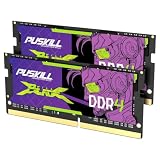
- Smooth 3200MHz Gaming Performance: Give your gaming laptop the speed it deserves. With 3200MHz frequency and CL22-22-22-52 timing, this DDR4 SODIMM kit delivers responsive gameplay in AAA titles and faster level loading compared to stock 2666MHz laptop memory.
- Massive 32GB Dual-Channel Kit (2×16GB): Run your game, Discord, streaming software, and browser tabs simultaneously without stutter or lag. 32GB is the sweet spot for today's most demanding titles. Dual-channel architecture maximizes your laptop CPU's memory bandwidth for smoother multitasking.
- True Plug-and-Play Laptop Upgrade: No BIOS settings. No manual tuning. Just install the two SODIMM modules into your laptop's memory slots, power on, and it runs at 3200MHz automatically. The easiest performance upgrade you'll ever make.
- Cost-Effective Performance Boost: Get premium 32GB capacity and 3200MHz speed at a price that makes sense. Whether you're upgrading an older gaming laptop or building out a new one, PUSKILL delivers the performance you need without breaking your budget.
- What You Get: PUSKILL 32GB DDR4 3200MHz SODIMM Kit (2×16GB), quick-install guide, lifetime warranty, and responsive customer support. Each module is burn-in tested for guaranteed laptop compatibility and stability.
Product prices and availability are accurate as of the date/time indicated and are subject to change. Any price and availability information displayed on Amazon at the time of purchase will apply.




