Quick wins for a faster PC:
Repair Windows errors before they cause bigger problemsFix Now →Scan for outdated or missing drivers - takes under a minuteDriver Scan →If your PS5 says “Unsupported disc” when you resume God of War Ragnarök, start by checking that your console supports discs, then restart and inspect the game disc. The message signals a disc-reading problem, but it does not identify the cause. One 2022 account described the error after the console was put into rest mode; that timing does not prove rest mode caused it.
First check whether your PS5 supports disc games
Before troubleshooting, confirm the exact console model. Sony says the CFI-1000 PS5 Digital Edition does not support disc-based games or media. Some CFI-2000 Digital Edition and CFI-7000 model-group consoles can use a separately sold CFI-ZDD1 series disc drive. Check Sony’s disc and media compatibility guidance for current model details before considering any drive purchase.

Sony also lists media formats the PS5 does not support, including CDs, BD-RE version 1.0, BD-R/RE XL, and unfinalized DVDs. Those limits do not mean a supported PS5 game disc should fail, but they underscore why the console model and disc type matter.
Try these checks in order
1. Restart the PS5 and reinsert the disc
Use the console’s normal restart option, then insert the game disc again. A 2022 article about this exact symptom suggests restarting, but it does not establish that restarting fixes the error. Treat it as a low-risk first check, not a guaranteed remedy.
What’s actually slowing this PC down?
Pick the symptom - the matching free tool is one click away.
#1 Best Overall

- From Jan. 2028, newly released games on PlayStation will be available for purchase on PlayStation Store and at retailers in digital format only. Discs for games released before Jan. 2028 can continue to be played on this device.
- This product is only for PS5 Digital Edition consoles (CFI-2000 model group – slim) or PS5 Pro Consoles
- Drive will play 4K Ultra HD Blu-ray discs, Blu-ray discs and DVDs
- Internet connection is required to pair Disc Drive and PS5 Digital Edition Console upon setup.
2. Inspect and gently clean the disc
Eject the disc and check for dust, smudges, scratches, cracks, warping, or labels. Sony notes that dust, scratches, recording quality, and recording-device characteristics can affect whether some discs play. Sony also warns against using cracked, deformed, repaired, labeled, non-circular, or 8 cm discs.
If the disc only needs cleaning, handle it carefully and wipe it gently with a clean, soft microfiber cloth. Do not polish it or use an abrasive repair method. Cleaning cannot fix a damaged or defective disc.
3. Check insertion and orientation for your model
Follow the disc-insertion instructions for your specific PS5 model; drive placement and orientation can differ across models. The title-matched article recommends checking that the disc is inserted correctly, but its claim that the console must be horizontal is not established as a universal requirement.
4. Test another supported disc
If you have another known-good, supported PS5 game disc, try it. If it works, the Ragnarök disc may be the issue. If several supported discs fail, a console disc-reading problem becomes more plausible. This is a practical comparison, not a definitive diagnosis or a confirmed Sony procedure for this error; community reports offer the same kind of anecdotal suggestion.
Rank #3

- KEM-497AAA DVD Optical Disc Drive Module Replacement Compatible with Sony PlayStation 5 PS5 (only fit CFI- 1215A 1200)
- NOTE:This is KEM-497AAA DVD Optical Disc Drive Module replacement to replace your old damage KEM-497AAA DVD Optical Disc Drive Module,Please check The model of your console before purchasing
- our broken or defective DVD drive.don't need to change new machine, just buy this item and replce your damage KEM-497AAA DVD Optical Disc Drive Module, let your Device work again again
- Package contents: 1x DVD Optical Disc Drive Connector Module Compatible with Sony Playstation 5 PS5 KEM-497AAA,1 x T8 Screwdriver,1 x “+” Screwdriver
- don't include instructions, please install it by a professional technician.You can watch some tutorial video on online. Any questions, please contact us first, we will try our best to help you
5. Consider optional software troubleshooting
The title-matched article also suggests starting Safe Mode and rebuilding the database, as well as restoring licenses. These are proposed troubleshooting steps, not verified fixes for this particular PS5 symptom. The PlayStation database-rebuild page available for error CE-35486-6 is specifically for PS4; it should not be treated as PS5 instructions for this issue.
If you choose to try a Safe Mode option, use Sony’s current instructions for your PS5 model and read the on-screen descriptions before selecting anything. Do not assume a software step will resolve a disc that is damaged or a drive that cannot read discs.
Rank #4

- 100% brand new and high quality.
- Sony Playstation 5 PS5 only fit CFI-1000 1015A.
- Package Includes: 1x Disc Drive Blu-ray Laser
- Please check the pictures and description before ordering it. Make sure it's what you need.
- If you have any question, please contact us. We will offer an excellent after-sell service.
What the rest-mode report does—and does not—show
The CPU Guide article, originally published November 23, 2022 and updated February 14, 2023, describes its author seeing “Unsupported disc” after playing the disc version of God of War Ragnarök, putting the PS5 into sleep mode, and starting it again. It proposes restarting, inspecting and cleaning the disc, checking insertion, Safe Mode, rebuilding the database, restoring licenses, and contacting PlayStation Support. It gives no controlled test or success rate for those steps, so it does not establish that rest mode caused the error or that any proposed fix will work.
A Reddit discussion dated October 13, 2023 also includes a report of “unsupported disc” with Ragnarök and comments suggesting that users test other discs. Those are individual experiences, not evidence that this is a common game defect, a known rest-mode bug, or necessarily a hardware failure.
Best Value
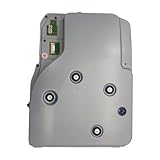
- 100% brand new and high quality.
- Version 2.0 - The square two pins / big connector
- Please remove the motherboard from this DVD-ROM drive and replace it with the motherboard of your original DVD-ROM drive, because your console only accepts its own motherboard.
- For Sony PlayStation PS5 5 Laser Lens (V2.0) 1115A 1100
- If you have any question, please contact us. We will offer an excellent after-sell service.
When to contact PlayStation Support
If the console supports discs and multiple supported discs still fail after basic checks, contact PlayStation Support or use its repair route. Avoid opening the console or buying a replacement drive before the model and cause have been diagnosed.
Quick Recap
Product prices and availability are accurate as of the date/time indicated and are subject to change. Any price and availability information displayed on Amazon at the time of purchase will apply.




