The GPD Win 5 can run Bazzite, but it is not accurate to say that it has confirmed, formal Bazzite support. A January 2026 announcement described an “official adaptation”; Bazzite later said the communications behind that claim did not represent an authorized support arrangement. For owners, the practical question is whether community-tested Linux gaming is worth trying—not whether the headline guarantees a maintained image or vendor-backed help.
What did GPD announce about Bazzite?
On January 21, 2026, reports described a GPD representative announcing work on an “official adaptation” of Bazzite for the Win 5 and directing users to report problems through Discord. The story was framed as the first official Bazzite support for an AMD Strix Halo handheld. That framing came from a secondary report of a Reddit announcement, not from evidence of a released, certified Bazzite image. VideoCardz’s account of the announcement is useful context, but it should not be read as a Bazzite support statement.
What did Bazzite clarify afterward?
In a January 27 correction and a January 30 follow-up, Bazzite’s parent project, Universal Blue, said GPD was not responsible for the misrepresentation. The project said a former contributor had communicated with GPD without authority to represent Bazzite and had been removed on December 16, 2025. It also said official vendor communications must go through the project’s email address, [email protected]. The project expressed interest in helping GPD expand Linux support, but did not confirm a formal Win 5 support program. Read the Win 5 correction and final clarification.
The distinction matters: the January headline cannot safely be repeated as a current, unqualified claim that Bazzite maintainers officially support the Win 5. Bazzite’s website says GPD devices are supported, but that broad wording does not establish a dedicated Win 5 image, complete feature support, or a support commitment for this model. Bazzite’s project site is the place to check its current overview and installation information.
Free tools Windows power users keep installed
One-click scans. No signup required.
#1 Best Overall

- Next-Gen ZEN 5 Performance: Choose your power with the efficient Ryzen 395 (16-core). Both processors deliver desktop-class performance in a portable package, easily handling the latest AAA titles.
- Built-in AI Acceleration: Experience a new level of efficiency and speed with integrated XDNA 2 AI acceleration, providing up to 126 TOPS of AI compute power that enhances both gameplay and creative workflows.
- Desktop-Class Graphics: The powerful Radeon 8060S GPU (40 CUs) are built on RDNA 3.5 architecture, ensuring stunning visuals, high frame rates, and full support for AMD FreeSync Premium and FSR 3.1.
- Extensive Memory Options: The GPD WIN 5, built to be a leading handheld gaming PC, 64GB LPDDR5X RAM at 8000 MT/s. With unparalleled bandwidth, this high-speed memory ensures seamless multitasking and quick loading across all games and operating systems, eliminating bottlenecks for a truly smooth and efficient portable gaming experience.
- Immersive High-Refresh-Rate Display: Game on a vibrant, high-resolution display with a smooth refresh rate, bringing every frame to life with exceptional clarity and reduced motion blur for a truly competitive gaming experience.
What “support” can mean for a handheld
| Kind of support | What it establishes | What it does not establish |
|---|---|---|
| Community compatibility | Owners can install or run the system and share fixes or workarounds. | A maintained image, guaranteed functionality, or response from project maintainers. |
| GPD endorsement | The hardware vendor promotes or helps test the software. | That Bazzite maintainers have accepted the device as a supported target. |
| Bazzite official support | The project explicitly accepts and maintains the device’s relevant image or configuration. | That GPD ships the device with Bazzite or provides warranty support for it. |
| Vendor-supported Linux model | The vendor sells a Linux-equipped SKU and provides official Linux guidance, recovery media, and support. | This is not established for the Win 5 by the January announcement. |
GPD’s Win 5 specifications list Windows 11 Home as the preinstalled operating system. Its firmware and driver page provides Windows-oriented firmware, BIOS, controller firmware, utilities, and manuals; neither page establishes a factory Bazzite edition or formal Linux support. See GPD’s Win 5 specifications and firmware and driver downloads.
What Bazzite is—and what it is not
Bazzite is a Fedora Atomic–based gaming distribution from Universal Blue. It offers Steam integration, a console-style gaming interface, and Proton compatibility for many Windows games. It is not Valve’s SteamOS, and “SteamOS alternative” describes its use case rather than identical software or device support. A game or feature working on one distribution does not guarantee it works on the other; results depend on hardware support, graphics drivers, input handling, firmware, and game-specific anti-cheat or DRM.
Rank #2

- Next-Gen ZEN 5 Performance: Choose your power with the efficient Ryzen 395 (16-core). Both processors deliver desktop-class performance in a portable package, easily handling the latest AAA titles.
- Built-in AI Acceleration: Experience a new level of efficiency and speed with integrated XDNA 2 AI acceleration, providing up to 126 TOPS of AI compute power that enhances both gameplay and creative workflows.
- Desktop-Class Graphics: The powerful Radeon 8060S GPU (40 CUs) are built on RDNA 3.5 architecture, ensuring stunning visuals, high frame rates, and full support for AMD FreeSync Premium and FSR 3.1.
- Extensive Memory Options: The GPD WIN 5, built to be a leading handheld gaming PC, 32GB LPDDR5X RAM at 8000 MT/s. With unparalleled bandwidth, this high-speed memory ensures seamless multitasking and quick loading across all games and operating systems, eliminating bottlenecks for a truly smooth and efficient portable gaming experience.
- Immersive High-Refresh-Rate Display: Game on a vibrant, high-resolution display with a smooth refresh rate, bringing every frame to life with exceptional clarity and reduced motion blur for a truly competitive gaming experience.
Why the Win 5 needs device-specific work
The Win 5 is a high-power Strix Halo handheld, not simply a small PC with a gamepad. GPD lists two processor configurations and a broad power range, plus a detachable battery and controls that depend on device-specific handling.
| Win 5 specification | GPD-listed detail |
|---|---|
| Ryzen AI Max+ 395 option | 16 cores / 32 threads, Zen 5, up to 5.1 GHz; Radeon 8060S graphics |
| Ryzen AI Max 385 option | 8 cores / 16 threads, Zen 5, up to 5.0 GHz; Radeon 8050S graphics |
| Processor power range | Configurable 45–75 W TDP |
| Memory and storage | Up to 128 GB LPDDR5X-8000 memory; up to 4 TB PCIe 4.0 NVMe storage |
| Screen | 7-inch, 1920 × 1080, 120 Hz |
| Battery and weight | 80 Wh detachable external battery; approximately 590 g handheld weight in GPD’s listing |
| Power adapter | 180 W DC adapter |
These specifications make several parts of the Linux experience important to verify rather than assume: graphics and power management, suspend and resume, Wi-Fi and audio, brightness and refresh-rate controls, battery reporting in detachable and wired modes, fan behavior, docks, and external displays. The Win 5 also has rear controls, a keyboard-toggle button, controller/mouse switching, haptics, a touchscreen, and a six-axis sensor. A working desktop or game launch does not prove that every input or power feature works correctly.
Do these 3 things before closing this tab:
1Fix the driver behind crashes, sound loss and screen glitches2Clear out junk files and repair common Windows errors3Scan for outdated or missing drivers - takes under a minuteRank #3
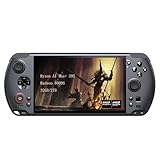
- [Ultimate Performance] Powered by the Ryzen AI Max+ 395 processor with 16 cores, 32 threads, and integrated Radeon 8060S graphics (40 CUs). Smoothly runs AAA titles and high-frame-rate games.
- [Flexible Power Design] Featuring an external 80Wh removable battery (FlexPower technology) and an ultra-lightweight body of just 565g, it offers exceptional on-the-go convenience. Pair with the included 180W adapter, perfectly balances endurance and mobility.
- [Innovative Expandable Storage The world’s first Mini SSD card slot supports hot-swappable expansion up to 2TB, with speeds up to 1600MB/s—5x faster than standard SD cards. Effortlessly expand your massive gamelibrary.
- [Esports-Grade Display & Controls] A 7-inch 1080p 120Hz LTPS screen with 100% sRGB, FreeSync Premium, and 6ms response ensures smooth visuals with no motion blur—ideal for both gaming and productivity. The capacitive joysticks (drift-free, zero dead zone) and Hall-effect triggers (with dual-mode switching) deliver precise, immersive tactile feedback.
- [Advanced Cooling System] Equipped with the Frostwind dual-fan and quad-heat pipe hybrid architecture, the system efficiently manages thermals even at 100W+ TDP. This prevents performance throttling during long, intense gaming sessions.
GPD’s listed battery-life figures—two hours of intensive use, three to four hours of moderate use, and six hours of light use—are manufacturer estimates tied to broad usage categories, not Linux measurements or a promise of runtime. GPD also lists a 45–75 W TDP range and an 80 Wh detachable battery; behavior may differ when using the battery, its cable, USB-C, or a dock. A generic USB-C charger should not be assumed to match the listed 180 W DC adapter. GPD’s specification page provides the hardware details.
What owners have reported about using Bazzite
Community discussion shows that users have tried Bazzite on the Win 5, but reports do not establish a consistent, complete feature set. In a reply in Universal Blue’s discussion, a user described face-button problems—including the keyboard button—with Handheld Daemon or InputPlumber in Gaming Mode. Other owner posts describe control gaps, update or kernel-related installation trouble, possible boot or GRUB hangs, and differences between desktop and gaming modes. These are individual reports, not controlled tests or proof that every Win 5 has the same faults. The reports appear in the Universal Blue discussion, a Win 5 feature discussion, and an owner installation thread.
Rank #4

- [Ultimate Performance] Powered by the Ryzen AI Max+ 395 processor with 16 cores, 32 threads, and integrated Radeon 8060S graphics (40 CUs). Smoothly runs AAA titles and high-frame-rate games.
- [Flexible Power Design] Featuring an external 80Wh removable battery (FlexPower technology) and an ultra-lightweight body of just 565g, it offers exceptional on-the-go convenience. Pair with the included 180W adapter, perfectly balances endurance and mobility.
- [Innovative Expandable Storage The world’s first Mini SSD card slot supports hot-swappable expansion up to 2TB, with speeds up to 1600MB/s—5x faster than standard SD cards. Effortlessly expand your massive gamelibrary.
- [Esports-Grade Display & Controls] A 7-inch 1080p 120Hz LTPS screen with 100% sRGB, FreeSync Premium, and 6ms response ensures smooth visuals with no motion blur—ideal for both gaming and productivity. The capacitive joysticks (drift-free, zero dead zone) and Hall-effect triggers (with dual-mode switching) deliver precise, immersive tactile feedback.
- [Advanced Cooling System] Equipped with the Frostwind dual-fan and quad-heat pipe hybrid architecture, the system efficiently manages thermals even at 100W+ TDP. This prevents performance throttling during long, intense gaming sessions.
GPD continued to publish Windows firmware and utilities: its page lists BIOS v2.25 dated January 15, 2026, with a warning that it cannot be rolled back to an older version, and controller firmware v1.12 dated May 13, 2026, with HID-reporting and calibration changes. The page labels the software work in progress and includes Windows compatibility notes. Check the current release notes and Linux reports before flashing; firmware changes may alter behavior, and the cited BIOS warning makes rollback especially important to consider. GPD’s firmware page has the release details.
Independent reader supportYour contribution helps us test, update, and keep practical guides available for everyone.Should you install Bazzite on a GPD Win 5?
Bazzite may suit you if
- You primarily play Steam games and want a Linux gaming environment with a console-style interface.
- You are comfortable troubleshooting handheld controls, updates, and boot issues using community guidance.
- You can keep a Windows recovery option available while testing Linux.
Windows is the safer choice if
- You rely on Game Pass, Microsoft Store games, particular launchers, or games whose anti-cheat or DRM does not work under Linux.
- You need GPD’s Windows utilities or want straightforward access to vendor firmware and controller tools.
- You expect every rear button, dock function, sensor, and power state to work without configuration.
Waiting is reasonable if
- You bought the Win 5 specifically for guaranteed, first-party Linux support.
- You do not want to manage recovery media, partitions, or firmware-related risk.
- Your essential games or controls have not been confirmed by recent Win 5 owner reports.
Do not assume Bazzite will run every Windows game. Check each game’s current Proton status and the relevant anti-cheat, launcher, multiplayer, and DRM limitations. Game compatibility is separate from whether the operating system boots or whether the hardware controls work.
Best Value
![GPD Win 5 [AMD AI Max+ 395-32GB+2TB] 7-inch 120Hz Display Mini Handheld Win 11 PC Game Console, Removable Battery, Radeon 8060S Graphics,1920X1080 Touchscreen Laptop Tablet PC (AI 395-32GB+2TB)](https://m.media-amazon.com/images/I/51HGshSL3ZL._SL160_.jpg)
- GPD WIN 5 CPU: AMD Ryzen AI Max+ 395 processor, 16 Cores/32 Threads. Base Frequency 3 GHz Max Turbo Frequency Up to 5.1 Ghz Graphics: Radeon 8060S Graphics card. 96GB VRAM, Eliminating VRAM Anxiety, Surpassing NVIDIA RTX 4060 Mobile
- GPD WIN 5 Screen: 7-inches Native physical landscape H-IPS Screen,120Hz High Refresh Rate, Resolution 1920x1080,16:9 resolution ratio,315ppi,Native Landscape Orientation, Tear-free, Low Latency,120Hz silky smooth gaming display. Supports AMD FreeSYNC Premium, tear-free, low latency, 6ms response time, peak performance. 100% sRGB color gamut, a feast of colors.
- Dual Storage Expansion and Ultra-Fast Ports: Features a unique Mini SSD slot (PCIe 4.0) supporting up to 2TB expansion, plus an M.2 2280 NVMe SSD and microSD slot. Includes a full-speed 40Gbps USB4 port, 10Gbps USB Type-C and Type-A ports, ensuring high-speed data transfer and connectivity for peripherals.
- GPD WIN 5 2025 Battery: Flexible 80Wh Detachable Battery and 180W Fast Charging: Features an external 80Wh removable battery with dual usage modes (back-mounted or wired) and a 180W DC adapter for full charge in 1.5 hours and direct power bypass for uninterrupted gaming.
- GPD WIN 5 2025 System OS Recovery: Here's the instruction of a simply re-installation to resolve software/driver issues: 1, Long press power button for 2-3 seconds to boot your laptop.Multiple Click "Tab" key when you see power led on.Then you can enter the System Recovery page. Touch the "Start" Icon on the screen when you log into the System Recovery page and then wait for the automatic reinstallation process,all problem resolved.
Precautions before changing the operating system
- Check current documentation first. Use Bazzite’s current installation guidance and device information, then look at recent Win 5-specific issue reports immediately before installing. The available information does not establish a dedicated, permanently maintained Win 5 installer or provide a verified model-specific installation procedure.
- Prepare a recovery route. Back up personal data and the original SSD or important partitions, create a Windows recovery drive, and keep copies of relevant GPD firmware files. Have another device available for troubleshooting and learn how to reach the Win 5’s BIOS and boot selection without relying on the installed operating system.
- Keep Windows available. A separate drive or a recoverable Windows installation is useful for vendor utilities and firmware work, and gives you a way back if Linux boot or input behavior fails.
- Review firmware before flashing. Record the installed BIOS version and read GPD’s warnings and release notes. In particular, the listed BIOS v2.25 cannot be downgraded to an older version, so do not treat a BIOS update as an easily reversible troubleshooting step.
- Verify the image source. Universal Blue says authentic Bazzite images are signed with its key and come from the
ublue-osnamespace in GitHub Container Registry. Its example verification command iscosign verify --key cosign.pub ghcr.io/ublue-os/image-name-here:latest; replace the example image name only with the verified image you intend to install. This is a signature check, not a Win 5 installation command.
Changing operating systems can complicate access to vendor utilities and may affect firmware workflows. The available material does not establish that installing Linux voids the Win 5 warranty, so check GPD’s current warranty terms rather than assuming either outcome.
Quick Recap
Product prices and availability are accurate as of the date/time indicated and are subject to change. Any price and availability information displayed on Amazon at the time of purchase will apply.



