The Tool Desk
Outbyte PC Repair FREERepair Windows errors before they cause bigger problemsFix Now →Outbyte Driver Updater FREEScan for outdated or missing drivers - takes under a minuteDriver Scan →Microsoft does not publish a normal internal or exhaust-air temperature for Xbox owners to compare against. Its manuals specify an operating environment of +5°C (+41°F) to +35°C (+95°F)—the temperature around the console, not a target or maximum reading for the console’s case, vents, or processor. A console that feels warm, or blows warm air, is not by itself proof that it is overheating.
What temperature is an Xbox supposed to be?
Microsoft’s Series X|S and Xbox One manuals give the same ambient operating range: +5°C (+41°F) to +35°C (+95°F). That range describes the environment in which the console operates. It is not a permitted surface temperature or a reading to expect from the exhaust vent.
As an Amazon Associate I earn from qualifying purchases.
The manuals and other reviewed Microsoft materials do not set a consumer-facing “normal” temperature for the console’s internal components or outgoing air. An infrared reading of the case, a handheld thermometer reading at a vent, or a number found in a forum cannot be treated as Microsoft’s temperature specification.
Why a warm console or vent may be normal
A console produces heat while it runs, and its cooling system moves heat away from the hardware. As a result, the case can feel warm and the air leaving a vent can feel warmer than the room. Touch alone does not tell you whether an internal component is within a specified range; Microsoft does not provide a consumer threshold for that comparison.
#1 Best Overall

- 【Necessary for Xbox Series X】---- This product integrates many functions, such as top cooling fan, dust-proof, light strip, USB interface for data transmission and USB port for charging. It helps to prevent for Xbox Series X console from over-heating and dust to extend the life of your console. (NOTE:When the console is working, the dust cover of the fan can be removed to speed up the heat dissipation effect. Alige the two holes under the dust cover first, then cover the dust cover.)
- 【Efficient Fan System】---- A high-speed large fan are built in the colorful dust-proof cooling fan,which can accelerate the hot air exhausted from the top of the console and reduce the temperature for Xbox series X console. The cooling fan stand with 3 gears and is a touch switch. The low gear is orange, the second gear is blue, and the high gear is green.The heat dissipation effect is more obvious, and the noise is very low, which you can hardly feel.
- 【Colorful Light Strip】---- The cooling bracket for Xbox seris X supports colorful lights and can change the light color with an independent touch switch. The light strip contains 6 monochromes and 1 mixed color. You can use the independent touch switch to change your favorite colors and own a more atmosphere in the process of the game. (NOTE: pressing the light switch for the 7th time will turn light off.)
- 【3.0 USB & USB Charge Port】---- There are 2 USB interfaces in total, one blue 3.0 USB interface supports 3.0 data transmission, another white 2.0 sub interfaces ONLY can charge more products, such as controller, mobile phones, small desk lamps, etc.It is convenient to provide USB interface in the process of your game.
- 【Dust Cover Filter】---- The cooling top bracket for Xbox seris X supports top dust proof,At the same time, the product contains 2 sets * dust cover compatible with Xbox Series X, 1 set * silicone dust plugs,which have accurate size and easy to install and replace without additional tools. Prevent dust from entering the USB and HDMI ports for Xbox Series X, extend the life of your console.
For Series X, Xbox’s 2020 design article describes a single axial fan and the system’s airflow design, but it does not give an internal or exhaust-air temperature limit. The article also says Series X and Series S support horizontal or vertical placement. Xbox Wire’s Series X|S design article.
Set up the console for airflow
Microsoft’s product guidance focuses on the surrounding environment and ventilation rather than a temperature reading to monitor. Use these checks:
Rank #2

- 🍃The new upgrade, black design tailored for Xbox Series S 1TB.LED Temperature Display-You can always know the temperature of your Xbox Series S console. It helps to prevent your Xbox Series S console from over-heating to extend the life of your Xbox Series S.
- 🍃Intelligent Control & Custom fan speed-[Automatic Mode]: The chip of G-STORY Xbox Series S cooling fan can automatically sense the temperature to adjust the fan speed, you can just enjoy the game and leave the heat to our cooling fan. (when the temperature is <35℃/95℉, it will stop working.) [Manual Mode]:Press the button to select the 3 speed you need, the LED will change color with the speed. (Note: Press down the button for 3s to switch between manual and automatic mode.)
- 🍃Three Level Fan Speed: Depends on the temperature of your xbox console, the Xbox Series S fan cooling system has 3 levels of fan speed(1500/1750/2000RPM) with RGB LED (Green light: 35~43℃/95~109℉; Blue light: 44~48℃/110~118℉; Red light: >48℃/119℉), it can cool your console at the most appropriate speed to protect your console.
- 🍃Low Noise & Light Weight: The Xbox Series S cooling fan is low noise and light-weight, it's powered by your xbox console, it's super portable and won't take too much space.
- 🍃Easy to Install: Just simply place the cooling fan on your console, and connect the cable to your xbox console, it will start to work.
- Keep ventilation openings clear; do not cover or block them.
- Do not place the console on a bed or sofa, where a soft surface can obstruct openings.
- Avoid a confined cabinet or other enclosure unless it has adequate ventilation.
- Keep the console away from heat sources.
- For Series X and Series S, choose horizontal or vertical placement while keeping the openings unobstructed. For other generations, follow the guidance for that specific model.
Microsoft’s console safety guidance covers ventilation and operating conditions for Series X|S, while the Xbox One product guide gives the corresponding older-model precautions.
Let a relocated console adjust to the room
If you move a Series X|S between places whose temperatures differ by 11°C (20°F) or more, Microsoft’s manual advises letting it reach room temperature before switching it on. The Xbox One guide uses a different wording: it advises waiting after a temperature difference of 20 degrees. These are model-specific instructions; use the guide for your console rather than applying one generation’s threshold to another.
Rank #3
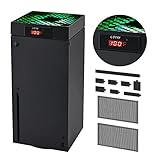
- 🍃LED Temperature Display-You can always know the temperature of your Xbox Series X console. It helps to prevent your Xbox Series X console from over-heating to extend the life of your Xbox Series X.
- 🍃Intelligent Control & Custom fan speed-[Automatic Mode]: The chip of G-STORY Xbox Series X cooling fan can automatically sense the temperature to adjust the fan speed, you can just enjoy the game and leave the heat to our cooling fan. (when the temperature is <35℃/95℉, it will stop working.) [Manual Mode]:Press the button to select the 3 speed you need, the LED will change color with the speed. (Note: Press down the button for 3s to switch between manual and automatic mode.)
- 🍃Three Level Fan Speed: Depends on the temperature of your xbox console, the Xbox Series X fan cooling system has 3 levels of fan speed(1500/1750/2000RPM) with RGB LED (Green light: 35~43℃/95~109℉; Blue light: 44~48℃/110~118℉; Red light: >48℃/119℉), it can cool your console at the most appropriate speed to protect your console.
- 🍃Low Noise & Light Weight: The Xbox Series X cooling fan is low noise and light-weight, it's powered by your xbox console, it's super portable and won't take too much space.
- 🍃Easy to Install: Just simply place the cooling fan on your console, and connect the cable to your xbox console, it will start to work. If you have any questions about using our product, please feel free to contact us. G-STORY is always here for you.
When warmth calls for troubleshooting
Warmth by touch is a weak signal on its own. Take a closer look if the console shows an overheating warning, shuts down unexpectedly in circumstances associated with heat, or has a fan that is silent, grinding, or otherwise behaving abnormally.
- Check the surroundings: clear the vents, move the console away from direct heat, and ensure a cabinet or enclosure is ventilated.
- Observe the fan and console behavior: note unusual noise, a fan that does not seem to run, recurring warnings, or heat-related shutdowns.
- Contact Xbox Support or a qualified repair provider if the problem persists. Microsoft’s Series X repair instructions include checking that the fan runs without unusual noise, but they are repair-context material—not a recommendation for ordinary owners to open the console.
Do not assume an add-on cooling fan is the answer. The independent iFixit Xbox One troubleshooting guide recommends unobstructed airflow and cautions that some third-party fans can redirect air incorrectly. Its model-specific advice should not be generalized to every Xbox generation.
Rank #4
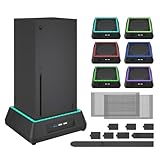
- 【🎃All-in-One Xbox Series X Fan Cooling System🎃】The Mviioe xbox cooling fan for xbox series x integrates heat dissipation, noise reduction, and RGB lighting. It's a must - have for gamers, improving gaming and prolonging device life.
- 【🌀Efficient Adjustable Cooling System🌀】Equipped with a large fan, the Mviioe xbox series x cooling stand offers 3 - speed settings (1800, 1900, 2000 RPM) and 3 - color indicators for different performance levels.
- 【🎊Fancy Color LED Gaming Light🎊】Featuring an intelligent chip, the Mviioe xbox x cooling station has a unique RGB light design with 6 solid colors and 1 mixed color. Customize your gaming mood with an independent touch switch.
- 【🎇Low Noise for Enhanced Gaming Experience🎇】The Mviioe xbox series x cooler uses a powerful yet silent fan, generating minimal noise during gaming. Note that higher speeds result in louder noise.
- 【🎄Charging Support with Dust Filters🎄】The Mviioe xbox series x stand with fan comes with 3 USB ports for accessory charging and a dust filter. Ensure not to connect to power over 5V 1A.
Why consumer temperature measurements can mislead
A temperature number is only useful when the measurement point, workload, room conditions, and a valid reference threshold are known. Microsoft’s Series S service guide mentions an infrared camera for board-level repair work; that repair-context tool does not establish a safe or normal outside-case temperature for owners. Without a manufacturer-published consumer threshold, measuring the case or vent does not answer whether an Xbox is overheating.
Quick wins for a faster PC:
Scan for outdated or missing drivers - takes under a minuteDriver Scan →Repair Windows errors before they cause bigger problemsFix Now →Fix the driver behind crashes, sound loss and screen glitchesFind Drivers →Quick Recap
Product prices and availability are accurate as of the date/time indicated and are subject to change. Any price and availability information displayed on Amazon at the time of purchase will apply.




