
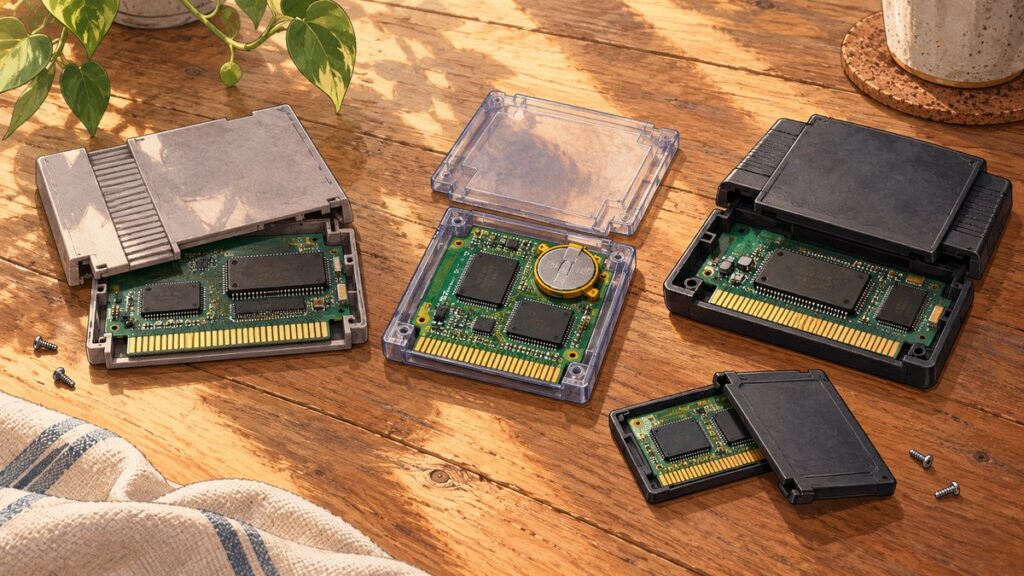
SNES and Sega Genesis cartridges are small computers, not just passive storage. Each contains a mask ROM with the game program and assets, plus address-decoding and mapping logic that lets the console reach the right data. A save-capable cartridge adds static RAM (SRAM) and usually a CR2032 coin cell. The game writes save bytes to SRAM while the console is powered; after shutdown, the battery supplies standby power so those bytes remain available.
When the cell is exhausted, the ROM can still boot normally because the game code is unaffected. The SRAM, however, can no longer retain its contents, so the game appears to forget saves. Understanding that separation explains both the hardware differences between SNES and Genesis games and the safest way to replace a battery without destroying an existing save.
As an Amazon Associate I earn from qualifying purchases.
What is inside a cartridge?
A cartridge printed circuit board (PCB) connects to the console through its edge connector. The console supplies power and address and data signals; chips on the PCB respond when their address ranges are selected. The exact board differs by title, but four functions are common: permanent game storage, address selection, optional writable memory, and power management.
Quick wins for a faster PC:
Clear out junk files and repair common Windows errorsFree Scan →Scan for outdated or missing drivers - takes under a minuteDriver Scan →Mask ROM stores the game
The mask ROM contains executable code, graphics, sound data, level layouts and other assets. It is nonvolatile, so removing the cartridge or a battery does not erase it. SNES game-chip capacities documented by Epilogue range from 2 Megabits (256 KB) to 48 Megabits (6 MB). Those figures describe the ROM data, not the size of the save area.
#1 Best Overall

- Read Before You Buy — No Video Output: These adapters support charging and USB 2.0 data transfer, but cannot transmit video signals. Except for standard USB webcams (which use USB data only), they are not compatible with HDMI/DisplayPort cables, video-capable USB-C hubs, or docking stations with video output.
- Convert USB-A Ports to USB-C: Designed to connect USB-C earphones, cables, flash drives, card readers, and other USB-C accessories to standard USB-A ports. Plug-and-play with no drivers or software required.
- Aluminum Alloy Housing: Built with a sturdy aluminum alloy shell that aids in heat dissipation and protects against daily wear and scratches. Designed to maintain a stable and secure connection.
- Compact & Travel-Friendly: The ultra-compact design allows the adapter to stay plugged into your device without blocking adjacent ports or adding bulk, reducing wear and tear on your original USB ports.
- 12-Month Warranty: Backed by a 12-month manufacturer warranty for peace of mind. Designed to meet strict quality control standards for reliable everyday performance.
Mapping logic makes larger games addressable
Both consoles divide the cartridge address space into regions and use decoding logic to select the appropriate ROM bank or RAM address. On SNES, the important schemes are LoROM and HiROM. LoROM presents 32 KB banks, while HiROM presents 64 KB banks; extended mappings support still larger or more specialized designs. Epilogue identifies the MAD-1 decoder on many SNES boards as a chip that performs address decoding and related selection work.
Genesis layouts are not one universal standard. A title’s PCB can use different ROM arrangements, SRAM address ranges and support logic. Consequently, two Genesis games that both save may have different chip positions or battery connections even though their user experience is similar.
Optional support chips add capabilities
Some SNES boards include coprocessors such as Super FX, SA-1 or DSP chips, or dedicated decompression hardware. Genesis cartridges can likewise include mappers or other title-specific logic. These additions affect how the console reaches game data, but they do not change the basic principle of a battery-backed save: writable SRAM must remain powered when the console is off.
Rank #2

- 5-in-1 USB-C Hub: Experience comprehensive connectivity featuring a Power Delivery input, two USB-A 2.0 ports, a USB-A 3.0 port, and an HDMI port. (Note: The USB-C power delivery input port is only for connecting an external wall charger to power your laptop and cannot power peripheral devices.)
- 90W Pass-Through Charging: Achieve optimal charging with 90W pass-through power to your laptop, supported by a total input of 100W, with the hub reserving 10W for operational efficiency. (Note: Wall charger not included.)
- Quick Data Transfers: Accelerate your productivity with rapid data transfers using a high-speed 5Gbps USB 3.0 port and two 480Mbps USB 2.0 ports.
- 4K HDMI Display: Enhance your visual experience with a hub capable of delivering 4K resolution at 30Hz in both mirror and extend modes. Please note that this hub is compatible with MacBook (macOS 12 and newer), Windows 10 and 11, ChromeOS, and laptops equipped with DP Alt Mode and Power Delivery. Note: This device is not compatible with Linux.
- What You Get: Anker USB-C Hub (5-in-1, 4K HDMI), welcome guide, 18-month warranty, and our friendly customer service.
| Cartridge function | SNES implementation | Sega Genesis implementation |
|---|---|---|
| Permanent game data | Mask ROM; documented examples span 2–48 Megabits (256 KB–6 MB). | Mask ROM; capacity and organization vary by title. |
| Addressing | LoROM (32 KB banks), HiROM (64 KB banks), and extended mappings; many boards use a MAD-1 decoder. | Title-specific layouts, address ranges and possible mapper logic. |
| Writable save data | Usually static RAM (SRAM) when a battery save is supported; 8 KB is typical in the cited guide, with larger sizes in some games. | Static RAM on save-capable boards, with size and address range varying by board. |
| Retention power | Commonly a tabbed or holder-mounted CR2032 cell and support circuitry. | Commonly a 3 V CR2032 cell; mounting may be soldered or held by a metal tab. |
| Extra hardware | May include Super FX, SA-1, DSP, decompression or other coprocessors. | May include mappers or other title-specific support ICs. |
How a cartridge save survives shutdown
The battery is not a tiny disk and does not contain the save file. The save is a pattern of bytes held in volatile SRAM. The cell’s job is to keep that SRAM in standby when the console is no longer supplying operating power.
- The game writes a record. During a save operation, the program sends bytes to designated SRAM addresses on the cartridge.
- Console power runs the circuit. While the SNES or Genesis is on, the cartridge receives normal operating power through the connector. The SRAM can be read and written at full operating conditions.
- Power is removed. When the console is switched off, the cartridge’s power-management circuit changes the SRAM to a low-power standby state.
- The coin cell takes over. A CR2032 supplies the standby voltage needed to preserve the SRAM contents. It does not rewrite or interpret the data.
- The next boot reads the same addresses. The game checks the SRAM and loads a valid record, often displaying the saved progress after its own integrity checks.
The Snes9x project describes the original-cartridge model as battery-backed RAM, “known as SRAM,” in which save data remains until the battery shuts off. Once the cell can no longer maintain standby voltage, SRAM contents become undefined or disappear, even though the ROM still executes.
Why a dead battery can look like a software fault
A game with a depleted cell commonly starts at its title screen, plays normally and may even allow a save during the current session. After power is removed, that new save vanishes. The symptom points to retention power rather than a damaged ROM. A loose edge connector, corroded PCB trace or failed SRAM chip can produce similar behavior, so a battery is the first suspect but not the only possible cause.
Rank #3

- Sleek 7-in-1 USB-C Hub: Features an HDMI port, two USB-A 3.0 ports, and a USB-C data port, each providing 5Gbps transfer speeds. It also includes a USB-C PD input port for charging up to 100W and dual SD and TF card slots, all in a compact design.
- Flawless 4K@60Hz Video with HDMI: Delivers exceptional clarity and smoothness with its 4K@60Hz HDMI port, making it ideal for high-definition presentations and entertainment. (Note: Only the HDMI port supports video projection; the USB-C port is for data transfer only.)
- Double Up on Efficiency: The two USB-A 3.0 ports and a USB-C port support a fast 5Gbps data rate, significantly boosting your transfer speeds and improving productivity.
- Fast and Reliable 85W Charging: Offers high-capacity, speedy charging for laptops up to 85W, so you spend less time tethered to an outlet and more time being productive.
- What You Get: Anker USB-C Hub (7-in-1), welcome guide, 18-month warranty, and our friendly customer service.
SNES save memory and mapping details
SRAM size is separate from ROM size
SNESdev defines an .SRM file as a dump of battery-backed cartridge save RAM. The SNES ROM header records the save-RAM size when such memory exists, and its chipset field indicates whether the board contains extra RAM, a battery, a coprocessor or a combination. An 8 KB SRAM size is typical in the Epilogue guide, but some games use more. A large 6 MB ROM therefore does not imply a large save area, and a small ROM can still require battery-backed SRAM.
LoROM and HiROM affect addresses, not the save concept
LoROM’s 32 KB bank arrangement and HiROM’s 64 KB arrangement determine how the console maps program data into its address space. Extended mappings accommodate larger games or special hardware. Save SRAM is assigned its own address region according to the board’s mapping logic, so a reader or emulator must know the title’s mapping to dump the correct bytes. A save file copied from one title is not automatically interchangeable with another merely because both use 8 KB SRAM.
Cartridge shells and access
Opening an original SNES or Super Famicom shell requires a specified 3.8 mm security bit. The bit size concerns the shell screws, not the battery itself. Once open, identify the PCB revision, battery polarity marks, solder tabs or holder, and any nearby support IC before touching the cell.
Rank #4

- Dual Converters, Infinite Potential:Includes 2× USB C male to USB A female adapters and 2× USB A male to USB C female adapters. Perfect for a wide range of uses—tablets with Bluetooth keyboards, expand USB ports on macbook, and more. Two different converters for all your daily needs
- Next-Level 10Gbps & 3A Charging: No more slow 480Mbps, this usb to usb c adapter has a transfer speed of up to 10Gbps, allowing you to do more transferring in less time. This usb adapter fits both USB A and USB C charger, supporting up to 3A fast charging
- Upgraded Exquisite Craftsmanship: With an aluminum alloy housing and metal connector, the usbc to usb adapter is extremely durable and sturdy. Rigorously tested to withstand more than 10,000 times of plugging and unplugging, ensuring long-lasting performance
- Broad Compatible: The usb c to usb adapter widely supports all USB C/ USB A devices like laptops, tablets, cellphones, car chargers, and phone chargers. Such as compatible with MacBook Pro/Air 2023/2022, Thunderbolt 4/3 Devices,Apple MagSafe Watch 9/8/7/SE/Ultra, iPad Pro 2022/2021, Samsung Galaxy S23/S20/S10, and iPhone 17/16/15 Pro. Plug and play
- Please Note: To reach 10Gbps speed, keep the cable under 3.3 ft. For USB A Male to USB C adapters, try flipping the USB C connector. USB C Male to USB A adapters support bidirectional 10Gbps transfer within 3.3 ft
How Genesis cartridge saves are arranged
A battery-backed Genesis board follows the same electrical pattern: mask ROM for permanent data, a static-RAM chip for writable data, a coin cell and support circuitry for retention. ConsoleArtisan’s documented EA board shows a mask ROM, a GM76C88 SRAM, a smaller support IC and a Seizaiken CR2032 3 V cell.
Genesis hardware is especially board-dependent. Cells may be soldered directly through welded tabs or retained by a metal tab with friction. SRAM location, chip marking and address range vary by title. Do not assume a replacement board, polarity orientation or save-reader setting from another Genesis game will match the cartridge on your bench.
What’s actually slowing this PC down?
Pick the symptom - the matching free tool is one click away.
The usual Genesis failure pattern
When the cell is dead, the game normally still boots from ROM. Save menus may work until the console is unplugged, after which progress is gone. If the game resets, shows graphics corruption or fails to boot at all, inspect the connector, PCB, ROM and support logic as well as the battery; those symptoms are not explained by a depleted retention cell alone.
Best Value

- 5-in-1 Connectivity: Equipped with a 4K HDMI port, a 5 Gbps USB-C data port, two 5 Gbps USB-A ports, and a USB C 100W PD-IN port. Note: The USB C 100W PD-IN port supports only charging and does not support data transfer devices such as headphones or speakers.
- Powerful Pass-Through Charging: Supports up to 85W pass-through charging so you can power up your laptop while you use the hub. Note: Pass-through charging requires a charger (not included). Note: To achieve full power for iPad, we recommend using a 45W wall charger.
- Transfer Files in Seconds: Move files to and from your laptop at speeds of up to 5 Gbps via the USB-C and USB-A data ports. Note: The USB C 5Gbps Data port does not support video output.
- HD Display: Connect to the HDMI port to stream or mirror content to an external monitor in resolutions of up to 4K@30Hz. Note: The USB-C ports do not support video output.
- What You Get: Anker 332 USB-C Hub (5-in-1), welcome guide, our worry-free 18-month warranty, and friendly customer service.
How to replace a battery without losing a save
The safest sequence is backup first, battery replacement second. Removing the old cell before copying SRAM can erase the only surviving save.
Before opening the cartridge
- Confirm that the game actually uses a battery save. Some titles use passwords or have no persistent save memory.
- Use a compatible cartridge reader or dumper to make an SRAM backup when the game still retains progress. Save the dump in more than one location and label it with the exact title and region.
- Have a replacement CR2032 with the correct solder tabs or holder arrangement. A bare loose coin cell is not a substitute for a tabbed cell designed for PCB mounting.
- Prepare the correct shell tool. SNES and Super Famicom shells use the specified 3.8 mm security bit.
- Work on an anti-static, well-lit surface and photograph the original battery orientation before desoldering.
SNES replacement procedure
- Remove the shell screws with the 3.8 mm security bit and lift the shell without scraping the PCB.
- Locate the battery and note the positive and negative markings, tab direction and nearby traces.
- Back up SRAM if you have not already done so. Do not rely on a visual inspection to prove that a save is safe.
- Desolder the old tabbed cell or release it from its holder using equipment appropriate for the board. Avoid levering against small surface-mount parts.
- Install the replacement CR2032 in the identical polarity and mechanical orientation. A reversed cell can prevent retention and may stress the circuit.
- Inspect both joints for a solid connection and check that the cell cannot touch neighboring traces or the shell.
- Reassemble enough of the shell to protect the board, boot the game and verify that the previous save loads.
- If the backup was made before replacement and the save is absent, write the saved SRAM image back with a compatible reader, then test a power cycle.
Genesis replacement procedure
- Open the cartridge and identify the PCB revision, battery mounting method and polarity.
- Back up the SRAM before disconnecting the old cell.
- If the cell is tab-soldered, remove the tabs carefully; if it is held by a metal friction tab, release the cell without bending the contact out of shape.
- Fit a CR2032 3 V replacement with matching tabs or holder hardware. Do not force a different footprint into place.
- Check for bridges, lifted pads and accidental contact between the cell and adjacent components.
- Boot the cartridge, load the old save and perform a complete power-off and restart test.
How to verify a repair
One successful boot is not enough. Verification should test both active operation and standby retention.
- Load the restored or original save and confirm the expected progress, inventory or settings.
- Make a small new change and save again, so you know the SRAM can still be written.
- Turn the console fully off, wait at least several minutes, then restart and load the save.
- Repeat the power cycle once more after the cartridge has cooled to room temperature.
- If the save disappears, measure or inspect the battery connection and support circuit, then compare the reader’s SRAM size and mapping settings with the title’s board.
What can go wrong, and how to diagnose it
It boots but forgets every save
Suspect a depleted cell first. Confirm that the replacement is installed with correct polarity and that both tabs or holder contacts are electrically sound. If the cell is good, inspect traces between the battery circuit, SRAM and support IC.
Crashes, No Sound, or Screen Glitches?
Random freezes, missing sound and display glitches usually trace back to one bad driver. Find and replace yours safely.Free scan · under a minuteWindows Errors? Fix Them Before They Spread
Repair common Windows errors and clear accumulated junk for a smoother, more stable PC - no reinstall needed.Free scan · no reinstallThe game does not boot after service
Reseat the PCB in the shell, clean the edge connector with an appropriate method, and inspect for solder bridges or lifted pads created during battery removal. A battery replacement should not alter ROM contents, so a new boot failure usually indicates a disturbed connection or board damage.
The reader produces an empty or invalid save file
Check that the reader supports the console and title, that the selected SRAM size matches the cartridge, and that the board’s mapping is recognized. SNES header information can identify save-RAM size and chipset features, but Genesis settings must follow the specific board. Never overwrite the cartridge until you have preserved the original dump.
The cartridge has no battery
Not every game saves to SRAM. Some use passwords, and some have no persistent progress system. A missing cell is therefore not proof that a cartridge is defective; inspect the PCB and the game’s documented save method before modifying it.
Quick Recap
SNES versus Genesis: practical differences for owners
| Question | SNES | Genesis |
|---|---|---|
| Does every cartridge have a battery? | No. Battery-backed SRAM is optional; some games use passwords or no save. | No. Battery-backed SRAM is optional and title-dependent. |
| What does the battery preserve? | Volatile SRAM bytes while the console is off. | Volatile SRAM bytes while the console is off. |
| Typical cell | CR2032; tab and placement depend on the PCB. | CR2032 3 V is common; soldered and friction-tab arrangements both exist. |
| How predictable is the board layout? | Mapping families such as LoROM and HiROM help classify boards, but coprocessors and revisions vary. | Layouts and SRAM address ranges vary substantially by title and board. |
| Best preservation order | Dump SRAM, document polarity, replace the cell, restore and power-cycle test. | Dump SRAM, identify the mounting method, replace the cell, restore and power-cycle test. |
A preservation checklist
- Identify the exact game, region and PCB before choosing reader settings or a replacement cell.
- Separate ROM capacity from SRAM capacity; they serve different purposes.
- Back up the save while the original battery still works.
- Record polarity, tab orientation and holder geometry with a photograph.
- Use a tabbed CR2032 or matching holder rather than improvising a loose cell.
- Test a newly written save through multiple complete power cycles.
- Keep the original SRAM dump after a successful repair; it is the fallback if the board later develops another fault.
Product prices and availability are accurate as of the date/time indicated and are subject to change. Any price and availability information displayed on Amazon at the time of purchase will apply.
Free tools Windows power users keep installed
One-click scans. No signup required.

