PC Slower Than It Used to Be?
A free scan shows the junk files, broken settings and background clutter dragging Windows down - then fixes them in one click.Free scan · Windows 10 & 11Crashes, No Sound, or Screen Glitches?
Random freezes, missing sound and display glitches usually trace back to one bad driver. Find and replace yours safely.Free scan · under a minuteOn your Switch, open My Page → Add Friend, then search by friend code, nearby users, or people you’ve played with. Your Switch user must be linked to a Nintendo Account, and the other person must accept your request before you appear as friends.
Add a friend on your Switch
Nintendo’s instructions apply to Nintendo Switch, Switch Lite, and Switch – OLED Model. Before sending or receiving requests, link the console user to a Nintendo Account. Choose carefully: Nintendo says you cannot unlink or change the account for that user after linking it. See Nintendo’s account-linking instructions.
- From the HOME Menu, select your user icon to open My Page.
- Select Add Friend.
- Choose the method that fits how you know the person:
- Search with Friend Code: Enter the other person’s code to send a request.
- Search for Local Users: Choose this for someone nearby. If your console is offline, the request is saved temporarily and sent automatically when the console next connects to the internet.
- Search for Users You Played With: Find someone you encountered in local wireless or online play and send a request.
- Ask the recipient to accept the request. Sending it alone does not make you friends.
These routes are documented by Nintendo Support.
Choose the right way to find someone
| Method | Use it when | What you need to know |
|---|---|---|
| Friend code on the console | You can exchange codes remotely. | Enter their code from My Page → Add Friend → Search with Friend Code. |
| Local users | The other user is nearby. | If offline, the request waits until your console reconnects. |
| Users you played with | You have encountered them in local wireless or online play. | Find them under Search for Users You Played With. |
| Nintendo Switch App | You have access to a smart device with the latest app version. | You can share a friend code, request URL, or QR code; send a request by entering a code or scanning a QR code. |
Find and share your friend code
On the console, open My Page → Profile. Your friend code appears on the right side. Share it with the person who will add you. Nintendo says the same Nintendo Account uses the same friend code on linked consoles. You can reissue a code, but must wait 30 days before changing it again. Details are in Nintendo’s friend-code instructions.
Add or accept a friend request in the Nintendo Switch App
The app offers another route if you have a smart device with the latest version installed. Select your user icon to copy your friend code, create a shareable request URL, or display a QR code. To send a request, select Add Friend and enter the other person’s code or scan their QR code. To accept a request, select the received request and choose Become Friends.
#1 Best Overall

- Plug in the AC adapter and power your Nintendo Switch system from any 120-volt outlet. The AC adapter also allows you to recharge the battery, even while you play.
Your friend list is tied to your Nintendo Account, so additions and removals made in the app or on the console are reflected across them. See Nintendo’s add-friends instructions.
Why you can’t send or receive a request
- The Switch user is not linked to a Nintendo Account: Nintendo requires this link to send or receive friend requests.
- Friend requests are turned off: Check the Receive Friend Requests setting in user settings.
- The account has child or supervised settings: Review the applicable parent or guardian controls and Nintendo Account family-group settings. Restrictions vary, so check the account rather than assuming one setting is the cause. Nintendo explains relevant controls here.
- The friend list is full: Nintendo sets a maximum of 300 friends per user. If needed, remove someone from the Friend List; you can also block a user there. Blocking prevents that user from sending friend requests. See Nintendo’s friend-management instructions.
- A nearby-user request was made while offline: Reconnect the console; Nintendo says the saved request is sent automatically when it next connects to the internet.
What being friends lets you do
Nintendo says Switch 2 and Switch users can become friends with one another. Friends can see each other’s online status in user settings and play compatible games together online, but interaction and online play depend on each game’s features. Friendship does not guarantee that a particular game supports cross-generation play. See Nintendo’s Switch 2 online-play information.
Quick Recap
Best Value
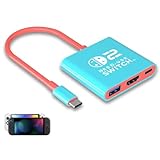
- Switch TV Dock Adapter - Support nintendo switch 1 and oled and steam deck and nintendo switch 2 tv dock mode paly. Compatible with switch 2 the latest firmware 21.0.0 version update.
- 4K HDMI Output Dock - For nintendo switch 2 and steam deck dock mode, the adapter output 4K60HZ high quality video. For old nintendo switch 1,Only supports native 1080P60HZ resolution.
- USB A 3.0 Input Port - The switch tv dock adapter come with one USB-A 3.0 input port, support access wired controller / dance pad / gamecube adapter / charging dock and other usb expansion device.
- Plug and Play on TV - First wake up switch console and then connect power adapter and hdmi cable. and then play happy on tv mode.NOTE:Switch 1 need 15v2.6a / Switch 2 need 20v3a PD charger.
- For More Devices - The switch tv dock adapter support nintendo switch 1 2 and steam deck dock mode well. Also compatible with Rog Ally, Legion Go and new ipad or mac or Samsung dex station.
Rank #4
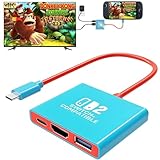
- ❤️𝐍𝐨𝐭𝐢𝐜𝐞: The TV Dock can support Switch 1 and Switch 2. If buy it for Switch 2, you need to update the TV dock first to the latest version to support the new Switch 2 generation. Please contact customer service via Amazon Messages to obtain the firmware upgrade package. We will assist you in completing the firmware upgrade.
- 1.Compact and Portable Design for Switch: Widely compatible Switch TV stand, Designed specifically for Nintendo Switch Switch/OLED. Not compatible with Switch Lite. Plug and play.The Switch TV dock is a lightweight and portable alternative to the official dock, making it ideal for travel and on-the-go gaming.
- 2.Multi-function 3 in 1 ports Switch TV Dock: This Switch docking station features a 4K@60Hz HDMI 2.0A output port, USB 3.0 port, and PD 100W fast charging Type-C port, compatible with a range of devices with Type-C port.
- 3.Switch TV Adapter with HDMI 2.0A 4K@60Hz Output: Enjoy high-definition gaming with the 4K@60Hz HDMI output of the Switch TV adapter, supporting a variety of TVs, monitors, and projectors.
- 4:Easy to Set Up: Simply connect the HDMI cable to TV, plug in the PD charger, and connect the Type-C port to the Switch TV mode will activate in 5 seconds.
Rank #3

- Officially Licensed by Nintendo
- LAN Adapter for Nintendo Switch
- Fast and stable wired internet connection
- Perfect for online multiplayer
- Plugs into Nintendo Switch Dock
Rank #2

- Adapter for Gamecube Controller - The gamecube adapter works with nintendo switch and wii u and pc and new nintendo switch 2. Support 4 gamecube wired controller or wavebird controller.
- Super Smash Bros Choice - The gamecube adapter support super smash bros game on switch or wii u. Note: Enter game by remote control for wii u console and only support super smash bros.
- Four Player Support - Come with four ngc input ports for your gamecube controller. You can play with your friends at same time. Most support connecting up to four ngc controllers.
- Plug and Play - Built in a stable IC chip,No lag and no drive install need. Change the adapter button on WII U to play on WII U and Switch mode, Change the adapter button on PC to play on PC mode.
- Turbo Feature Support - What turbo actually does is replicates the same button pushed by the user over and over again at an extremely fast rate. Free your hands from some complex games.
Product prices and availability are accurate as of the date/time indicated and are subject to change. Any price and availability information displayed on Amazon at the time of purchase will apply.




