
What’s actually slowing this PC down?
Pick the symptom - the matching free tool is one click away.
For the Chaos Archwizard encounter on Taedal’s Tower floor 17, prioritize the Adventurer’s shield, keep moving through the boss’s hazards, and interrupt the Fury Attack aimed at your ally. Staff/Wand can add damage and healing, but the encounter guides do not establish a required build or rotation.
Where the Chaos Archwizard fight takes place
Chaos Archwizard is the floor 17 encounter in Taedal’s Tower, also called Shield of Stalwart Cooperation. You fight alongside an Adventurer NPC, so protecting that ally is part of the encounter, not just dealing damage to the boss. Game8’s floor 17 guide describes the shield and Fury Attack mechanics; Games Lantern’s tower guide covers the damaging spells and arena hazards.
As an Amazon Associate I earn from qualifying purchases.
How to handle the fight
- Start inside the Adventurer’s shield. Move close to the Adventurer and stand within the shield before initiating the encounter. Game8 identifies it as protection against the opening explosion.
- Move out of marked ground danger. When a blue danger area appears, leave it promptly rather than trying to finish a cast. Games Lantern says it detonates shortly after appearing.
- Keep repositioning around the line attack. The Archwizard rotates while projecting blue fire forward. Move out of its path as it turns instead of remaining in front of it. A magical sphere slam also deals area damage; leave its danger area.
- Return to the shield during the arena-wide danger phase. When the encounter relocates you and the Adventurer to opposite ends and purple damage zones appear, cross the arena quickly. Get into the Adventurer’s shield before the wide-area attack lands.
- Intercept Fury Attack for the Adventurer. When the Adventurer prepares an attack and the boss winds up Fury Attack against them, stand between the two and use a defensive skill at the right time to parry. Game8 says a successful parry—or tanking the hit—lets the Adventurer attack the boss.
- Navigate the purple haze and rotating strands. Treat this phase as a route-finding hazard: use the relatively safe outer area, then move between or jump over the rotating smoke strands rather than crossing the damaging haze.
- Step out of the highlighted teleport zone. Game8 describes a marked zone in front of the boss that teleports anyone caught to the arena edge. The delay gives you time to move clear.
A 2024 walkthrough uses the labels “Lightning Breath,” “shadow AoE,” and “Flame Eruption,” and describes jumping shadow lines to reach the Knight. Those are the video’s terms, not confirmed patch-stable official move names; use the visible cues in your version of the fight. Kasum Adventurer’s walkthrough was published in October 2024.
The Tool Desk
Outbyte PC Repair FREERepair Windows errors before they cause bigger problemsFix Now →Outbyte Driver Updater FREEScan for outdated or missing drivers - takes under a minuteDriver Scan →What Staff/Wand contributes
Staff/Wand can combine Staff fire and lightning skills with Wand curses that deal damage over time, while also providing self- and ally-healing options. Game8’s Invocator PvE guide describes respectable single-target damage alongside sustain, but also notes low mobility and a more demanding playstyle. Those trade-offs matter here: healing can help, but stationary casting during a marked hazard can leave you exposed. Keep a healing option available and prioritize movement when the arena signals danger.
#1 Best Overall

- Ergonomic asymmetric shape: The IRONCLAW WIRELESS SE’s unique shape is designed for larger hands and right-handed players who prefer a palm grip. Don’t strain your wrist conforming to a mouse that’s wrong for you, choose comfortable control instead
- 10 Programmable buttons: Program macros, map keybinds, and get your mouse set up for peak performance and productivity via powerful, easy-to-use iCUE software
- Precise CORSAIR MARKSMAN sensor: Get the precision you need for performance gaming with the 26K DPI CORSAIR MARKSMAN sensor. Surface calibration allows the IRONCLAW WIRELESS SE to adapt to any setup
- Massive battery life: With up to 285 hours of battery life over 2.4GHz and up to 532 hours of battery life using Bluetooth, you’ll have more than enough battery for marathon gaming sessions
- Customizable RGB lighting: The unique shape gives your RGB lighting more places to shine. Customize the scroll wheel, logo, and the front grill with your lighting preferences. There’s also 3-stage indicators to display DPI and profile cues
The available encounter guidance does not establish a Staff/Wand rotation, equipment setup, or boss-specific optimal build. A separate Staff/Wand guide result does not provide dependable details for prescribing one here. Build balance and move behavior can change by patch; Game8 says it ended Throne and Liberty coverage in March 2025, so its November 2024 encounter guide should not be treated as confirmation of current-version tuning. Game8’s Invocator build guide
Quick Recap
Rank #4
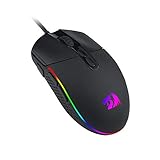
- 5 Adjustable DPI Levels and 4 Polling Rate - M719 mouse is designed with 5 DPI levels available: DPI 400/800/1600/2400/4000. easy to switch between different game needs. DPI can be adjusted freely by ±100 from 100 to 10000 via software to meet all your needs. 4 polling rate is adjustable: 125Hz/250Hz/500Hz/1000Hz, high polling rate ensures a smooth and fast movement.
- Any Button is Reassignable - 8 programmable buttons are all editable with customizable tactical keybinds in whatever game or work you are engaging. 1 rapid fire + 2 side macro buttons offer you a better gaming and working experience.
- 8 Decent RGB Backlit Modes - Turn the backlit on and make some kills in your gaming battlefield. The hyped dynamic RGB backlit vibe will never let you down when decorating your gaming space, it would be better with other Redragon accessories with lights on.
- Comfort Grip - The ergonomic bumps on both sides makes gaming mice fit in any hands. It provides long-lasting comfort for players, without fatigue even during long hours of intense gameplay. It won’t slip when lifting the gaming mouse, or making fast and precise swipes.
- The Choice Of Die-hard Gamers - Whether you are targeting, aiming, slashing or attacking, a professional gaming mouse is your best weapon! The mouse will be your ideal partner. Perfectly compatible with Windows XP/Vista/Win7/Win8/Win10/ME/2000/Mac, etc.
Rank #3

- 24K DPI Precision Tracking: Adjustable 200-24,000 DPI (6 presets + 7 expandable via software). Dual visual feedback – wheel LED + RGB strip color-coding – instantly displays active DPI. Customizable 125-1000Hz Polling Rate for ultra-responsive tracking. Delivers 300IPS speed and 35G acceleration for pixel-perfect accuracy.
- Long 180Hr Smart Power + Rapid USB-C Recharge: 1,000mAh rechargeable battery powers 180hrs runtime (ECO Mode) or 48hrs (RGB Mode). Fully recharges via USB-C in 1 hour. Smart auto-sleep: 1min idle → light sleep (wake via movement) / 5min idle → deep sleep (wake via button). Sleep timers adjustable via driver for personalized power management.
- Tri-Mode Pro Connectivity - 2.4G/BT5.2/USB-C for PC/Mac/Laptop: Seamlessly switch between ultra-fast 2.4GHz (1000Hz), BT5.2 (dual-device pairing), and USB-C wired modes (1000Hz). Store 4 device profiles and toggle between them with the dedicated bottom button.
- 90g Honeycomb Ergo Design: Matte Grip + Sweat-Resistant Structure. lightweight honeycomb shell (90 ±2g - without receiver) with matte texture enhances grip control during intense gaming. Medium-sized contour (4.93x2.48x1.61 in) optimized for comfortable grip by most hand sizes. Features 50M-click micro switches for crisp feedback and PTFE skates for near-frictionless glide.
- Zero-Install Web Driver (Mac & PC): Customize DPI, 1000Hz polling, RGB, and program 6 buttons directly in your browser. Just set your profile, close the tab, and game with zero background software draining your system's performance.
Rank #2

- 【𝐓𝐑𝐈𝐏𝐋𝐄-𝐌𝐎𝐃𝐄 𝐂𝐎𝐍𝐍𝐄𝐂𝐓𝐈𝐕𝐈𝐓𝐘】M814W wireless gaming mouse switch effortlessly between ultra-fast 2.4G for gaming, Bluetooth for office work, and wired USB-C mode for continuous use. Advanced RGB lighting and button remapping require the downloadable software for Windows PCs (Mac OS is not supported for software customization).aming Mouse, M814W
- 【𝐀 𝐃𝐄𝐃𝐈𝐂𝐀𝐓𝐄𝐃 𝐑𝐀𝐏𝐈𝐃 𝐅𝐈𝐑𝐄 𝐊𝐄𝐘】Customize 7 primary buttons (excluding the Rapid Fire key) through software to execute complex macros. The pre-set Rapid Fire key (1 click = 3 clicks) delivers a tactical advantage in FPS games straight out of the box.
- 【𝐋𝐎𝐍𝐆-𝐋𝐀𝐒𝐓𝐈𝐍𝐆 𝐁𝐀𝐓𝐓𝐄𝐑𝐘】Battery Capacity Up to 10,000 mAh, Enjoy up to 250 hours of battery life in 2.4G mode with RGB off. With typical RGB use, experience extended daily use. The flexible USB-C cable allows for convenient charging while continuing to game or work.
- 【𝐇𝐈𝐆𝐇-𝐏𝐑𝐄𝐂𝐈𝐒𝐈𝐎𝐍 𝟐𝟒𝟎𝟎𝟎 𝐃𝐏𝐈 & 𝟏𝟎𝟎𝟎𝐇𝐳 𝐏𝐎𝐋𝐋𝐈𝐍𝐆 𝐑𝐀𝐓𝐄】Adjust sensitivity from 400 to 24000 DPI on-the-fly for precise control. With a 1000Hz polling rate, experience ultra-responsive and accurate tracking, ensuring every movement is instantly reflected on screen.
- 【𝐄𝐑𝐆𝐎𝐍𝐎𝐌𝐈𝐂 𝐂𝐎𝐌𝐅𝐎𝐑𝐓】Designed with a contoured shape and textured grips to fit comfortably in medium to large hands. This ergonomic design reduces fatigue during long gaming marathons or intensive workdays, providing reliable comfort and control.
Product prices and availability are accurate as of the date/time indicated and are subject to change. Any price and availability information displayed on Amazon at the time of purchase will apply.
Independent reader supportYour contribution helps us test, update, and keep practical guides available for everyone.
