To change the Xbox name associated with Dead by Daylight, change your Xbox gamertag. On Xbox One, open System > Settings > Personalization > My profile > Customize profile, select your gamertag twice, then enter a new one or choose a suggestion. You can also use Microsoft’s online gamertag change page.
Three account names are easy to mix up: your Xbox gamertag, your Microsoft Account display name, and your Behaviour Account nickname. Only the gamertag is the Xbox platform identity used as a game’s primary display name under Microsoft’s console requirements.
Change your Xbox gamertag
Microsoft documents this console route for Xbox One:
- Press the Xbox button on your controller.
- Go to System > Settings > Personalization > My profile > Customize profile.
- Select your gamertag, then select it again.
- Enter a new gamertag or choose one of the suggestions.
- Save or confirm the change if prompted.
Microsoft also provides an online option for retail users: visit social.xbox.com/changegamertag and sign in with the account whose gamertag you want to change. The console instructions above are specifically for Xbox One; menu labels may differ on other Xbox generations.
Quick wins for a faster PC:
Clear out junk files and repair common Windows errorsFree Scan →Scan for outdated or missing drivers - takes under a minuteDriver Scan →#1 Best Overall
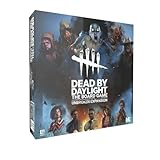
- Play as 5 new resourceful Survivors with their own unique Perks!
- Play as 5 new Killers with horrifying Powers that defy logic to hunt your prey!
- Customize your experience with all-new Perks and set-up options!
- Bring the game to life with 10 hauntingly detailed miniature figurines!
Which name are you trying to change?
| Name | What it is | Where to change it |
|---|---|---|
| Xbox gamertag | Your Xbox platform identity. Microsoft’s Xbox console requirements say titles must use the gamertag as their primary display name on Xbox consoles; this is platform-wide guidance, not a description of every DBD screen. | Xbox profile settings or Microsoft’s online gamertag change flow. |
| Microsoft Account display name | The name shown in Microsoft Account contexts. Changing it does not change your Xbox gamertag. | Edit your name after signing in to your Microsoft Account. This is not the setting to use to change your Xbox identity in a game. |
| Behaviour Account nickname | A separate nickname in your Behaviour Account settings. Behaviour’s instructions do not establish that it replaces the Xbox name shown in DBD. | Sign in to your Behaviour Account, open Account Details, select the pencil beside the nickname, enter the new nickname, and save. Behaviour says you can change it once every 24 hours. |
What to expect after changing it
The cited Microsoft Xbox One instructions say the initial gamertag change is free once. Microsoft’s GDK guidance also says accounts get one free change to set a modern gamertag. These sources do not establish a current price for later changes across all regions and account situations, so check the change flow for any charge before confirming.
Official sources do not specify how quickly a changed gamertag appears on every Dead by Daylight screen or in every match. If DBD still shows the old name, first check that the Xbox profile itself displays the new gamertag. If it does, contact Xbox or DBD support about the account-specific issue.
Rank #2

- EXPAND YOUR GAMEPLAY – Take your Dead by Daylight board game further with 5 new Survivors and 5 terrifying Killers, each with unique abilities for fresh strategies and tension. Requires the base set to play.
- HORROR-THEMED STRATEGY – Escape or become the ultimate ghost killer game villain with new Perks and Powers that heighten suspense and excitement. Will you survive the night or fall to the darkness?
- DETAILED MINIATURES – Includes 10 hauntingly sculpted miniatures, bringing characters to life with eerie precision. A must-have for fans of horror board games, collectible art, and immersive tabletop play.
- MULTIPLE WAYS TO PLAY – Customize matches with new setup options, creating fresh scenarios for replayability. Whether you love betrayal, hidden movement, or outsmarting foes, this expansion enhances your Dead by Daylight experience.
- PERFECT FOR HORROR FANS – Great for teens, adults, and couples who love strategy, tabletop, or party games. A top pick for game nights, mystery lovers, and fans of monsters and survival horror.
Why the distinction matters
Microsoft Support states, “Changing your display name does not change your gamertag.” Microsoft’s Xbox console requirements separately state that titles on Xbox consoles must use the gamertag as their primary display name. That platform rule supports changing the gamertag when your goal is to change the Xbox identity used in a game, but it does not document DBD-specific menus or guarantee when the game refreshes the name.
Quick Recap
Product prices and availability are accurate as of the date/time indicated and are subject to change. Any price and availability information displayed on Amazon at the time of purchase will apply.




