Choose a nearby region that shows a low, steady ping in the live client, then confirm the selection for your game mode before queueing. For a party, coordinate around the inviting host’s region and pay attention to any current high-ping warning. Tarkov’s controls can differ by mode, and no single region or ping target is guaranteed to be best for every player.
How to choose a Tarkov server
- Open the server or region controls for your mode. Use the live launcher or in-game controls; the exact path can vary by mode and build.
- Compare the displayed ping. Start with nearby available regions, but use the client’s readings rather than assuming the geographically closest option will perform best.
- Favor a stable connection. If the client shows a consistently better reading for another available region, consider that option. Recheck before queueing because availability and readings can change.
- Confirm the selection, then queue. Make sure the mode and region shown in the client match what you intended to select.
Battlestate has described work on player interpolation to improve movement smoothness and stability in cases involving unstable connections, ping differences, or packet loss. That developer description confirms these factors matter, but it does not establish a universal ping ceiling or prove that one region will perform best for you. Escape from Tarkov’s official updates are the place to check for current client and service information.
As an Amazon Associate I earn from qualifying purchases.
Check which mode you are playing
PvE: local or server-based play
Battlestate documented an option to choose local or server-based play from the PvE location-selection screen, while noting it would monitor server load to prevent long queues. That announcement does not establish that the same control appears in every mode, describe every availability condition, or guarantee which choice will queue faster. Check the current PvE screen before selecting.
Recommended Free Tools
Other modes
Do not assume the PvE location-selection screen or its controls apply to other modes. Use the live launcher or the server and region controls available for the mode you are about to play; the official sources do not establish one universal menu path for every mode or build.
#1 Best Overall
![TOP CUSTOMS Escape from Tarkov - Tagilla Figurine Replica [Updated Packaging]- Collectible Figurine Statue- FactoryBoss - Gift Idea - Gamers](https://m.media-amazon.com/images/I/41EZSWsEqsL._SL160_.jpg)
- Exclusive Top Customs design – crafted to closely resemble Tagilla’s in-game appearance with premium attention to detail
- Made from durable hard PVC, NOT 3D printed, using high-quality injection molding for a clean, professional finish
- Perfect for collection and display alongside your Tarkov gear or gaming setup!
- Ideal gift for your squadmates, friends, boyfriends/girlfriends
- A must-have for Tarkov fans. Whether you’re messing around in the hideout or building the ultimate 'Chad' loadout, this collectible hits hard.
Choosing a region with a party
Coordinate the region before the group queues, and check the current client warnings for members whose connection may be poor. In a 2022-era announcement, Battlestate said the inviting host chose the region. The same announcement described a warning if a team member’s latency exceeded 225 ms, while allowing the group to continue. Treat that figure as historical guidance, not a current universal cap or disconnect threshold; follow the warnings shown by the game now.
What to compare when regions look similar
- Displayed ping: Compare the readings in the client immediately before play rather than relying only on distance.
- Stability: A steady connection matters alongside the ping number. Battlestate has specifically discussed unstable connections and packet loss in its description of networking work.
- Party compatibility: The host’s region choice can affect the group, and a current warning for a high-ping member is relevant to whether the party should proceed.
- Mode behavior: PvE has had a documented local-versus-server-based selection; do not transfer that behavior to other modes without checking their controls.
Battlestate also announced optimization of LATAM servers for connection stability and matchmaking in a regional update. That was a time- and region-specific announcement, not a current performance guarantee for LATAM or other regions.
Rank #2

- Exclusive Top Customs design - Inspired by the iconic Customs boss from Escape from Tarkov, this Reshala figurine is designed for fans who want a piece of Tarkov on their shelf.
- Made using durable PVC injection molding for consistent detail and a clean finish — not 3D printed.
- Stands approx. 9 cm (3.54 inches) tall, ideal for desks, shelves, gaming setups, or collector displays.
- A unique collectible for Tarkov players, streamer fans, or anyone building a Tarkov-themed collection.
Check current availability and updates
Server availability, displayed ping, mode controls, and party warnings can change. Check the live launcher or in-game controls before a session and consult Battlestate’s official update feed for current announcements. The official material cited here does not establish a complete current region list, a universal recommended ping value, or a quantified before-and-after performance result.
Do these 3 things before closing this tab:
1Fix the driver behind crashes, sound loss and screen glitches2Clear out junk files and repair common Windows errors3Scan for outdated or missing drivers - takes under a minuteQuick Recap
Rank #4
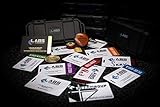
- The product is NOT an in-game items, 1:1 real keycards from escape from tarkov.
- All EFT Labs keycards,TerraGroup Labs access keycard,Black,Blue,Green,Red,Violet,Yellow Keycards. Object 21WSObject 11SR Keycards.
- Blank emfc Chips(no info was written) are integrated in all cards.
- All cards are in a protective plastic holder to prevent from scratches,the plastic holder was to protect the cards,but they might folded,sorry.
- Secure Container Outer Dimension:6.88'(L)x3.22'(W)x1.54'(H)
Rank #3

- Precision in Play: 1K Hz Polling Rate for Sharp Accuracy -Equipped with a 1K Hz polling rate and 26,000 DPI, the M2 captures every nuance of your movement, translating it into precise, in-game actions. Perfect for both competitive and casual gaming, it ensures your responses are always on point, thanks to the PAW3395.
- Experience the unique blend of style and practicality with the M2's hollowed-out design. This creative approach not only gives the mouse a distinctive look but also ensures optimal airflow, keeping your grip cool during intense gaming sessions.
- With the TUROSPEED Wireless technology, the M2 offers versatile connection options - from the ultra-fast 2.4G to the agile Bluetooth, down to the steadfast wired connection. Coupled with prolonged battery life, this mouse ensures you're always ready, always dominant.
- Elevate your gaming environment with the M2's customizable GLOWSYNC RGB lighting. Choose from five dynamic light modes and create your own lighting profiles using the intuitive software. Whether it's pulsing, steady, or reactive lighting, personalize your mouse to match your gaming setup and mood.
- The M2 is your canvas for customization. 5 programmable buttons, combined with user-friendly software, allow you to configure macros, adjust DPI settings, and tailor button functions to align with your gaming strategies.
Product prices and availability are accurate as of the date/time indicated and are subject to change. Any price and availability information displayed on Amazon at the time of purchase will apply.




