
The Tool Desk
Outbyte PC Repair FREERepair Windows errors before they cause bigger problemsFix Now →Outbyte Driver Updater FREEScan for outdated or missing drivers - takes under a minuteDriver Scan →You can clean dust from a PS3’s exterior and vents without opening the console: unplug it, wipe the casing with a soft, dry cloth, then use a low-powered vacuum to remove dust from the vents. Keep the vents clear and give the console room to breathe. Sony cautions against disassembling or modifying the system, and external cleaning is not guaranteed to fix persistent overheating or unusual fan noise.
What you need
- A soft, dry cloth for the exterior casing.
- A vacuum cleaner with a low-power setting for dust at the vent openings.
Sony does not specify a vacuum brand, model, nozzle, or performance rating. Match the tool to the task: use the cloth on the plastic surface and low-powered suction at the vents. Do not substitute solvents, other cleaning chemicals, or chemically treated cloths. Sony’s PS3 care guidance gives these cleaning methods.
As an Amazon Associate I earn from qualifying purchases.
Clean the PS3 externally, step by step
- Turn off and unplug the console. Disconnect the AC power cord from the electrical outlet before cleaning the PS3 or connected accessories.
- Position it safely. Move the console only as far as needed to reach it without pulling or stressing cables, and set it on a stable surface.
- Wipe the casing. Use a soft, dry cloth. Do not apply cleaning liquid or use a chemically treated cloth.
- Remove dust from the vents. Use a low-powered vacuum cleaner at the vent openings to lift accumulated dust. Sony’s instructions call for suction; they do not specify a particular vacuum or attachment.
- Check the console’s surroundings. Make sure the vents are not blocked and that the system is not boxed into a cramped space.
- Reconnect power when finished. Plug the AC cord back in after the external cleaning is complete.
Place the console to support airflow
Sony’s original PS3 manual says to keep the system at least 10 cm (4 in) from a wall. It also warns against placing it on long-fiber carpet, in a cramped space, or under a cloth, and says not to block the vents. These are placement instructions from Sony’s original manual, published in 2006; the specific 10 cm distance is not stated in the other model manuals covered here. Sony’s PS3 manuals cover system care and ventilation.
What not to do
- Do not open the casing. Sony says there are no user-serviceable components inside and cautions against disassembly or modification. Its original manual notes that the supplied hard disk may be removed, but not disassembled or modified; that does not make the console’s internal components user-serviceable. Sony’s hardware manuals include PS3 safety information.
- Do not use solvents or chemicals on the casing. Use a dry cloth instead.
- Do not treat other cleaning methods as Sony’s instructions. The reviewed manuals recommend a low-powered vacuum for vent dust; they do not prescribe compressed-air blasting or liquid cleaning as the external cleaning procedure.
- Do not assume cleaning will repair a fault. The manuals provide no guarantee that external dust removal will resolve overheating, abnormal fan noise, or a malfunction.
How often should you clean a PS3?
Sony’s manuals do not give a fixed cleaning interval. Clean when you see dust collecting on the casing or around the vents, and keep the vent openings unobstructed. Avoid turning that observation into a mandatory weekly or monthly schedule: no schedule is specified in the manuals.
#1 Best Overall

- 【Differences from other products】- Compared with other products, we have added a high-grade metal double-headed crowbar, which can be used in conjunction with a nylon double-headed crowbar, which greatly meets your various needs; we have improved the curved tweezers to make it easier for you to hold small tools.
- 【Function of screwdrivers】- PS3, PS4, PS5 controllers use T8 and PH0 (+ 2.5mm) screwdrivers, and handles use PH0. The XBOX controller uses T6 and T8 screwdrivers, the handle and the console use T8 and T10. PH0 (+ 2.5mm) can also be used in various household appliances, furniture and toys.
- 【Magnetic S2 steel screw head】 - All our screwdrivers are magnetically designed, which can fix small screws to avoid falling; and are made of high-quality S2 steel, after heat treatment, it is more accurate and durable than silver CRV bits.
- 【Slip-resistant flexible handle】- The screwdriver handle is made of TPR and PP materials, with a special non-slip design, easy to grasp and very comfortable; the flexible cover at the bottom of the screwdriver handle can rotate smoothly. When using the screwdriver vertically, press down and rotate it firmly. The screwdriver handle makes it easier to repair the instrument through force transmission, thereby making maintenance more effective.
- 【Package included】- This kit includes PH0 and Torx T6 /T8 /T10 screwdrivers, tweezers, brushes, 5 crowbars.
If the PS3 still overheats or sounds abnormal
External cleaning addresses surface and vent dust, not every possible cause of heat, noise, or malfunction. If the problem continues after cleaning and improving airflow, consult a qualified console repair provider for diagnosis. Sony’s support page provides system-care information, but does not promise that cleaning resolves persistent symptoms. Sony PS3 support.
Quick Recap
Best Value

- 【Widely application】Torx T6/T8 and crossed screwdriver 2.0/4.0 suitable for Xbox 360 Xbox One controllers and PS3, PS4, PS5 controllers and many common electronic devices.
- 【Differences from other products】We added a Slotted screwdriver that can be removed from the PS5 base and other household appliances for a wider range of uses.
- 【High-quality Material】The screwdriver bit is made of high-quality S2 steel, which is hardness up to 60 degrees, durable. The handle is made of PPR and PP materials, non-slip and flexible, easy to use, light and flexible.
- 【Strong magnetic】The screwdrivers all have magnetic,It can be easily fixed by attaching screws.
- 【After-sales service】If receive missing or defective products,you can contact us an any time,we can provide return service.
Rank #4

- BRAND: TRISONIC
- PRECISION BRUSH CLEANING SYSTEM KEEPS OPTICAL LASER LENS CLEAN AND DUST-FREE
- RESTORES LASER LENS TO ORIGINAL PERFORMANCE LEVEL
- COMPATIBLE WITH CD-ROM, CD-R/RW DVD-ROM CONTAINS A VOICE GUIDE
- CLEANING LIQUID INCLUDED
Rank #3

- 【Differences from other products】-- Compared with other products, we have added a high-grade metal double-ended crowbar, which can be used in conjunction with nylon double-ended crowbar to meet your various needs; we also added 4 handle rocker caps and 4 handle screws are easy to replace; we have improved the arc-shaped tweezers to make it easier for you to grasp small PS4 and PS5 accessories.
- 【Screwdriver set for ps4 ps5】-- PH00 (2.0mm) Phillips screwdriver is used for PS4 and PS5 controller ; PH0 (3.0mm)/T8 screwdriver is used for PS4 game console; PH1 (4.0mm) Phillips screwdriver is used for various household appliances , Furniture and toys.
- 【Magnetic S2 Steel Screw Head】-- Our screwdrivers are all magnetic design, which can fix small screws to avoid falling or loss; and made of high-quality S2 steel, after heat treatment, it is more accurate and more accurate than silver CRV drill bits. durable.
- 【Slip-resistant flexible handle】-- The screwdriver handle is made of TPR and PP materials, with a special non-slip design, easy to grasp and very comfortable; the flexible cover at the bottom of the screwdriver handle can rotate smoothly, and when you use the screwdriver vertically, press it down hard and Turning the screwdriver handle makes it easier to repair the instrument through force transmission, thereby making maintenance work more effective.
- 【PS4 full set of screwdriver set]】-- This set includes PH00, PH0, PH1 Phillips screwdriver and T8 Torx safety screwdriver, tweezers, brushes and PS4 handle 2.0 screws and handle rocker cap for replacement.
Rank #2
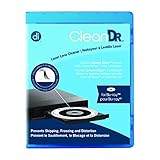
- Laser lens cleaner for Blu-Ray players and Blu-Ray video game systems having issues with discs that load slowly, skip, or freeze during playback
- Patent-pending Zero-Clearance Technology and 10-Brush Cyclone Clean process removes dirt and dust build-up that causes audio and video dropout and distortion
- Cleaning the laser lens can extend the life of the Blu-Ray player while improving sound and image quality
- Includes Image & Sound Calibration Tools and instructions in English, French or Spanish
- Works with Blu-Ray Players, DVD Players, XBOX/XBOX 360/XBOX ONE, PS/2/3/4. Not compatible with CD only players
Product prices and availability are accurate as of the date/time indicated and are subject to change. Any price and availability information displayed on Amazon at the time of purchase will apply.

