Open the RSI Launcher, click the arrow beside the RSI logo in the upper-left, and choose Settings. Under Application settings, click CLEAR LAUNCHER CACHE. Then reopen or retry the launcher and check whether it downloads the manifest, verifies files, and continues installation.
Clear the cache in the RSI Launcher
- Open the RSI Launcher.
- Click the arrow next to the RSI logo in the upper-left corner.
- Select Settings.
- Under Application settings, click CLEAR LAUNCHER CACHE.
- Retry the launcher and see whether the manifest downloads and the file check or installation completes.
RSI’s launcher troubleshooting guide says the launcher uses two cache folders to help it open and load faster. It identifies the in-app button as the supported way to clear them.

If the launcher is still stuck checking for updates
Check the available space on the drive where Star Citizen is installed. RSI notes that the launcher may not fully check available and required storage before installation or verification, so insufficient space can be relevant even when the launcher appears to be checking files. See RSI’s guide to a launcher stuck checking for updates.
Know which troubleshooting action you need
| Action | What it affects | When to consider it |
|---|---|---|
| Clear Launcher Cache | Launcher cache, cleared from Settings. | Start here for launcher troubleshooting; RSI describes it as a less drastic option than deleting launcher and game files. |
| Verify game files | Installed game files. | Use this separate check when troubleshooting corrupted or broken files, including frequent crashes or errors. See RSI’s launcher installation and file-check guidance. |
| Delete the USER folder | Player-specific settings and other client information; the folder is rebuilt when the game runs again. | Consider this as a distinct, more involved client troubleshooting step. Rename or preserve the folder first if you want to keep custom settings. See RSI’s login troubleshooting guidance. |
| Delete launcher and game files | Launcher and game installation files. | This is a substantially more extensive removal procedure. RSI advises saving custom profiles, keybindings, and user.cfg, as well as relevant log files, before proceeding. See RSI’s deletion instructions. |
When cache clearing does not address the problem
Clearing cache is a troubleshooting step, not a guaranteed fix for every launcher or login issue. RSI lists multiple launcher instances and network or VPN interference among possible causes of some login and session errors. For those symptoms, consult its Error Code 19000 / 19005 guide rather than repeatedly clearing cache.
Quick Recap
Best Value
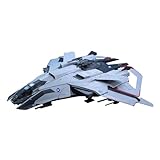
- A Kotobukiya Japanese import
- From the sci-fi game Star Citizen
- PLANET-RING has meticulously recreated the F8C Lightning at 1/100 scale
- Snap-fit construction requires no glue
- Includes a dedicated LED stand
Rank #4

- CLASSIC QUICK-WIT CATEGORIES GAME: Try to outwit other players by coming up with unique answers in this version of the fast-paced Scattergories party game for adults and teens
- THINK FAST AND BE CREATIVE TO SCORE: In the classic Scattergories game, write down things in each category that start with the letter rolled -- from appetizers to movie stars. Your answer only counts if no one else has it. After 4 rounds, the player with the most points wins!
- STURDY FOLDERS FOR LOTS OF FUN: This family board game for 2 players or more includes folders that are easy to write on and hold both lists and answer sheets
- ENHANCE CLASSIC BOARD GAME WITH ONLINE TOOLS: Scan the QR code -- or go to the web link -- to use the virtual timer and letter die on your smartphone
- FUN PARTY GAME FOR 6 PEOPLE: It’s an exciting group game for family and friends -- break it out for weekend fun, get-togethers, and holidays!
Rank #3

- READY, SET, WARP! Race across 24 tracks and warp to 15 CrossWorlds with Travel Rings, a unique gameplay mechanic that transports the iconic characters from the Sonic and SEGA universes into new dimensions. Use unpredictability to your advantage as you change the landscape of each race!
- RACE WITH THE BEST! Choose from 23 iconic Sonic characters, the largest roster of any Sonic racing game!
- MAKE IT YOURS: Mix and match between 45 unique original vehicles and 70 different gadgets to trick out your ride, level up your kart, and create the ultimate machine to match your racing style.
- GAIN THE ADVANTAGE WITH POWERFUL ITEMS! Dominate your opponents with 23 different items including returning favorites and all-new items like the Monster Truck!
- MULTIPLE WAYS TO PLAY: Gather with friends and play local split-screen in Grand Prix and the new party mode Race Park, compete against a community of players from around the world with up to 12 players online in World Match, or test your driving skills in Time Trials.
#1 Best Overall

- JOIN CONSTELLATION — Become part of the last group of space explorers seeking rare artifacts throughout the galaxy as you pursue humanity’s greatest mystery.
- CREATE YOUR EXPLORER — Customize your appearance and choose a Background and Traits as you shape your character in this role-playing game.
- EXPLORE THE SETTLED SYSTEMS — Visit more than 1,000 planets, from bustling cities and dangerous bases to wild landscapes, and meet characters, join factions, and take on quests.
- CAPTAIN YOUR SHIP — Personalize your ship, modify its weapons and shields, and assign crew members for unique bonuses. Take part in space dogfights, dock at star stations, and board or commandeer enemy ships.
- CRAFT AND FIGHT — Gather resources to craft supplies, equipment, and weapons, build outposts, and research crafting recipes. Modify weapons to suit your playstyle and use boost packs to maneuver in zero gravity.
Product prices and availability are accurate as of the date/time indicated and are subject to change. Any price and availability information displayed on Amazon at the time of purchase will apply.
Independent reader supportYour contribution helps us test, update, and keep practical guides available for everyone.



