Xbox’s documented mouse connection is wired USB, not Bluetooth pairing. Plug a wired USB mouse into a USB port on the console, then use it in a game or app that supports mouse input. Xbox’s accessible guidance does not establish a way to pair a Bluetooth-only mouse directly.
Connect a wired USB mouse to Xbox
- Plug the mouse’s USB cable into an available USB port on the Xbox console.
- Open a game or app that supports mouse input and try using the mouse there.
Xbox says wired USB mice can be used for navigation in select games and apps. That does not mean mouse input is available throughout the console or in every title. Xbox Accessibility Features | Accessible Gaming
Can you pair a Bluetooth-only mouse?
The official Xbox guidance available here describes wired USB mice; it does not give a Bluetooth pairing procedure or confirm that a Bluetooth-only mouse can connect directly to an Xbox. If you need the documented connection method, use a wired USB mouse rather than relying on Bluetooth.
Check whether your game supports mouse input
Before choosing a mouse for a particular game, check that title’s current Xbox listing for keyboard-and-mouse capability. Microsoft Store has a filtered listing of Xbox console games with that capability: Games on Xbox for Console Keyboard & Mouse. Support can vary by game, so a mouse connected to the console may still not control the title you opened.
#1 Best Overall

- Important Usage Notes: If the mouse responds slowly or abnormally, charge it as the battery might be low. The mouse enters sleep mode after 10 minutes of inactivity; click any button to wake it. Charge for 2 hours before first use. The blue light indicates charging and turns off when fully charged
- Dual-Mode Connection: Supports Bluetooth (Windows 8/10, Mac OS, iPad/iPhone with iOS 13+) and 2.4G wireless. Plug in the USB receiver for easy setup without extra software
- RGB Backlight: The mouse features RGB 7-color breathing lights, offering a cool visual effect, especially at night. The lights turn off in sleep mode to save power
- Rechargeable & Power Saving: Includes a built-in rechargeable battery, charged via USB cable. The mouse automatically enters sleep mode after 1 minute of inactivity to save energy
- 3-Level DPI & 6 Buttons: Adjustable DPI (1600/1200/800) and 6 buttons for efficient work and gaming. Silent buttons ensure no disturbance while using
If the mouse does not work in a game
- Confirm that the game supports mouse input; a USB connection alone does not guarantee compatibility.
- Check the game’s current Xbox or Microsoft Store listing for keyboard-and-mouse support.
- If the mouse is Bluetooth-only, use a wired USB mouse to try the documented connection method.
Xbox’s accessible guidance does not specify a device-specific troubleshooting procedure, a settings path, or a complete list of supported games, so those details should not be assumed.
Quick Recap
Rank #3
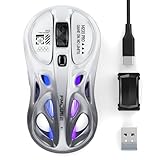
- HOLLOW DESIGN, PREMIUM GLOSS FINISH & DESKTOP AESTHETIC UPGRADE — Honeycomb shell with layered RGB glow-through effect. High-gloss coating — quality you see and feel. 4.7 x 2.4 x 1.3 in, 65g. For users who want style and performance in one.
- TRUE TRI-MODE, 3-DEVICE SWITCH — CABLE & ADAPTER INCLUDED — 2.4G, Dual Bluetooth, or Wired USB-C. Switch 3 devices instantly. 1.8m USB-C cable + USB-A adapter included — ready for any setup out of the box.
- GAMING-GRADE PRECISION, PLUG & PLAY — SAFE MACRO SOFTWARE INCLUDED — PixArt PAW3311 sensor, 12000 DPI, 300 IPS tracking, 35G acceleration, 1000Hz polling rate (wired & 2.4G), 5-level DPI (800–12000). Works instantly out of the box. Official FMOUSE driver for button remapping & macro programming — verified safe, no bloatware.
- RGB THROUGH HOLLOW SHELL — SINGLE-CLICK DPI, LONG-PRESS LIGHTING CONTROL — Layered RGB glows through honeycomb structure. Single-click top button to cycle DPI levels. Long-press 2s+ to switch RGB colors, change modes, or turn off backlight — no software needed.
- 500mAh BATTERY, USB-C & USE WHILE CHARGING — Built-in 500mAh for long-lasting wireless use. Turn off RGB to significantly extend battery life. Charge via any USB-C cable while in use — zero downtime. Windows/macOS/ChromeOS/Android 5.0+. 2-year warranty.
Rank #2

- 【Tri-mode Bluetooth Mouse】This mouse connects via Bluetooth 5.0/4.0 or 2.4GHz wireless— seamlessly pair this wireless mouse with laptops, tablets, or PCs. Switch between devices in 0.8s, perfect for hybrid office and home setups.
- 【Rechargeable Mouse/Automatic Sleep】Built-in 500 mAh large-capacity battery, Type-C charging port. Say goodbye to AA batteries, environmentally friendly charging, and reduce electronic waste. It will automatically enter sleep mode after 5 minutes of inactivity.
- 【Smart Bluetooth Mouse with LED Status Display】The built-in LED screen shows real-time battery percentage, DPI level (800/1000/1200/1600/2400), and connection mode. Never guess your settings again—control is literally at your fingertips.
- 【Silent Button & Portable】This mouse uses a silent button, which retains the click feel without disturbing others, making it ideal for quiet environments such as libraries and offices. The small and portable size is perfect for business trips and travel.
- 【Ergonomic Comfort Mouse】Designed with a contoured thumb rest and arched palm support, this mouse prevents wrist strain during 8-hour workdays. The smooth matte finish resists fingerprints, while the textured grip zone ensures control during rapid movements.
Product prices and availability are accurate as of the date/time indicated and are subject to change. Any price and availability information displayed on Amazon at the time of purchase will apply.




