Free tools Windows power users keep installed
One-click scans. No signup required.
To play through Snes9x Netplay, one computer hosts the game and the others connect to it as clients using the host’s IP address or hostname. The computers need working TCP/IP connectivity. Before setting it up, note that the Snes9x Windows readme contains a historical warning that netplay “has not been maintained and tested in a long time, so it might be broken.” That note is labeled “NOTE 2017 OV2”; it is not a test of every current build, so successful play is not guaranteed.
What you need before connecting
- A copy of Snes9x on each computer, with network access between the machines.
- The same game available to the players; the server directs clients to load the game it is hosting.
- The host’s IP address or hostname, which clients will enter when connecting.
The Windows readme, updated for Snes9x 1.63 in July 2024, describes play over TCP/IP on a local network or the Internet. It notes that Internet play depends on short ping times but gives no numerical latency limit. The readme’s menu names and behavior may differ between operating systems or builds. Snes9x Windows readme
Set up the host and connect clients
- Choose the host. The host acts as the server and master player (player 1). The Windows guide recommends the group use its fastest computer on its fastest available connection.
- Start the server. On the host, load the game, open the Netplay menu, and choose Act as server. If your network requires it, initialize the network first.
- Connect from each client. On each other computer, load the same game requested by the server, open the Netplay menu, select Connect to server…, and enter the host’s IP address or hostname. The first remote client is player 2; later clients take the next player positions.
- Wait for synchronization. The server coordinates the joining client’s game state. With Sync Using Reset Game checked, the guide says SRAM data is sent and everyone is reset. Otherwise, the server sends a freeze file to bring the joining client into the game state.
These menu directions and synchronization details are from the Windows readme; check the menus in your own build if labels or behavior differ. Snes9x Windows readme
Check the network path if the connection fails
Snes9x uses TCP/IP for netplay. A client must be able to reach the host on the port configured for the server. Local network play avoids an Internet route; remote play depends on the Internet connection and ping, and the documentation does not establish a universal ping threshold or provide a release-specific router port-forwarding procedure.
Recommended Free Tools
#1 Best Overall

- Premium build quality
- Compatible with all SNES models
- 10 ft. cable
Snes9x supports the command-line options -net, -port <num>, and -server <string>. A sample Unix configuration lists port 6096, but that is an example value—not a universal default for every platform, release, or configuration. Snes9x sample Unix configuration Snes9x command-line source
- Connection refused: Check that the host is running a Snes9x netplay server and that the client is using the configured hostname and port. The implementation’s connection-refused message points to those checks; this does not explain every timeout or firewall error. Snes9x netplay implementation
- Timeout or unreachable host: Confirm the client can reach the host over TCP/IP and that the host’s network allows incoming traffic on its configured port. The setup guide does not specify a universal firewall or router configuration, so exact steps depend on your operating system and network.
- Different game state after joining: Allow the server’s synchronization to finish. The Windows guide describes SRAM transfer and a reset when Sync Using Reset Game is enabled, or a freeze-file sync when it is not.
Coordinate play and choose your controls
The Windows guide suggests running in windowed mode so status information appears in the window title bar. It also recommends using a separate chat application to coordinate the game choice and communicate while playing. A keyboard can be used for input; a compatible USB gamepad is optional if you prefer physical controls. Snes9x documents joypad mappings and input-device options, but netplay does not require buying a controller. Snes9x command-line source Snes9x Windows readme
Quick Recap
Rank #4

- 🔥Wired controller works for original SNES Nintendo system, specially designs for old school SNES Online Games On TV.This is NOT USB version controller,only works for the super Nintendo console.Not Support the both controllers working for Super Famicom Game Console or at a time, only support one controller for 1 player playing on Retro Duo or Retron 5.
- 🔥Classic designe:Super precise cross key and function buttons, the cross direction key adopts frosted concave design, super sturdy shoulder buttons with responsive buttons, anti-sweat and anti-slip, provide precision control for a wide range of games, perfect for retro gaming lover.
- 🔥7-pin connector port, including a 1.8 meters (6ft) cable.Wire was good and long enough,you also can use a expansion cable which is nice for not having to sit on the floor to play.
- 🔥Great quality with accurate and reliable input response, this is a decent replacement controller for OG SNES
- 🔥Third party controller, not original SNES controller.It is a perfect SNES controller replacement with high quality functional stability. Notice: only applicable to the host shown in the diagram, not suggest for third console, align the plug with the port on the console and insert it.
Rank #3
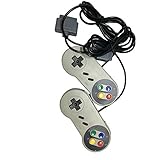
- Color: grey. Featured all 6 controller buttons with D-pad, Start, Select,A,B,X,Y and two shoulder buttons
- Works with all Super Nintendo Entertainment System Classic and SNES-compatible consoles
- 7-pin controller connector - Premium-quality components.
- High quality classic controller
- Package includes: 2 x Classic Controller for SNES
Rank #2

- 2.4G wireless retro Controller for your original SNES/SFC system
- Includes 2.4G wireless receiver
- Lag Free & rechargeable built-in Lithium Ion battery
- Includes 2.4G Controller, 2.4G receiver and USB cable
Product prices and availability are accurate as of the date/time indicated and are subject to change. Any price and availability information displayed on Amazon at the time of purchase will apply.




