You can’t turn recoil off with a legitimate normal setting in Rainbow Six Siege on PC. You can make it more manageable by learning the weapon’s pattern in the Shooting Range, firing controlled bursts, and testing the recoil-control attachments available for that weapon.
Why R6 weapons do not have literal zero recoil
Recoil is part of each weapon’s behavior, not a universal setting you can disable. Ubisoft’s official Operation Brutal Swarm recoil-system description says vertical and horizontal recoil intensify during sustained fire: the longer the burst, the stronger the recoil. High-capacity weapons can also enter an additional, harder-to-control recoil stage.
That means recoil control depends on the weapon, how long you fire, and whether its movement is mainly vertical, horizontal, or both. A single sensitivity setting or attachment recommendation will not work equally well for every gun.
How to practise recoil control in the Shooting Range
Use the Shooting Range to learn the specific weapon and setup you plan to play. Ubisoft has described the range as a place to get accustomed to recoil patterns; the steps below are a practical way to apply that guidance, not a quoted Ubisoft procedure.
What’s actually slowing this PC down?
Pick the symptom - the matching free tool is one click away.
#1 Best Overall

- Rediscover the Fun of FPS Gaming – Tired of ordinary flat gaming mice; ErgoStrike7's unique 65° vertical gun-grip design brings a fresh level of immersion and excitement to cinematic campaigns or casual action games
- 65° Vertical Ergonomic Grip – Designed around a natural handshake position; the 65-degree vertical grip helps reduce wrist strain while providing lasting comfort and smooth control during extended gameplay sessions
- Stop Clicking. Start Shooting. – Experience a true mechanical trigger instead of a traditional mouse button; enhanced by an adjustable linear motor that delivers tactical recoil feedback ordinary mice can't match
- PAW3395 Precision & Tri-Mode – Powered by the PixArt PAW3395 optical sensor for responsive tracking; supports low-latency 2.4GHz wireless, Bluetooth 5.1, and wired USB-C across Windows, macOS, laptops, and Steam Deck
- Customize Every Detail – Fine-tune DPI, remap buttons, assign macros, personalize RGB lighting, and adjust specific recoil modes with intuitive software; create a setup that matches your playstyle for ultimate fun
- Enter the Shooting Range and select the weapon you want to learn.
- Use the attachments you currently have equipped, then fire a short burst at a fixed point.
- Watch how the shots climb or move sideways, and adjust your aim to keep the grouping consistent.
- Repeat with a longer burst so you can see how sustained fire changes the pattern. High-capacity weapons may become harder to control as the burst continues.
- Try an available recoil-control attachment, then repeat the same bursts to judge whether the tradeoff helps your control.
Practise one weapon at a time. If you switch guns or change attachments, test again rather than assuming the old pattern still applies.
Choose attachments for the weapon, not an old universal build
Ubisoft has described recoil-control attachments as a way to customize weapons, but options depend on the selected gun. Check the attachment choices shown in-game for that weapon and compare them in the Shooting Range. Do not rely on an old attachment list as if it were a current, universal recommendation.
Rank #2

- Ergonomic Gun-Grip Design – Vertical grip reduces wrist strain and helps prevent RSI. Comfortable for long gaming sessions.
- Real Recoil Feedback – Built-in linear motor simulates real gun recoil for a more immersive FPS experience.
- Trigger-Based Controls – Left click becomes a true trigger pull. Includes zoom toggle and burst-fire button.
- High Precision – Up to 26000 DPI with PixArt sensor. Fast, accurate tracking for any playstyle.
- Custom Profiles – Use Ragnok software to remap buttons, adjust recoil strength, and save app-specific settings.
There is no supported basis here for naming one best attachment or sensitivity setting across all R6 PC weapons. The useful test is whether a currently available attachment helps you keep that particular weapon’s grouping consistent without making its other handling tradeoffs unsuitable for you.
Re-check recoil after balance updates
Weapon recoil can change with updates, so advice tied to a specific gun needs a patch date. In Ubisoft’s Y11S1.3 Patch Notes, published May 5, 2026, the AUG A2 had reduced vertical recoil on PC and console; the M762 had reduced horizontal recoil on PC; and the Spear .308 had reduced first-shot kick and vertical recoil on PC and console. These are dated, weapon-specific examples, not a promise that the same changes or best build apply indefinitely.
The Tool Desk
Outbyte Driver Updater FREEScan for outdated or missing drivers - takes under a minuteDriver Scan →Outbyte PC Repair FREERepair Windows errors before they cause bigger problemsFix Now →Rank #3

- Real Recoil Feedback: Built-in linear motor simulates gun recoil for a more immersive FPS experience with adjustable vibration strength
- Trigger-Based Controls: Left click functions as a true trigger pull with additional zoom toggle and burst-fire button for enhanced gameplay control
- Ergonomic Gun-Grip Design: Vertical grip with 65-degree angle reduces wrist strain during extended gaming sessions and supports natural hand positioning
- Tri-Mode Connectivity: Supports three connection modes allowing seamless switching across multiple devices for versatile gaming setup compatibility
- Custom Profiles and Software: Use Ragnok software to remap buttons, adjust recoil strength, and save application-specific settings with adjustable RGB lighting modes
When a patch affects a weapon you use, revisit its pattern in the Shooting Range and check the latest official notes before settling on a loadout. Historical recoil explanations can help describe the system, but they are not a current balance guide.
Independent reader supportYour contribution helps us test, update, and keep practical guides available for everyone.Keep recoil control legitimate
Build control through practice and in-game options. Scripts, macros, or devices that automatically compensate for recoil do not teach the weapon’s pattern and are not a legitimate substitute for manual control.
Quick Recap
Best Value
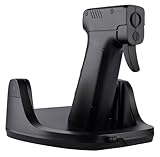
- Realistic aiming actions: This gun mouse can move horizontally back, forth, left, and right, and the wrist can also swing up and down. That is to say, when the wrist(or arm) swings up, down, left, and right, the game crosshair moves up, down, left, and right accordingly.
- Realistic gun grip design and feel: Just like holding a real pistal while aiming and shooting in games. The trigger uses a mouse button, so it does not have the force and stroke of a real weapon, but ensures response speed and good feel.
- Ultra smooth movement: At the bottom of this gaming mouse, design with fan-shaped arrangement of pulleys, allowing for faster and smoother swinging of the wrist or arm. Bearings are also used for up and down swinging, resulting in very low resistance. Motions will entirely dependent on the joints of your hands.
- Independent DPI setting: The horizontal and vertical sensors respectively have independent DPI setting buttons, with 8 horizontal segments and 10 vertical segments of DPI value, to meet the needs of fine DPI adjustment as a gaming mouse.
Rank #4
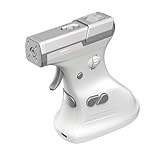
- Ergonomic Gun-Grip Design – Vertical grip reduces wrist strain and helps prevent RSI. Comfortable for long gaming sessions.
- Real Recoil Feedback – Built-in linear motor simulates real gun recoil for a more immersive FPS experience.
- Trigger-Based Controls – Left click becomes a true trigger pull. Includes zoom toggle and burst-fire button.
- High Precision – Up to 26000 DPI with PixArt sensor. Fast, accurate tracking for any playstyle.
- Custom Profiles – Use Ragnok software to remap buttons, adjust recoil strength, and save app-specific settings.
Product prices and availability are accurate as of the date/time indicated and are subject to change. Any price and availability information displayed on Amazon at the time of purchase will apply.




