Do these 3 things before closing this tab:
1Repair Windows errors before they cause bigger problems2Fix the driver behind crashes, sound loss and screen glitches3Clear out junk files and repair common Windows errorsTo customize a Striker’s appearance in Mecha BREAK, open Striker Bay, select Striker Design, then choose an appearance option. Paint, patterns, insignia, accents, and skins are the visual controls described in a July 2025 guide; their availability and unlock requirements may vary by Striker and cosmetic.
Change a Striker’s appearance
- Open Striker Bay.
- Select Striker Design.
- Choose the appearance control you want to adjust, then select an available option.
A July 2025 Pro Game Guides customization overview describes these categories. Treat it as a guide-level overview rather than a guarantee that every Striker has every control or that all cosmetics share the same unlock route.
What each option changes
- Paint: Changes colors, either across the Striker or on selected parts, according to the guide.
- Pattern: Adds a decal-like design.
- Insignia: Displays an achievement badge.
- Accent: Adds smaller color details.
- Skin: Selects an appearance option for the Striker.
These are appearance choices; selecting paint or another visual option does not, by itself, change the Striker’s equipment or combat kit.
Customize Cloudpiercer mod-part appearances
The September 2026 official update notice gives a specific workflow for Cloudpiercer: acquire mod parts to unlock their corresponding appearances, then open Striker Bay > Striker Design > Custom Design to customize their paint. The notice says Cloudpiercer mod-part paint is of the highest quality and has no wear effects; this statement applies to those mod parts, not necessarily to all paints in the game.
#1 Best Overall

- Official collaboration with Mecha BREAK: PANTHER
- 87 keys. RGB Backlight. Function shortcut keys and Fn lock. Integrated Game Bar Button.
- Kailh Glaze Jellyfish Pro linear switches. Hot-swappable PCB. Support n-key rollover.
- Double-layered ABS keycaps with matte UV coating. MDA-like height. Top mount style.
- Fast-mapping on Super Buttons (no software needed)
Change Cloudpiercer attributes separately
Cloudpiercer’s mod attributes are managed separately from its appearance. In Striker Bay, open the mod tab, select the Cloudpiercer attributes you want, and apply them. Changing paint in Custom Design does not apply these attributes.
Do you need to buy anything?
No physical paint or accessory is established as necessary for this in-game customization process. Mecha BREAK’s Steam listing identifies the game as free to play, and the documented steps use its menus.
Quick Recap
Best Value

- Support PC and Android
- Support for Wireless
- Dual Vibration Motors Inside
- Durable Switches with Excellent Feel
Rank #4

- DESIGNED FOR GREATER CONTROL AND PRECISION — The controller’s ergonomics provide a natural grip that ensures agile and accurate button interaction. The contoured design and non-slip rubber grips allow all-day gaming at peak performance
- ADDITIONAL REMAPPABLE FRONT-FACING BUTTONS — 2 multi-function buttons at the front of the controller can be remapped via Razer Controller Setup for Xbox to unleash greater control and a more personalized play style
- MECHA-TACTILE ACTION BUTTONS AND D-PAD — Wield hyper-responsive actuation with a cushioned touch when executing moves
- HAIR TRIGGER MODE WITH TRIGGER STOP-SWITCHES — For a competitive edge, activate Hair Trigger Mode via two slide-locks on the underside of the controller that greatly reduce travel distance to the main triggers, enabling an ultra-fast rate of fire
- 3.5MM ANALOG AUDIO PORT — Game on for hours in comfort with the ease and convenience of plugging 3.5mm audio device straight into the controller, instead of the console
Rank #3

- BREAKER SERIES — Hold nothing back. Ice Breaker keeps it forever fresh with a mix of iced and frosted blues. Part of the collective debut of the Breaker special edition series.
- BOLD STYLE, BUILT TO PERFORM — Define your swagger with a wild, head-turning design. Stay elegantly on target with textured triggers built for every moment.
- RUBBERIZED GRIPS — Hold on to the action with rubberized grips on the back cases, designed for comfort and control during long gaming sessions.
- UP TO 40 HOURS OF BATTERY LIFE — Get up to 40 hours of battery life so you can keep playing without stopping to recharge.
- PLAY ACROSS EVERY SCREEN — Quickly pair with, play on, and switch between devices including console and PC. Stream games across mobile, gaming handhelds, Smart TVs, and supported VR headsets with XBOX Cloud Gaming.
Rank #2
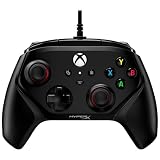
- Officially Licensed by Xbox: The HyperX Clutch Gladiate is fully compatible with Xbox One and Xbox Series X|S consoles, as well as PC.
- Faster Trigger Pulls with Dual Trigger Locks: Set the lock position for short pulls to execute actions faster, or keep the longer pulls for trigger actions that need more finesse.
- Gain The Advantage with Programmable Buttons: Configure the rear buttons to actions like thumb stick clicks so you’ll have faster access to them, giving you an extra edge in competition.
- Immersive, Powerful Dual Rumble Motors: Feel every shot, hit, and rev or your engine more vividly with the Clutch Gladiate’s dual rumble motors.
- Comfortable, Textured Grips: Keep a firm grasp on the game situation and your controller with the comfortable textured grips.
Product prices and availability are accurate as of the date/time indicated and are subject to change. Any price and availability information displayed on Amazon at the time of purchase will apply.
Independent reader supportYour contribution helps us test, update, and keep practical guides available for everyone.



