Recommended Free Tools
To try equipping more than two hairs on Roblox, use the browser-based Avatar Editor: equip one hair, open Advanced, and enter another hair’s numeric asset ID in an empty field. Roblox documents Advanced for adding items by ID, but its stated limit is 10 items overall—not a guarantee that 10 hairs, or even every third-hair combination, will save.
Equip additional hair with the browser Avatar Editor
-
Sign in to Roblox in a web browser and open Avatar.
-
In the hair category, equip the first hair normally.
-
Find the additional hair in the Roblox catalog. Open its item page and copy the numeric asset ID from the item link. Roblox’s Avatar Editor instructions explain how to identify the asset ID in a catalog URL.
Quick wins for a faster PC:
Scan for outdated or missing drivers - takes under a minuteDriver Scan →Clear out junk files and repair common Windows errorsFree Scan →Fix the driver behind crashes, sound loss and screen glitchesFind Drivers →Special offer. See more information about Outbyte and uninstall instructions. Please review EULA and Privacy policy.#1 Best Overall
![Roblox Celebrity Collection - Brookhaven: Hair & Nails Game-Pack [Includes Exclusive Virtual Item]](https://m.media-amazon.com/images/I/41Q467BVwxL._SL160_.jpg) Roblox Celebrity Collection - Brookhaven: Hair & Nails Game-Pack [Includes Exclusive Virtual Item]
Roblox Celebrity Collection - Brookhaven: Hair & Nails Game-Pack [Includes Exclusive Virtual Item]- Take your favorite Roblox adventures off the screen and into the real world with this unique game pack, featuring two iconic characters and accessories
- Mix and match parts to build your own unique Roblox character
- Deck out your figures with the included accessories
- Each package comes with a redeemable code to unlock an exclusive virtual item on Roblox
- Collect all your favorite Roblox figures today!
-
Return to the Avatar Editor, choose Advanced, and paste the ID into an empty asset-ID field. Repeat with another hair ID if you want to try adding more.
-
Save the avatar. If the preview does not reflect the change, select Redraw beneath the avatar picture.
Rank #2
 36PCS Video Game Hair Ties for Women Girls, Elastic Hair Ties Ponytail Holder Controller Hair Accessories Videos Gaming Party Favor (Video)
- Package - There are a total of 36 hair rings, 6styles, video game hair ties with green, red, grey, black, yellow and blue, as well as different patterns, they look very good together, Christmas accessories are perfect for gifts to friends.
- Perfect Video Game Accessories - These video game hair ties are an excellent choice for video game party, suitable for various occasions such as school events, or family celebrations, adding fun and festive spirit to children's looks.
- Multicolour - The set contains 36 video game hair bands, hair ties in a variety of colors and styles. A variety of colors and styles to perfectly match your every outfit.
- High Quality - Video hair ties made of high quality rubber and nylon, these video game ties can be used for a long time, still maintain elasticity, can be easily stretched and quickly recovered, soft touch and comfortable feel, keep your hair firm and not easy to loosen, perfect for different hairstyles for preschool girls and little girls.
- Suitable for All Hairstyles - Whether it's a ponytail, braids, or loose hair, these video game ties can easily match any hairstyle, making them ideal for different hair lengths and types, adding unique charm to every little girl's hairstyle.

What the 10-item limit means
Roblox Support says Advanced can be used to add up to 10 items by entering asset IDs. This is an overall item limit described by the support page, not a hair-specific allowance or promise that any particular combination will be accepted.
Independent reader supportYour contribution helps us test, update, and keep practical guides available for everyone.If Roblox refuses a third hair
Try the browser editor
If you are editing through the app or an in-game prompt and cannot find Advanced or save the combination, try the website editor. A 2025 Roblox Developer Forum report described a case where the in-game save prompt accepted fewer accessory IDs than the website Avatar Editor. That report indicates a possible difference between editor surfaces; it does not establish that every account or experience behaves the same way.
Rank #3
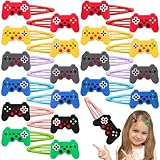
- Package - There are a total of 30 video game hair clips, 6 different styles, plenty of patterns, to meet your different dress needs, can also be used in clothes, bags and so on.
- Lightweight and Practical - Made of soft rubber material and metal, this video games hair clips is lightweight and strong, easy to carry, and this video game hairpin can easily hold your hair in place, and it is very good-looking and makes you stand out from the crowd.
- Perfect for Various Occasions – These video game hair clips are ideal for video game party, school events, costume party, and even daily wear. The cute game controller designs add a themed touch to any occasion, making them a perfect accessory for both casual and special events.
- Perfect Holiday Gift and Party Favor - Celebrate video games in style with our video theme hair clips.The cartoon and cute video hair clips is perfect for a video game party favor.
- Customer Service - If you have any question or want to know more details about video games hair clips, please contact us, we will help you. We'll provide you with a pleasant experience.
Check whether the change saved
Use Redraw if the preview seems stale, then verify the avatar after saving. A preview that has not updated does not by itself show whether Roblox accepted the item.
Understand the hair-specific uncertainty
A Roblox Developer Forum user reported a more-than-two-hair error in August 2023. A Roblox staff reply said the issue could not be reproduced and was believed to be a website quirk that would be fixed soon after. That old exchange does not establish today’s maximum. A June 2025 Creator AMA discussion also raised accessory-category limits, with staff saying improvements were being explored; it did not confirm that a change had shipped.
Quick Recap
Best Value
Rank #4
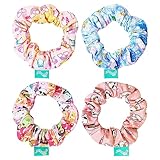
- All Right Reserved - KELLYTOY A JAZWARES COMPANY Online Exclusive Accessories
- Add a touch of fun to your look with this stylish scrunchy pack! It includes 4 large scrunchies in a variety of attractive designs and colors. There are 4 printed scrunchies featuring your favorite characters. Perfect for girls of all ages, these scrunchies are easy to match with any style and sure to put a smile on everyone's face. Suitable for all hair types, these scrunchies are the perfect accessory for any occasion!
- Quality: Soft and gentle on hair, protecting it from breakage and damage, durable and long-lasting fabric, easy to clean and maintain with simple handwashing.
- LUV HER products are made with safe non-toxic materials that will not harm your child's skin nor emit any unpleasant odor. Feel confident that your little one can wear this durable item all day long without risks. Ages 8+ Made of high-quality materials for long-lasting wear
Product prices and availability are accurate as of the date/time indicated and are subject to change. Any price and availability information displayed on Amazon at the time of purchase will apply.




