The Tool Desk
Outbyte PC Repair FREERepair Windows errors before they cause bigger problemsFix Now →Outbyte Driver Updater FREEFix the driver behind crashes, sound loss and screen glitchesFind Drivers →Open the highlight on the post-match results screen, then find it later under Profile > Favorites. Select Save to export it; on PC, check the save location shown in the game, and on console, look in the device’s media library.
View a highlight after a match
-
Wait for the post-match results screen to load.
-
Select the highlight associated with your hero. The results screen may also show highlights from teammates.
If you want to keep a particular clip, view it from the results screen when it is available. Dot Esports reports that a highlight may not appear in Favorites if it was not viewed there. Dot Esports’ walkthrough describes this results-screen and Favorites workflow.
Find and export a saved highlight
-
Open your profile and select Favorites to find recent retained highlights.
Crashes, No Sound, or Screen Glitches?
Random freezes, missing sound and display glitches usually trace back to one bad driver. Find and replace yours safely.Free scan · under a minuteWindows Errors? Fix Them Before They Spread
Repair common Windows errors and clear accumulated junk for a smoother, more stable PC - no reinstall needed.Free scan · no reinstallSpecial offer. See more information about Outbyte and uninstall instructions. Please review EULA and Privacy policy.#1 Best Overall
 Exquisite Gaming: Marvel: The Amazing Spider-Man - Original Mobile Phone & Gaming Controller Holder, Device Stand, Cable Guys, Licensed Figure 8 Inch
- Marvel Fandom Connection: This officially licensed 8 in Spider-Man figure lets you celebrate your favorite superhero while keeping your gaming setup organized and visually impressive on any desk
-
Select the highlight you want and choose Save.
-
Choose from the visual settings available in the game, then wait for the save to finish before leaving the screen.
Locate the exported video
Windows PC
Dot Esports reports the default folder as C:Users<username>VideosMarvelRivalsHighlights. The walkthrough says to use Change to pick another folder. Check the save location displayed by your current game client if it differs; the detailed path comes from a walkthrough and is not confirmed in the official March 2026 notes. A December 10, 2024 official patch note confirms that a bug involving changing where Highlights were saved was fixed, but does not establish the current default path. Marvel Rivals Version 20241210 Patch Notes
Rank #2

- MODERNIZED DESIGN — Experience the modernized design of the XBOX Wireless Controller with sculpted surfaces and updated geometry that enhances comfort and control during long gaming sessions.
- PRECISION PERFORMANCE — Stay on target with a hybrid D-pad and textured grips on triggers, bumpers, and back case for improved accuracy and handling.
- SHARE BUTTON: Seamlessly capture and share content such as screenshots, recordings, and more with the new Share button.
- VERSATILE CONNECTIVITY — Connect via USB-C for plug-and-play on console and PC, or quickly pair and switch between supported devices with XBOX Wireless and Bluetooth support.
- BUILT-IN AUDIO SUPPORT — Plug in compatible headsets using the 3.5mm audio jack for direct voice chat and immersive in-game sound.
Console
After exporting a highlight, check the console’s media library. The exact menu labels and destination are not specified in the official patch notes, so follow the current console and game interface.
Independent reader supportYour contribution helps us test, update, and keep practical guides available for everyone.Save highlights before replay access expires
A video highlight export and a full match replay are different things. The official Version 20260320 patch notes describe both in-game replays and video highlights, and warn that some replays may have a viewing expiration. They give no universal expiration period and do not say that exported video files are removed after an update. If you want a local copy of a highlight, export it through the Save control rather than relying only on later replay access. Marvel Rivals Version 20260320 Patch Notes
Free tools Windows power users keep installed
One-click scans. No signup required.
Quick Recap
Best Value
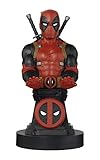
- Finally! Pop culture with a purpose!
- Holds your phone, game controller, whatever you want - while it charges!
- Comes with a six foot long charging cable - right in the Box!
- Heavy Duty PVC Statue and sturdy base that holds without tipping over - or breaking like other fragile resin statues.
- Easily holds and displays most all hand held electronics - including the new Nintendo Lite!
Rank #4

- Supported Multi-Platform:Switch/Switch 2 (NO support wake-up function)/iOS/Android/Windows PC (Notice:Not compatible with Xbox, PlayStation or GeForce Now, For game platforms not mentioned, please consult customer service before buying)
- Connection modes:Wired/Bluetooth/Wireless Dongle(Connect to PC via Bluetooth : Select iOS (phone) mode, but it's not recommended; Dongle is more stable)
- 【Innovative Intelligent Interactive Screen】Manba One V2 wireless game controllers create a new era of controller screens; Equipped with a 2-inch display, no App & software needed, you can set the pc controller directly through the screen visualization, More convenient operation
- 【Micro Switch Button】Manba One wireless controller has Micro Switch Button and ALPS Bumper; The 6-axis gyroscope function makes switch games more immersive
- 【Customize Your Own Controller】The intelligent interactive screen allows you to easily set vibrations, buttons, joysticks,lights, etc., without the need for complex key combinations; 4 configurations can be saved to unlock your own gameplay for different games; The 4 back keys support macro definition settings, and you can activate the set character's ultimate move with one click
Rank #3

- BREAKER SERIES — Hold nothing back. Storm Breaker lets nothing stop its style with classic grays and blacks, offset with whites. Part of the collective debut of the Breaker special edition series.
- BOLD STYLE, BUILT TO PERFORM — Define your swagger with a wild, head-turning design. Stay elegantly on target with textured triggers built for every moment.
- RUBBERIZED GRIPS — Hold on to the action with rubberized grips on the back cases, designed for comfort and control during long gaming sessions.
- UP TO 40 HOURS OF BATTERY LIFE — Get up to 40 hours of battery life so you can keep playing without stopping to recharge.
- PLAY ACROSS EVERY SCREEN — Quickly pair with, play on, and switch between devices including console and PC. Stream games across mobile, gaming handhelds, Smart TVs, and supported VR headsets with XBOX Cloud Gaming.
Product prices and availability are accurate as of the date/time indicated and are subject to change. Any price and availability information displayed on Amazon at the time of purchase will apply.




