Free tools Windows power users keep installed
One-click scans. No signup required.
If Apex Legends closes, freezes, or displays an error, start by checking EA’s server status and the game’s current update, then follow the troubleshooting steps for your platform and exact error. There is no single fix that applies to every crash: a connection failure, damaged game files, a background app, and a console-specific issue need different responses.
Why does Apex Legends keep crashing?
“Crashing” can mean the game closes to desktop, freezes, fails to launch, displays a code, or cannot connect. Note your platform and launcher, the exact error text, and whether the problem happens at startup, during a match, or after an update. Those details help separate a local crash from a file, anti-cheat, update, or service problem. EA’s Apex Legends error-code guide maps several named errors to specific steps.
What should I check before changing settings?
- Check for an outage. Look at EA server status and the official @PlayApex updates referenced in EA’s error-code guide. If EA confirms maintenance or downtime, wait for service to return rather than reinstalling the game.
- Restart Apex and your device. A restart is a quick first step for a temporary hang or background task.
- Install available updates. Check for an Apex update and, on console, system software updates. On PC, check Windows and graphics-driver updates if your error points to them.
EA says error 429 is usually associated with server maintenance or downtime. If you cannot connect, follow the network-error guidance in EA’s error-code page; do not treat a connection issue as proof that the game itself is damaged.
How do I fix Apex crashing on PC?
Close apps and test for background interference
Close other running apps and try Apex again. If crashes continue, EA recommends a clean boot to disable potentially interfering background tasks. For DXGI_ERROR_DEVICE_HUNG, EA associates the error with a stuck background app and recommends a full system restart.
What’s actually slowing this PC down?
Pick the symptom - the matching free tool is one click away.
#1 Best Overall
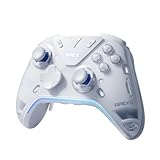
- Flydigi apex 5 pc controller work across multiple platforms: PC/NS/TV/Android/Laptop (NOT Support Xbox/PS)
- 3 Connection Modes: Wired/Bluetooth/2.4G Dongle Wireless connectivity, and can charging by wired connectivity or apex 5 exclusive dock (need extra purchase)
- FORCEFLEX Joysticks 2.0: Adjust joystick tension from 30gf to 100gf with Flydigi’s patented design, this is the first special feature apex 5 premium gaming controller provide, enjoy strong recentering, zero drift, and stick durability
- 3ms Ultra-Low Joystick Latency: 216MHz beast-powered processor bring lighting fast response, Wired: 3ms, Wireless: 5ms, more linear input, more precise, zero ghosting and laag, the second special feature apex 5 premium gaming controller provide
- FORCEADAPT Triggers: Realistically transmit in-game physics to the triggers and delivers enhanced 4-motor stereo vibration with counter-weighted zones, creating a highly immersive gaming experience in specific genres, especially in racing and shooting games, the third special feature apex 5 premium gaming controller provide
Repair the game files
In the EA app, open Library > Apex Legends > Manage > Repair. If you play through Steam, use Steam’s game-file repair flow instead. File repair is relevant to several errors, including Apex_crash.txt, r5apex.exe, and some anti-cheat integrity errors.
Update Windows and graphics drivers when indicated
EA says error 23 can be caused by an outdated graphics driver or missing or damaged game files. Its r5apex.exe guidance also includes updating Windows. For error 23, EA additionally points to matching the EA Account and app language and region settings. Use the exact error-specific instructions in the EA guide rather than assuming every crash has the same cause.
Rank #2

- XBOX WIRELESS CONTROLLER + USB-C CABLE — Includes the XBOX Wireless Controller in Carbon Black and a 9' USB-C cable. Play wirelessly or plug in for a wired gaming experience, right out of the box.*
- WIRED OR WIRELESS, YOUR CALL — Connect the included 9' USB-C cable for zero-setup wired play on console and PC. Go wireless when you want the freedom to play from the couch, the desk, or anywhere in between.
- PC READY. NO EXTRAS NEEDED — Plug the USB-C cable into your Windows PC and you're playing instantly. No adapters, no Bluetooth pairing, no additional purchases required. Works across the XBOX app, Steam, and more.*
- MODERNIZED DESIGN — Experience sculpted surfaces and refined geometry designed around how you actually hold a controller. Stay on target with a hybrid D-pad and textured grip on the triggers, bumpers, and back case.
- UP TO 40 HOURS OF BATTERY LIFE — Get up to 40 hours of wireless battery life on standard AA batteries. When the batteries run low, plug in the included cable and keep playing without missing a beat.*
Try a frame-rate cap or V-Sync
EA lists capping the frame rate and enabling V-Sync as additional crash-troubleshooting options. Treat either as an experiment: the available guidance does not establish that these settings fix every crash or identify a universal cause.
Reinstall only if earlier steps fail
EA lists reinstalling Apex and the EA app as later options. Reinstallation takes longer than restarting or repairing files; EA says Apex progress remains after reinstalling the game.
Rank #3

- MODERNIZED DESIGN — Experience the modernized design of the XBOX Wireless Controller with sculpted surfaces and updated geometry that enhances comfort and control during long gaming sessions.
- PRECISION PERFORMANCE — Stay on target with a hybrid D-pad and textured grips on triggers, bumpers, and back case for improved accuracy and handling.
- SHARE BUTTON: Seamlessly capture and share content such as screenshots, recordings, and more with the new Share button.
- VERSATILE CONNECTIVITY — Connect via USB-C for plug-and-play on console and PC, or quickly pair and switch between supported devices with XBOX Wireless and Bluetooth support.
- BUILT-IN AUDIO SUPPORT — Plug in compatible headsets using the 3.5mm audio jack for direct voice chat and immersive in-game sound.
How do I fix Apex crashing on PlayStation or Xbox?
Start with the reversible platform-wide steps below before reinstalling:
- Install any available console system-software update.
- Unplug attached USB devices and restart the console.
- Power-cycle the console if a normal restart does not help.
- If Apex is installed on external storage, try installing or running it from internal storage.
- Reinstall Apex only if the earlier steps do not resolve the problem.
PlayStation
EA lists restoring the game license at Settings > Account Management > Restore Licenses. For a PlayStation-specific error such as CE-34878-0, consult EA’s current error-code instructions; its page points to restarting the console in Safe Mode for that code.
Rank #4

- Platform Compatibility: This PC controller is designed for Windows PC, Steam, Switch, Android, and iOS. Xbox-style asymmetric stick layout for PC gamers. Three modes cover all your devices. Please check your device compatibility before purchase
- Three Connection Modes: 2.4G wireless, Bluetooth, wired USB-C. PC gets native XInput/DirectInput. Switch pairs via Bluetooth, no adapter. This gaming PC controller switches devices seamlessly. Stable wireless minimizes random disconnects during gaming
- Hall Effect Precision: Hall effect joysticks and triggers eliminate stick drift. This gaming controller for PC delivers smooth, responsive input with no dead zones. Built for FPS, racing, and action games. Long-term precision for competitive PC gaming
- Back Buttons & Battery: Two programmable back buttons map combos and shortcuts. Textured grips with dual vibration. 1000mAh battery delivers up to 20H playtime. RGB can be turned off. A solid PC controller for gaming with custom back buttons
- ABXY Layout Switch: Press B + Minus + Plus to swap between PC and Switch modes. Features: 1000Hz polling rate, RGB lighting, turbo. Note: designed without mic jack or gyro sensor
Xbox
EA lists clearing the alternate MAC address through the console’s Network Settings. Follow the current Xbox menu prompts and EA’s platform-specific instructions if labels differ.
Independent reader supportYour contribution helps us test, update, and keep practical guides available for everyone.What do common Apex Legends error messages mean?
| Error or symptom | What EA says | Relevant next step |
|---|---|---|
Apex_crash.txt |
EA describes this as “Your game has crashed.” | Follow the crash/freezing steps and repair game files. |
r5apex.exe |
EA says this can result from an inconsistency with the game installation. | Repair game files and update Windows. |
| Error 23 | Possible causes include outdated graphics drivers or missing or damaged game files; EA also mentions matching EA Account and app language and region settings. | Check the driver, repair files, and review the account/app settings named in EA’s guide. |
DXGI_ERROR_DEVICE_HUNG |
EA associates it with a stuck background application. | Restart the system and close background apps. |
| Anti-cheat integrity error or error 30005 | EA’s guide gives error-specific anti-cheat instructions and recommends file repair for integrity errors. | Repair files first, then use the current procedure on EA’s error page. Do not change or remove anti-cheat files based on instructions for a different error. |
| Error 429 or connection failure | Error 429 is usually associated with server maintenance or downtime; other connection errors have separate network steps. | Check service status first. For a connection-specific issue, EA may recommend a router restart, Ethernet, a platform restart, or waiting for a service fix. |
| Game version does not match host | The installed game may need an update; Steam may still be downloading one in the background. | Update Apex and let any Steam download finish before joining. |
EA announced that Apex Legends on PC would switch to EA Javelin Anticheat effective September 29, 2026. Anti-cheat procedures can change, so use the live EA error-code instructions for the exact message rather than applying an older file-level workaround.
Quick wins for a faster PC:
Clear out junk files and repair common Windows errorsFree Scan →Scan for outdated or missing drivers - takes under a minuteDriver Scan →When should I reinstall Apex?
Reinstall after checking for a service issue, restarting, updating, and repairing files where available. On console, also try the platform steps above. A reinstall is time-consuming and is not a substitute for a server-status check or an error-specific fix. EA says progress remains after reinstalling Apex. The game is free to download on PC, PlayStation, Xbox, and Nintendo Switch 2, according to EA’s download information; buying the game is not a crash fix.
Quick Recap
Product prices and availability are accurate as of the date/time indicated and are subject to change. Any price and availability information displayed on Amazon at the time of purchase will apply.




