The Tool Desk
Outbyte Driver Updater FREEFix the driver behind crashes, sound loss and screen glitchesFind Drivers →Outbyte PC Repair FREERepair Windows errors before they cause bigger problemsFix Now →First identify what “lag” means in your case: delayed actions, connection errors, or unstable connectivity call for network troubleshooting; choppy movement, stuttering, and frame-rate drops point more toward graphics settings, device load, heat, or drivers. These six fixes follow HoYoverse’s official support guidance, but not every step applies to every platform or symptom.
1. Separate connection lag from performance lag
Watch for the pattern before changing settings. If the game looks smooth but actions arrive late, or you see connection errors, start with the network steps in Fix 6. If movement is choppy, frames drop, or the game freezes, work through the performance fixes first. Both can happen at once, so address each symptom separately.
HoYoverse’s official PC FAQ phrases the question as “What do I do if the game lags?” Its support guidance distinguishes graphics and device performance problems from network-specific errors. It does not establish a universal “good ping” number, so do not use an unsupported ping cutoff to diagnose the issue.
2. Check that your device meets the recommended requirements
Compare your actual device and operating system with the requirements for your platform. HoYoverse says devices should meet its recommended specifications for a smooth experience; requirements are not a promise of a particular frame rate. Its system-requirements article was updated November 11, 2025, and notes that storage needs may increase with future updates.
Recommended Free Tools
#1 Best Overall

- KAMISATO AYAKA CUSTOM DESIGN: Every detail of this headset reflects Kamisato Ayaka’s refined design philosophy.
- LIGHTSYNC RGB + Switching Voice: Customize dual-zone RGB lighting with 16.8M colors via G HUB, and enjoy Kamisato Ayaka’s voice when powering on/off for a personal touch.
- WIRELESS FREEDOM: 20 meter range and Lightspeed wireless audio transmission. Keep playing for up to 29 hours.
- ULTRA LIGHTWEIGHT: At just 278g, it features a clever suspension strap evenly distributes weight across your head, letting you game for hours in absolute comfort.
- IMMERSIVE AUDIO: PRO-G drivers deliver rich, distortion-free sound. Next-gen DTS Headphone:X 2.0 provides surround sound for full immersion.
| Platform | HoYoverse-published requirements |
|---|---|
| Windows PC | Minimum: 8 GB RAM; 6th-generation Intel Core i5 or AMD Ryzen-series equivalent; GTX 1050 or equivalent discrete graphics, or Intel Iris Xe core graphics; DirectX 11; 110 GB available storage. Recommended: 16 GB RAM; 7th-generation Intel Core i7 or AMD Ryzen 5000 series or better; GTX 1060 6 GB or better; DirectX 11; 110 GB available storage. HoYoverse recommends an SSD for a smoother experience. |
| Android | Supported: Snapdragon 660 (Adreno 512) or Helio G88 (Mali-G52) and above; 4 GB RAM; Android 10.0+; 40 GB storage. Recommended: Snapdragon 855, Dimensity 1000, or Kirin 980 and above; 6 GB RAM; Android 12.0+; 60 GB storage. |
| iOS/iPadOS | Supported devices include iPhone 8 Plus or iPhone X and later listed models, iPad mini (5th generation), iPad Air (3rd generation), or iPad (8th generation) and later; 3 GB RAM; iOS 14.0+; 40 GB storage. Recommended: iPhone 12 series or iPad (9th generation) and later listed devices; Apple A13 or above; 4 GB RAM; iOS 14.0+; 60 GB storage. |
| PlayStation 5 | 150 GB available storage. |
| Xbox Series X|S | 150 GB available storage. |
These are the values in HoYoverse’s November 11, 2025 requirements article, not independent performance benchmarks. If your device is below the recommended tier, lower graphics settings may help, but they cannot make unsupported hardware meet the recommended specification. Check the current official requirements again because storage needs can change.
3. Lower graphics quality and frame rate
For stutter or frame drops, reduce the load the game places on the device. HoYoverse lists shadows, texture quality, and resolution as settings to lower; its broader lag guidance also points to graphics quality and special effects. Its graphics troubleshooting guidance suggests trying medium graphics or Compatible Mode and reducing the frame-rate setting from 60 to 30.
Rank #2

- 【MULTI-PLATFORM GAMING HEADSET】Mpower is a multi-platform gaming headset, which can connect to PS4 / XBOX ONE ( 2015 Version ) / Laptop / VR/ Mobile Devices via the 3.5mm audio+mic combined jack. The conversion cable with dual 3.5mm audio and mic jacks is for connecting to PC.
- 【EXCELLENT STEREO AUDIO】Mpower is equipped with 50mm speakers and makes the stereo sound powerful. The retractable and flexible microphone picks up your voice clearly and the big leather earmuffs provide an extreme noise-cancellation function.
- 【SUPERIOR USING EXPERIENCES ON MOBILES AND CONSOLES】Convenient in-line control is easy to adjust while gaming. The compatible L-shape jack at the end of cable makes it easy to put the hands in the right position with comfortable posture while playing mobile games.
- 【COMFORTABLE TO WEAR】The ear muffs are padded with skin-friendly leather, which feels extremely soft.This comfortable earmuffs and headband are breathable and skin-friendly to wear for a long while.
- 【Perfect After-sales Service】 Please kindly know that all the products would be checked or tested before shipping out to ensure a good shopping experience. We promised to bring the best quality gaming headset to our customers. We offer 18 months after-sale service to our customer.
- Open the in-game settings and go to the graphics settings.
- Lower graphics quality, shadows, special effects, texture quality, or resolution, depending on which options your platform offers.
- If stuttering continues, try Compatible Mode where available and set FPS to 30 instead of 60.
- Play again and assess whether the specific symptom improves; change settings one at a time if you want to identify which adjustment matters.
These are troubleshooting options, not guaranteed fixes. Lower settings trade visual detail or motion smoothness for reduced graphics load.
4. Close apps running in the background
Browsers, streaming services, and other unnecessary apps can use system resources while Genshin Impact is running. Close what you do not need, then check whether stuttering or frame drops change. This is a low-cost check before making more disruptive changes.
What’s actually slowing this PC down?
Pick the symptom - the matching free tool is one click away.
Rank #3
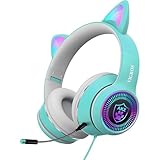
- CUTE CAT EAR HEADPHONES WITH COLORFUL FLASHING LIGHT - This cartoon theme Bluetooth headsets is cute and nice. This headset built-in flashing dazzling colors. This cartoon headset adds more fun when you are listening to music, watching videos or movies.It is a best gift for girls/kids/teen/adult even cat lovers while their birthday or Christmas.
- HIGH QUALITY PERFORMANCE - Built-in 40 mm speakers, which can produce Hifi stereo sound. The high-tech design provide a excellent gaming experience and immersive feeling of video. The matt design increases the advanced sense of earphone.
- DETACHABLE NOISE-CANCELING MICROPHONE - Equipped with a flexible noise-canceling microphone in the package, the microphone is free to bend. The high-definition noise reduction technology helps you chatting without noise, and no lag in communication. Please make sure your mic is plugged in for better voice picking up. If you want to mute the mic in gaming, you must pull it off because of the no button simple design.
- PORTABLE& ERGONOMIC DESIGN - The earmuffs are made of lightweight material which is comfortable to wear and block the outside sound. The head-band can be adjusted and stretched freely. The headset is easy to fold and carry, it will save your space when you are travelling.
- STRONG COMPATIBLE - With USB and 3.5MM plug , which can be compatible with new version laptops, new version xbox one, ps4, Nintendo Switch,mobile phone, tablet, but NOT compatible with iPhone without 3.5mm port. One key control the volume, easy to operate for gaming time. (ps. When using on PC, you need to use the adapter to ensure the normal use of the microphone and headphones!)
5. Check ventilation, graphics drivers, and game files
Reduce heat and improve airflow
For stuttering and frame-rate drops, HoYoverse recommends ensuring proper ventilation and clean fans. On a PC, monitoring software can show component temperatures during gameplay, but HoYoverse’s support guidance does not prescribe a temperature threshold. Keep vents unobstructed and do not treat any one temperature reading as an official pass-or-fail number.
Update or reinstall PC graphics drivers
On PC, update the graphics driver from the relevant official vendor—NVIDIA, AMD, or Intel. If the driver is already current and the problem persists, HoYoverse recommends a clean driver reinstallation. This is a PC-specific step, not a general solution for console or mobile lag.
Rank #4
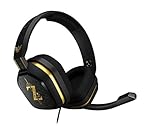
- The A10’s durable aluminum headband with damage-resistant rubberized cover and detachable cable system is designed to withstand wins, losses, and everything in between.
- Tuned for Gaming, ASTRO Audio was developed with pro gamers and game designers to deliver clarity and detail at every frequency and volume level.
- Featuring over-the-ear construction with premium ear cushions and headband, these lightweight ASTROs lower fatigue and extend the duration of any gaming session.
- Crystal clear communication and easy flip-to-mute action puts you in control of your voice com.
- The A10 connects to any audio source with a 3.5 millimeter jack – perfect for console controllers and most PCs and Macs.
Repair potentially corrupted game data
HoYoverse recommends checking game-file integrity through the launcher or the in-game integrity-check option. Use the option available for your installation to look for and repair corrupted data. This is distinct from lowering graphics settings: it addresses damaged game files, not an inherently underpowered device.
Independent reader supportYour contribution helps us test, update, and keep practical guides available for everyone.6. Troubleshoot the local network when the symptom is connectivity
Use network remedies for connection symptoms, not as a universal way to improve frame rate. For PC error 6001, HoYoverse says local network setup may interfere with the game connection and recommends these options:
Quick wins for a faster PC:
Repair Windows errors before they cause bigger problemsFix Now →Fix the driver behind crashes, sound loss and screen glitchesFind Drivers →Best Value

- Celebrate your love of Genshin Impact with this custom mousepad.
- Displays Kaedehara Kazuha relaxing.
- Dimensions: 8.7 X 7.1 X 0.12 Inches.
- Material is Made Of Durable Heat Resistant Polyester Fabric Cloth that translates to Easy Cleaning And Maintenance.
- Non-Skid Natural Rubber Back Provides Heavy Grip and Keeps The Mouse Pad From Sliding.
- Disable an active VPN or proxy and test the connection again.
- Restart the router or modem.
- Try a wired connection if your device and network support it.
HoYoverse also suggests switching between Wi-Fi and mobile data for some listed download or network errors, or restarting the router, depending on the platform and error. A wired connection is only an option to test; it cannot resolve graphics load, overheating, server-side issues, or every connection problem.
Restart the game, then contact support if needed
As an additional general check, HoYoverse advises fully closing the game, waiting five minutes, and starting it again. If the issue remains, gather the details support requests so the report describes a reproducible problem rather than just “lag.”
- Game UID, a screenshot or video, operating system and device model, internet service provider (ISP), and a detailed description of what happens.
- For PC: CPU, GPU, RAM, when the issue occurred, antivirus name and version, and the specified logs.
- For an error-code issue: the code, troubleshooting steps already tried, and relevant logs.
HoYoverse warns that output_log.txt and crash files reset when the game restarts. If you need those files, capture the relevant evidence while the error is happening, before restarting.
Quick Recap
Product prices and availability are accurate as of the date/time indicated and are subject to change. Any price and availability information displayed on Amazon at the time of purchase will apply.




