What’s actually slowing this PC down?
Pick the symptom - the matching free tool is one click away.
If Microsoft Sudoku is not saving progress, first confirm the game is signed in to the Microsoft account you expect—not Guest—then reconnect to the internet and give the device you played on time to sync. Restart and update the game before trying Windows’ repair or reset options. If progress is still missing, reinstall only as a last resort: none of these steps guarantees recovery of lost daily challenge history or unsynced progress.
First, identify what is missing
“Not saving” can mean different things: a completed daily challenge appears incomplete after reopening the game, progress is missing on the same PC, or progress does not appear on another device. Start with the account and sync checks below; use app troubleshooting if the issue persists on one PC.
- Daily challenge history is missing: check the signed-in account and connection before changing or reinstalling the app.
- Progress is missing on another device: verify the account on both devices and let the original device connect and sync before playing on the second one.
- The game is malfunctioning on one PC: restart and update it, then consider Windows’ repair and reset options.
Check the account and connection first
Make sure Sudoku is not using Guest or the wrong account
Check the account shown in Microsoft Sudoku and confirm it is the account associated with the progress you expect. A Microsoft-hosted community thread includes a report of Sudoku opening as “Guest” even while other Microsoft games worked; that is a reported symptom, not proof that it explains every missing save. Read the community discussion.
Reconnect the device that has the latest progress
If you played offline, the device may hold local changes that have not reached the cloud. Connect it to the internet and allow the game to run before switching devices. Avoid starting new sessions on multiple devices until the earlier one has had a chance to sync, since local and cloud versions can diverge.
Recommended Free Tools
#1 Best Overall
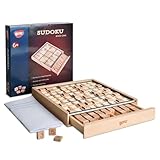
- No More Erasing -No pencil or paper required,Double-sided tiles for trial and error, not have to erase wrong number
- Easy Storage - Designed with a drawer container, easy for storage and carry around
- Product Specifics- The product measures 8.9 × 8.8 × 1.3 inches, and comes with a booklet of 100 puzzles plus a bag of spare tiles.
- Anxiety Relief - Sudoku is a great way to focus on the task at hand and clear your mind of stress and anxiety
- Improve Concentration - An interruption can break the player's train of thought and force them to start over,which eventually train the brain to block external distraction
Microsoft’s Game Development Kit documentation describes this behavior for the general Xbox Game Saves flow: games may save locally while offline, and local and cloud changes can require conflict resolution when they next synchronize. The documentation does not establish that every Microsoft Sudoku data type—such as daily challenge history, achievements, or puzzle state—uses the same save behavior. Microsoft’s Game Saves sync flow was last updated January 26, 2026.
Restart and update Microsoft Sudoku
- Close and reopen Sudoku. Reopen the game and check whether the expected progress appears.
- Check for Windows updates. Install available updates, then restart the PC if prompted.
- Update Microsoft Store and the game. Open Microsoft Store, check for app updates, and install an update for Microsoft Sudoku if one is available.
- For a cross-PC sync problem, recheck the account on both devices. A Microsoft Q&A response dated March 24, 2026, also suggests signing out and back in and updating Sudoku. This is an independent advisor’s suggestion, not a guaranteed fix. See the Sudoku sync discussion.
Microsoft’s Windows 10 and Windows 11 guidance for Microsoft Store apps recommends closing and reopening the app and checking for updates before moving on to repair, reset, or reinstall. Microsoft’s app troubleshooting steps may use different labels depending on the Windows version.
Rank #2

- 【What You Get】This complete Sudoku puzzle set includes 81 wooden number tiles, with 2 spare tiles provided for each number to prevent loss. You also receive a booklet containing 200 Sudoku puzzles of varying difficulty levels. The game is housed in a sleek black wooden board measuring 22.5x22.5x3.3cm, featuring a built-in drawer for convenient storage and portability. Everything is designed for endless logic fun and easy organisation.
- 【Material】Crafted from high-quality eco-friendly wood, this Sudoku board is durable, smooth, and safe. The natural wood material ensures longevity and a comfortable tactile experience, while the non-toxic finish makes it ideal for frequent use. It surpasses paper puzzles in durability, offering a reusable and sustainable brain-teasing option.
- 【Size & Function】With compact dimensions of 22.5x22.5x3.3cm, this wooden Sudoku board is portable and space-saving. Its unique drawer allows for tidy tile storage, and the dual-sided tiles (black for confirmed numbers, red for possibilities) enhance gameplay clarity. Unlike basic puzzles, this set eliminates the need for pencils or paper, providing a tactile and engaging logic challenge that improves problem-solving skills.
- 【Scenes & Gifts】Perfect for family game nights, cognitive training, or as a thoughtful gift for puzzle enthusiasts. It promotes brain exercise for adults, and seniors alike, fostering focus and logical thinking. Whether for home use, travel, this Sudoku game adds fun to any setting and makes an ideal present for birthdays or holidays.
- 【Easy Operation】Simply place the wooden tiles into the 9x9 grid to solve puzzles—no additional tools required. The intuitive design lets you quickly set up and play, helping to relax the mind through stimulating challenges. This hands-on approach reduces screen time and encourages mental relaxation, making it a healthy way to unwind while boosting logical abilities.
Repair the app, then consider reset
If restarting and updating have not helped, Windows may offer options to repair or reset an app. Search Windows Settings for Microsoft Sudoku in the installed-app list, open its advanced options if available, and try Repair first. If that does not resolve the problem, consider Reset.
Windows labels and menu locations vary by version. Resetting may affect local app state, so do not treat it as a way to recover unsynced progress. A January 2024 community reply suggested repair and reset for a Sudoku problem, but that is not an official guarantee of recovery. The community thread also contains user reports of daily challenge progress disappearing.
Rank #3

- COGNITIVE SKILLS - Our sudoku set provides a stimulating mental workout that enhances logical thinking, problem-solving skills and concentration for players of all ages. Sudoku actively engages the brain, offering a rewarding sense of accomplishment with each solved puzzle.
- PORTABLE TRAVEL READY - This Sudoku game features an all-in-one board that cleverly integrates a storage box, ensuring all 81 numbered tiles are neatly organized and highly portable. Enjoy Sudoku on the go with everything securely in place, ready for play anywhere, anytime.
- FUN FOR ALL AGES - Whether you're a complete beginner eager to learn the ropes or a seasoned Sudoku expert seeking your next brain-teasing challenge. The included comprehensive guide provides clear instructions for newcomers and a wide variety of puzzles ranging from easy to advanced.
- NOSTALGIC NOVELTY GIFT - Appealing to those who appreciate retro aesthetics and a hint of vintage. Our Iron & Glory Sudoku game with a sense of nostalgia for traditional games, making it a unique novelty gift for puzzle enthusiasts and anyone who values intellectual board games.
Reinstall only after the lower-risk checks
If the account, connection, restart, update, repair, and reset checks have not fixed the app, reinstalling is a later troubleshooting option in Microsoft’s general Store-app guidance. A reinstall can affect local data; it does not guarantee that missing progress will return. If the progress remains missing, use Microsoft’s official support options for Microsoft Sudoku rather than assuming the save can be restored.
Independent reader supportYour contribution helps us test, update, and keep practical guides available for everyone.What to do if progress is still gone
Microsoft has a support page specifically titled for lost Microsoft Sudoku daily challenge or game progress, but its article text was not available in the accessible page view. It is still the appropriate official route to start with if the checks above fail: I’ve lost daily challenge or game progress in Microsoft Sudoku. No available source guarantees recovery of lost daily challenge progress.
Quick Recap
Best Value

- Vibrant, Engaging Multi‑Color Design: Features 81 smooth, colored wooden pegs in 9 distinct hues that instantly capture attention. The bright colors help players visualize patterns more easily and make the Sudoku board game visually appealing for both teenagers, adults and the elderly, turning logic practice into a colorful, hands‑on experience
- 3 Difficulty Levels for Endless Challenge: Includes 28 carefully designed puzzle cards with solutions, divided into three progressive stages: Easy, Challenging and Tough. This wide range Sudoku Board Game allows beginners to learn step‑by‑step while keeping seasoned players engaged with increasingly complex puzzles that sharpen deduction and problem‑solving skills over time
- Develops Logic & Concentration Naturally: Sudoku is proven to boost logical reasoning, memory, and focus. By training the brain to spot patterns and eliminate possibilities, this Sudoku game helps players of all ages improve cognitive skills, relieve stress through mindful engagement, and build confidence as they advance through each level
- Mess‑Free Play with Reusable Components: No pencils, no paper, no erasing! The wooden balls and puzzle board provide a clean, reusable setup. Simply place and rearrange the balls as you test different solutions—this tactile, screen‑free play reduces clutter and encourages repeated use without wear or waste
- Perfect for Cozy Nights: This Wooden Sudoku Board Game is a math brain teaser desktop board game which is designed to melt away stress and enhance focus for cozy evenings – helping you relax, focus, and unwind.Compact and well‑organized in a storage bag, it’s easy to carry, store, and keeps everything tidy—perfect for home, travel, or as a gift
Rank #4
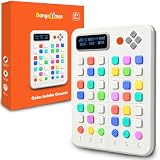
- Color Sudoku Console with 6-Color Algorithm: This electronic sudoku game replaces digits with six vivid colors for faster visual pattern recognition. Each row, column, and block must include all six colors once, making logic intuitive without digit fatigue. A fresh, accessible sudoku for kids ages 8+, teens, and family play.
- 500 Challenges, 8 Levels with Progress Memory: This handheld sudoku game offers 500 puzzles across 4x4, 6x6, standard 9x9, and advanced 9x9 grids. Eight progressive levels from beginner to expert. Auto-save lets players pause and resume. A brain teaser that builds problem-solving, memory, and pattern recognition for kids.
- Screen-Free Family Games with Quiet Controls: No phone, tablet, or Wi-Fi needed, this brain teaser keeps kids and parents engaged during family game nights, car rides, and indoor activities. Three volume levels plus full mute for quiet play. Cycle three LED brightness levels. Built-in key-lock prevents accidental presses.
- 47-Key Physical Layout, 4-in-1 Sudoku Modes: Five function buttons, 36 coordinate keys, and six answer keys deliver precise tactile input. Ergonomic ABS body with soft silicone buttons fits small and adult hands. Four modes from 4x4 to advanced 9x9 make this STEM color sudoku console ideal for family nights and home learning.
- Safety-Tested Sudoku for Kids Ages 8+: Eco-friendly ABS body, silicone keys, lead-free circuitry. Passes ASTM F963-23, CPSIA, CPC, FCC, CE, EN71, EN62115 with TIC Direct Validation PASS. 3 AAA batteries included. A ready-to-play STEM brain teaser gift for birthdays, holidays, and screen-free family learning.
Product prices and availability are accurate as of the date/time indicated and are subject to change. Any price and availability information displayed on Amazon at the time of purchase will apply.




