If Star Citizen shows error 60015, change the selected login region before entering the Universe. For errors 19003 or 19004, follow RSI’s broader 19k troubleshooting sequence: check service status and account access, use the RSI Launcher, verify game files, then check your clock, network, and security software. RSI does not publish separate fixes for 19003 and 19004 in its retrieved 19k guidance, so these steps address the error family rather than guarantee a code-specific fix.
What Star Citizen errors 19003, 19004, and 60015 mean
Errors 19003 and 19004 belong to the 19k family covered by RSI Support’s Error Code 19000 / 19005 guidance. RSI says these messages can occur when the client cannot communicate properly with game servers or account data. The error window may say “authentication or login failed.” A 19k code does not identify one definite cause: account access, server load, the launcher, corrupted files, network conditions, or security software may be involved. RSI says, “There isn’t one catch-all procedure that we can give to help players resolve it quickly.”
RSI’s separate guidance for error 60015 points to a different issue: the selected instance is not working properly. Its remedy is to change the login region manually before entering the Universe. The article also mentions a 40015 variant. Do not treat the region change as a universal fix for 19003 or 19004.
RSI’s Alpha 4.10.1 Known Issues page tracked 19k login errors and listed 60015 among reported 60k errors under investigation at that time. That is patch-specific context, not confirmation of the current live status.
Recommended Free Tools
#1 Best Overall

- Up to 15m wireless range: Removing the boundaries of wires, the 2.4 GHz wireless signal provides a range of up to 15m
- Cross-platform connectivity: With our new USB transmitter, you can easily connect cross-platform between console and PC; separately sold console-specific USB transmitters allow for cross-console compatibility using the same headset
- 15+ hours battery life: Enjoy anxiety-free marathon gaming sessions with more than 15 hours of battery life; recharge the headset using the included USB-C to USB-A cable
- Flip-to-mute microphone: Be in charge of your full audio experience with the flip-to-mute uni-directional microphone which delivers clear and accurate communication with easy mute functionality
- EQ presets: Choose between 3 different audio presets to make sure you have the best equalizer settings for the game you’re playing
Fix error 60015 by changing the login region
- At the game’s login or Universe entry screen, open the login-region selector.
- Select a different available region, then try to enter the Universe again.
This is RSI’s direct recommendation for error 60015. The error indicates a problem with the selected instance; choosing another login region is intended to route you to a different instance.
Troubleshoot errors 19003 and 19004
Work through these steps in order. They follow RSI’s published guidance for the 19k family; the source does not specify a separate procedure for each of these two codes.
Rank #2

- WORKS IN ALL LIGHT CONDITIONS - Our eye and head tracking technology makes your favorite games more immersive whether you are in a pitch black room or in bright daylight.
- HEAD AND EYE TRACKING IN ONE DEVICE - Tobii Eye Tracker 5 tracks both head and eye movements for more immersive PC gaming experiences. Compatible with Windows 10 and Windows 11
- 170+ ENHANCED GAMES - Celebrated by players for bringing game changing features to Star Citizen, Microsoft Flight Simulator, War Thunder, Euro Truck Simulator, and 170+ other game titles.
- NO WEARABLES NEEDED - Say goodbye to devices that require you to wear trackers on a hat and enjoy the freedom in game and outside of it.
- WINDOWS HELLO - Tobii Eye Tracker 5 is compatible with Windows Hello and uses biometric data to make your device safer.
1. Check service status and retry if servers are busy
Check the RSI server status before changing local settings. If services are degraded, client-side troubleshooting may not resolve the problem. RSI also notes that 19k errors can become more common after patches and events, and may clear as traffic drops. If the status page is healthy but the error began during a busy period, wait and try again later.
2. Confirm account access and launch through RSI Launcher
Make sure the account has access to a Star Citizen game package. Then start the game through RSI Launcher.exe in the RSI Launcher folder. RSI warns that starting StarCitizen_Launcher.exe directly from a game instance folder bypasses account login and can produce a 19k error.
Rank #3
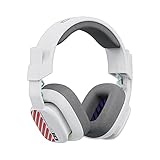
- Enhanced sound quality: ASTRO Gaming A10 Gen 2 Headset for PlayStation 5, PlayStation 4, Nintendo Switch, PC, Mac features custom-tuned 32mm dynamic drivers so you can always hear your game and teammates with clarity and precision
- Flip-to-mute mic: Integrated boom microphone that can be flipped up to mute for privacy and down for crystal-clear comms via a 6.0 mm unidirectional mic
- In-line volume control: This PlayStation headset features a removable headphone cable with in-line volume control, letting you adjust audio without pausing the game
- Built to last: An ultra durable headband and sturdy construction offers reliable performance that transcends the standard gaming headset for PlayStation PS5/PS4
- Comfortable over-ear headset: Ergonomical and robust circumaural construction with a closed back design; optimal for long sessions
If the launcher appears stuck or multiple copies are open, close duplicate launcher processes from the system tray or Task Manager, reopen the RSI Launcher, and try again.
3. Verify the game files
In RSI Launcher Settings, run file verification for the affected install channel and let it finish before launching. This can address corrupted or incomplete files; do not interrupt verification while it is running.
Rank #4

- 【MULTI-PLATFORM GAMING HEADSET】Mpower is a multi-platform gaming headset, which can connect to PS4 / XBOX ONE ( 2015 Version ) / Laptop / VR/ Mobile Devices via the 3.5mm audio+mic combined jack. The conversion cable with dual 3.5mm audio and mic jacks is for connecting to PC.
- 【EXCELLENT STEREO AUDIO】Mpower is equipped with 50mm speakers and makes the stereo sound powerful. The retractable and flexible microphone picks up your voice clearly and the big leather earmuffs provide an extreme noise-cancellation function.
- 【SUPERIOR USING EXPERIENCES ON MOBILES AND CONSOLES】Convenient in-line control is easy to adjust while gaming. The compatible L-shape jack at the end of cable makes it easy to put the hands in the right position with comfortable posture while playing mobile games.
- 【COMFORTABLE TO WEAR】The ear muffs are padded with skin-friendly leather, which feels extremely soft.This comfortable earmuffs and headband are breathable and skin-friendly to wear for a long while.
- 【Perfect After-sales Service】 Please kindly know that all the products would be checked or tested before shipping out to ensure a good shopping experience. We promised to bring the best quality gaming headset to our customers. We offer 18 months after-sale service to our customer.
4. Check the Windows clock, permissions, and routing
- Confirm that the Windows date, time, and time zone are correct, then sync the clock if needed.
- Try launching the RSI Launcher as an administrator.
- Temporarily disable a VPN or proxy to see whether routing is contributing to the problem. Turn it back on after the test if you normally use it.
- Review security software settings. RSI suggests whitelisting the game’s launcher files; if you temporarily disable protection to test, re-enable it afterward.
5. Flush DNS
In Windows, open Command Prompt and run ipconfig /flushdns, following RSI’s instructions. Then restart the launcher and try logging in again.
6. Rebuild the USER folder only if simpler checks fail
RSI says the USER folder contains client settings and can be recreated. Locate the folder for the affected install and rename it rather than deleting it if you want to preserve a backup. Launch the game so it can generate a fresh folder. This resets client settings, so use it after the less disruptive checks.
Best Value
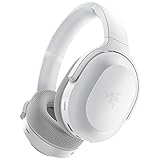
- RAZER SMARTSWITCH DUAL WIRELESS — The headset can instantly switch between high-speed 2.4GHz or Bluetooth mode for seamless audio as you hop between using your PC/console and phone respectively
- INTEGRATED BEAMFORMING NOISE-CANCELING MIC — The dual hidden microphones feature powerful levels of noise suppression ensuring you’re clearly heard in loud indoor and outdoor areas
- RAZER TRIFORCE 40MM DRIVERS — Patented 3-part driver design pushes out exceptional highs, mids, and lows that don’t muddy audio quality, providing deeper gaming immersion and a more dynamic listening experience for music and videos
- ULTRA-SOFT FLOWKNIT MEMORY FOAM EAR CUSHIONS — The breathable weave surface minimizes heat build-up, while the ultra-soft memory foam provides plush, comfortable cushioning for all-day use
- 40-HOUR BATTERY LIFE WITH USB-C CHARGING — Designed with enough juice to power you through more than a full day of gaming and work
When to use Character Repair or contact RSI Support
Character Repair is a later step
RSI says Character Repair may help with certain 19000-series errors when other troubleshooting has not worked. Use it only for an applicable persistent case, not as the first response to a login error. RSI advises allowing the repair to process; accounts are generally available again after about 15 minutes. Logging in again too quickly may cause further account issues.
Escalate with useful details
If the error persists, gather the game and system files requested by RSI and contact RSI Support. Include the exact error code, when it occurs, and which checks you tried and whether they changed the result. For a problem that appears to affect other players or a particular patch, consult the RSI Known Issues page or submit a report through the Issue Council as appropriate.
Quick Recap
Product prices and availability are accurate as of the date/time indicated and are subject to change. Any price and availability information displayed on Amazon at the time of purchase will apply.




