What’s actually slowing this PC down?
Pick the symptom - the matching free tool is one click away.
For linking Nintendo Switch Parental Controls to a console, get the six-digit code from the Parental Controls app—not from email. Sign in to the app with the parent or guardian’s Nintendo Account, then enter the displayed Link Code in the console’s Parental Controls setup.
Get the six-digit Link Code in the app
-
Install or open the Nintendo Switch Parental Controls app on an iOS or Android smart device.
-
Start setup in the app and sign in with the parent or guardian’s Nintendo Account. Nintendo requires an adult account to use the app.
-
Read the six-digit Link Code shown in the app and keep that screen open while you use the console.
The Tool Desk
Outbyte PC Repair FREERepair Windows errors before they cause bigger problemsFix Now →Outbyte Driver Updater FREEFix the driver behind crashes, sound loss and screen glitchesFind Drivers →Special offer. See more information about Outbyte and uninstall instructions. Please review EULA and Privacy policy.#1 Best Overall
 Wireless Switch Controller for Nintendo Switch/Switch 2/Lite/OLED Controller, Switch Controller with a Mouse Touch Feeling on Back Buttons, Extra Switch Pro Controller with Wake-up,Programmable, Turbo Function
- 【PROGRAMMABLE FUNCTION for SWITCH CONTROLLER】: The switch controller with 2 back programming buttons, there are two modes, which are single programming or multi-programming. M1/M2= A+B+Y+L+ZL+R+ZR+D-pad, then you can use other fingers to operate more comfortably and centered. Switch controllers with the programmable buttons helping to minimize button abuse and stick clicking it can last more than several years with heavy use.
- 【ONE-BUTTON WAKE-UP SWITCH CONSOLE】: The switch wireless controller is used for the first time, you need to press the "Y + HOME" button to connect. Then next time just simply presses the "HOME" button of the pro switch controller to wake up your device. It's very convenient for you to start the game. (NOTE: DOES NOT SUPPORT WAKE-UP SWITCH 2 AND AUDIO FUNCTIONS)
- 【VIBRATE FUNCTION & GYRO SENSOR】: The controller for switch have dual vibration motors with 3-level precise vibration: weak, medium and strong that provide you excellent vibration feedback to enhance the game immersion. With the 6-axis gyro sensor, this controller can detect the inclination of the controller and make a quick response, give you more fun while playing motion sensing games
- 【ERGONOMIC DESIGN & TURBO FUNCTION】: The pro controller switch remote's ergonomic and non-slip design that allows you to control the game stably and don’t have to worry about the sweat in your hands. The wireless switch controller can be set to auto TURBO or manual TURBO mode. There are 3 adjustable speeds: 5 shots/s, 12 shots/s or 20 shots/s. You also can customize the TURBO button, A/B/X/Y/L/ZL/R/ZR all buttons can be set to TURBO, which make it easier to win an arcade or action game
- 【SCREENSHOT & HIGH-PERFORMANCE BATTERY】: The switch pro controller wireless’s continuous screenshoting function help you more enjoyable to play games. The switch pro controller for controllers with 600 MAH large capacity rechargeable battery, but it just need 2-3 hours to charge fully. Switch controllers pro can run for 10-15 hours, make sure you can enjoy games longer without interruption. (Warm Tips: Left Stick has been upgraded, please purchase with confidence.)
Nintendo’s US setup instructions require an internet connection to link the console and app. No purchase is needed to retrieve the app-generated code.
Enter the code on the console
-
From the HOME Menu, open System Settings, then choose Parental Controls.
Rank #2
Sale Nonbliep 2 Pack Wireless Controller for Nintendo Switch 2/1 Lite/OLED and PC, with Bluetooth, Turbo, Gyro Axis, Dual Vibration, and Screenshot, Compatible with Steam and Switch 2/1
- 🎮【Compatible with Nintendo Switch】PERFECT COMPATIBILITY: Wireless controller is fully compatible with Nintendo Switch/Switch 2/Switch Lite/ Switch OLED /Windows PC and perfect support Nintendo and video games.(Note: This function can be used to wake up the original Switch, but not the second generation.)
- 🎮【ENHANCED GAMING EXPERIENCE】: Enjoy an immersive gaming experience with built-in dual motion motors and TURBO function. Choose from 3-level turbo speeds (8, 15, or 25 rounds/second) and the automatic shooting function for precision gameplay. The latest motion sensing technology and feedback technology ensures rapid response to movements.
- 🎮【WIRELESS AND RELIABLE】: Our high-performance wireless technology ensures a reliable signal within 10 meters, with strong anti-interference capability. Equipped with 4 LEDs indicating functions and controller buttons, this controller also boasts an excellent dual analog joystick design for seamless gameplay.
- 🎮【EXCELLENT HAND FEELING】: The wireless controller is built with ergonomic and lightweight construction, make it comfortable even for long hours of continuous play. The gamepad comes with non-slip design, which will never slip off even if your hand sweats during intense gameplay.
- 🎮【Long battery life】: The switch pro controller f with 1000 MAH large capacity battery, but it just need 2-3 hours to charge fully. Switch controllers pro can run for 10 hours, make sure you can enjoy games longer without interruption.
-
Follow the prompts to use the smart device app. If parental controls are already set up, choose Change Settings, enter the existing PIN, and select Use Your Smart Device.
-
Enter the six-digit code shown in the app, select OK, then complete the linking confirmation on the console. Check that the parent or guardian account shown is the same one used to sign in to the app.
Special offer. See more information about Outbyte and uninstall instructions. Please review EULA and Privacy policy.Rank #3
Sale AceGamer 2 Pack Wireless Controller for Nintendo Switch/Lite/OLED/Switch 2, Hall Effect Joystick for Switch 2 Pro Controller with Wake-Up/Turbo/Dual Vibration/Programmable (Red+Blue)
- 🎮【Universal Compatibility】AceGamer Controller is fully compatible with Switch/Switch Lite/Switch OLED and provides perfect support for switch games. You can use it play the game of Nintendo Switch 1 on Nintendo Switch & 2.No need to install drivers, easy to connect. Note: Third-party products are not manufactured by switch. AceGamer provides warranty service, if you have any questions or problems, please contact us for an immediate solution.
- 🎮【No Drifting-Hall Effect Joystick】Higher sensitivity hall effect joystick, which fundamentally solves the problem of joystick drift, worn, insensitive and out of control. A comprehensive evolution of the hall joystick, extended lifespan up to 5 million rotations. Highly precise, it is ideal for intricate maneuvers and micro-controls in games. AceGamer Pro Controller ergonomic design and hall joystick allows players to experience the game better.
- 🎮【Sensitive Motion Control and 4-level Vibration】The integrated 6-axis gyro sensor can help you react quickly and specifically improve your experience in sports games. Buttons and joysticks respond without delay. One button to control the vibration level. Built-in dual vibration motors with 4-level feedback (0 %, 30 %, 70 %, 100 %)❗*TIPS*❗: Please calibrate before use.Please do not touch the joystick when connecting, otherwise it will cause drift. If drifted, please reconnect.
- 🎮【Programmable Button and Turbo Burst with 3 Speeds】The switch controllers have additional buttons that simplify complex skill operations with the M1/M2 button (M1/M2 = any A/B/X/Y/L/ZL/R/. ZR/L3/R3/D-pad buttons, up to 16 buttons). 2 programming modes: ①Single assignment ②Multiple assignment. Supports auto turbo/manual turbo mode. 3 adjustable burst speed: 5 shots/s, 12 shots/s and 20 shots/s.
- 🎮【Ergonomic Design & One-Button Wake-Up Switch Console】: The pro controller switch remote's ergonomic and non-slip design that allows you to control the game stably and don’t have to worry about the sweat in your hands. The switch wireless controller is used for the first time, you need to press the "Y + HOME" button to connect. Then next time just simply presses the "HOME" button of the pro switch controller to wake up your device.
Nintendo’s setup guide describes this as entering the six-digit Link Code from your smart device.
On Nintendo Switch 2
Switch 2 has a separate Nintendo linking flow, but it also uses a six-digit Link Code from the Nintendo Switch Parental Controls app. Sign in to the app, retrieve the code on the smart device, enter it on the console, and accept the linking confirmation. See Nintendo’s Switch 2 linking instructions.
Rank #4
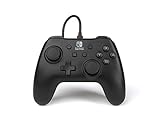
- Matte black design
- Ergonomic controller shape with Nintendo Switch button layout
- Instant plug and play connection (no sync required)
- Detachable 10ft (3m) USB cable with Velcro strap
If you expected the code by email
The app-to-console linking code is displayed in the Parental Controls app; Nintendo’s linking instructions do not direct users to wait for an email. A different six-digit code is emailed to a family-group administrator when registering an email address to a supervised Nintendo Account. If you received an email-code prompt, check whether you are registering that account’s email address rather than linking the Parental Controls app. Nintendo explains the separate process in its supervised-account email registration instructions.
If the Link Code does not appear
The standard instructions establish that the code appears after signing in to the app, but do not cover every account-access, app, or network problem that could prevent it from appearing. For account-specific recovery, contact Nintendo Support rather than guessing at the cause.
Quick Recap
Best Value

- Take your game sessions up a notch with the Nintendo Switch Pro Controller
- Handheld Nintendo Switch gaming at a great price
- Comes with charging cable (USB C to USB A)
Product prices and availability are accurate as of the date/time indicated and are subject to change. Any price and availability information displayed on Amazon at the time of purchase will apply.



