Improve gear in Blue Protocol: Star Resonance by treating its systems as separate investments: Reforge enhances an individual item, Refining strengthens an equipment slot, and Sigils add attributes to gear. Later progression adds Gear Breakthrough and Modules. Start by checking what you can equip now and what you expect to replace soon; item-bound upgrades can lose value when that item is replaced.
Start with gear you can use now
Equipment drops and available gear-level bands change as your character progresses. Before spending scarce materials, compare your current item with the equipment you can realistically obtain next. An upgrade on a soon-to-be-replaced item may be less useful than a slot improvement that carries forward.
| # | Preview | Product | Price | |
|---|---|---|---|---|
| 1 |
|
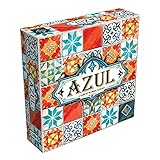
Azul Mosaic Tile-Placement Strategy Board Game, 2-4 Players, 30-45 Min | $31.99 | Buy on Amazon |
The systems below come from Prydwen Institute’s Gear Upgrade Guide, last updated January 15, 2026. Gear rules, stat pools, level caps, and materials can change between seasons, so check the current in-game interface and patch notes before committing resources. The official Blue Protocol: Star Resonance site provides the game’s update hub, but the cited search result does not verify current gear-specific rules.
What each gear system improves
| System | What it improves | What to consider |
|---|---|---|
| Reforge | An individual item’s Perfection and an additional attribute, according to Prydwen’s January 15, 2026 guide. | The improvement belongs to that item. The guide says dismantling can recover most Reforge Stones. |
| Refining | A gear slot’s stats; the guide describes armor slots as providing Stamina plus Refined Armor, and weapon and accessory slots as providing Refined ATK. | Refinement stays with the slot when you replace the item equipped there. |
| Sigil embedding | An added attribute on a gear piece. | The guide says each piece holds one Sigil and replacing it destroys the existing Sigil. |
| Gear Breakthrough | Raises the level band of eligible gear at a later stage. | The guide describes it as a Season 2 system; its named level bands and materials may not apply to the current season. |
| Modules | A separate endgame gearing system. | The cited guide identifies Modules as an endgame system but does not establish current details for every season. |
Use Reforge for an item you plan to keep
Reforge raises an item’s Perfection and allows an additional Advanced Attribute to be rerolled, as described in the January 2026 guide. Reforge Stones come from various game modes, including dungeons. Because Perfection is attached to the item rather than its slot, consider whether the item is worth investing in before spending stones. If you later dismantle it, the guide says most Reforge Stones can be recovered; it does not say all of them are returned.
Do these 3 things before closing this tab:
1Clear out junk files and repair common Windows errors2Scan for outdated or missing drivers - takes under a minute3Repair Windows errors before they cause bigger problems#1 Best Overall
- AWARD-WINNING STRATEGY BOARD GAME: Azul won the 2018 Spiel des Jahres. This draft and place game is inspired by Portuguese mosaic tiles to outscore rivals in this acclaimed game for adults and families
- TILE PLACEMENT & MOSAIC ART: Select tiles from shared factory displays, complete pattern rows, and build your stunning mosaic wall. Every placement decision shapes your score and your board
- BOARD GAMES FOR ADULTS & FAMILIES: Easy rules get you playing in minutes, yet deep tile placement strategy and draft & deny mechanics create satisfying complexity for experienced adult board gamers
- PERFECT BOARD GAME FOR TWO ADULTS: Azul shines in head-to-head 2-player duels and scales brilliantly to 3 or 4 players. New tile combinations each round make every game a fresh, replayable challenge
- GREAT GIFT ADULT BOARD GAME: Designed for 2-4 players ages 8 and up, 30-45 minutes playtime. Azul is consistently a top-rated mosaic board game worthy of any collection, family game night at home, road trips, vacations or gifts
Refine slots for progress that carries over
Refining is the clearest carry-forward investment in the guide: its stats remain on a slot when you equip a replacement item there. Armor slots provide Stamina and Refined Armor, while weapon and accessory slots provide Refined ATK. The guide calls Refined ATK particularly valuable, but that does not establish a universal priority for every class or build.
Check the chance before a risky attempt
According to the guide, Refining succeeds 100% at low levels, and the success chance starts to fall at 5→6. It lists a 65% chance at 13→14. These are source-dated values, not confirmation of rates in the live game on October 8, 2026; check the chance shown in your current interface before each attempt.
The guide describes a Blessing option using Buri Mech Shards and/or Moss Mech Shards to restore the success chance to 100%. It also says a failed attempt consumes all resources involved. Use the displayed Blessing options if you want to avoid that risk, and verify the current materials and effect in game before spending them.
Independent reader supportYour contribution helps us test, update, and keep practical guides available for everyone.Embed Sigils only after weighing replacement cost
A Sigil adds an attribute, but embedding and replacing it involve a trade-off. Prydwen’s January 2026 guide says each gear piece accepts one Sigil, embedding costs Bound Luno and gemcore materials, and replacing an embedded Sigil destroys the old one. Check the item’s likely lifespan and the available attribute before committing. These costs and rules are source-dated and may change.
The Tool Desk
Outbyte Driver Updater FREEFix the driver behind crashes, sound loss and screen glitchesFind Drivers →Outbyte PC Repair FREEClear out junk files and repair common Windows errorsFree Scan →Leave Breakthrough and Modules for later progression
The guide describes Gear Breakthrough as a Season 2 system, with Dreamer’s Stardust for gear moving from level 140 to 150 and Weaver’s Stardust for gear moving from level 160 to 170. It says those materials can be obtained through the Honor Coin shop or raids. Treat those levels and sources as details from that guide, not as a promise that they apply to your current season or character.
Modules are another endgame gearing system identified by the guide. Its cited details do not establish current Module mechanics, so consult the live game’s menus and current patch notes before planning around them.
A practical order for spending materials
- Check the next gear band. See what equipment you can use now and whether an item is likely to be replaced soon.
- Prioritize slot Refining when carry-over matters. Its stats remain with the slot after an item swap, but inspect the materials and current success chance first.
- Reforge a worthwhile item. Use Reforge Stones on gear you expect to keep, remembering that Perfection belongs to the item.
- Decide whether a Sigil is worth binding to the piece. Account for its Bound Luno and gemcore cost and the stated loss of the old Sigil on replacement.
- Recheck season-specific systems. Confirm that Breakthrough or Modules apply to your gear band and that the required materials and rules are current.
There is no universally optimal order for every class, build, or season established by the cited guide. Compare each choice by whether it improves an item or a slot, what it costs, whether failure can consume materials, and whether the system applies to your current gear band. A separate BP Events gear reference includes version selection and Season 3 rare-stat labels, another reason to verify season-sensitive details rather than assume older numbers remain current.
Quick Recap
Product prices and availability are accurate as of the date/time indicated and are subject to change. Any price and availability information displayed on Amazon at the time of purchase will apply.




