The official Vanilla Tweaks installation guide covers Java Edition, not Bedrock. Its Java downloads are not Bedrock add-ons, so renaming a Java .zip file to .mcpack will not make it work. To get similar changes in Bedrock, use a pack built for Bedrock—such as the separate, unofficial Bedrock Tweaks project—and activate it in the world’s pack settings.
Why the official Vanilla Tweaks download will not install in Bedrock
Vanilla Tweaks sorts its downloads into resource packs, data packs, and crafting tweaks. Its installation page tells Java Edition players to install resource packs through Options → Resource Packs → Open Resource Pack Folder; data packs and crafting tweaks go in the selected Java world’s datapacks folder. The page does not give Bedrock installation instructions: Vanilla Tweaks installation guide.
Bedrock uses its own add-on packaging and file structure. Microsoft’s documentation describes importing Bedrock .mcpack files and explains that Java and Bedrock texture packs differ in structure and format. A Java pack needs genuine adaptation to Bedrock; changing the filename extension is not a conversion: Microsoft Learn: Introduction to Resource Packs and Microsoft Learn: Converting Java Texture Packs to Bedrock.
Choose a Bedrock-compatible alternative
Bedrock Tweaks describes itself as “A Complete Unofficial Port of Vanilla Tweaks to Minecraft Bedrock Edition.” It is a separate project, not the official Vanilla Tweaks download; the available sources do not establish an affiliation or endorsement between them: Bedrock Tweaks.
Outdated Drivers Are Slowing You Down
One free scan finds every outdated or missing driver and matches the right update for your exact hardware.Free scan · exact hardware matchPC Slower Than It Used to Be?
A free scan shows the junk files, broken settings and background clutter dragging Windows down - then fixes them in one click.Free scan · Windows 10 & 11#1 Best Overall
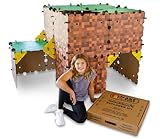
- ✔️ Real-World Minecraft: Build your favorite Minecraft creations in the real-world with the Minecraft Explorer Kit. Simply connect together the large grass and dirt panels with the high density foam connectors and add gold braces for strength. Fill entire rooms and play inside what you’ve built. Entertains for hours and hours at a time.
- ✔️ Buy More, Build Bigger: The building possibilities are endless with our strong, durable, easy to build forts. Transform your room into a kingdom, a princess castle, or a giant maze with our fort building kit.
- ✔️ Durable, Easy to Store, and Reusable: At the end of the day, reclaim your space by tearing down the fort and storing in the provided carrying case under a bed or in a closet. No need to throw away large bulky cardboard boxes.
- ✔️ Whole Family Fun: A perfect bonding time activity for kids, parents, and grandparents. Our all in one building kit is ready to be assembled straight out of the box. No need for adhesive or tools, just open and enjoy building a Minecraft fort, maze, or tunnel right away.
- ✔️ Reduce Screen Time and Boost Creativity: Provide a healthy balance to screens by providing creative real-world fun. Encourage your little engineers to spend time off screens and solving problems to build the ultimate Minecraft fort.
Before downloading any alternative, check the publisher’s supported Minecraft version and platform, whether it changes visuals or gameplay, and whether it supplies a resource pack, behavior pack, or both. A pack must be built for Bedrock and your game version to be eligible for Bedrock’s activation menus.
Import and activate a Bedrock pack
Import the pack
Download a Bedrock-formatted add-on from its publisher. If it is a valid .mcpack, use your platform’s supported open or import method. Microsoft documents opening the file to import it on Windows; file handling differs across other platforms. Do not assume that every device exposes the same folders or supports local file copying: Microsoft Learn: Introduction to Resource Packs.
Rank #2

- BUILD THE DREADED CREEPER – Young explorers, ages 10 and up, build a large poseable version of the iconic Minecraft mob
- MINECRAFT ACTION FIGURE – Kids construct every detail of the Creeper, from its 4 poseable legs to its detachable head
- HIDDEN SURPRISE INSIDE – Builders can remove the Creeper's head to reveal a compartment that hides a first-version Creeper minifigure and TNT element
- POSEABLE ROOM DECOR – After building, kids can put their creation on display in the bedroom or playroom
- GIFT IDEA FOR KIDS – Makes a wonderful birthday or any-time gift idea for boys and girls
Apply it to an existing world
- In Minecraft, select Play and edit the world where you want the changes.
- Open Resource packs for visual or audio changes, or Behavior packs for gameplay changes.
- Find the add-on under Available and activate it. If the publisher provides both pack types, follow its instructions for which to enable.
These are Bedrock’s world-level add-on settings; importing a file alone does not activate it for a world. Minecraft Help documents the activation flow for existing worlds, new worlds, and Realms: Minecraft Help: Activate Add-Ons in Minecraft: Bedrock Edition.
Use a pack in a new world or Realm
For a new world, choose compatible add-ons during world creation. For a Realm, follow Minecraft Help’s Realm-specific process; it is the documented cross-device route for sharing a world with activated add-ons. Console file access and local copying can differ, so do not assume a PC-style import procedure will work on a console.
Rank #3

- MINECRAFT TOY FOR KIDS – LEGO Minecraft Zombie Dungeon (21587) building toy for boys and girls ages 8 years old and up
- 5 LEGO FIGURES – Builders can cast a Wastelands Wanderer minifigure, a slime and 3 zombies (including one with enchanted leggings and gold sword and one with diamond helmet) in their pretend play adventure stories
- GAMING-INSPIRED FUNCTIONS – Set in the Minecraft desert biome, this zombie dungeon features a rotating, zombie-spawning chamber and a sliding piece that triggers a rockfall
- INSPIRE CREATIVE STORYTELLING – The Wastelands Wanderer, equipped with a diamond pickaxe, mace and netherite armor, takes on a slime and 3 zombies in the desert biome dungeon
- ACCESSORIES FOR PRETEND PLAY – Features netherite armor, a mace, diamond pickaxe, gold sword, diamond helmet, crafting table, torch and a chest containing bread, bone and rotten flesh
Fix pack problems safely
If an add-on causes crashes, visual glitches, or errors, first make a backup of the world. Then disable packs one at a time and test the world to identify a conflict. If several packs are active, changing their order may also help. Minecraft Help recommends backing up before troubleshooting: Minecraft Help: Troubleshooting Minecraft: Bedrock Edition Add-Ons.
Quick Recap
Product prices and availability are accurate as of the date/time indicated and are subject to change. Any price and availability information displayed on Amazon at the time of purchase will apply.




