Recommended Free Tools
To use your Apex Legends progress on Steam, link Steam to the EA Account that already holds that progress. Go to EA Account settings, sign in, open Connected Accounts, choose Steam, then continue to Steam and complete the sign-in and linking prompts.
Link Steam to the EA Account with your Apex progress
- Open EA Account settings and sign in to the EA Account containing the Apex Legends progress you want to use.
- Select Connected Accounts. Check whether Steam is already linked and confirm that this is the EA Account you intend to use.
- If Steam is not linked, select Steam, continue to Steam, and complete the Steam sign-in and linking prompts.
- Launch Apex Legends through Steam and check that your expected progress appears.
The exact prompts can vary with your sign-in status and whether a Steam account is already linked. EA says accounts generally need to be linked only the first time you play an EA game on Steam.
Why is my Apex progress missing on Steam?
If Apex starts at Level 1 or your progress is missing, EA identifies two likely account-link causes: Steam is not linked, or it is linked to a different EA Account. In Connected Accounts, check which EA Account is connected to Steam. Use the EA Account that contains your Apex progress.
Apex progress is permanently tied to its EA Account; it cannot be moved to another EA Account. EA says Apex Cross Progression requires platform accounts to be linked to the EA Account, and progress remains associated with that EA Account. See EA’s Cross Progression guidance.
The Tool Desk
Outbyte PC Repair FREEClear out junk files and repair common Windows errorsFree Scan →Outbyte Driver Updater FREEScan for outdated or missing drivers - takes under a minuteDriver Scan →#1 Best Overall
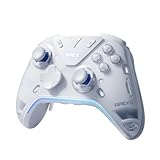
- Flydigi apex 5 pc controller work across multiple platforms: PC/NS/TV/Android/Laptop (NOT Support Xbox/PS)
- 3 Connection Modes: Wired/Bluetooth/2.4G Dongle Wireless connectivity, and can charging by wired connectivity or apex 5 exclusive dock (need extra purchase)
- FORCEFLEX Joysticks 2.0: Adjust joystick tension from 30gf to 100gf with Flydigi’s patented design, this is the first special feature apex 5 premium gaming controller provide, enjoy strong recentering, zero drift, and stick durability
- 3ms Ultra-Low Joystick Latency: 216MHz beast-powered processor bring lighting fast response, Wired: 3ms, Wireless: 5ms, more linear input, more precise, zero ghosting and laag, the second special feature apex 5 premium gaming controller provide
- FORCEADAPT Triggers: Realistically transmit in-game physics to the triggers and delivers enhanced 4-motor stereo vibration with counter-weighted zones, creating a highly immersive gaming experience in specific genres, especially in racing and shooting games, the third special feature apex 5 premium gaming controller provide
Before you unlink or switch EA Accounts
Do not unlink Steam as a first troubleshooting step. EA warns that unlinking an account used for Apex can cause Battle Pass leveling, item-unlock, and other errors. Steam entitlements also stay with the EA Account to which that Steam account was first linked; relinking Steam to another EA Account does not transfer them.
If you think Steam is connected to the wrong EA Account, first try to recover access to the original account and check its Connected Accounts page. Review EA’s unlinking guidance before making changes.
Quick Recap
Best Value

- 🏆 Predator Rank Design — Show everyone you've reached the top—this pendant faithfully recreates the iconic Predator rank badge with bold skull crest, striking red enamel accents, and white battle-hardened detailing.
- ⚔️ Battle-Ready Build — Crafted from solid zinc alloy with a brushed gunmetal finish, toughened enamel fill, and scratch-proof coating—built like your loadout, made to survive daily carry.
- 🎒 Clip Anywhere, Rep Everywhere — Snap it onto your backpack, keys, lanyard, sling bag, or controller case—turn everyday carry into a statement of competitive pride.
- 🎁 Gift Ready for Apex Mains — Comes in premium display-ready packaging—perfect birthday, Christmas, or tournament prize for the Wraith main, Octane rusher, or Pred grinder in your squad.
- 🛡️ Officially Inspired Collectible — A must-have addition to any Apex Legends merch shelf—alongside Funko Pops, heirloom replicas, and badge pins. Not a generic keychain, but a true fan collectible
Rank #4

- Now Including Hall Effect Modules – Say goodbye to stick drift with contact-free magnetic sensors in the thumbsticks giving you smoother control, enhanced precision, and increased longevity
- Code for Bonus Virtual Item Included – Moon Bounce Emote
- 2 Types of Glow – Bring the spirit of the arcade to your controller with a glow in the dark effect and a reaction when a UV light is applied giving off a fluorescent glow
- Advanced Gaming Buttons – Get an edge over the competition with two mappable buttons you can program on-the-fly, mid-game—no system settings to configure
- 3-Way Trigger Locks – Set the travel distance of the triggers with three different positions to pull off quicker actions in your favorite FPS games or go full throttle in a high-end race car
Rank #3

- 【Super Easy Setup】 No need to spend dozens of hours upgrading firmware and reading forum tutorials; no need to memorize complicated key combinations. Connect and adjust all the settings via the Vlead app, and you're ready to go.
- 【Wide Compatibility】 Leadjoy VX2 Aimbox Keyboard Mouse Converter compatible with Xbox One, Xbox Series X/S, PlayStation 4【DO NOT COMPATIBLE WITH PLAYSTATION 5】
- 【Built-in 3.5mm Headset】 Leadjoy VX2 Aimbox equipment with a 3.5mm headset, avoid environmental noise, support voice chat with your teammates, real-time experience of the game's stereo sound, increasing the experience of the game, let the sound guide you to the breathtaking immersion and glory.
- 【Agility Translation Technology】 Advanced VX agility translator technology provides 1:1 gaming accuracy, which supports accurate and timely movement with the keyboard and mouse on Xbox/PS.
- 【Adjustable Game Setting on App】 Easily configure the mouse, camera, joystick, keybinds, and lighting settings on the "Vlead" App according to your preference.
Rank #2

- Platform Compatibility: This PC controller is designed for Windows PC, Steam, Switch, Android, and iOS. Xbox-style asymmetric stick layout for PC gamers. Three modes cover all your devices. Please check your device compatibility before purchase
- Three Connection Modes: 2.4G wireless, Bluetooth, wired USB-C. PC gets native XInput/DirectInput. Switch pairs via Bluetooth, no adapter. This gaming PC controller switches devices seamlessly. Stable wireless minimizes random disconnects during gaming
- Hall Effect Precision: Hall effect joysticks and triggers eliminate stick drift. This gaming controller for PC delivers smooth, responsive input with no dead zones. Built for FPS, racing, and action games. Long-term precision for competitive PC gaming
- Back Buttons & Battery: Two programmable back buttons map combos and shortcuts. Textured grips with dual vibration. 1000mAh battery delivers up to 20H playtime. RGB can be turned off. A solid PC controller for gaming with custom back buttons
- ABXY Layout Switch: Press B + Minus + Plus to swap between PC and Switch modes. Features: 1000Hz polling rate, RGB lighting, turbo. Note: designed without mic jack or gyro sensor
Product prices and availability are accurate as of the date/time indicated and are subject to change. Any price and availability information displayed on Amazon at the time of purchase will apply.
Independent reader supportYour contribution helps us test, update, and keep practical guides available for everyone.



