Recommended Free Tools
For an adult villager you have never traded with, break the job-site block it claimed. It should become unemployed, after which you can offer an available workstation for a different profession. Trading locks the villager’s profession, and babies and nitwits cannot change professions.
Remove the claimed workstation
- Check the villager. It must be an adult, not a baby or a nitwit. Babies and nitwits cannot change professions. Minecraft Wiki’s villager mechanics reference describes these limits.
- Check its trading history. If you have traded with the villager, removing its workstation will not make it lose its profession.
- Break the job-site block it claimed. An adult villager that has not been traded with can lose its profession when that block is removed.
- To give it a different job, place the corresponding available workstation. Villagers get professions by claiming job-site blocks. Each profession has a specific workstation; for example, Mojang’s Village & Pillage announcement identifies a lectern for a librarian and a cauldron for a leatherworker.
Why the villager may not change jobs as expected
Another villager may claim the workstation
Placing a workstation does not guarantee that the villager you have in mind will claim it. Check whether another villager has claimed the block, and consider how job-site claiming works in your edition.
Java and Bedrock handle job sites differently
The Minecraft Wiki mechanics reference says Java villagers search for nearby unclaimed job sites and must approach a block to claim it. In Bedrock, villagers use a shared village list of job sites, and an unemployed villager needs a bed to claim a job. These differences can affect which villager takes a workstation.
A reported Bedrock issue is not a confirmed general rule
A Mojang Bug Tracker report, MCPE-228652, describes villagers retaining jobs after lecterns were removed in Bedrock version 1.21.111. The report is marked unconfirmed and duplicate, so it is evidence of a reported problem—not proof that the usual mechanic has changed or that the behavior affects every current Bedrock version.
Quick Recap
Rank #4

- Capture the excitement and adventurous play of Minecraft
- Each 3.25-inch scale Minecraft action figure comes with accessories to re-create favorite in-game moments
- The character figures are posable with movable joints for even more ways to play
- The designs of the figures and accessories stay true to the unique, pixelated world of Minecraft
- Makes a great toy for video-game players and fans ages 6 years old and up, who will want them all (Each sold separately, subject to availability.)
Rank #3

- The Minecraft Player Survival Pack provides everything a new player needs to get started
- Includes a workbench, wood pickaxe, wood sword, bed, chest and fully-articulated Steve action figure
- It's part of the Minecraft Series 1 collection and features detailed designs that are true to the game
- Begin your adventure with the Minecraft Player Survival Pack
- Collect all Series 1 Minecraft action figures!
Rank #2

- Minecraft fans can join Steve on a quest to save the Village from attack with this Village Raid action figures and accessories set!
- The collectible pack includes 3 Minecraft action figures and 3 accessories to recreate the action in real life for play or display!
- Steve, a Raid Captain and a Ravager are included in 3-inch scale with movable joints for action moves and posability!
- Storm into the story with accessories that include an iron sword, enchanted crossbow and ominous banner!
- The collectible Minecraft set makes a fun, themed toy for video-game players and fans ages 6 years old and up!
#1 Best Overall
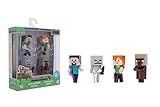
- Premium Die-Cast Build – Crafted from high-quality metal for a durable, sturdy collectible set with a premium feel
- Iconic Minecraft Characters – Includes Steve with Sword, Alex with Axe, Skeleton, and Villager, bringing the world of Minecraft to life
- Perfect Display Size – Each figure stands at 2.5 inches, ideal for desks, gaming setups, and nostalgic display pieces
- Great for Collectors & Fans – A must-have for Minecraft lovers, video game enthusiasts, and pop culture memorabilia collectors
- Jada Toys – Bringing legendary gaming characters to life with expertly crafted die-cast collectibles designed for fans and collectors
Quick checks if the profession remains
- Confirm the villager is an adult and is not a nitwit.
- Confirm you have never traded with it; a trade locks its profession.
- Make sure you removed the workstation the villager claimed.
- When assigning a new job, check for another villager claiming the block and account for Java or Bedrock job-site rules.
- If you are playing Bedrock 1.21.111, keep the reported lectern-removal issue in mind, but do not assume it establishes a general version change.
Product prices and availability are accurate as of the date/time indicated and are subject to change. Any price and availability information displayed on Amazon at the time of purchase will apply.




