The Tool Desk
Outbyte PC Repair FREERepair Windows errors before they cause bigger problemsFix Now →Outbyte Driver Updater FREEFix the driver behind crashes, sound loss and screen glitchesFind Drivers →You may be able to play Fortnite on Intel HD Graphics, but the exact graphics model matters. Epic lists Intel HD 4000 as a minimum PC GPU—not every Intel HD chip—and a PC that only meets minimum requirements may still struggle at high settings. Check your full specifications first, then update the game and drivers, reduce graphics load, and try Performance Mode. If local play is still inadequate, cloud gaming is another option.
Check whether your Intel graphics model meets Fortnite’s requirements
“Intel HD Graphics” is a broad label, not enough to confirm compatibility. Epic’s current PC minimum lists Intel HD 4000 or AMD Radeon Vega 8 as the minimum video card. It also lists a Core i3-3225 3.3 GHz processor, 8 GB RAM, and Windows 10 version 22H2 64-bit or Windows 10 Enterprise version 21H2 64-bit. Requirements can change, so compare your PC with Epic’s current Fortnite PC system requirements.
Epic’s recommended specifications are considerably stronger: an Nvidia GTX 960, AMD R9 280, or equivalent DX11 GPU with 2 GB VRAM; a Core i5-7300U 3.5 GHz, AMD Ryzen 3 3300U, or equivalent processor; at least 16 GB RAM; an NVMe SSD; and Windows 10/11 64-bit. Epic cautions that a PC meeting only the minimum may not run the game at its highest settings.
- In Windows, search for and open System Information.
- Under Components > Displays, note the exact graphics device. Also check your processor, installed memory, and Windows version.
- Compare those details with Epic’s current requirements. A different Intel HD generation should not be assumed to perform like Intel HD 4000.
Intel also recommends checking the PC’s specifications against Epic’s requirements before changing settings: Intel’s Fortnite graphics guide.
#1 Best Overall

- Powered by an Intel Core i5 12th Gen i5-12450H 4.4GHz Processor for fast and efficient performance.
- Equipped with an NVIDIA GeForce RTX 3050 6GB GDDR6 graphics card for excellent gaming visuals.
- Includes Up to 64GB of DDR4-3200 RAM for smooth multitasking and gameplay.
- Features a spacious Up to 2TB Solid State Drive for quick data access and storage.
- Boasts a vibrant 15.6" FHD IPS Micro-Edge Anti-Glare 144Hz Display for immersive gaming experiences.
Prepare the PC before changing graphics settings
- Install available Windows updates and the appropriate Intel graphics driver for your exact GPU. Driver packages vary by graphics model; an old driver version mentioned in troubleshooting advice is not necessarily the latest one for your PC.
- Update Fortnite through the Epic Games Launcher.
- Close programs and background tasks you do not need while playing. Epic and Intel both recommend freeing system resources on lower-spec systems.
These steps can remove avoidable software and resource problems, but they cannot make an unsupported GPU equivalent to a newer graphics card.
Lower Fortnite’s rendering load
Use fullscreen, reduce the game’s resolution or 3D Resolution, and lower visual-quality settings. Intel suggests trying 1600 × 900 or 1280 × 720 to improve smoothness and playability. If you want menus and HUD elements to remain sharper, lowering 3D Resolution while keeping the display at its native resolution is another option.
Rank #2
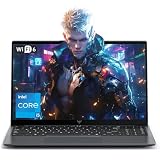
- Powerful Intel i5-12600H Processor -Featuring the 12th Gen Intel i5-12600H (12 Cores / 16 Threads, up to 4.5GHz), MALLRACE Gaming laptop delivers exceptional multitasking and processing power for complex work tasks. Paired with Intel Iris Xe Graphics, it renders vivid visuals for editing, streaming, and presentations. Ideal for professionals and students needing robust performance.
- Expandable Memory & Massive Storage-Comes with 24GB LPDDR5 4800MHz for seamless multitasking. 512GB M.2 NVMe PCIe 3.0 SSD (dual M.2 slots) supports up to 4TB total storage, offering fast loading and ample file space. Equipped with an 54.72Wh lithium-polymer battery, this pc laptops provides all-day power for remote work, classes, or business trips
- Ultra-Portable Design & Immersive Full HD Display-Slim body and lightweight 1.65kg —Portable traditional laptop for commutes, business trips, or campus use. 15.6-inch 16:9 Full HD display delivers sharp text and vibrant colors, reducing eye strain during long sessions. 180° hinge design allows easy content sharing with colleagues/partners
- Stable Connectivity & Secure Video Communication-Equipped with WiFi 6 and BT5.2 for fast, stable wireless connections—perfect for remote work, online classes, gaming and wireless peripheral pairing. 1MP webcam with a physical privacy switch protects your privacy after video calls. Full suite of ports (3 USB 3.2, HDMI 1.4, 2 Type-C, etc.) supports versatile device connections for all scenarios
- Windows 11 Laptop Computer & Reliable Performance-Preloaded with Windows 11, offering a secure, user-friendly OS with advanced productivity features. Powered by power supply for stable, consistent performance. The durable plastic build ensures long-term reliability, making it a trustworthy companion for daily work, study, and travel.
Change settings one at a time and assess them in actual matches. A lower resolution or reduced visual quality can make the game easier to run, but the best balance depends on your PC and your tolerance for a softer image.
Try Performance Mode
In Fortnite’s Advanced Graphics settings, select Performance as the rendering mode. Performance Mode reduces visual quality to lower memory use and ease CPU and GPU load. Epic’s Fortnite Team described it as a way to increase frame rate for players who meet the game’s system requirements; it is not a guarantee that a below-minimum PC will run well.
Quick wins for a faster PC:
Fix the driver behind crashes, sound loss and screen glitchesFind Drivers →Repair Windows errors before they cause bigger problemsFix Now →Scan for outdated or missing drivers - takes under a minuteDriver Scan →Rank #3

- Beyond Performance: The Intel Core i7-13620H processor goes beyond performance to let your PC do even more at once. With a first-of-its-kind design, you get the performance you need to play, record and stream games with high FPS and effortlessly switch to heavy multitasking workloads like video, music and photo editing
- AI-Powered Graphics: The state-of-the-art GeForce RTX 4050 graphics (194 AI TOPS) provide stunning visuals and exceptional performance. DLSS 3.5 enhances ray tracing quality using AI, elevating your gaming experience with increased beauty, immersion, and realism.
- Visual Excellence: See your digital conquests unfold in vibrant Full HD on a 15.6" screen, perfectly timed at a quick 165Hz refresh rate and a wide 16:9 aspect ratio providing 82.64% screen-to-body ratio. Now you can land those reflexive shots with pinpoint accuracy and minimal ghosting. It's like having a portal to the gaming universe right on your lap.
- Internal Specifications: 16GB DDR5 Memory (2 DDR5 Slots Total, Maximum 32GB); 1TB PCIe Gen 4 SSD
- Stay Connected: Your gaming sanctuary is wherever you are. On the couch? Settle in with fast and stable Wi-Fi 6. Gaming cafe? Get an edge online with Killer Ethernet E2600 Gigabit Ethernet. No matter your location, Nitro V 15 ensures you're always in the driver's seat. With the powerful Thunderbolt 4 port, you have the trifecta of power charging and data transfer with bidirectional movement and video display in one interface.
Epic’s April 30, 2021 article gave one example of a laptop with an Intel i5-8265U, 8 GB RAM, and Intel UHD Graphics 620 running at 24 fps before Performance Mode and 61 fps after it, at 720p. That is a dated result for that specific configuration, not a benchmark for Intel HD 4000 or a prediction for the current Fortnite build. The article also reported 18 fps before and 45 fps after at 720p on a different laptop with an AMD A10-5745M, 6 GB RAM, and AMD Radeon HD 8610G; that example likewise does not establish Intel HD performance. See Epic’s Performance Mode article.
Troubleshoot a crash when changing window mode
If Fortnite crashes specifically when you change window mode in-game, Intel’s troubleshooting article recommends installing current Windows updates and performing a clean installation of the correct Intel graphics driver. It also advises changing Fortnite’s window mode outside the game rather than through the in-game setting. Follow the steps for your graphics device in Intel’s Fortnite graphics guide; do not treat a driver version listed in older guidance as universally current.
Rank #4

- 『 Immersive Visual Experience 』15.6" FHD IPS 1920 x 1080 144Hz Pixels 250 nits brightness → 45% NTSC → Perfect For Work, movies, and casual gaming.
- 『 Power-Packed Performance 』Intel i5-13420H → 8 cores (4 P+ 4E) 12threads → Up to 4.6 GHz with Turbo Boost 12 MB Smart Cache → NVIDIA GeForce RTX 3050 GDDR6 6GB Graphics → Handles HD videos and light gaming.
- 『 Lightning-Fast Memory & Storage 』8 GB DDR4 3200 MHz → Smooth multitasking → 512 GB NVMe M.2 SSD → Rapid file transfers → Pre-installed Windows 11 Home.
- 『 Sleek & Portable Design 』Full size Backlit Keyboard with Numpad → Mica Silver→ Ultra-Portable Build → 14.09" L ×10.04" W ×0.93" H 5.06 lbs.
- 『 Versatile Connectivity Options 』Headphone/Microphone Combo Jack → 1xRJ-45 LAN → HD Audio → Realtek Wi-Fi 6 (2x2) → Bluetooth 5.3 →HDMI v2.1, 1x USB 3.2 Gen 2 Type-C support Power-off Charging / 10Gbps, 1x USB 3.2 Gen 2 Type-A support Power-off Charging / 10Gbps, 1x USB 3.2 Gen 2 Type-A support 10Gbps.
Choose an alternative if local play remains poor
| Option | What it depends on | Main trade-off |
|---|---|---|
| Local settings changes | Your PC must still meet the game’s requirements closely enough to run it. | Free to try, but Performance Mode and lower settings reduce visual quality and may not solve weak hardware. |
| Cloud gaming | A compatible device, service availability in your region, and a high-speed, low-latency, stable internet connection for Xbox Cloud Gaming. | The service renders the game remotely, reducing the burden on local graphics hardware; streaming quality and responsiveness depend on the connection. |
| Hardware upgrade | A PC or laptop whose exact specifications meet the requirements for the performance you want. | Can improve local capability, but costs more than settings changes and requires checking the exact GPU and other specifications before purchase. |
Epic lists both Xbox Cloud Gaming and GeForce NOW as ways to play Fortnite through cloud gaming. Epic says Fortnite on Xbox Cloud Gaming does not require a paid Xbox Game Pass subscription; service and regional availability can vary. Cloud play shifts rendering away from your PC, but it does not remove the need for a suitable device and reliable connection.
If you prefer local play and settings changes are not enough, consider a laptop with dedicated graphics only after checking its exact GPU, processor, memory, and operating system against Epic’s current requirements. No particular laptop can be recommended from the specifications alone.
Quick Recap
Best Value

- Intel Core i9 14th Gen 14900HX 1.6GHz Processor, NVIDIA GeForce RTX 5070 8GB GDDR7, 32GB DDR5-5600 RAM
- 1TB PCIe Gen4 x4 NVMe M.2 SSD
- 15.1" WQXGA OLED Glossy Display
- Gigabit LAN, 2x2 WiFi 7 (802.11be), Bluetooth 5.4
- 4.19 lbs. (1.90 kg),Windows 11 Home
Product prices and availability are accurate as of the date/time indicated and are subject to change. Any price and availability information displayed on Amazon at the time of purchase will apply.




