Quick wins for a faster PC:
Repair Windows errors before they cause bigger problemsFix Now →Scan for outdated or missing drivers - takes under a minuteDriver Scan →On a PSP running compatible custom firmware (CFW), fully power it off, then hold the R trigger as you turn it on. On ARK, this opens the Recovery App. This is not a standard menu on Sony’s stock firmware, and the exact route depends on the CFW installed.
Enter ARK Recovery App with the R trigger
- Check the firmware. This procedure is for custom firmware, such as ARK—not the ordinary system software supplied by Sony.
- Fully power off the PSP. Do not use sleep mode; start from a powered-off console.
- Press and hold the R trigger.
- Turn on the PSP while continuing to hold R. ARK documents this boot sequence for loading its Recovery App.
ARK’s documentation also describes opening the Recovery App while running ARK Loader. The available app and exact setup can differ; ARK documentation describes an external Recovery App stored on a Memory Stick, but that does not establish a Memory Stick as a universal requirement just to try the R-trigger boot sequence. ARK-4 Recovery documentation
Choose a recovery route based on whether the XMB loads
| Route | When it may work | What to know |
|---|---|---|
| Hold R while powering on | The PSP is fully powered off and has compatible CFW. | For ARK, this loads the Recovery App. It is not a stock-firmware feature. |
| CFW VSH/XMB menu | The PSP reaches the XMB and the installed CFW exposes the relevant menu entry. | Menu names and availability vary by CFW and installation; a VSH menu may include a Recovery Menu entry. |
ConsoleMods describes the common CFW recovery entry and VSH-menu route, while noting the route is tied to the CFW setup. ConsoleMods PSP: Recovery Menu
If the Recovery App does not appear
- The PSP boots normally: Confirm that it has custom firmware. Sony’s official PSP system-settings documentation does not describe the R-trigger CFW recovery menu. Sony PSP-1000/2000/3000 default settings
- It was in sleep mode: Turn it fully off and repeat the sequence, holding R before switching it on.
- The XMB is available: Check the installed CFW’s own documentation for its VSH or loader route; these entries are not universal.
- Recovery still is not available: The precise Recovery App and its storage setup depend on the CFW. ARK documents an optional external app on a Memory Stick, but the boot-key instruction alone does not mean every PSP needs a new card.
Recovery mode is not a guaranteed fix for a bricked PSP
Opening a recovery menu is different from repairing a console that cannot boot. ARK identifies Pandora Battery or Baryon Sweeper with a Magic Memory Stick as last-resort approaches when a PSP is bricked and ordinary recovery options do not help. These are advanced, model-dependent procedures; do not treat the R-trigger menu as a guaranteed unbrick method. ARK-4 Recovery documentation
#1 Best Overall

- 【Battery Compatible】 This psp 3001 battery fits for Sony PSP 2000(2001、2002、2003、2004、2005、2006、2007、2008、2010), PSP 3000(3001、3002、3003、3004、3005、3006、3007、3008、3010), PSP Lite, PSP Slim( Not compatible with Sony PSP 1000 Model ). Please check your PSP model number first
- 【Cable Compatible】Cable Length: 4.04ft/1.23cm. this 2 IN 1 charging cable compatible with Sony PSP 1000 2000 3000 Series (PSP-1001, 2001, 3001) and the latest E-1000 model. Also supports PS3 DualShock 3 Controller.Not compatible with PSP Go version.
- 【Powerful Battery】Capacity:1200mAh, Voltage:3.7V, Battery type: Li-ion Battery, rechargeable.this psp battery use grade A+ cells for longer battery life with no memory effect. Sizes:58.4*35.8*9.7 mm
- 【Multiple Safety Protections】psp 3001 battery and charger features four layers of protection (over-charging, short-circuit, high-temperature, and surge protection) with a high-quality, Fire-resistant construction.
- 【Package Included】1* PSP 3000 battery + 1* psp charging cable.
ARK-specific option: boot official firmware once
On a permanent ARK installation, holding Home while powering on boots official firmware mode and disables CFW functionality for that boot. This is ARK-specific guidance, not a universal shortcut for other custom firmware. ARK-4 Recovery documentation
Quick Recap
Best Value

- 100% Compatible with original battery.
- Battery Model : PSP-S110 ,
- Replace Part Number: PSP-S110 Voltage : 3.6V, Capacity : 1200MAH Color: Black
- Compatible model:FOR PSP 2000 (2001, 2002, 2003, 2004, 2005, 2006, 2007, 2008, 2010), PSP 3000 (3001, 3002, 3003, 3004, 3005, 3006, 3007, 3008, 3010), PSP Lite, PSP Silm
- Please don't hesitate to contact us if you have any questions or concerns before or after your purchase. We are committed to your 100% satisfaction
Rank #4

- 【High Capacity Performance】Our 2Pcs Rechargeable Battery Pack offers a real capacity of 1200mAh, ensuring long-lasting power for your PSP devices, including PSP-3000, PSP-3001, PSP-2000, PSP-2001 and more. Enjoy uninterrupted gaming sessions with our reliable PSP battery.
- 【Compatible with Multiple Models】This rechargeable battery pack is specifically designed as a replacement for various PSP models, including the PSP Lite and PSP Slim console. Perfectly compatible with PSP 2000 battery and PSP 3000 battery requirements. (Note: Do not compatible with PSP 1000 fat console)
- 【Clear LED Indicator】Designed for user-friendly installation, our PSP battery allows you to effortlessly replace your old or worn-out batteries. Our charging station has a LED indicator, charging with red light and full-charged with green light.
- 【Durability & Safety】Constructed with high-quality lithium polymer materials, this rechargeable battery ensures durability and safety while charging. Trust in our PSP battery to provide optimal performance without compromising your device.
- 【Cost-Effective Solution】Save money and reduce waste with our rechargeable 2Pcs battery pack. A perfect investment for any gamer looking to extend their playtime with an efficient and effective PSP battery solution.
Rank #3

- 【High Capacity Performance】Our 2Pcs Rechargeable Battery Pack offers a real capacity of 1800mAh, ensuring long-lasting power for your PSP devices, including PSP-1000, PSP-1001, PSP-110 and more. Enjoy uninterrupted gaming sessions with our reliable PSP battery.
- 【Compatible with Multiple Models】This rechargeable battery pack is specifically designed as a replacement for various PSP models, including PSP-110 (1002, 1003, 1004, 1005, 1006, 1007, 1008, 1010), PSP Fat Console. Perfectly compatible with PSP 1000 battery requirements. (Note: Do not compatible with PSP 2000/3000 slim console)
- 【Clear LED Indicator】Designed for user-friendly installation, our PSP battery allows you to effortlessly replace your old or worn-out batteries. Our charging station has a LED indicator, charging with red light and full-charged with green light.
- 【Durability & Safety】Constructed with high-quality lithium polymer materials, this rechargeable battery ensures durability and safety while charging. Trust in our PSP battery to provide optimal performance without compromising your device.
- 【Cost-Effective Solution】Save money and reduce waste with our rechargeable 2Pcs battery pack. A perfect investment for any gamer looking to extend their playtime with an efficient and effective PSP battery solution.
Rank #2
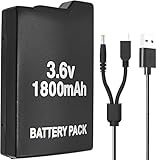
- Perfect Compatibility: Model PSP 110 280 battery compatible with Sony PSP 1000 series and PSP Fat console video games(Not fit for PSP 2000/3000), please check your device model before purchasing
- Long-Lasting Durability: 3.6 V 1800 mAh lithium polymer upgraded battery is the same as the original compatible Sony PSP battery, have a long service life
- Safe to Use: PSP-1001 rechargeable battery has a built-in microchip to prevent overcharging, over-discharging, short-circuiting, overheating, etc., to ensure the safety of the battery
- Cable Compatibility: The 2 in 1 charger cable compatible with Sony PSP 1000 2000 3000 series and the latest E-1000 model. Also supports PS3 DualShock 3 Controller(But not fit for PSP Go version)
- Package Included: 1 x PSP-280 battery & 1 x 2 in 1 charging cable for Sony PSP gaming console
Product prices and availability are accurate as of the date/time indicated and are subject to change. Any price and availability information displayed on Amazon at the time of purchase will apply.




