Quick wins for a faster PC:
Clear out junk files and repair common Windows errorsFree Scan →Scan for outdated or missing drivers - takes under a minuteDriver Scan →To remove another team from a private Yahoo Fantasy Basketball league, you must be the commissioner and the league must not have drafted. Open Yahoo Fantasy, select basketball, then go to Commissioner > Manage Other Teams > Remove Teams. Choose Remove beside the team and confirm with Delete Team. If the team list is locked, unlock it first.
Remove a team before the draft
- Sign in to Yahoo Fantasy in a browser and open your Fantasy Basketball league.
- Open the Commissioner tab.
- Select Manage Other Teams, then Remove Teams.
- Select Remove beside the team you want to remove.
- Confirm by selecting Delete Team.
If Yahoo has locked the team list, unlock it before removing the team. This commissioner workflow is for removing another team’s place in a private league; it is different from deleting your own team.
Yahoo also offers Remove and Ban. Yahoo warns that this prevents the manager from rejoining the league and cannot be undone, so use it only if that is your intention. Yahoo’s team removal and post-draft instructions.
What to do if the league has drafted
Yahoo says a commissioner cannot add or remove teams after the draft without resetting the league draft. If a manager has left, the practical alternative is to transfer the team to a new manager rather than delete it. In a private league, try contacting the inactive manager through League Chat or email to arrange the transfer. Yahoo’s general abandoned-team guidance says it will not remove a team simply because its manager has abandoned it. Yahoo’s removal guidance and Yahoo’s abandoned-team guidance.
#1 Best Overall

- Desk Toys: This toys and games include 1 court, 1 rebound with built-in score keeper, 2 frames , 3 fences, 6 balls. The desktop games is designed as basketball gifts and desk games for office for adults
- Relieve Stress: The basketball toys which is also called table top games helps children reduce learning pressure; The desk games is perfect basketball stuff for adults to reduce working pressure
- Basketball Gifts: Our basketball toys is the best basketball gifts for boys, The table top games is perfect basketball gifts for boys 8-12. The basketball shooting game is also basketball gifts for basketball lovers
- Parent-Child Toys and Games: The mini basketball game is the perfect basketball games for kids 8-12 and their parents to enjoy together, strengthen parent-child relationship. The basketball stuff is ideal parent-child toys & games
- Made by GOODLYSPORTS- a professional manufacturer of basketball toys. We have our own factory producing basketball stuff, which can bring more fun to your life
If removing the team after the draft is essential, Yahoo’s instructions require resetting the draft, unlocking the team list, and manually re-entering the league information through an offline draft. This is disruptive; consider it only if the league is prepared to rebuild its draft setup.
If you want to delete your own team
A manager deleting their own team uses a separate workflow, not the commissioner’s Remove Teams control. Yahoo says to use a web browser; team deletion is not available in the Fantasy App.
Rank #2
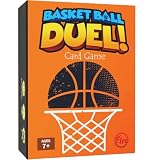
- 🏀 BASKETBALL-THEMED FUN FOR ALL AGES – A fast-paced basketball card game for ages 7+, perfect for kids, teens, adults, and sports fans. Combines competition, strategy, and nonstop action for endless replay value.
- 🧩 PUZZLE YOUR WAY TO VICTORY – Tetris meets Uno! Connect the 4 correct game item cards to complete a basketball play and score points before opponents swipe your chance.
- 📦 PREMIUM FLIP-TOP BOX SET – Comes with 65 high-quality cards, including game, bonus, and immunity cards, all stored in a durable, eye-catching flip-top box.
- 👥 PLAY SOLO OR TEAM UP – 2–4 players can face off individually, or team up for exciting 2-vs-2 gameplay that adds layers of collaborative strategy.
- 🎁 PERFECT GIFT FOR BASKETBALL LOVERS – A slam-dunk choice for kids, teens, and adults who love basketball, board and card games, or competitive family fun. Great for Birthday, Christmas Gift or Stocking Stuffer.
- Open Yahoo Fantasy in a browser and select the sport.
- Beside My Teams and Leagues, select the gear icon.
- Choose Delete Team beside the team, then confirm.
Yahoo lists different deadlines by league type: public leagues must be deleted before the draft room opens; public prize leagues (formerly Pro Leagues) must be deleted at least 72 hours before the draft; and private-league deletion must happen before the commissioner finalizes the league’s team list. Check the deadline shown for your league because these cutoffs are not interchangeable. Yahoo’s instructions for deleting your own team.
If an unrenewed team is holding a spot
A reserved place for a returning manager in a renewed league is not the same as an active team that needs removal. Yahoo documents a desktop workflow for Fantasy Football: open the League tab, find Unrenewed Teams, and use the remove-reserved-spot control beside the team. That help page is for Football, so confirm that Basketball offers the equivalent control before relying on the same steps. Yahoo cautions that if the removed team traded draft picks, those picks cannot be imported from the prior season. Yahoo’s unrenewed-team instructions for Fantasy Football.
Rank #3

- SAFE & STURDY BUILD: Made from qualified ABS plastic with smooth rounded edges, this toy ensures safe play for active kids.
- DUAL-MODE GAMEPLAY: This tabletop game includes two types of balls to keep players engaged. Players can score by shooting the ball into the hoop or hitting the target. Who achieved 3+3 points first was the winner.
- ONE ON ONE COMPETITION: This basketball battle toy allows two players to compete against each other. It is an excellent choice for family game night or playdates that encourage good sportsmanship among friends
- FOCUS & SKILL DEVELOPMENT: Enhances hand-eye coordination and patience as kids master force control by aiming and pressing the launch button accurately
- GREAT GIFT FOR KIDS: This screen free activity makes a wonderful present for birthdays or holidays. Suitable for family and friends to enjoy game time together
If you mean delete the entire league
Deleting the league removes more than one team’s place, so do not use this option if you only want to remove a team. For Fantasy Basketball, Yahoo says to reset the draft if the league has drafted and unlock the team list if it has been finalized. Then go to Commissioner > Delete League and confirm. Yahoo’s Fantasy Basketball league-deletion instructions.
Independent reader supportYour contribution helps us test, update, and keep practical guides available for everyone.Choose the right action
| Your situation | Action | Key condition |
|---|---|---|
| You are commissioner and want to free a team spot | Commissioner > Manage Other Teams > Remove Teams | Before the draft; unlock the team list if needed |
| You are deleting your own team | Use the gear beside My Teams and Leagues, then Delete Team | Use a browser and meet the deadline for your league type |
| The league drafted and a manager left | Transfer the team to a new manager | Removing a team requires resetting the draft |
| A returning team has not renewed | Remove the reserved spot, if the Basketball interface provides that control | The documented Yahoo steps are for Fantasy Football |
| You want to end the league | Commissioner > Delete League | Follow Yahoo’s draft-reset and team-list requirements |
Yahoo’s help pages provide the procedures above, but interface labels and deadlines can change. Check the controls and deadline displayed in your league before confirming a deletion.
Quick Recap
Best Value

- Made of high quality ABS plastic and easy to assemble. All you have to do is launch your fingers into an intense b-ball competition.
- Dimensions: 59.5cm x 18.5cm x 23cm / 23.5in x 7.3in x 9in; Color: Blue/White; Material : High Quality Plastic.
- Can be used on the table, on the floor or on the bed. In addition to being used at indoor home, it is also suitable for offices and very convenient for outdoor travel.
- How to play: Each team has five basketballs. After one player shoots the ball into the basketball hoop, the ball will slide down the pipe into the opponent's court. The team with no basketballs left wins.
- Fun For All Age: Kids and adults will be able to get lots of fun from it. Suitable for age 6+.
Rank #4

- EXCITING GAME FOR KIDS: Bounce ‘em in 4 the win! The Connect 4 Shots game is a rapid-fire, bouncin' twist on the Connect 4 game where 2 players simultaneously bounce balls into the grid
- FRENZIED, FREE-4-ALL FUN: Feel the exhilaration in this active game for kids! Two players compete to be the first to get 4 in a row—up, down, or diagonally—of the same color to win
- GETS KIDS UP AND MOVING: Want to get your kids moving and engaged in a fun activity? Unlike traditional board games, the Connect 4 Shots game is played standing up. Everyone will want to get in on the actionGETS KIDS UP AND MOVING: Want to get your kids moving and engaged in a fun activity? Unlike traditional board games, the Connect 4 Shots game is played standing up. Everyone will want to get in on the action
- EASY TO STORE: The grid is collapsible—just fold it into the storage case when everyone's finished playing. The built-in storage makes this game easy to take along on vacations or to parties
- COOL GIFT FOR KIDS AND FAMILIES: The Connect 4 Shots game makes a winning gift for kids ages 8 and up and families, and it’s a super fun indoor game for playdates or rainy day fun
Product prices and availability are accurate as of the date/time indicated and are subject to change. Any price and availability information displayed on Amazon at the time of purchase will apply.




