VRChat has no universal desktop key for sitting. To use a chair in a world, move close and try Left Click; whether it works depends on how that world set up the seat. To sit anywhere using an avatar pose, press R, open Expressions, and look for a sit or pose control. That option is creator-dependent. C crouches and Z goes prone; neither is a general sit command.
How to sit in a world’s chair
- Move beside the chair with WASD.
- Aim the mouse at the seat or its interaction area.
- Try Left Click, VRChat’s documented Desktop Mode interaction and pickup input. The keyboard and mouse guide does not specify one standard chair interaction for every world.
- If nothing happens, look for instructions in the world or ask its creator or community. The chair may use a different arrangement or be decorative.
How to use an avatar’s sitting pose
- Press R to open the desktop Action Menu.
- Choose Expressions and look for a sit, pose, or toggle control. The exact label and availability depend on the avatar.
- If you do not see one, the current avatar may not include a sitting pose. Try an avatar whose creator provides one.
VRChat’s Action Menu documentation explains that avatar controls can be customized, so there is no guaranteed sit option shared across all avatars.
Which method should you try?
| Method | Where it works | Input to try | What determines success |
|---|---|---|---|
| World chair or seat | At a seat provided by a world | Left Click | How that world implements its chair interaction |
| Avatar pose | Where the avatar’s pose control is usable | R, then Expressions | Whether the avatar creator included a sitting control |
Crouching and going prone are different
- C crouches.
- Z crawls or goes prone.
These are the desktop controls listed by VRChat, not commands for sitting in a chair. See the keyboard and mouse guide.
Playing on PC without a headset
You can play VRChat on a modern Windows computer without a VR headset. Keyboard and mouse are supported, as is an XBOX-like gamepad. VRChat’s Getting Started guide, updated August 22, 2026, covers getting into the game; the controls guide lists supported desktop input paths.
The Tool Desk
Outbyte PC Repair FREERepair Windows errors before they cause bigger problemsFix Now →Outbyte Driver Updater FREEScan for outdated or missing drivers - takes under a minuteDriver Scan →#1 Best Overall

- The Roto VR chair revolutionizes VR experiences by synchronizing physical rotation with in-game movement. This 360-degree motion significantly enhances immersion, making virtual worlds feel more realistic. Crucially, this synchronization helps to minimize or eliminate motion sickness, a common issue with VR, allowing for extended and more comfortable gaming sessions. The chair’s design focuses on bridging the gap between visual and physical sensation, creating a more believable and enjoyable virtual reality.
- Patented 'look & turn' technology transforms the seated 360º experience with its powerful motorized base and full-body haptics resolves motion sickness and enhances immersion. By enabling physical rotation, the Roto VR chair provides an intuitive and natural control scheme. Users can simply turn their bodies to navigate virtual environments, eliminating the need for cumbersome controller inputs. This feature dramatically increases spatial awareness, allowing players to react more quickly and naturally to in-game events.
- Designed for extended use, the Roto VR chair prioritizes user comfort with an ergonomic design and adjustable features. The chair is constructed from high-quality, durable materials, ensuring long-lasting performance. Furthermore, users can customize their experience by adjusting rotation speed, haptic feedback intensity, and chair height, tailoring the setup to their individual preferences. The integrated cable management system also contributes to a cleaner and more organized gaming environment.
- The Roto VR chair is compatible with a wide range of VR headsets and games, expanding the possibilities for immersive entertainment. Beyond gaming, the chair's capabilities extend to various VR applications, including virtual tourism, medical training, architectural visualization, and educational experiences. This versatility makes the Roto VR chair a valuable tool for both entertainment and professional use, showcasing its potential to transform how we interact with virtual reality.
- The Roto VR chair represents a significant step forward in VR technology, offering a glimpse into the future of immersive entertainment. Its modular design allows for expansion with optional accessories, such as racing wheel and flight stick mounts, further enhancing the user experience. The inclusion of haptic feedback adds another layer of realism, making virtual interactions more visceral. The Roto VR system is designed to evolve, ensuring that users can continue to experience the latest advancements in VR technology.
If clicking does not work
The chair does not respond
Left Click may pick up an object without activating the seat. The general desktop control list documents interaction and pickup, but does not define how every world configures chairs. Check for world-specific instructions or ask someone familiar with that world.
There is no sit option in Expressions
Avatar controls are customizable. If the current avatar has no sitting control, use a different avatar that includes one.
Rank #2
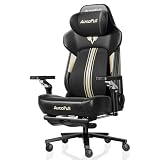
- [World First with Bionic Hand Massage] The AutoFull M6 Ultra+ Gaming Chair features an innovative bionic hand massage in the lumbar area, mimicking the movements of real massage hands to specifically relax the lower back muscles. This advanced technology effectively relieves muscle tension during long gaming sessions or intense work periods, delivering an exceptionally natural and lasting comfort experience.
- [Ventilated & Heated Gaming Chair] The seat provides optimal comfort all year round. Two high-performance fans cool to a comfortable 19°C and reduce sweat in summer, while powerful graphite heating elements warm to 50°C in winter. With three adjustable levels, you can effortlessly set the temperature to your preference, keeping you focused and relaxed whether gaming or working.
- [720° Mechanical Armrests] Smooth, precise five-direction adjustment via a sophisticated internal mechanism. Adjust your gaming chair armrests up, down, forward, backward, or sideways to optimally support wrists and elbows – or slide them under the desk to save space when you lean forward.
- [New Headrest – Easy Adjustment] The headrest has been completely redesigned, now allowing flexible adjustment up, down, forward, and backward. This provides optimal adaptation to your individual sitting posture and delivers ergonomically correct support for your head at all times. As a result, tension is effectively reduced and comfort during long work or gaming sessions is significantly enhanced.
- [Quick Switch Between Work & Relaxation] Recline back with the generous 160-degree tilt and enjoy comprehensive support for head, neck, and shoulders. Carefully contoured side wings provide enhanced pressure relief.
You are trying to click a HUD element
In the live-build notes for VRChat 2026.3.3, Build 1919, dated October 2, 2026, VRChat describes holding TAB to release the cursor for interacting with desktop HUD elements in first-person mode. This is for the HUD, not a control for world chairs. See the 2026.3.3 release notes.
Quick Recap
Rank #4

- [Heavy Duty & Wide Seat for Big Adults] Engineered for big and tall users with a 330 lbs max load capacity. Featuring a 22.1" ultra-wide seat and 34.6" high backrest to provide spacious comfort for long gaming sessions or 8+ hours home office work, ensuring full-body support without feeling cramped. Equipped with a USB-powered electric massage lumbar pillow to relieve lower back fatigue
- [Flexible 160° Recliner with Retractable Footrest] Find your perfect posture with a 90°-160° adjustable backrest for gaming, reading, or WFH napping. The built-in extendable footrest allows you to fully stretch out, transforming your computer chair into a comfortable lounge recliner in seconds. Perfect for professionals and gamers who need a quick energy rest between tasks
- [Premium PU Leather & Quiet 360° Smooth Swivel] Constructed with high-density foam and skin-friendly, waterproof PU leather. he heavy-duty metal frame and SGS-certified gas lift ensure long-term durability and safety. The 360° swivel base features silent rubber casters that glide smoothly on both carpet and hardwood floors without scratching, ideal for quiet late-night gaming sessions without disturbing others
- [Ergonomic Adjustable Fit] Fully customizable setup with a 17.9"-22" adjustable seat height to match various desk levels. The gaming chair's backrest measures 18.2" x 34.6", and the seat cushion measures 21.8" x 18.9". Total cushion length reaches 31.7" with the footrest extended, accommodating different leg lengths and sitting postures for optimal ergonomic alignment
- [Easy 15-Min Assembly] All product parts will be delivered in one package. When installing, please look at the diagram on the instruction manual to avoid errors. Please let us know if there is any damage caused in transit or other problem about products, we will help you
Rank #3

- 【7-Point Precision Support – Total Body Relief】Extended sitting takes a toll on more than just your back. JECQCUPG engineered a complete 7-point support system that addresses seven critical zones: head, neck, shoulders, back, lumbar, hips, and legs. Each zone receives targeted pressure distribution to encourage proper spinal alignment and steady blood flow. The headrest and lumbar cushion adjust independently to fit heights from 120cm to 190cm. Whether you're locked into a gaming session or grinding through work hours, this system keeps fatigue at bay so you stay sharp and comfortable.
- 【51cm Wingless Seat – Sit Any Way You Like】Narrow seats with bulky side bolsters force your legs into unnatural positions. JECQCUPG removes those barriers with a flat, wingless cushion that spans a full 51cm – a full 13cm wider than the typical 38cm effective seat width found on standard chairs. The generous surface invites you to sit cross-legged, sideways, or however feels natural. High-density, high-rebound foam filling resists flattening, so your hips and thighs enjoy consistent cushioning without annoying pressure points. Comfort that adapts to you, not the other way around.
- 【Sofa-Grade Cushioning – Foam Meets Pocket Springs】Most gaming chairs rely on a single layer of foam that breaks down within months. JECQCUPG takes a smarter approach: dual-layer high-density foam paired with durable pocket springs – a construction borrowed from premium sofas. This combination delivers a plush yet supportive feel that cradles your body while preventing bottoming-out. The breathable PU leather cover resists scratches, wipes clean in seconds, and holds its shape through years of daily use. It's the kind of comfort that makes you forget you're sitting in an office chair.
- 【Synchronized Armrests + 3 Recline Angles】Three optimized angles – 90° for focused work, 110° for casual browsing, and 135° for full relaxation – give you the flexibility to switch postures throughout the day. But JECQCUPG goes further: the armrests are synchronized to tilt automatically with the backrest. Your arms stay supported at every recline angle, preventing shoulder strain and awkward positioning. The seat height adjusts up to 10cm, accommodating everyone from teenagers to tall adults. One chair, three modes, endless comfort.
- 【Steel-Reinforced Build – 150kg Capacity, Easy Assembly】Flimsy frames lead to squeaks, wobbles, and premature failure. JECQCUPG is built around a one-piece steel frame and a reinforced 5-star base – with steel thickness 3mm greater than most competing models. Tested to support 150kg, it offers a stable, secure sit for users ranging from 120cm to 185cm. Smooth-gliding, floor-friendly casters roll silently across any surface. Assembly is quick and frustration-free thanks to clear illustrated instructions and a complete tool set. Backed by responsive customer support – we've got you covered from unboxing to everyday use.
Product prices and availability are accurate as of the date/time indicated and are subject to change. Any price and availability information displayed on Amazon at the time of purchase will apply.




