Recommended Free Tools
Use the built-in System Transfer on both consoles; copying an SD or microSD card alone will not make its downloaded content usable on the new system. Keep both 3DS systems available, check that the target can receive the transfer, and choose the transfer method that fits your model and card capacity.
Before you start: check the consoles and preserve target data
- You need both systems. Nintendo says the transfer cannot be completed without access to the source console, and its overview documents a seven-day wait before another transfer can be attempted. See Nintendo’s System Transfer Overview.
- Check region compatibility. Nintendo says systems from different regions cannot transfer between each other. Requirements can vary by system family and region, so use the official guide for your target model.
- Update and power both systems. Nintendo’s cited New Nintendo 3DS guide requires the latest system update and an active internet connection. Keep both consoles charged or connected to power; a full wireless transfer can take more than four hours, depending on the amount of data.
- Do not link an NNID to the target first. Nintendo says a target with an NNID already linked cannot receive the transfer. The source NNID can be linked to the target after transfer, and will no longer be available on the source. Two NNIDs cannot be merged.
- Save anything on the target you want to keep. The transfer generally replaces target information with source information. Nintendo’s UK guide advises copying target photos and recordings to a microSD card first if they matter to you. Review the on-screen warnings and your region’s instructions before proceeding.
If the target already has an NNID linked, Nintendo says formatting it removes the link, but formatting erases data on that system. Back up anything you need before considering that step.
Run System Transfer on both consoles
- On each console, open System Settings > Other Settings > System Transfer.
- Follow the on-screen instructions, identifying the source system (the old 3DS) and target system (the new 3DS) correctly.
- Meet the update, internet, region, and power requirements shown for your models. If the guide for your system says a region change requires opening eShop once before transfer, follow that instruction.
- Choose a transfer option offered for your hardware and cards. For a New Nintendo 3DS family target, Nintendo documents full wireless, PC-based, and low-capacity microSD transfer options.
- Keep both consoles powered and follow the prompts until the transfer completes. Do not interrupt the process.
Nintendo says a full wireless transfer may take more than four hours, depending on how much data is being moved. In a specific New Nintendo 3DS preparation scenario with a source SD card of 4 GB or less, Nintendo says the transfer may take up to two hours. These are Nintendo’s estimates for the described situations, not guaranteed completion times.
Choose a transfer method for a New Nintendo 3DS family target
| Method | What moves immediately | What you need to consider |
|---|---|---|
| Full wireless | Downloaded content transfers over local wireless. | The target microSD card needs enough room for the source’s downloaded data. Nintendo warns the process can take more than four hours depending on data volume. |
| PC-based | Data is copied from the source SD card to the target microSD card as part of Nintendo’s transfer process. | Requires a PC with an SD card reader, suitable microSD access or adapter, and a size #0 cross-head screwdriver to open the target system. Follow Nintendo’s sequence exactly; copy the entire Nintendo 3DS folder and do not alter or delete files inside it. |
| Low-capacity microSD transfer | Data other than downloaded software transfers. | Downloaded software must be redownloaded afterward; Nintendo says its save data is restored when the title is redownloaded. This route depends on redownload access and the content remaining available. |
Nintendo recommends a source card of 4 GB or less for low-capacity transfer in the cited New Nintendo 3DS guide. For larger source cards, the guide discusses increasing target capacity or using low-capacity transfer. Card instructions are model-specific: confirm your exact console and card type before buying or swapping a card. Not every 3DS model uses microSD.
#1 Best Overall

- Versatile 5-in-1 Charging Solution: This 5-in-1 USB charging cable is designed to charge for multiple Nintendo devices, including Nintendo DS Lite, 3DS, Gameboy Advance SP, PSP, and Wii U. Say goodbye to multiple cables—this one does it all!
- Multi-Device Compatibility: Charge for a variety of consoles, including Nintendo DS Lite, Nintendo DS, New 3DS XL, New 3DS, 3DS XL, 2DS, DSi XL, GBA SP(Gameboy Advance SP), PSP 1000, PSP 2000, PSP 3000, and Wii U. Whether you’re using your handheld gaming console or a retro favorite, this cable is compatible with the most popular Nintendo devices and more.Additionally, it is compatible with Windows 98SE/2000/XP/Vista/7/8 operating systems. Please note that this product does not support data transfer functionality.
- Fast Charging: This cable supports fast charging through USB ports on your laptop, PC, car charger, wall charger, or power bank—allowing you to quickly power up your devices whether you're at home, in the car, or on the go (charger not included).
- Durable and Long-Lasting: Made from high-quality materials, this cable is built to last. The 100 cm cable length gives you plenty of room to charge your devices comfortably, and it’s ideal for long-term use, whether you're at home, in the office, or traveling.
- Easy to Use & Charge Multiple Devices Simultaneously: The 5-in-1 cable is designed for hassle-free charging, supporting charging multiple devices simultaneously. It's perfect for gamers who want a reliable, high-performance solution for charging all their favorite devices at once. No more tangled cables—just plug it in and get going!
What “everything” means—and what may not transfer as expected
Nintendo’s transfer inventory covers eShop content and licenses, save data associated with downloaded software, system settings, friend-list data, photos and sound files, preinstalled application data, and other system-specific information. It is a system and account migration with defined handling, not a byte-for-byte clone. Most target information is overwritten, while Nintendo documents exceptions and different handling for some target SD-card photos and sound files. Check the prompts and your region- and model-specific guide for the exact treatment.
Nintendo explicitly warns that simply copying data to the new system’s card will not make copied content usable there. Card copying is only part of the official process in routes that call for it; it does not replace System Transfer.
Rank #2
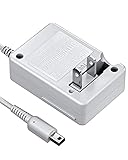
- FOR YOUR FAVORATE GAME CONSOLE: VOYEE cares about every requirements from our players, brings this brand new nintendo 3DS charger to accompany your happy game time, which works perfectly as the original was. We care every parts, made it compatible with your 3DS/ DSi / DSi XL / 3DS XL / 2DS / N3DS / N3DS XL / N2DS XL under the best condition
- CARRYING WITHOUT CONCERN: With VOYEE made 3DS charger, just enjoy your own pocket gaming at anywhere, as it is small, light. You will love to carry it for your 3DS charging needs, which supports 100-240 auto voltage is suitable for any places in USA
- COMFORTABLE FOR DAILY USE: VOYEE extended power cord makes it easy to continue your fun gaming from the floor to desk, bed sides, the cord can be extended up to 43 inches/ 110cm, which is also flexible and durable, can bear 5000+ bending test, just enjoy game the way you like
- SAFE & THE BEST PROTECTION: VOYEE's upgraded circuitry and built-in safeguards to protect your game consoles against excessive current, detecting batteries situation, faster reaction to prevent overheating and overcharging, this 3DS charger can automatically switches to saver
- VOYEE'S SERVICE ASSURANCE: VOYEE have confidence in our products’ build quality, we offer 18-months quality assurance for all products, no worry using it. Our friendly and prompt customer service always be happy help you out within 24 hours, your 100% satisfaction is our pursue
Redownloads, NNIDs, and the closed 3DS eShop
Nintendo ended purchases of 3DS software and DLC on March 27, 2023, at 5:00 p.m. Pacific Time. Nintendo says previously purchased eligible games and DLC can still be redownloaded “for the foreseeable future,” and existing software updates can still be received. That wording is not a guarantee of indefinite server availability. Read Nintendo’s Wii U & Nintendo 3DS eShop Discontinuation Q&A for the current policy.
Content tied to separate NNIDs is not combined by a transfer. Nintendo says eShop content associated with different NNIDs cannot be merged; only content tied to the NNID linked to the target is available there. If you use low-capacity transfer, reconnect to eShop after the transfer and redownload eligible titles to restore their save data.
The Tool Desk
Outbyte Driver Updater FREEFix the driver behind crashes, sound loss and screen glitchesFind Drivers →Outbyte PC Repair FREERepair Windows errors before they cause bigger problemsFix Now →Quick Recap
Best Value

- 【Universal Compatibility】2 Pack 3DS Charger Cable compatible for Nintendo New 3DS XL/New 3DS/3DS XL/3DS/New 2DS XL/2DS XL/2DS/DSi/DSi XL
- 【Stable & Fast Charging】This 3DS Charger has advanced chip to protect being damaged from overrunning or overcharging When connected to power source. Rigorous Insulation Resistance & Durability Tests create the fast, efficient & stable charging adapter.
- 【Premium & Durable Material】This 3DS Charging Cable made of high quality ABS + PVC material and Copper Wire ensures Stable Current Transmission, with high temperature resistant, ensure the excellent charging experience.
- 【Lightweight and Portable】The 3DS Charging Cable is lightweight and easy to carry, you can hang it in your bag or pocket, it's perfect for traveling. Integrated charging, easy to use, just plug it into the computer, USB C port, and power pack to quickly charge.
- 【Friendly Customer Service】If you are not absolutely thrilled with our premium 3DS/2DS Charging Cable, Please feel free to contact us at any time. We provide 30 days warranty with with free returns or exchanges.
Rank #4

- 【PLAY WHILE CHARGING】The 4 FT (1.2 m) cable gives you more freedom during gameplay. Whether you're finishing a level on the couch or charging at a desk, you can keep playing without staying close to the power source.
- 【DESIGNED FOR POPULAR 3DS SYSTEMS】Compatible with New 3DS XL, New 3DS, 3DS XL, 3DS, New 2DS XL, 2DS, DSi, and DSi XL. Not compatible with DS or DS Lite consoles, helping you avoid ordering the wrong charger.
- 【CHARGE FROM USB POWER SOURCES】Connect to a wall adapter, power bank, laptop, desktop computer, or car USB port. A practical replacement cable for everyday charging at home or on the go.
- 【INCLUDES 2 RETRACTABLE STYLUS PENS】Includes one red stylus sized for Original 3DS storage slots and one black stylus sized for Original 3DS XL storage slots. Both styluses can be used on compatible handheld touchscreen systems.
- 【USE AS A SPARE OR REPLACEMENT CABLE】Keep an extra charger in your travel bag, gaming setup, or another room. A convenient backup when your original cable is misplaced or no longer available.
Rank #3

- Safe & Reliable Charging: Enjoy peace of mind with built-in safeguards against overcurrent and overheating. Perfectly compatible with Nintendo New 3DS XL, New 3DS, 3DS XL, 3DS, New 2DS XL, 2DS XL, 2DS, DSi, and DSi XL. (Note: Not compatible with Nintendo DS or DS Lite).
- Fast Charging Performance: Features high-quality 24 AWG copper wiring for efficient power delivery and lower resistance. Charge your device significantly faster than most standard cables.
- Play While Charging: The generous 1.2-meter (approx. 4 feet) cable length gives you the freedom to keep gaming comfortably while your console charges – no need to pause your adventure.
- Built to Last: Constructed from premium materials and engineered to endure over 10,000 bends, this cable is designed for long-lasting, everyday durability.
- Universal USB Compatibility: Easily charge from any standard USB port, like those on power banks, laptops, wall adapters, car chargers, and more.
Official instructions and card-copy guidance
- System Transfer Overview — transfer availability and general restrictions.
- How to Transfer Data From a Nintendo 3DS to a New Nintendo 3DS — New Nintendo 3DS transfer methods and preparation.
- How to Prepare for a System Transfer to a New Nintendo 3DS — card and preparation details for the described model flow.
- How to Transfer Data Between SD Cards or microSD Cards — Nintendo’s card-copy instructions and warning that card copying alone does not authorize content on another system.
Product prices and availability are accurate as of the date/time indicated and are subject to change. Any price and availability information displayed on Amazon at the time of purchase will apply.




