Quick wins for a faster PC:
Fix the driver behind crashes, sound loss and screen glitchesFind Drivers →Clear out junk files and repair common Windows errorsFree Scan →Scan for outdated or missing drivers - takes under a minuteDriver Scan →To make gaming lights react well to audio, choose an audio-level effect, then adjust its available intensity and brightness controls in the app you use. There is no universal audio-sensitivity slider or recommended numeric setting across Hue Sync, Razer Chroma, consoles, and other RGB software. Hue Sync’s desktop app instead offers immersion/intensity and brightness adjustments; Razer’s Philips Hue module includes an “Audio meter” effect that responds to audio level.
Choose the kind of game-light response you want
Audio-reactive lighting and game-sync lighting do not necessarily respond to the same input. An audio meter follows sound level; a screen-based or game-integrated effect follows visual content or supported game events. Pick the mode that matches what you want the lights to track rather than treating every lighting effect as audio sensitivity.
- Audio-level response: Razer’s Philips Hue module guide describes its “Audio meter” effect as lighting devices according to audio level, using a default spectrum of colors. See the Razer Philips Hue Module Master Guide.
- Screen or game response: Hue Sync can capture computer content and create a light script, while game integrations may map effects to supported game actions. These modes are not interchangeable with an audio-level meter. See Philips Hue’s Hue Sync app page and Razer’s Hue and Chroma page.
Choose a sync path for your platform
| Option | Best for | Setup considerations | Tuning controls |
|---|---|---|---|
| Hue Sync desktop app | PC and Mac games or other computer content | Hue color-capable lights, a Hue Bridge, and an Entertainment Area configured in the Hue app | Immersion/intensity modes and brightness |
| Hue HDMI sync path | Consoles and other HDMI-connected sources | Choose a compatible HDMI sync product for the source and display; confirm current compatibility | Product-specific controls |
| Razer Chroma Audio meter | Audio-level-responsive lighting across supported Chroma and Hue devices | Compatible Chroma software/devices and the relevant Hue integration | Audio-level effect and available color or brightness controls |
| Game-integrated or screen-responsive effects | Effects mapped to visual content or game events | Requires the relevant integration and support for the game and device | Event mapping, effect intensity, and brightness where available |
Hue documents the desktop workflow and an HDMI sync route as distinct ways to sync lights. Use the Hue Sync compatibility guide to check supported products and formats rather than assuming every console, display, or signal works with every product.
Set up Hue Sync on a PC or Mac
- Confirm the desktop route fits your source. Hue’s desktop app is its documented route for syncing computer content. For a console or another HDMI-connected source, check the HDMI sync product route and compatibility instead.
- Prepare the Hue system. The desktop workflow calls for color-capable Hue lights, a Hue Bridge, and an Entertainment Area configured in the Hue app. Hue recommends multiple lights for a more immersive arrangement; Play light bars are one optional choice, not a requirement if you already have compatible lights. Details are on the Hue gaming page.
- Select the response mode. Choose audio-level response if you want the lighting to follow sound. Choose a screen or game integration if the desired effect is tied to what appears on screen or to game events.
- Adjust intensity and brightness separately. Hue describes choosing immersion modes from normal to intense and adjusting brightness to control the light effect’s intensity. Start with a restrained effect and increase it gradually until it is visible without competing with the game. This is a practical tuning method, not a manufacturer-prescribed setting.
- Test while playing in your usual room conditions. Check the result with your normal sound output, room brightness, and light placement. Those conditions affect how strong an effect feels.
What “sensitivity” means in practice
Unless the specific app exposes a separate sensitivity control, treat “sensitivity” as the practical strength of the response. The official Hue and Razer material cited here establishes intensity/immersion and brightness controls for Hue Sync, plus Razer’s sound-level Audio meter; it does not establish one cross-platform sensitivity slider or a universal numeric value. Use the actual control names shown by the product you have rather than expecting identical controls in Hue Sync, Razer Synapse, console software, and third-party RGB apps.
Quick Recap
Best Value

- 🎵 1. Ultra-Clear 10-Tube Music Visual Effect: This RGB music sync light bar features 10 independent light tubes with 250 LED pixels, delivering smooth, real-time audio visualization with high responsiveness to sound and rhythm.
- 🎵 2. High-Sensitivity Sound Reactive System: Built-in upgraded microphone accurately captures ambient sound and synchronizes lighting effects instantly. Enjoy dynamic color changes that react to music, games, or voice in real time.
- 🎵 3. Dual Placement for Car & Desktop Setup: Designed for flexible use in multiple environments. Install it on your car vent using the included clip, or place it on desks, shelves, and gaming setups using adhesive mounting pads.
- 🎵 4. Stable USB Type-C Power Supply: Powered via USB Type-C for continuous and stable operation without charging. Compatible with power banks, laptops, PCs, and car USB ports, ensuring reliable long-term use.
- 🎵 5. Simple Control & Ideal Gift Choice: Three-button control allows easy adjustment of brightness, color, and sensitivity. Comes with full accessories in a premium packaging box, making it a great gift for gamers, car lovers, and music fans.
Rank #4

- 🌈 Sound Reactive RGB Lighting Built-in sound reactive technology syncs the LED strip lights with music, movies, and gaming audio. The dynamic RGB color-flow effects create an immersive lighting experience perfect for gaming rooms, bedrooms, and entertainment setups.
- 🎮 90 Color Flow Lighting Effects Enjoy vibrant RGB color changing LED lighting with up to 90 dynamic color flow modes. Create the perfect atmosphere for gaming, relaxing, watching TV, or hosting parties with smooth multicolor transitions.
- 🎛️ IR Remote Control Included Easily control brightness, colors, lighting effects, and music sync modes using the included IR remote control. Quickly customize your ambient room lighting without needing an app or complicated setup.
- 🔌 USB Powered & Easy Installation Convenient USB powered LED strip lights plug directly into TVs, gaming consoles, computers, power banks, or wall adapters. The flexible light strip with adhesive backing installs easily behind TVs, desks, shelves, or walls.
- 🔋 Remote Battery Requirement The included IR remote requires 2 AAA batteries (not included) to operate, allowing convenient wireless control of colors, lighting effects, and brightness.
Rank #3
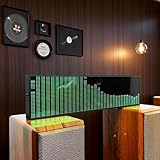
- Real-Time Rhythm Visualizer: Experience your music with vibrant, sound-activated RGB lighting that dances to every beat, or use the included audio cable for direct music sync to the LED spectrum display.
- Dynamic Light Show: Choose from 36 stunning display styles, 16 colors, 9 spectrum modes, 6 floating dot effects, and 4 frequency bands to create your perfect desktop ambiance light.
- Smart Desktop Companion: Seamlessly switches to a precise digital clock with network time sync and weather forecast display when music stops. A functional and stylish desktop gadget.
- Easy Plug-and-Play: Effortlessly powered via standard USB (5V/1A) using your phone charger, computer, or power bank. Simple setup for instant music visualizer fun.
- Immersive Audio Decor: Elevate your room decor, gaming setup, home studio, or parties with this captivating RGB music light that reacts to sound, creating an engaging sound reactive atmosphere.
Rank #2

- 【Creat for Entertainment】RGB effects with 213 preset modes,bring your entertainment movies sports songs and gaming to life, you'll be immersed in your favorite movies, games, or songs with a vibrant light show, enhance your gaming, movie and music experience.
- 【Music synchronization mode】With the built-in microphone, the smart light bars syncs smoothly with your music or ambient sound, the light can react and move to the beat of your music, movie, and gaming audio for an immersive sound and light experience like no other, perfect for setting the mood for a family concert, karaoke night or gaming, etc.
- 【3 Control Methods】Easily manage your light bars with the APP, remote control or control box,Customize the exact light you want , Control segmented color and brightness.Also, you can DIY color, set up music sync and scene mode.
- 【Timing Function】 You can set the light to turn on and off at your preferred time, allows you to fall asleep or wake up in a warm atmosphere.And you don't need to worry about forgetting to turn them off when you leave the house, very convenient for you to use it in your daily life.
- 【Safe&High Quality】The smart light bars is made of alloy,plastic,electronic components material,durable and long-lasting,sturdy,it has extremely low heat, so children and pets can touch it with confidence. Dual design of anti-skid and counterweight for more stable use. We provide professional customer service before and after purchase. If there is any quality issue with the light bars, please feel free to contact us.
#1 Best Overall

- SMART MUSIC RHYTHM SENSING: Built with a high-sensitivity microphone and noise reduction tech, this RGB rhythm light bar instantly picks up surrounding music beats. Choose from 18 vivid colors and 8 dynamic lighting styles including gradient, flash and sound sync modes. Bring immersive audio-visual enjoyment to your gaming room, home party and daily leisure time
- 32 LED DYNAMIC RHYTHM RESPONSE: Packed with 32 colorful LED beads, this sound activated rhythm light reacts sharply to every music shift. It vividly visualizes your music, matching heavy rock bass and gentle soft melodies perfectly, turning ordinary audio into eye-catching dynamic lighting effects
- ONE-BUTTON CUSTOMIZABLE LIGHTING: Easily adjust colors, lighting modes and speed via simple one-touch control to build your exclusive lighting vibe. This music atmosphere light works great for live stream backdrops, car interior decor and holiday party decorations, no complicated setup required
- MULTI SCENARIO COMPATIBLE DESIGN: This RGB rhythm light bar adopts USB powered plug-and-play design, ready to use right after plugging in. Perfect for desktops, bedrooms and car interiors. Made of lightweight high-temperature resistant PC material, it creates stunning ambient lighting for any occasion
- ATMOSPHERE CREATION: Easily level up your space atmosphere by combining music and dynamic lighting. This gaming ambient rhythm light is a fantastic pick for music lovers and tech fans. Great for romantic dinners, holiday decor and daily scene upgrading, bringing wonderful light & shadow fun to your space
Troubleshoot weak or distracting reactions
- Lights barely react: Confirm the selected effect is audio-level based if you expect it to follow sound. Check the selected sync mode, that the intended audio source or application is being captured, and that the software and devices are compatible. Do not assume a higher sensitivity value exists if the app does not expose one.
- Lights are too bright: Lower brightness first. If the effect still feels too active, reduce the available immersion or intensity setting.
- Lighting follows the wrong thing: Recheck whether the selected mode tracks audio, screen content, or supported game events. A visual sync mode will not behave like an audio meter.
- Controls or capture options differ: App interfaces and support can change. Hue release notes document past desktop-app support for microphone capture and audio-device selection, but do not guarantee the same current controls or behavior on every setup. Check the Hue Sync release notes and current product compatibility information.
Product prices and availability are accurate as of the date/time indicated and are subject to change. Any price and availability information displayed on Amazon at the time of purchase will apply.




