Outdated Drivers Are Slowing You Down
One free scan finds every outdated or missing driver and matches the right update for your exact hardware.Free scan · exact hardware matchWindows Errors? Fix Them Before They Spread
Repair common Windows errors and clear accumulated junk for a smoother, more stable PC - no reinstall needed.Free scan · no reinstallYou generally can’t unlink a platform account from an EA Account and move its progress to a different EA Account. EA says progress stays with the original account, and access to purchases, rewards, subscriptions, and other content may also be affected. If you’re changing accounts because you can’t access the original one, recover it or contact EA Help before unlinking.
What “unlinking your EA account” means
Usually, you’re unlinking a platform identity—such as Steam, PlayStation, or Xbox—from the EA Account it is connected to. You manage these connections in EA Account settings under Connected Accounts. EA recommends connecting a platform account to an EA Account you intend to keep long term, since progress and purchases can remain tied to that EA Account. EA’s account-linking guidance
Unlinking does not delete or transfer the progress associated with the original EA Account. EA states that if you link the platform account to a different EA Account, game progress will not transfer. Its account-management guidance also says that moving a game between accounts does not move the data: saves and achievements remain linked to the original EA Account. EA’s unlinking guidance EA’s multiple-account guidance
What you could lose access to
Unlinking can affect more than save progress. EA warns that you may lose access to:
#1 Best Overall

- With broad game support, the Logitech Gamepad F310 works with old standbys to today's biggest titles, so it's easy to set up and use with your favorite games.
- Profiler software allows the gamepad to be programmed to perform keyboard and mouse commands for games without gamepad support.* * Requires software installation.
- A familiar control layout that doesn't require a learning curve to be able to use, with all the same buttons as on an Xbox 360.
- The unique floating D-pad rests on four switches-instead of a single pivot point-making it responsive to quick changes in direction.
- The six-foot cord lets you lean back and play a comfortable distance from your PC monitor.
- Game progress
- DLC, expansions, and extra game content
- Memberships or subscriptions
- Previous drops and other rewards
- In-game purchases
EA’s guidance describes risks to access; it does not guarantee that unlinking preserves these items or provide a general transfer procedure for them. Your specific outcome can depend on the account and game, so read EA’s current warning before confirming.
What to do before unlinking
- Identify the accounts and game. Note the game, platform, platform account, and EA Account currently connected. Check whether you can still sign in to that original EA Account.
- If you can’t access the original EA Account, stop here. Try EA Account recovery or contact EA Help before changing the platform link. Unlinking is not a way to move saves or achievements to a replacement account.
- Check the game-specific warning. Steam, EA SPORTS FC, and Apex Legends have additional risks described below. Confirm that none apply to your situation.
- Review your linked-account changes. EA says switching linked accounts is limited to three times in a rolling year. The published guidance does not establish whether you are eligible for another switch in your specific case.
- Proceed only if you accept the access risks. Use the steps below, and do not confirm if losing access to progress or other linked content would be unacceptable.
How to unlink a platform account
- Sign in to your EA Account and open Connected Accounts in account settings.
- Find the platform account you want to disconnect and select Unlink.
- Read EA’s disclaimer about the consequences. Confirm only if you understand and accept the risks.
- Complete identity verification if EA prompts you.
For an authorized third-party app rather than a gaming platform, open Authorized Applications and select Revoke for the app.
Rank #2

- Featuring a bright, bold, unmistakable blue design
- Dual Rumble Motors - Take your gaming experience to the next level, providing tactile feedback and sensations that bring your virtual worlds to life.
- Immersive Impulse Triggers – provides haptic feedback sensations using built-in motors so you can feel the action of the game.*
- Extra Long USB-C Cable - Provides you with 10 ft. of distance for more comfort and flexibility than shorter cables.
- Ergonomic Design – Lightweight and comfortable for long gaming sessions.
If Unlink is grayed out, EA says the account is not eligible to relink and directs users to its unlinking troubleshooting guidance. Don’t assume that support can override the restriction or transfer the account’s data.
Extra risks for Steam, EA SPORTS FC, and Apex Legends
Steam
If Steam is linked to a different EA Account, entitlements such as in-game rewards, points, and items remain on the EA Account first linked to that Steam account. EA says players cannot move games or personas between accounts themselves. For a possible account merge or account-specific review, contact EA Help; a merge is not guaranteed.
What’s actually slowing this PC down?
Pick the symptom - the matching free tool is one click away.
Rank #3

- MULTI-PLATFORM PLAY — Play on PC, Switch 2, Switch, Android & iOS. Connect via 2.4G, Bluetooth or USB-C. Not compatible with Xbox, PlayStation, Luna or GeForce Now
- TMR ANTI-DRIFT JOYSTICKS — High-sensitivity TMR sticks deliver smooth, precise control with 5+ million cycles—2.5X the 2-million-cycle benchmark of Hall sticks
- FULL MECHANICAL BUTTONS — ABXY buttons and D-pad use mechanical switches for crisp, tactile feedback and consistent actuation in FPS, fighting and action games
- 2 PROGRAMMABLE BACK BUTTONS — Assign jump, crouch or reload without lifting your thumbs. Program directly on the controller with no app or software
- DUAL-MODE TRIGGERS — Switch between smooth Hall Effect triggers for racing and fast micro-switch triggers for FPS and action games
EA SPORTS FC
Unlinking the platform account currently active in the Web and Companion Apps can remove access to those apps. EA says setting another linked platform account as active first greatly reduces the risk, but does not eliminate it. If uninterrupted access to the apps matters, EA’s guidance is not to unlink.
Apex Legends
EA warns that unlinking a platform account used to play Apex Legends may cause Battle Pass leveling, item-unlock, and other errors. Consider that risk before disconnecting the account.
Rank #4

- Why Choose the abxylute M4 Snap-On Phone Controller? Designed exclusively for short quick retro gaming, like Game Boy, NES, SNES and etc. Trusted by 6000+ backers on a tech-focused crowdfunding platform. Pocket-sized play, perfect for your rest time. This compact clip-on controller is compatible with iOS and Android, features a Turbo function—crafted for short bursts of play vertically, horizontally or in detached mode, and ideal for packing in your pocket.
- 【Easy Setup – Power On & Play Instantly!】We recommend attaching the magnetic stickers to a phone case for all phones, rather than using a bare phone. ✅ For Apple MagSafe Models: Snap the magnetic ring onto your MagSafe phone case, power on, and start gaming! ✅ For Non‑MagSafe Models: First attach the included magnetic sticker to your phone case, then snap the magnetic ring onto it. Power on and game right away!
- 【Wide Compatibility – Android & iPhone】Compatible for Android devices, iPhones, and card-size phones (Android devices and iPhone 11/SE and earlier models; iPhone 12/13/14/15/16/17 with MagSafe). Works with all mainstream phones for smooth gaming. Fits iPhone Pro/Pro Max models but may feel top-heavy. Not compatible with foldable phones.
- 【Compact Yet No Loss of Fun】Featuring HID, PS and NS modes, it seamlessly connects to gaming devices via Bluetooth.⚫ HID Mode: Local Games for Android⚫ PS Mode: CODM & PS Remote Play for Android & iOS⚫ NS Mode: All kinds of Emulators
- 【Born for Retro Emulators on Mobile】Designed for retro gaming fans, the M4 Controller works smoothly with top emulators such as Delta, RetroArch and PPSSPP on both iOS and Android.It supports classic games for platforms including Game Boy, NES, SNES,3DS, FC, SFC, SS, N64, GBA, GBC, NDS, and more.
Can EA transfer or merge the accounts instead?
EA’s guidance says saves and achievements stay connected to the original EA Account, and players cannot move games or platform accounts themselves. EA account merges are not always possible. Contact EA Help for an account-specific review rather than unlinking in expectation of a transfer or merge; EA’s published guidance does not promise either outcome.
Quick Recap
Best Value
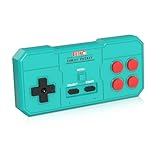
- Plug & Play, Instant Connection Simply install 2 AAA batteries (not included) – no drivers or setup needed. The controller auto-connects to your GV300S console for instant retro gaming.
- 2-Player Fun with Extra Controllers Want to team up with friends? Buy an additional controller for co-op battles! Classic button layout and ultra-responsive controls bring back childhood gaming joy.
- Perfect Replacement for GV300S Designed exclusively for GV300S consoles, this controller matches original specs. Ideal for replacing lost or damaged controllers.
- Retro Buttons, Precise Control Classic D-pad + function buttons deliver lag-free responsiveness, Conquer challenging levels with ease!
- Ready to Use & Complete Package Includes 1 controller and 1 manual – unbox and start gaming instantly!
Product prices and availability are accurate as of the date/time indicated and are subject to change. Any price and availability information displayed on Amazon at the time of purchase will apply.
Do these 3 things before closing this tab:
1Scan for outdated or missing drivers - takes under a minute2Clear out junk files and repair common Windows errors3Fix the driver behind crashes, sound loss and screen glitches



