Recommended Free Tools
If your Switch is broken and you can’t use it, you usually don’t need to unlink your Nintendo Account before signing in on a replacement. What you may need to remove remotely is a separate console association: its Virtual Game Card system link or its pass-enabled console status. Those settings have different steps and once-per-year limits.
First, identify what you want to unlink
Nintendo uses “link” for the Nintendo Account attached to a user on a Switch. It also has separate settings for systems that can load Virtual Game Cards and for the console designated as pass-enabled. Choose the action that matches your goal:


| What you want to do | Relevant setting | What to know |
|---|---|---|
| Remove an account from a user on a working Switch | Account-to-user link | Nintendo’s method is to delete that user. The user’s local save data is deleted too, but the Nintendo Account and its purchases remain. Nintendo Support |
| Remove a broken Switch from Virtual Game Card sharing | Virtual Game Card systems | Use Nintendo Account’s Game Systems settings to unlink an inaccessible system. This remote route is limited to once per year. Nintendo Support |
| Remove a broken Switch as the pass-enabled console | Pass-enabled console | Use the Shop Menu website to deregister it. This website route is limited to once per year. Nintendo Support |
| Use purchased games on a replacement Switch | Sign in and download games | Sign in to the Nintendo Account on the new console and download digital games. Save restoration depends on an eligible cloud backup and an active Nintendo Switch Online membership. Nintendo Support |
If the broken Switch is inaccessible
Unlink it from Virtual Game Card systems
- Sign in to your Nintendo Account on the Nintendo Account website.
- Open Game Systems, then choose Systems Sharing Virtual Game Cards.
- Select Unlink beneath the broken system and confirm.
Nintendo allows the web-based unlinking route once per year. There is also a forced unlink option in Virtual Game Card Settings, subject to the same once-per-year limit. If you have already used the applicable route and cannot access the old Switch, contact Nintendo Support. Nintendo says an account can have two systems that load Virtual Game Cards at a time; see its Virtual Game Card guidance.
Deregister it as the pass-enabled console
- Sign in to Nintendo’s Shop Menu website.
- Choose Deregister Pass-enabled Console.
- Enter your Nintendo Account password and confirm.
The website deregistration route is limited to once per year. If you have already used it within the year, contact Nintendo Support. The next Switch used to connect to Nintendo eShop can become the pass-enabled console. See Nintendo’s pass-enabled console instructions.
If you can still use the Switch
Nintendo does not provide a way to toggle off the account link while keeping the same user. Its documented way to unlink the account from a user is to delete that user in the console’s user settings. Deleting the user also deletes that user’s save data stored on the console. Check your backup or transfer options before proceeding, especially for saves that are not supported by Save Data Cloud. Nintendo says the account and its purchases are not deleted and the account can be linked to another user later. Nintendo’s user-linking instructions
Using a replacement Switch
You can sign in to your Nintendo Account on another Switch and download your digital games; Nintendo says you do not have to unlink the account from one console before linking it to a different one. The standard user-and-save transfer requires access to the original console, so it cannot be used when that Switch is unavailable. Cloud save data can be downloaded on the second system only for supported games with a backup, and the Nintendo Switch Online membership must remain active. Nintendo’s transfer and save-data guidance
Rank #2

- 6.2" LCD Screen
- Local co-op, online, and local wireless multiplayer
- Nintendo Switch is the home of Mario & friends
Don’t try to fix a remote unlink by initializing the console
Initializing is performed on the Switch itself; it is not a remote account-management method. It erases console-memory data, including software, save data, screenshots, and user information. If initialization is performed while the console is offline, Nintendo says it may remain registered as the primary console. When you cannot use the device, use the relevant website setting above or contact Nintendo Support instead. Nintendo’s initialization instructions
Account website labels and available options can vary by region. These steps reflect Nintendo of America’s support guidance, accessed October 8, 2026, for Switch-family systems and, where relevant, Switch 2.
What’s actually slowing this PC down?
Pick the symptom - the matching free tool is one click away.
Quick Recap
Best Value
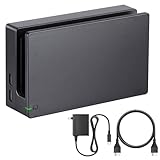
- Third party Switch TV dock, but functionally identical to the dock included with the NS Switch system. Note: Not for new Switch 2 console.
- Maintain multiple Switch docks in your home to easily move from one TV to another.
- Includes a Switch dock, charger and high speed HDMI cable.
Rank #3

- 6.2” LCD screen
- Three play modes: TV, tabletop, and handheld
- Local co-op, online, and local wireless multiplayer
- Detachable Joy-Con controllers
- Nintendo Switch is the home of Mario & friends
Product prices and availability are accurate as of the date/time indicated and are subject to change. Any price and availability information displayed on Amazon at the time of purchase will apply.




