The Tool Desk
Outbyte PC Repair FREERepair Windows errors before they cause bigger problemsFix Now →Outbyte Driver Updater FREEFix the driver behind crashes, sound loss and screen glitchesFind Drivers →Install the free Just Dance Controller app, open a compatible Just Dance game, then follow its on-screen prompts to connect your phone. You can either hold the phone as a motion controller or use Camera Controller Mode for hands-free, full-body scoring. Camera scoring is for solo play; use another supported controller method for multiplayer.
Choose how you want to use your phone
| Method | How it works | Best fit |
|---|---|---|
| Handheld motion control | Hold the phone and move it as you dance. | Players who want a phone-based controller, including when playing with others. |
| Camera Controller Mode | Place the phone so its camera can see you; the game tracks full-body movement for scoring. | Solo play without holding a controller. |
These are different control methods: camera scoring does not mean holding the phone while dancing. Ubisoft says the 2026 Controller App offers both handheld motion-controller and camera-controller options. On Nintendo Switch and Switch 2, console controllers are also available as a scoring option. Ubisoft has not published comparative latency or accuracy figures for these methods.
Set up the phone
- Check compatibility. Ubisoft lists iOS 14.4 or later and Android 9 or later as the minimum operating-system requirements for Camera Controller Mode. The feature requires no additional accessories, according to Ubisoft’s Just Dance 2026 announcement.
- Install Just Dance Controller. Ubisoft’s October 6, 2025 patch notes say the mobile companion app was renamed Just Dance Controller. The app is described as free.
- Open the game and follow its prompts. Use the connection instructions shown in your Just Dance game to connect the phone or choose the phone controller mode. Ubisoft’s public material confirms the app and feature but does not give a universal sequence of taps or screens, so the exact flow may depend on the game and platform.
- For camera scoring, select Camera Controller Mode. Position the phone so its camera can see your body while you dance. Ubisoft describes the feature as full-body tracking but does not specify a required stand or exact camera placement.
- Choose a compatible song and start dancing. Check the song’s camera-compatibility indicator where available. Every choreography from Just Dance 2025 Edition and Just Dance 2026 Edition is compatible with Camera Controller Mode; Ubisoft does not guarantee that every Just Dance+ or older-edition song will work.
Know the play-mode limits
Camera Controller Mode is solo-only. If you want local multiplayer, choose a supported controller method instead. Ubisoft says local multiplayer can support up to six players, depending on the mode and platform; that does not mean six players can be scored by the phone camera.
Ubisoft described Camera Controller Mode as out of beta and stable for regular use in Just Dance 2026 Edition. In its development account, Ubisoft reported recording 9,000 movements, using 6,000 for training and 3,000 for testing, with an 80% success rate on data testing. Ubisoft said Score Level Designers manually balanced and adjusted the remaining 20%. These are internal development and data-testing figures, not an independent measure of consumer accuracy or a guarantee of any player’s scoring results. The feature’s development involved Apolline Wasik, a Data Scientist specializing in Computer Vision, and Léo Gammel, a Score Level Designer, according to Ubisoft’s account of how Camera Controller Mode works.
#1 Best Overall

- 【Wide Compatibility】This package comes with 4 wristbands is especially designed for Nintendo Switch/Switch OLED Joy-Con. Perfectly compatible with the popular Switch Dance Game 2026/2025/2024/2023/2022/2021 and for Zumba Burn It Up. Available in both adult and child sizes, it's perfect for family play and bonding.
- 【Hands-Free Dancing】Our wristband for Switch are combined with a bracelet, when playing dance games like for Just Dance games, put your controller into our wristband to free your hands and dance freely, increase the fun of the game!
- 【Secure Design】Our wristbands are specially designed for Nintendo dance games, with a slide-in design and non-slip sponge pads at the bottom and slide. Controller for Joy-pad can be fixed in the protective space and resist shock, it prevents your controller for Joy-pad from falling out of the dance group.
- 【Soft Materia & Adjustable Strap】 Made of skin-friendly fabric which is breathable and washable, they fit comfortably without putting any pressure on your wrist. Adjustable shoulder straps provide greater convenience, you can feel free to adjust the length according to your wrist size. (Strap length: 26cm / 29cm).
- 【Easy to Install】Simply insert the Joy-Cons into the bracelet and adjust the velcro straps to fit your wrist and you're ready to start dancing freely to Just Dance 2025. (If the wrist strap is a little loose for children, it is recommended to wear the wrist strap on the upper arm for a more comfortable fit) Never worry about the controller falling off again; enjoy hands-free gaming and total immersion in your favorite game.
If the phone does not connect or a song is unavailable
- No connection instructions appear: Return to the game’s on-screen controller or connection prompts and follow the flow for your platform. Ubisoft’s public guidance does not establish one tap-by-tap pairing sequence for every edition.
- Camera scoring is unavailable for a song: Check that song’s compatibility indicator. Just Dance 2025 and 2026 choreographies are supported; support for Just Dance+ and earlier-edition songs can vary.
- You are trying to play with others: Switch from camera scoring to a supported multiplayer controller method. Camera Controller Mode is solo-only.
- Your phone may not meet the minimum: Check its operating system against Ubisoft’s stated requirements: iOS 14.4 or later, or Android 9 or later.
For the current feature and song-compatibility details, see Ubisoft’s Camera Controller Mode announcement and the feature explanation.
Quick Recap
Best Value
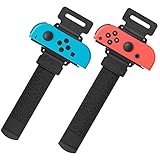
- Universal Compatibility: The wristband was designed for Nintendo Switch/ Switch OLED Joy-Cons controllers, used for the most popular dance game for Just Dance 2025 Nintendo Switch,for Just Dance 2024 Nintendo Switch, for Just Dance 2023 Nintendo Switch, for Just Dance 2022 Nintendo Switc, and for Zumba Burn It Ups
- Soft & Skin-friendly: YUANHOT wrist band for Nintendo Switch Just Dance made of soft and skin-friendly material helps reduce pressure and friction on the wrists, minimizing discomfort and potential irritation.The width for the armband Nintendo Switch 2025 Just Dance for is less than 5cm, reducing the feeling of stuffy heat; Perfect accessories pack for Animal Crossing fans
- Meet Different Needs: Two wristbands for just dance 2025 and just dance 2024 in one package. One is for kids, with total length 10inches (26cm); one is for Adult, with total length 11.5inches (29cm). The velcro elastic band for just dance nintendo switch can be adjusted at will. Perfect if you want to have a dance gaming day with your family and friends
- Reliable Protection: for nintendo switch wrist strap is a gasket on the bottom, which can effectively prevent controllers from being scratched when clamping. The slot design fixes your controllers snugly, so you can enjoy your just dance nintendo switch game without worrying about slipping. Great gift for children
- Easy to Use: Simply insert the compatible Joy-Con Controllers into the grip and tighten it according to your wrist, then start enjoying your just dance nintendo switch without fear of dropping or sliping
Rank #4
![[4 PACK] Wristband for Just-Dance 2026 2025 2024 2023 Nintendo Switch](https://m.media-amazon.com/images/I/41ks4pbPHGL._SL160_.jpg)
- Please Note: Do Not Suitable for Nintendo Switch 2.
- 4-Pack Wristband for Just Dance — This package comes with 4 wristbands designed for Nintendo Switch & Switch OLED's Joy-Con. Available in 2 sizes for both kids and adults, it's perfect for the whole family to enjoy gaming together
- Free Your Hands and Kids' — Put your joy-con in our wristband and free your hands while playing Just Dance. Dance freely to the music with your whole body and boost your gaming fun
- Stable & Reliable — Secured by joy-con's slide rail card slot, equipped with sponge pads on all three contact surfaces. No need to worry about accidentally throwing the Joy-Con during intense dancing
- Lightweight & Comfortable Fabric — Made of skin-friendly fabric that can be washed repeatedly. Extremely lightweight and portable, weighing only 25 grams and taking up little space
Rank #3
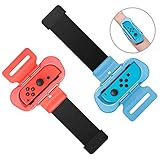
- 【Universal Compatibility】Designed specifically for fully compatible with Nintendo Switch/Switch OLED Joy-Cons, the wrist strap seamlessly compatible with Just Dance 2026, compatible with Just Dance 2025, compatible with Just Dance 2024, compatible with Just Dance 2023, compatible with Just Dance 2022, and compatible with Zumba Burn It Up, and so on.
- 【Comfortable Wear】Made of soft material, the wrist strap for Just Dance 2026 2025 ensures a cozy fit without causing any pressure on your wrist. Its breathable design prevents any stuffiness after prolonged use. With adjustable Velcro, this strap fits most wrist sizes (4.72-7.5 inches in circumference), making it suitable for both adults and children.
- 【Hands-Free Gaming】By integrating controller handles with wristbands for Just Dance 2025, this design allows you to fully immerse yourself in the game without having to hold the controllers. The wrist strap is compact in size and lightweight, making it easy to carry around and enjoy a more comfort and relaxed gaming experience anytime anywhere.
- 【Controller Protection】Unlike other products, our wrist straps for Just Dance 2026 2025 are designed to safely secure for Joy-Cons without causing any harm or damage during gameplay. The controller grips ensure for Joy-Cons stay firmly in place, preventing them from slipping off your arms or flying out of the grips.
- 【Easy Installation and Removal】Simply insert for Joy-Cons into the grips and adjust the Velcro straps to fit your wrist, and you're ready to start dancing for Just Dance 2026 2025 and playing freely. No more worries about the controllers falling off; enjoy hands-free gaming and full immersion in your favorite games.
Rank #2

- Advanced motion sensing and light tracking technology
- Easily accessible trigger and face buttons
- Immersive vibration feedback
- Rechargeable batteries provide long hours of play
Product prices and availability are accurate as of the date/time indicated and are subject to change. Any price and availability information displayed on Amazon at the time of purchase will apply.




