To use Fortnite Shared Wallet, link your PC and console accounts to the same Epic Games account, then sign in to Fortnite on each device. Eligible V-Bucks are shared across supported platforms, but Nintendo Switch keeps a separate balance for V-Bucks purchased there. Currency earned through Fortnite Passes, Quest Packs, or Save the World is shared across platforms.
Set up Shared Wallet across your devices
- Link each platform account to the same Epic Games account. Use that Epic account when playing Fortnite on PC and your consoles. Epic says linked accounts make purchased content and progress accessible across platforms, with separate rules for V-Bucks. See Epic’s account-linking instructions and its cross-platform purchases and progress guidance.
- Check that the platform supports Shared Wallet. Epic’s support guidance names Xbox, PlayStation, PC, and Android in its examples; its gift-card guidance also refers to mobile and cloud gaming. Availability may vary by platform or region, so check Epic’s current Shared Wallet guidance.
- Sign in on the platform where you bought the V-Bucks. Purchased currency may need to be viewed on its purchase platform before checking another supported device.
Which V-Bucks carry over?
V-Bucks earned through Fortnite Passes, Quest Packs, or Save the World are shared across platforms. V-Bucks bought with money follow the platform wallet rules: most supported platforms share eligible purchased V-Bucks, while Nintendo Switch does not.
| # | Preview | Product | Price | |
|---|---|---|---|---|
| 1 |

|
Fortnite Physical Gift Card | $30.00 | Buy on Amazon |
| 2 |

|
Fortnite eGift Card | $15.00 | Buy on Amazon |
| 3 |

|
Fortnite Physical Gift Card | $50.00 | Buy on Amazon |
| 4 |

|
Fortnite eGift Card | $50.00 | Buy on Amazon |
| 5 |
|
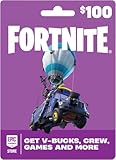
Fortnite Physical Gift Card | $100.00 | Buy on Amazon |
As an Amazon Associate I earn from qualifying purchases.
Nintendo Switch has a separate purchased balance
V-Bucks purchased on Switch remain on Switch and cannot be used in the Fortnite Web Shop. Purchased V-Bucks from supported non-Switch platforms do not appear in the Switch wallet. This difference does not by itself mean your Epic accounts are linked incorrectly.
Items purchased with V-Bucks
Items bought with V-Bucks are available on the platforms where you play Fortnite, even if the currency used to buy them is subject to platform-specific wallet rules. Epic’s cross-platform purchases article explains the account-linking requirement.
#1 Best Overall
- An Epic Games account is required to redeem an Epic Games Store Card code
- If playing on a console platform (PlayStation Network, Xbox Live, Nintendo Switch or Mobile) you need to link your Epic Games account to that gaming platform (one time) to redeem your gift card code
- The 16 digit code on the back of the card WILL NOT work if redeemed directly through your gaming platform (PlayStation Network, Xbox Live, Nintendo Switch, Mobile, etc.)
- Note: Nintendo devices do not support Fortnite Shared Wallet, so V-Bucks purchased using your account balance will not show up on your Nintendo device. However, if you purchase items in the web Item Shop — or another platform where you play Fortnite — those items will be available in your Locker across all platforms.
- Redemption: Online
Examples of how balances can appear
These are illustrative examples from Epic Games Support, not statistics about player balances:
| Example purchase or earning | Xbox, PlayStation, PC, Android | Nintendo Switch |
|---|---|---|
| 1,000 V-Bucks purchased on PC | 1,000 | 0 |
| 1,000 V-Bucks purchased on Nintendo Switch | 0 | 1,000 |
| 1,000 V-Bucks purchased on PlayStation plus 500 earned through Battle Pass tiers | 1,500 | 500 |
The third example demonstrates the distinction: the earned 500 are shared, while the 1,000 purchased on PlayStation are not shown on Switch. Epic also notes that PC-purchased V-Bucks are not shared with other platforms for accounts in Korea.
Rank #2
- Redeemable on accounts in the United States and in U.S. Dollars.
- Gift card must be redeemed at EpicGames.com/redeem. This gift card WILL NOT work if redeemed directly on a console device (PlayStation, Xbox, Nintendo Switch, etc.)
- If you play Fortnite experiences on a console device, you need to link your Epic Games account to your console account(s) so items purchased at Fortnite.com/item-shop appear across all of your linked accounts
- Requires internet connection, valid Epic account and prior acceptance of the terms
- Redemption: Online
Fix a V-Bucks balance that looks wrong
- Restart Fortnite. Then check the balance again.
- Sign in on the platform where the V-Bucks were purchased. Verify the purchase there first.
- Confirm the Epic Games account. Check that the platform account is linked to the same Epic account used on your other devices.
- Check platform support and wallet rules. A Switch-versus-non-Switch difference, or the Korea PC-purchase rule, may explain the display.
- Inspect Transaction History to confirm that the purchase completed.
- Contact the platform’s support team if you bought V-Bucks through PlayStation, Xbox, or Nintendo and the balance is still missing. Epic’s missing V-Bucks troubleshooting guide provides this sequence.
Using Epic account balance or a Fortnite gift card
A gift card can add funds to an Epic account balance, which may be used for V-Bucks and other Fortnite purchases through supported Epic payment flows. This is optional; it is not required to use Shared Wallet. Epic notes that Nintendo Switch does not support Shared Wallet: V-Bucks bought using Epic account balance can be used through the Web Item Shop or a connected Shared Wallet platform, while items bought with those V-Bucks are available across platforms. See Epic’s gift-card redemption guidance and where Epic account balance can be used.
Recommended Free Tools
Quick Recap
Best Value
- An Epic Games account is required to redeem an Epic Games Store Card code
- If playing on a console platform (PlayStation Network, Xbox Live, Nintendo Switch or Mobile) you need to link your Epic Games account to that gaming platform (one time) to redeem your gift card code
- The 16 digit code on the back of the card WILL NOT work if redeemed directly through your gaming platform (PlayStation Network, Xbox Live, Nintendo Switch, Mobile, etc.)
- Note: Nintendo devices do not support Fortnite Shared Wallet, so V-Bucks purchased using your account balance will not show up on your Nintendo device. However, if you purchase items in the web Item Shop — or another platform where you play Fortnite — those items will be available in your Locker across all platforms.
- Redemption: Online
Rank #4
- Redeemable on accounts in the United States and in U.S. Dollars.
- Gift card must be redeemed at EpicGames.com/redeem. This gift card WILL NOT work if redeemed directly on a console device (PlayStation, Xbox, Nintendo Switch, etc.)
- If you play Fortnite experiences on a console device, you need to link your Epic Games account to your console account(s) so items purchased at Fortnite.com/item-shop appear across all of your linked accounts
- Requires internet connection, valid Epic account and prior acceptance of the terms
- Redemption: Online
Rank #3
- An Epic Games account is required to redeem an Epic Games Store Card code
- If playing on a console platform (PlayStation Network, Xbox Live, Nintendo Switch or Mobile) you need to link your Epic Games account to that gaming platform (one time) to redeem your gift card code
- The 16 digit code on the back of the card WILL NOT work if redeemed directly through your gaming platform (PlayStation Network, Xbox Live, Nintendo Switch, Mobile, etc.)
- Note: Nintendo devices do not support Fortnite Shared Wallet, so V-Bucks purchased using your account balance will not show up on your Nintendo device. However, if you purchase items in the web Item Shop — or another platform where you play Fortnite — those items will be available in your Locker across all platforms.
- Redemption: Online
Product prices and availability are accurate as of the date/time indicated and are subject to change. Any price and availability information displayed on Amazon at the time of purchase will apply.




